Get a free sales audit to uncover hidden revenue opportunities!

Your sales pipeline might look full, but if deals are stalling, follow-ups are missed, and forecasts are unreliable, you’re losing revenue. The root cause? Poor pipeline hygiene. Clean data and disciplined processes can shorten sales cycles, improve forecasting, and prevent missed opportunities.

Here’s how to fix it:

  • Define a clear sales process with deal stages: Ensure every stage has specific entry/exit criteria and mandatory next steps.
  • Track overdue tasks: Missed follow-ups hurt sales; automate reminders to keep deals moving.
  • Log all activities: Centralize emails, calls, and meetings to maintain a complete deal history.
  • Use dashboards: Spot stalled deals and bottlenecks with visual insights.
  • Automate pipeline management: Set alerts for aging deals and schedule regular audits.

Teamgate helps sales teams follow structured processes, track real-time activity, and maintain pipeline discipline – without turning CRM into a full-time admin job. A clean pipeline isn’t just about organization; it’s the key to predictable revenue and better coaching.
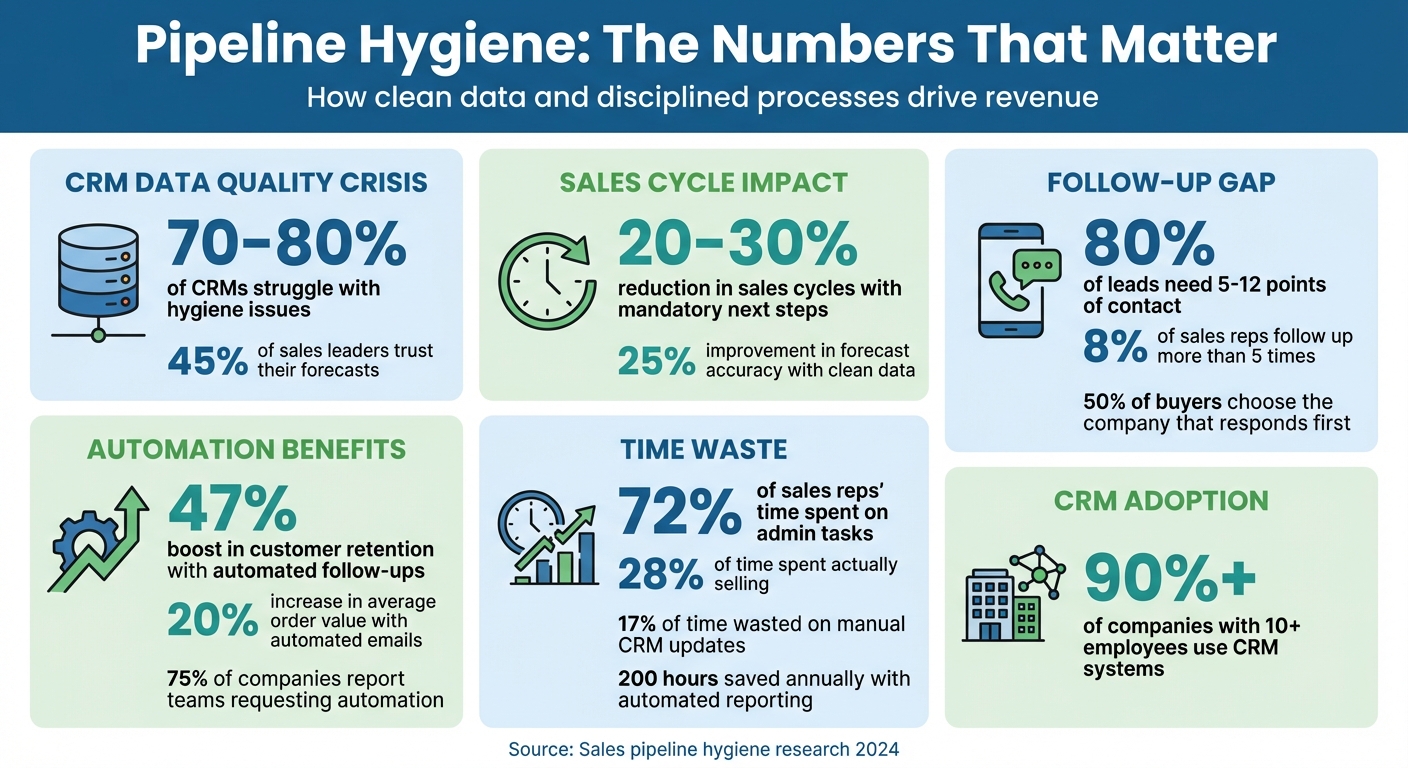
Pipeline Hygiene Statistics: Impact on Sales Performance and Revenue

Pipeline Hygiene Statistics: Impact on Sales Performance and Revenue

Fix Pipeline (Mis)Management: Tips from Top Experts

Define Clear Deal Stages and Required Next Steps

When your pipeline lacks standardized stages, it becomes an unreliable guessing game. Deals can sit in vague categories like "In Progress" for weeks, making it nearly impossible for managers to pinpoint real opportunities. In fact, 70-80% of CRMs struggle with hygiene issues due to undefined stages and missing validation rules. Setting clear definitions and requiring specific actions at each stage creates the structure needed for a disciplined and effective pipeline.

Every deal must have a clearly defined next step. Leaving next steps optional allows opportunities to slip through the cracks. Teams that enforce mandatory next actions often see sales cycles reduced by 20-30% because follow-ups become part of the process, not a last-minute scramble. The difference between a well-maintained pipeline and one that stalls lies in ensuring no deal moves forward without a clear next step.

Teamgate CRM simplifies this process by making it impossible to overlook missing next steps. Its Visual Deal Pipeline uses color-coded alerts to highlight deals that are overdue or lack a defined next action, bringing stalled opportunities to the forefront. Real-time tracking also shows how long each deal has been in its current stage, giving managers the tools they need to coach their teams more effectively.

Use Consistent Stage Definitions

Clear, objective criteria for each stage are essential for keeping your pipeline organized. For example, "Prospecting" might require initial contact, "Qualified" could mean a scheduled demo with a confirmed budget, and "Proposal" might indicate that a formal quote has been sent. By defining specific entry and exit requirements for each stage, your team moves from subjective interpretation to consistent execution. This approach eliminates confusion and ensures that reports accurately reflect deal progress.

During onboarding, train your team on these stage definitions using real-world examples of effective and poor data entry. Assign a data steward to conduct regular audits and monitor metrics like stage completion rates. This ensures everyone follows the same process, leading to more accurate forecasting and smoother operations.

Require a Next Step for Every Deal

Make it a rule that every deal in your CRM must include a next step. Validation rules should block deals from advancing without scheduling a specific action, such as a call, demo, or proposal. This practice keeps deals moving forward and prevents stagnation. When follow-ups become second nature, reps spend less time figuring out what to do next and more time taking meaningful actions.

Create sales dashboards to track the percentage of deals missing next steps, and review these regularly to identify stalled opportunities. This proactive approach transforms pipeline management from reactive problem-solving into forward-thinking coaching. With this visibility, leaders can quickly identify recurring issues and address process gaps before they impact revenue.

Clear Overdue Tasks and Prevent Missed Follow-Ups

Tackling overdue tasks is essential once you’ve established clear stages and next steps. These overdue items can hurt revenue, as leads lose interest and deals stall. The data is striking: 80% of leads need five to twelve points of contact before making a decision, yet only 8% of sales reps follow up more than five times. This gap leaves opportunities untapped.

The answer lies in automating follow-ups. Companies using automated follow-up systems report a 47% boost in customer retention compared to those relying on manual processes. By automating follow-ups, reps can shift their focus from administrative duties to building relationships. Tools like Teamgate CRM automatically log activities such as emails and calls, and set reminders for deals that are aging without action. Real-time alerts and color-coded indicators help reps identify at-risk deals, ensuring no opportunity slips through the cracks. Automating these steps minimizes human error and keeps your pipeline moving.

Speed also matters – 50% of buyers choose the company that responds first. With a CRM that flags aging deals and suggests next-best actions, response times improve, and engagement stays strong. This isn’t about adding more work; it’s about removing the manual oversight that slows teams down. In fact, 75% of companies say their teams are asking for automation to manage workloads, freeing up time for reps to connect with prospects instead of chasing forgotten tasks.

Set Up Automated Follow-Up Tasks

Automation makes follow-ups seamless. Configure triggers to create tasks when a lead hasn’t responded within three to five days or when they interact with high-intent pages, like pricing or demo requests.

Multi-channel follow-ups amplify the impact. Automate outreach across email, SMS, and LinkedIn to meet prospects where they’re most active. Companies using automated follow-up emails see a 20% increase in average order value, thanks to timely and personalized recommendations. The goal is to reduce manual effort while preserving a personal touch – your CRM should handle scheduling and reminders, so reps can focus on meaningful conversations.

Build a Daily Task Routine

Automation aside, a disciplined daily routine ensures timely follow-ups. Start each day by reviewing and prioritizing overdue and upcoming tasks, focusing on deal value and urgency. This structured approach prevents indecision and keeps you on track.

"Clean data is not a one-time task; it is a daily habit." – Tate Stone, CRM Data Hygiene Expert

Weekly pipeline reviews can also help you monitor deal health and ensure proper coverage. Use drop-down menus instead of open text fields during data entry to maintain consistency and accuracy. This habit pays off: sales reps waste up to 17% of their time on manual CRM updates. When your system automates activity tracking and task creation, that time can be redirected to selling.

Log All Activities and Keep Deal Records Current

Keeping your follow-ups timely is just one piece of the puzzle – accurate activity logging ensures your pipeline remains dependable and actionable.

Every interaction matters when it comes to forecasting. Yet, only 45% of sales leaders trust their forecasts, often due to missing context: lost conversations, overlooked bottlenecks, and stalled deals. As Paul Bookstaber from Salesforce aptly states:

"Your forecast is only as good as the data coming into it from your sales teams."

By centralizing all interactions in your CRM, you can avoid these pitfalls. Over 90% of companies with more than 10 employees already use a CRM system to store emails, calls, and meetings in one place. This approach creates a complete picture of customer relationships, prevents duplicate efforts, and ensures outreach happens at the right stage of the sales process. Whether a deal changes hands or is revisited after a lull, having all the details in one place means no guesswork – just clarity.

Take Bailey International, for example. This hydraulic components manufacturer automated the logging and routing of customer calls using CRM and contact-center software. By centralizing interaction data and instantly accessing customer information, they cut call-answer times by 15% and reduced call abandonment rates by 60% to 70%. The result? Faster responses, better customer experiences, and a more reliable pipeline. Centralized logging turns raw data into actionable insights.

Store All Interactions in One Place

When emails, calls, and meetings are linked directly to deal records, nothing slips through the cracks. Imagine a rep logging a discovery call, attaching the follow-up email, and noting the next meeting date – all in the same CRM record. The result? A transparent view of the deal’s progress, enabling smooth handoffs and seamless communication across the team. Teamgate CRM simplifies this process by automatically capturing activities as they happen, eliminating the need for manual data entry.

Adding supporting documents, like proposals or contracts, directly to deal records further enhances clarity. This way, when managers review the pipeline, they don’t just see the stage of the deal – they also see the latest activities and relevant documentation, enabling accurate, evidence-backed forecasts.

Update Records in Real-Time with Mobile Apps

Real-time updates are just as important as centralized data for maintaining pipeline accuracy. Delaying activity logging until the end of the day or week often leads to forgotten details. Research shows that employees who clearly understand how their performance is measured are twice as likely to stay motivated. Logging interactions immediately ensures nothing is missed.

Mobile apps with cloud synchronization make real-time updates effortless. For instance, after a client meeting, a rep can use the Teamgate mobile app (available for iOS and Android) to log the call outcome, schedule the next task, and attach notes – all on the spot. This ensures that pipeline reviews reflect the most up-to-date information. Quick and easy logging not only keeps the data accurate but also encourages natural CRM adoption.

Track Pipeline Health with Dashboards and Reports

Once you have accurate activity logging in place, the next step is to make sense of that data. Without clear visibility into your pipeline, problems can go unnoticed until they start affecting revenue. Dashboards transform raw data into actionable insights, acting as early warning systems that highlight potential risks. This allows managers to step in with coaching or solutions before small issues snowball into major problems. By keeping your pipeline organized and transparent, dashboards play a key role in ensuring predictable revenue.

When managers struggle to quickly identify aging opportunities, missed follow-ups, or deals without defined next steps, they’re left guessing instead of making informed decisions. Teamgate CRM tackles this head-on by spotlighting critical indicators like deal age, activity levels, and next-step coverage. This ensures that coaching and forecasting are based on real, up-to-date data.

Monitor Key Pipeline Metrics

Tracking the right metrics is essential for spotting bottlenecks and neglected opportunities. For example, deals that have been open for over 90 days or have seen no calls, emails, or meetings in the past 14 days are clear signs of inactivity and need immediate attention.

Teamgate’s dashboards make it easy to spot these issues. Color-coded indicators flag deals with overdue closing dates, while the Pipeline Movement report highlights deals that haven’t advanced in weeks. These tools help you identify where your sales process might be stalling, so you can take focused action to address the problem.

Run Weekly Reviews to Find Stalled Deals

Tracking metrics is only half the battle – regular reviews are what turn insights into action. Dashboards are most effective when used consistently. Set aside 30 minutes every Monday to review deals that are at risk. Focus on opportunities that lack next steps, have been inactive for over 45 days, or show no recent engagement. Prioritize high-value deals, assign follow-up tasks, and document outcomes to keep everything on track.

Teamgate’s Time Journey Dashboard simplifies this process by tracking status changes and highlighting bottlenecks. You can use filters to create a focused "at-risk" view, showing deals that are overdue, inactive for two weeks, or missing next steps. By catching these issues early, weekly reviews help turn your pipeline into a reliable tool for predicting revenue.

Use Automation to Maintain Pipeline Discipline

Keeping your pipeline organized and effective is crucial, but relying on manual updates isn’t realistic. Sales reps already spend 72% of their week on administrative tasks, leaving just 28% for actual selling. Automation steps in to make pipeline management easier, keeping everything on track without adding to your workload.

Automation helps catch potential issues early, ensuring timely action and removing the guesswork from managing your pipeline. Below are some practical automation techniques to keep your pipeline disciplined and effective.

Set Alerts for Aging Deals

Deals that sit idle for too long are often lost opportunities. A deal untouched for 30 days isn’t "active" – it’s more likely dead, even if it still appears in your forecast. Teamgate CRM tackles this with Staleness Rules that flag deals based on inactivity. For example, if a deal shows no activity for 30 days, the system prompts the rep to either update it with meaningful progress or close it as lost. If no action is taken, the system can automatically close the deal, preventing outdated deals from distorting your forecasts.

To make it even easier, Teamgate uses color-coded indicators to visually highlight overdue deals. The closing date indicator turns red for overdue deals and yellow for those approaching their deadlines. This way, reps can quickly identify which deals need immediate attention. These automated prompts ensure follow-ups happen on time, keeping your pipeline accurate and actionable.

Schedule Regular Pipeline Audits

Maintaining pipeline discipline isn’t a one-time effort – it requires ongoing attention. Automation simplifies this by generating automated sales reports and analytics, eliminating the need for manual data collection. In fact, automated reporting for weekly reviews can save up to 200 hours annually, giving managers more time to focus on coaching rather than data gathering.

Teamgate’s Pipeline Movement reports offer a clear view of where deals are getting stuck and how long they’ve been stalled. For example, you can set up a recurring Monday morning report that highlights deals with over 14 days of inactivity, missing next steps, or overdue close dates. This ensures that pipeline audits happen automatically, creating a routine where issues are addressed promptly – before they affect your quarterly results.

Conclusion

Maintaining a clean pipeline is the foundation for protecting revenue and achieving predictable growth. Clean data can reduce sales cycles by 20–30% and improve forecast accuracy by up to 25%. With a well-maintained pipeline, leaders gain actionable insights like deal age, activity levels, and next-step coverage – replacing guesswork with data-driven decisions.

Revenue leaks, though often unnoticed, can have a significant impact. Open deals without progress, missed follow-ups, and time spent on lost opportunities quietly drain resources. Teamgate CRM is designed to stop these leaks. It ensures no deal is left without a next step, automates follow-up reminders, and flags aging deals before they slip away – all while keeping administrative tasks to a minimum.

Teamgate CRM is built on three core principles: discipline, pipeline clarity, and high user adoption. Reps update it seamlessly because it integrates naturally into their daily workflows, not because managers are constantly monitoring them. This gives leaders a clear view of deal health and next steps, enabling focused and effective coaching.

FAQs

What are the main advantages of keeping your sales pipeline clean?

Maintaining a clean sales pipeline is key to ensuring your team works efficiently, focusing their energy on active, high-potential opportunities. By clearing out outdated or stagnant deals, your team can better prioritize their efforts, avoid wasted time, and concentrate on what truly matters.

A well-organized pipeline also sharpens forecasting accuracy. With up-to-date and reliable data, sales leaders can spot bottlenecks, provide targeted coaching, and make informed decisions that lead to steady revenue growth. In essence, keeping your pipeline in order saves time, boosts productivity, and ensures no valuable opportunities slip through the cracks.

How does automation make sales pipeline management more efficient?

Automation streamlines sales pipeline management by taking over repetitive tasks, keeping follow-ups on track, and reducing the need for manual data entry. This frees up your sales team to focus on what truly matters – building strong connections with leads and closing more deals.

With features like automated reminders, task assignments, and activity tracking, sales reps can stay on top of their opportunities without skipping important steps. Plus, automation keeps the pipeline accurate and up-to-date, offering a clear and reliable view for both the sales team and leadership.

Why is it essential to define clear deal stages and next steps in your sales pipeline?

Defining clear deal stages and actionable next steps is essential for keeping your sales process organized and effective. This clarity ensures every opportunity is actively managed, aligns your sales activities with the buyer’s journey, and reduces the risk of deals stalling or falling through the cracks.

With clearly outlined stages and next steps, you can better monitor progress, prioritize the right opportunities, and maintain a more reliable and predictable pipeline. This not only helps speed up sales cycles but also increases the likelihood of closing deals successfully.
Related Blog Posts

A customer-first approach to call quality focuses on what matters most: solving customer issues, building trust, and creating positive experiences. Traditional methods often miss the mark by emphasizing rules over outcomes. Instead, successful frameworks prioritize metrics like issue resolution, empathy, and clarity, which directly impact customer satisfaction and loyalty.

Key takeaways include:

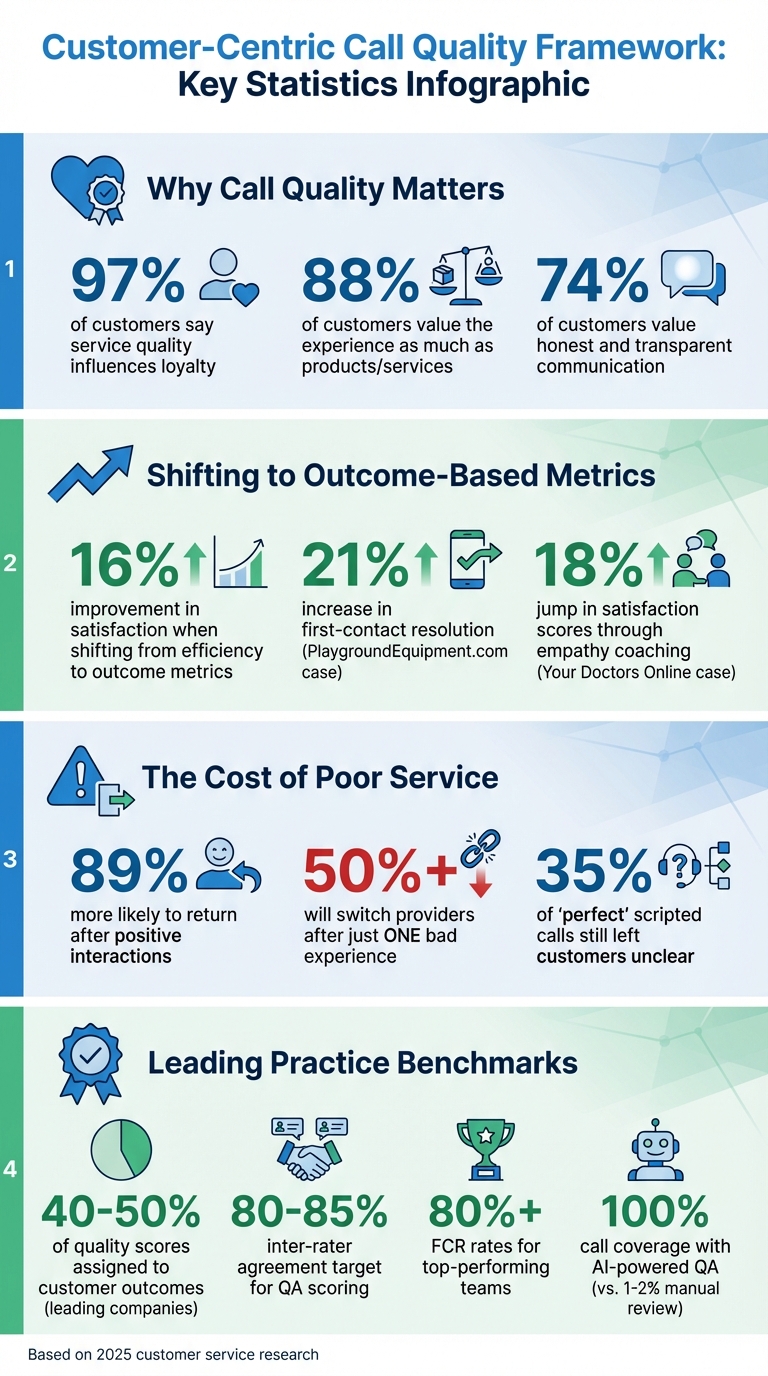
  • 97% of customers say service quality influences loyalty.
  • Shifting from efficiency metrics (like call speed) to outcome-based metrics (like first-call resolution) improves satisfaction by up to 16%.
  • Real-time data and tools like AI-powered QA can monitor 100% of interactions, uncovering hidden trends and improving coaching.
  • Consistency across channels builds trust, with customers 89% more likely to return after positive interactions.

Teamgate helps sales teams maintain discipline, gain clarity, and trust their pipeline without the complexity of bloated CRMs. By focusing on meaningful actions and reliable data, your team can deliver service that drives both satisfaction and revenue growth.

Customer-Centric Call Quality: Key Statistics and Impact Metrics

Customer-Centric Call Quality: Key Statistics and Impact Metrics

How to Improve Customer Experience with NPS in Call Centers

Core Principles of Customer-Centric Call Quality

To truly serve your customers, it’s essential to shift the focus from rigid checklists and script adherence to what really matters: ensuring the customer leaves each interaction feeling confident, informed, and satisfied. This approach redefines success, emphasizing meaningful outcomes over mere compliance. The principles outlined here form the foundation for the metrics and strategies discussed later.

Prioritizing Customer Outcomes

Success in customer service isn’t just about efficiency – it’s about results that matter to the customer. Take the example of Nicolas Breedlove, CEO of PlaygroundEquipment.com, who in 2025 redefined his team’s goals. Instead of measuring "calls handled per hour", they began tracking "resolution confidence." The impact was immediate: first-contact resolution rose by 21%, and customer satisfaction improved by 16% within just three months. Similarly, Conrad Wang, Managing Director at EnableU, found that extending call durations by 10–15% to ensure clarity and emotional comfort reduced repeat contacts to under 5% in three months.

"Good isn’t a checklist – it’s about outcomes." – Conrad Wang, Managing Director, EnableU

Leading companies now assign 40–50% of their total quality scores to customer outcome metrics, such as issue resolution and clarity. This shift aligns with the fact that 88% of customers value the experience a business provides as much as its products or services. Raihan Masroor, CEO of Your Doctors Online, discovered that 35% of calls rated "perfect" by script standards still left patients unclear about next steps. By coaching agents on empathy and phrasing, satisfaction scores jumped 18% in just two months.

Maintaining Consistency Across All Interactions

Customers expect the same level of service whether they interact via phone, email, or chat. Consistency across all channels not only builds trust but also strengthens your brand. Using a single quality monitoring scorecard for all communication types – while including "Not Applicable" options for channel-specific criteria – ensures uniform standards for accuracy, compliance, and connection.

The stakes are high: 74% of customers value honest and transparent communication more than ever, and over 50% will switch providers after just one bad experience with a contact center. When every interaction demonstrates a commitment to solving problems and building relationships, customers are 89% more likely to return for repeat purchases.

Using Data for Continuous Improvement

Consistency is just the beginning. Leveraging real-time data takes call quality to the next level by turning insights into actionable strategies. For example, in 2022, a major regional bank in the Southeast United States partnered with phData to automate its data pipelines. This shift from a two-week manual reporting cycle to real-time insights saved the bank $425,000 annually and freed up its analytics team to focus on deeper insights.

Data can also personalize coaching and refine agent performance. By tracking metrics like empathy scores or resolution confidence, you can pinpoint areas for improvement and measure progress. Regular calibration sessions – weekly or monthly – between QA analysts and team leads ensure scoring consistency, aiming for an inter-rater agreement of 80–85%. Additionally, introducing a "Customer Friction Log" during QA reviews helps identify unnecessary steps in the resolution process, guiding improvements in products or workflows.

Metric Type Key Data Points Role in Quality Improvement
Operational AHT, FCR, Abandoned Call Rate Measures efficiency and immediate resolution success
Perceptual CSAT, NPS, Sentiment Analysis Gauges the customer’s emotional response and loyalty
Behavioral Script Adherence, Empathy, Soft Skills Evaluates agent performance against brand standards

Key Metrics for Measuring Call Quality

Measuring call quality effectively means turning vague goals like "better service" into clear, actionable results. By focusing on the right metrics, you can balance operational efficiency with customer satisfaction, ensuring that agents deliver service that is not just fast but impactful. These metrics work together to provide a full picture of call performance, blending efficiency with customer-focused outcomes.

Customer Satisfaction Score (CSAT)

CSAT gauges how satisfied a customer feels immediately after an interaction. This is typically captured through a straightforward post-call survey asking, “How would you rate your experience today?” on a scale of 1–5 or 1–10. Since it reflects the quality of a single interaction rather than the overall relationship, CSAT is excellent for identifying which agents, processes, or issues consistently result in positive experiences. Considering that 97% of consumers say customer service quality is a major factor in their loyalty, CSAT is a direct measure of how well your team is meeting expectations.

Net Promoter Score (NPS)

While CSAT focuses on individual interactions, NPS measures overall loyalty by asking, “How likely are you to recommend our brand?”. Responses range from 0–10, categorizing customers into Promoters (9–10), Passives (7–8), and Detractors (0–6). NPS captures the cumulative effect of all customer touchpoints, making it a strong indicator of brand health. For instance, if CSAT scores are high but NPS remains flat, it might suggest that while individual calls are going well, the broader customer experience needs improvement.

First Call Resolution (FCR)

FCR tracks the percentage of issues resolved during the first contact and is a key driver of CSAT. Top-performing teams achieve FCR rates above 80%, while the average typically falls between 70–75%. High FCR not only improves customer satisfaction but also reduces costs – repeat calls consume agent time, increase call volume, and can damage trust.

Average Handle Time (AHT)

AHT measures the total time spent on a call, including talk time, hold time, and after-call work. While it’s an important efficiency metric, focusing too much on lowering AHT can backfire. If agents feel pressured to rush calls, they might leave issues unresolved, leading to repeat calls. Balancing AHT with metrics like FCR and CSAT ensures that speed doesn’t come at the expense of quality.

Quality Scores

Quality scores are internal evaluations based on detailed scorecards that assess factors like empathy, tone, process adherence, and technical accuracy. Unlike CSAT or NPS, which reflect the customer’s perspective, quality scores provide insight into how agents achieve their results. As Balto explains:

An agent scorecard tells you what the results were. A QA scorecard shows you how those results were achieved.

Effective scorecards typically break down interactions into categories such as greeting, communication skills, problem-solving, and closing. Since manual QA processes often review only 1–2% of calls due to time constraints, many organizations are adopting AI-powered QA tools to analyze 100% of interactions.

Here’s a quick breakdown of these metrics and their primary focus:

Metric Focus Primary Goal
CSAT Transactional Measures customer satisfaction with a specific call.
NPS Relational Assesses long-term customer loyalty and advocacy.
FCR Effectiveness Evaluates the ability to resolve issues on first contact.
AHT Efficiency Measures the speed of service delivery.
Quality Score Behavioral Assesses adherence to standards, empathy, and accuracy.

Building and Implementing Your Call Quality Framework

Creating an effective call quality framework involves a structured approach that evolves through three key stages: operational, tactical, and strategic. Each stage builds on the one before it, and skipping foundational steps often leads to ineffective results.

Start with the basics at the operational level, where the focus is on daily consistency. This includes setting up scorecards, meeting evaluation quotas, and identifying agents who need immediate support. Once these processes are running smoothly, move to the tactical level, where you analyze patterns over weeks or months to uncover root causes of issues and address knowledge gaps. Finally, at the strategic level, align your quality assurance (QA) efforts with broader business goals, such as enhancing brand reputation and fostering customer loyalty. Together, these levels transform routine operations into a competitive advantage.

Here’s a breakdown of how these levels work together:

Framework Level Focus Area Primary Goal
Operational Day-to-day performance Tracking individual KPIs and addressing immediate performance gaps
Tactical Monthly/quarterly data Identifying bottlenecks and opportunities for improvement
Strategic Long-term vision Aligning customer service with brand reputation and loyalty

Operational Components

The operational level focuses on the tools and processes that keep quality monitoring consistent on a daily basis. A key tool is the quality scorecard, which breaks down interactions into measurable criteria like greetings, compliance, and problem-solving. Keep these scorecards straightforward by limiting metrics to fewer than 15 to avoid overwhelming agents and evaluators.

Modern technology has revolutionized this stage. AI-powered platforms now enable 100% call coverage, offering real-time monitoring and automated scoring – far surpassing the traditional approach of manually reviewing just 1–2% of calls. CRM systems like Teamgate further streamline workflows by centralizing call logs, communication histories, and activity tracking, making it easier to spot patterns and improve interactions.

Scoring methods should be clear and adaptable:

  • Binary (Yes/No) scoring works well for compliance-related criteria with no ambiguity.
  • RAG (Red/Amber/Green) scoring helps assess partial adherence to processes.
  • Scale-based scoring (1–10) is ideal for more subjective skills like empathy and rapport.

Including a "Not Applicable" option ensures agents aren’t penalized for situations where certain scripted steps don’t apply.

Tactical Components

Once the operational groundwork is laid, the tactical stage focuses on driving medium-term improvements. This involves coaching, training, and behavior management to move beyond identifying issues to actively resolving them. Calibration sessions, where multiple evaluators score the same interaction, are essential for maintaining consistency and minimizing bias.

Use QA data not just to point out mistakes but to showcase “gold standard” interactions as training examples. Highlighting what excellent performance looks like encourages agents to replicate those behaviors. Gamification can also boost engagement – call centers that introduce competitive elements have seen 15% reductions in call times and 10% increases in sales.

Involving agents in the process, such as through self-scoring or framework design, builds trust and ownership. This shifts QA from being viewed as a system for catching errors to one that genuinely supports development. Recognizing that 31% of organizations face resource challenges for coaching and training, it’s crucial to design tactical processes that are both effective and efficient.

Strategic Components

At the strategic level, QA evolves into a tool that strengthens customer satisfaction and aligns with long-term business goals. This stage connects quality scores to broader metrics like Net Promoter Score (NPS), customer lifetime value, and brand reputation, turning QA into a driver of customer-centric growth.

To achieve this, adopt a multichannel approach. Use tailored evaluation criteria for different channels – for example, focusing on grammar and response time for chat, tone and empathy for calls, and professionalism for email. This ensures your QA reflects how customers experience your brand across all touchpoints.

Leadership involvement is essential. With 96% of consumers worldwide considering customer service a key factor in brand loyalty, QA cannot remain siloed. Regularly report QA insights to executives, focusing on how improvements impact revenue, retention, and competitive positioning. This is where QA shifts from reactive problem-solving to proactive planning, influencing areas like product development, marketing strategies, and overall customer experience.

How Teamgate CRM Supports Call Quality

Teamgate

To maintain high call quality, your team needs tools that promote discipline, provide clear visibility, and streamline task management. Teamgate CRM addresses these needs by preventing common pitfalls like unlogged calls, missed follow-ups, and inconsistent coaching. By centralizing call activities, task tracking, and performance insights, it keeps sales reps focused on actionable next steps while offering managers reliable data for coaching. Instead of burdening teams with manual updates, Teamgate captures their daily activities – calls, emails, meetings, and notes – and transforms them into a reliable, actionable sales pipeline. Key features like SmartDialer, task management with reminders, and real-time dashboards make this process seamless and effective.

SmartDialer and Call Logging

Teamgate’s SmartDialer, integrated with Twilio, simplifies call initiation and logging. Every call is automatically logged, saving reps an average of 5.5 hours per week that would otherwise be spent on manual data entry. This automation also combats data decay, a common issue where over 40% of manually entered CRM data becomes outdated within a month. By capturing call details, outcomes, and next steps in real time, managers can set clear activity goals – like daily call targets – and compare them to actual performance. Sales cycle reports add another layer of insight, highlighting where deals are won or lost and helping refine follow-up strategies.

"Data-driven intelligent analysis and reporting, provide sales managers with a real-time image of their business."

Activities, Tasks, and Reminders

Effective task management ensures follow-ups aren’t missed. Teamgate turns every call into a scheduled task or reminder, so next steps are always clear. With SmartDialer, reps can create follow-up tasks immediately, complete with due dates and descriptions, while automated reminders ensure nothing falls through the cracks – even when managing multiple deals. Without logging these tasks, follow-ups can easily be overlooked. Managers can review activity reports to confirm that reps are not only making calls but also following through on their commitments. Mobile apps for iOS and Android extend this functionality, allowing reps to receive reminders and update tasks while on the go.

Sales Dashboards for Call Insights

Real-time dashboards give managers a clear view of team performance. These dashboards track call volume, task completion, and deal progression, offering insights that drive evidence-based coaching. They also help identify bottlenecks in the pipeline, such as leads stalling in the "initial contact" stage, enabling timely interventions. Sales velocity reports shed light on issues like call frequency, messaging, or lead qualification.

"With the help of sales performance reports… sales individuals have the power to boost motivation and stay on top of all planned tasks, and goals."

For teams juggling multiple lead sources, Teamgate’s marketing reports provide additional insights. They reveal which channels deliver the best call-to-conversion rates, helping teams fine-tune their strategies and allocate resources more effectively.

Conclusion

Focusing on call quality with the customer in mind not only safeguards revenue but also strengthens loyalty. When 97% of consumers say service quality impacts their loyalty, every interaction becomes a chance to either build or lose trust. Companies that emphasize customer outcomes over rigid scripts often see meaningful results – effective quality assurance frameworks can boost service quality by 11% in as little as three months.

Metrics like CSAT, NPS, and FCR are more than just numbers; they highlight actionable behaviors. Leading organizations often allocate 40–50% of their quality scores to customer outcomes, uncovering areas where revenue may be at risk. For these metrics to work, they need to be practical, behavior-focused, and seamlessly integrated into daily workflows so reps can act on them immediately. This approach not only drives immediate improvements but also informs long-term strategies, linking directly to tools that enable consistent performance.

Teamgate CRM simplifies this process by automating call logging, organizing tasks and reminders, and delivering real-time insights. This allows reps to focus less on administrative work and more on taking meaningful actions. Managers, in turn, can coach based on real data rather than assumptions. The outcome? A clear and dependable pipeline that prevents missed opportunities and ensures timely follow-ups, making revenue more predictable.

Customer-centric call quality requires commitment. By aligning your quality framework with what customers truly value, equipping your team with tools that minimize friction, and leveraging data to drive ongoing improvements, you achieve more than just higher satisfaction scores. You protect your revenue, reduce churn, and set the foundation for sustainable growth.

FAQs

What makes customer-centric call quality frameworks different from traditional methods?

Customer-centric call quality frameworks shift the focus to the customer’s experience, moving away from an overemphasis on internal performance metrics. Traditional approaches often center on data like call volume, average handle time, and resolution rates. In contrast, customer-centric models prioritize metrics that reflect the customer’s perspective, such as customer satisfaction (CSAT), first call resolution, and emotional engagement.

These frameworks rely on structured scorecards and evaluation forms to assess calls based on criteria directly tied to customer needs. This method turns subjective feedback into actionable insights, enabling managers to uncover coaching opportunities, maintain consistency, and foster ongoing improvement. By aligning quality management with what matters most to customers, these frameworks create a more meaningful and customer-driven strategy.

What are the key metrics for evaluating call quality?

The key metrics for assessing call quality revolve around two main aspects: customer satisfaction and operational efficiency. First Call Resolution (FCR) tracks how often customer issues are resolved during the initial interaction, minimizing the need for follow-ups and boosting overall satisfaction. Similarly, the Customer Satisfaction Score (CSAT) gathers direct feedback from customers after a call, offering valuable insights into their experience and perception of the service.

Another critical metric is Average Handle Time (AHT), which measures the balance between efficiency and thoroughness – ensuring calls are resolved effectively without unnecessary delays. Beyond these quantitative metrics, factors like an agent’s tone, communication skills, and empathy significantly influence the quality of the customer experience. Regularly monitoring and analyzing these metrics helps teams pinpoint areas for coaching, maintain compliance, and enhance service quality, all while staying aligned with a customer-first approach.

How does real-time data enhance call quality and improve customer satisfaction?

Real-time data plays a key role in improving call quality and customer satisfaction by helping businesses spot and address issues the moment they arise. With constant monitoring of agent performance, companies can maintain consistent service and take immediate action to resolve any problems.

Beyond that, real-time insights empower managers to offer timely coaching and make informed decisions based on actual data. This results in more seamless interactions, enhanced customer experiences, and a noticeable boost in satisfaction with every call.

Related Blog Posts

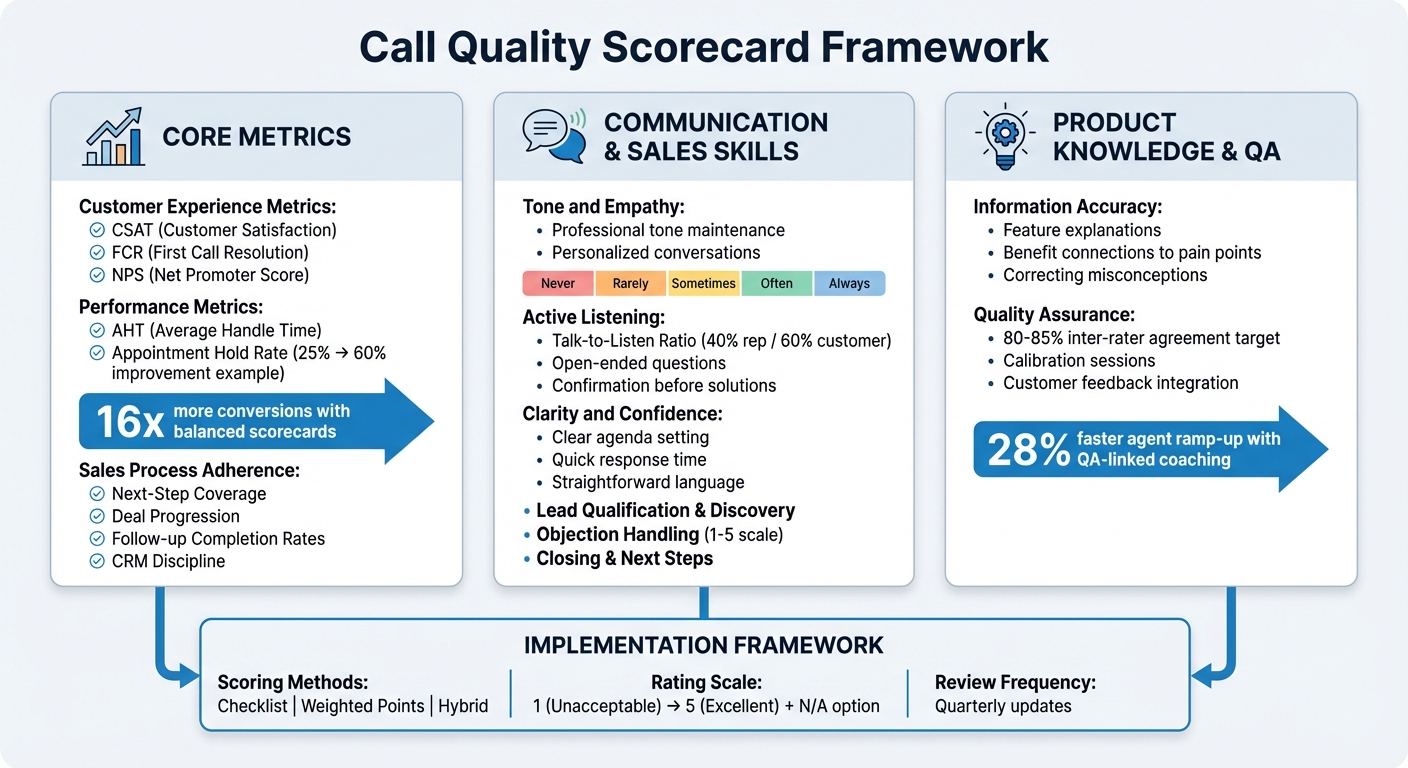
A call quality scorecard is a structured way to assess sales reps’ performance during customer calls, ensuring consistency and measurable improvements. It evaluates behaviors like objection handling, active listening, and adherence to a proven sales process. By focusing on clear metrics, managers can provide actionable feedback, and reps can identify areas for improvement. Key components include:

  • Customer Experience Metrics: Track satisfaction (CSAT), first-call resolution (FCR), and net promoter scores (NPS).
  • Performance Metrics: Measure efficiency with metrics like average handle time (AHT) and appointment hold rates.
  • Sales Process Adherence: Ensure reps follow a consistent process, including clear next steps and CRM updates.
  • Communication Skills: Evaluate tone, empathy, active listening, and clarity.
  • Sales Techniques: Assess lead qualification, objection handling, and closing effectiveness.
  • Product Knowledge: Ensure reps provide accurate, relevant information tailored to customer needs.

A well-designed scorecard ties these metrics to business outcomes, improving coaching and driving better results. Tools like Teamgate help teams follow a clear sales process, offering reliable pipeline insights without overcomplicating CRM use.

Call Quality Scorecard Framework: Essential Metrics and Components

Call Quality Scorecard Framework: Essential Metrics and Components

How To Define Evaluation Criteria For Call Center QA Scorecards? – Call Center Pro Strategies

Core Metrics for Your Call Quality Scorecard

Metrics are the backbone of a call quality scorecard that drives revenue. By focusing on objective data, you can identify where deals are won or lost, rather than just tracking surface-level activity. The most effective scorecards evaluate three critical areas: the customer’s experience, the efficiency of your reps, and their adherence to a proven sales process. Together, these metrics provide a well-rounded view that connects customer satisfaction, operational efficiency, and process discipline.

Customer Experience Metrics

Customer experience metrics give insight into how prospects perceive their interactions. One key measurement is Customer Satisfaction (CSAT), which captures how customers rate their experience immediately after a call. Another is First Call Resolution (FCR), which tracks whether reps resolved the customer’s issue on the first attempt – an essential factor in building trust and influencing buying decisions. Additionally, the Net Promoter Score (NPS) gauges whether customers would recommend your company based on their call experience.

Beyond these numbers, evaluate whether reps effectively identify the prospect’s pain points, understand the impact on their business, and validate your company’s ability to address these challenges. For customer success calls, it’s also important to track whether reps set clear expectations for onboarding, timelines, and partnership goals.

While customer satisfaction is crucial, operational performance plays a direct role in driving revenue.

Performance Metrics

Performance metrics reveal inefficiencies that could be costing you revenue. For example, Average Handle Time (AHT) measures how efficiently reps manage calls, but it’s important to balance this with conversion rates to ensure reps aren’t sacrificing quality for speed. Another critical metric is the appointment hold rate – the percentage of scheduled consultations that actually occur. This metric can highlight where revenue leaks happen.

A real-world example comes from brokerage owner Daniel, who between 2016 and 2024 introduced a real-time CRM-based scorecard for his 105 agents. By focusing on the outcomes of consultations rather than call volume, his team improved appointment hold rates from under 25% to over 60%. Teams using balanced scorecards like this often see as much as 16x more of their appointments convert into deals.

"The largest revenue leak is not generating leads. It is what happens after an appointment is scheduled." – Aaron Kiwi Franklin, Ylopo/MaverickRE

Sales Process Adherence

Adherence to a proven sales process ensures consistency and results. One key metric is next-step coverage, which tracks whether every call concludes with a clear follow-up action. Calls that lack defined next steps often lead to stalled deals. Additionally, monitoring deal progression through pipeline stages can help pinpoint where opportunities get stuck. Follow-up completion rates are another critical measure, ensuring reps follow through on the commitments made during calls.

To dig deeper, break calls into stages – such as Greeting, Discovery, Value Proposition, Objection Handling, Closing, and Documentation. Assess whether reps ask open-ended questions during discovery, align solutions with customer needs, and secure a tangible next step, like scheduling a demo or trial. Also, track CRM discipline, which includes the accuracy and timeliness of logging call outcomes and updating deal information. Without complete and accurate data, forecasting and pipeline management can quickly fall apart.

Using a modern sales operating system like Teamgate CRM simplifies tracking these metrics by automating updates to call outcomes and deal progression. This ensures you have the data needed to drive better decisions and improve sales performance.

Communication and Soft Skills Assessment

Evaluating communication and soft skills is just as important as tracking core performance metrics. While metrics like call duration or conversion rates show operational efficiency, the way your sales reps communicate – through tone, listening, and clarity – has a direct impact on building trust and moving deals forward. These skills, though harder to quantify, play a crucial role in driving revenue and establishing strong customer relationships.

Tone and Empathy

Your scorecard should assess whether reps maintain a professional and empathetic tone throughout their interactions. This goes beyond delivering a standard pitch – it’s about personalizing the conversation and addressing the specific pain points of the customer. Tools like AI-powered sentiment analysis can help identify moments where empathy is lacking.

To make this measurable, use a five-point frequency scale: Never, Rarely, Sometimes, Often, Always. For example, did the rep genuinely acknowledge the customer’s challenges or adapt their approach to the customer’s emotional cues? This structured evaluation ensures a consistent way to measure empathy. From here, you can also assess listening skills to ensure a balanced and meaningful dialogue.

Active Listening

Active listening is all about fully engaging with the customer’s input. A good scorecard should measure whether reps ask thoughtful, open-ended questions and listen without interrupting. Key behaviors to evaluate include confirming understanding before offering solutions and asking follow-up questions to clarify the customer’s needs.

To track this, monitor the talk-to-listen ratio. Ideally, the customer should speak about 60% of the time, leaving 40% for the rep. If reps dominate the conversation, they risk missing important insights about the prospect’s needs. By analyzing this ratio, you can identify coaching opportunities to help reps strike the right balance.

Clarity and Confidence

Clear and confident communication is essential for earning trust and moving conversations forward. Reps should be able to present a concise and persuasive value proposition. One way to measure this is by evaluating whether the rep sets a clear agenda at the start of the call. For example, Gong’s research highlights:

"Scoring is only effective if your team is aligned on what each of your answer values mean." – Gong

Use a five-point scale to rate agenda setting, where a "5" indicates a well-defined purpose, timeline, and expected outcomes, and a "1" reflects the absence of an agenda.

Additionally, assess factors like response time – how quickly and smoothly reps answer questions – and their ability to use straightforward, easy-to-understand language. Confidence is evident in how reps handle objections without defensiveness and how they take control of the conversation by clearly outlining next steps. These elements, when combined, ensure reps communicate with clarity and authority.

Sales Skills and Techniques to Measure

Beyond tracking performance and customer experience metrics, it’s essential to evaluate the sales techniques that truly drive results. A well-designed scorecard should focus on the skills that help reps close deals. These competencies highlight the difference between building rapport and actually sealing the deal, offering valuable insights into a rep’s overall effectiveness.

Lead Qualification and Discovery

Discovery calls are the foundation of every successful deal. Your scorecard should assess whether reps ask thoughtful, open-ended questions that uncover real business challenges – not just surface-level needs. Top-performing reps go further, pinpointing underlying issues, understanding their impact, and aligning your solution as the answer.

To evaluate these calls effectively, use a structured framework. Look for signs that the rep clarified the prospect’s role, outlined the decision-making process, and actively listened to identify how your product can help the client grow. Discovery should feel like a two-way conversation, not an interrogation.

Objection Handling

How reps handle objections can make or break a deal. Your scorecard should measure whether reps listen attentively without interrupting, respond confidently, and address concerns in a way that keeps the conversation moving forward. Pay attention to whether they acknowledge the prospect’s concerns and provide thoughtful, reassuring responses.

Consider using a 1–5 scale to rate performance here, with "1" signaling major gaps and "5" representing mastery. If multiple reps score low, it might be time to revisit your sales scripts. Peer learning can also be a powerful tool – encourage reps to analyze high-performing calls to understand what effective objection handling sounds like.

Closing and Next Steps

Every call needs to end with a clear next step. Evaluate if the rep explicitly asked for the sale or moved the deal forward – whether that’s scheduling a demo, starting a trial, or closing the payment process. Check if they clearly defined the purpose and timing of the next meeting and logged an estimated close date in your CRM. With Teamgate CRM, these crucial follow-ups are seamlessly tracked, ensuring nothing slips through the cracks.

"Scorecards help managers and enablement teams focus on explicit coaching opportunities and ensure that the whole team can learn from the best examples." – Gong

A strong close should include summarizing the agreed-upon next steps and securing the prospect’s commitment before ending the call professionally. Without this discipline, deals risk stagnating, leading to lost revenue opportunities.

Up next, assess how effectively reps demonstrate product knowledge to ensure every interaction is both accurate and persuasive.

Product Knowledge and Information Accuracy

Mastering product knowledge is just as essential as honing communication and sales skills – it’s the backbone of building and maintaining customer trust. Even the most skilled reps in discovery or objection handling can lose credibility if they mix up product details. To ensure trust isn’t compromised, your scorecard should assess whether reps consistently deliver accurate, clear explanations that connect product features to the customer’s specific challenges. It’s not about rattling off specs – it’s about demonstrating expertise in a way that instills confidence.

Accurate product knowledge is a key pillar of any well-rounded call quality framework, complementing strong communication and sales techniques.

Feature and Benefit Explanation

A great rep doesn’t just explain what a product does – they explain why it matters. The best performers actively listen to the customer, identify their pain points, and link product features directly to solving those issues. Your scorecard should evaluate how naturally and effectively reps make these connections, ensuring the explanations feel relevant and tailored to the customer’s needs.

To measure consistency, use a scale like: Never, Rarely, Sometimes, Often, Always. Reps should consistently highlight key selling points during conversations. Tools like Teamgate CRM, with its built-in product catalog, can help reps quickly access accurate product details and seamlessly integrate them into deals without risking manual entry errors. This not only minimizes mistakes but also keeps conversations fluid and professional.

Correcting Misconceptions

It’s common for prospects to bring outdated or incorrect assumptions about your product into the conversation. How your reps handle these moments can make or break trust. Your scorecard should evaluate whether reps address misconceptions professionally and effectively. Did they acknowledge the concern with empathy – using phrases like "I understand" – before providing a clear and accurate correction? Did they offer a reassuring response that kept the dialogue productive and engaging?

"When your reps follow established guidelines, your interactions with prospects are more predictable and consistent with your branding." – PhoneBurner

Monitor these interactions through live tools or post-call reviews to assess how well reps handle such situations. If multiple reps struggle with the same misconception, it’s a signal to update training materials or refine talk tracks. By turning misconceptions into opportunities for clarity, you can guide your team toward more precise and impactful conversations. Tracking these corrections also provides valuable insights for ongoing training improvements.

How to Structure and Implement Your Scorecard

Creating a scorecard is about building a tool that grows alongside your team. The goal is to strike a balance between objectivity and relevance, allowing evaluators to assess calls consistently while focusing on what truly impacts results. Start by bringing together key stakeholders: sales managers, QA analysts, compliance officers, and top-performing reps. This diverse group ensures the scorecard reflects real-world selling scenarios, not just theoretical ideals. With this foundation, you’ll set up a system for evaluations that are measurable, actionable, and seamlessly integrated into your sales process.

Choose a Scoring Framework

The structure of your scorecard determines how effectively it translates insights into actionable improvements. Choose a framework that aligns with your sales goals and the complexity of your calls. Here are three common approaches:

  • Checklist-based scorecards: Ideal for compliance-heavy environments, these offer clear yes/no answers. For example, did the rep mention the recorded line disclosure? Did they confirm the next step?
  • Weighted points system: Best for teams prioritizing skill development, this method assigns greater value to impactful behaviors like objection handling or closing, while routine tasks like greetings carry less weight.
  • Hybrid approach: Combines elements of both. Use binary questions for compliance, qualitative scales for soft skills (e.g., Good/Needs Work/Poor), and quantitative metrics for outcomes like conversion rates.

Start small by creating one or two scorecards tailored to specific call types, such as discovery or onboarding calls. Once these are refined, you can expand them across the team.

Define Rating Scales

Ambiguity leads to inconsistency. To ensure fairness and clarity, define behavioral anchors that explain exactly what each score represents. For example, when scoring how well a rep sets an agenda:

  • A "1" might mean no reason was given for the call.
  • A "3" could indicate the call’s intention was mentioned but lacked full context.
  • A "5" would reflect a rep who clearly outlined the purpose, duration, and outcomes while steering the conversation effectively.

Use a straightforward 1-5 scale where 1 signals "Unacceptable/Major Issues" and 5 represents "Excellent/Exceeded Expectations". Include a "Not Applicable" option for criteria that don’t apply to every interaction. This prevents skewed data and keeps evaluations fair. Share these definitions with your team in advance so everyone understands how their performance will be measured. This clarity supports consistent evaluations and aligns with your broader sales metrics.

Test and Refine the Scorecard

Your first scorecard won’t be perfect – and that’s okay. Test it with sample calls, gather feedback from evaluators and reps, and make adjustments quarterly or after significant changes. The ultimate measure of success is whether high scores align with better business outcomes – are top-scoring reps also converting more deals?

Encourage reps to self-score their calls using the framework. This practice fosters self-awareness and helps them internalize the standards. Establish a feedback loop where team leads and agents can suggest updates, ensuring the scorecard reflects the realities of frontline sales.

Teamgate CRM’s activity tracking and deal stage visibility can help you tie scorecard performance directly to pipeline health. With regular refinements, your scorecard will stay aligned with evolving sales strategies and operational needs.

Quality Assurance and Continuous Improvement

A scorecard is only as effective as the effort and discipline behind it. Without ongoing updates and consistent use, even a well-designed scorecard can lose its connection to your sales goals. Think of your scorecard as a dynamic tool that evolves with your team, market trends, and customer needs. Regular calibration, customer feedback, and focused coaching ensure it stays relevant and effective. This approach builds the foundation for fair and consistent evaluations across your team.

Maintain Consistency in Evaluation

Consistency begins with standardization. Evaluators should assess calls using the same criteria, definitions, and scoring methods. Calibration sessions are key – have evaluators independently score the same call, then review and resolve discrepancies. Aim for an inter-rater agreement score of 80–85% to ensure alignment within your team.

"Without a structured way to evaluate what’s happening on those calls across your enterprise, coaching becomes guesswork and performance stays flat." – Gong

Visual dashboards can help track evaluator trends over time. For instance, if one manager consistently scores more strictly than others, it might be time to revisit scoring guidelines and retrain on the framework. A standardized evaluation process ensures every rep gets fair, actionable feedback that aligns with your overall sales goals.

Use Customer Feedback

Your internal scores should match what customers actually experience. Incorporate Voice of the Customer (VoC) data through quick post-call surveys to capture immediate feedback using metrics like CSAT or Customer Effort Score. Compare these insights with your internal scorecard ratings. If a rep performs well internally but customers express dissatisfaction, your scorecard may be focusing on the wrong behaviors.

"A bad scorecard can lead to scores that don’t represent what a quality interaction actually means to your brand or worse still – result in inflated customer satisfaction metrics that your team can’t use to improve." – MaestroQA

AI-powered sentiment analysis can evaluate emotional cues – such as worry, disappointment, or satisfaction – across 100% of interactions, far surpassing the 1–2% of calls typically reviewed manually. Pay special attention to end-of-call emotional cues, as they often indicate the customer’s lasting impression. Negative feedback should trigger immediate follow-up and coaching, turning challenges into learning opportunities. These customer insights can also guide your coaching strategies, ensuring they address the right areas.

Use scorecard data to uncover skill gaps and create targeted coaching plans. Look for patterns over time – such as consistently low scores in objection handling or unclear next steps – and tailor coaching to address these weaknesses. Contact centers that link QA scoring to coaching see new agents ramp up 28% faster.

Teamgate CRM’s activity tracking and deal stage visibility make it easier to connect scorecard performance with pipeline outcomes. This helps you pinpoint behaviors that drive conversions and adjust coaching priorities accordingly. Establish a feedback loop where reps and managers can propose updates to the scorecard, ensuring it remains practical and in tune with your team’s needs. Review and update your criteria regularly – quarterly or after major changes like product launches or shifts in sales strategy. By doing so, you embed continuous improvement into your sales process, keeping your team aligned with what delivers results.

Conclusion

A well-crafted call quality scorecard eliminates uncertainty and establishes a repeatable, structured sales process. By standardizing how your team engages with prospects, every conversation aligns with your brand values – building trust and minimizing the chance of missing critical details that could jeopardize deals. Scorecards also serve as the backbone for data-driven coaching, enabling you to spread effective practices across your entire team. From enhancing customer interactions to ensuring clear next steps, this approach drives consistent, reliable performance.

This framework doesn’t just set expectations – it becomes a seamless part of your sales operations. With Teamgate CRM, every call, activity, and next step is tracked, ensuring no deal slips through the cracks. Its visual dashboards and activity reports highlight stalled opportunities and performance gaps [6–8]. This clarity allows managers to shift from reacting to problems to proactively addressing them, stepping in before leads go cold.

"Accurate CRM reports and analytics are essential for identifying strengths and weaknesses among a sales team, and the individuals involved, the complete sales process, and any shortcomings in sales cycles." – Teamgate

When sales reps measure their performance against scorecard metrics, they gain clarity on what to improve. This focus boosts motivation and lets them channel their energy into the actions that close deals. By combining scorecard insights with a CRM that ensures pipeline accuracy and timely follow-ups, you can safeguard revenue and achieve steady, predictable growth.

FAQs

What metrics should be included in a call quality scorecard?

A strong call quality scorecard should measure both the technical and interpersonal elements of a call. Important metrics to include are call connection and audio quality, compliance with scripts and protocols, and the level of professionalism demonstrated during the conversation.

It’s also essential to evaluate customer engagement, handling objections, and key soft skills such as empathy, confidence, and active listening. Together, these metrics provide a thorough assessment of sales call performance and highlight opportunities for improvement.

What are the benefits of using a call quality scorecard to improve sales performance?

A call quality scorecard is a powerful tool for improving sales performance. It provides a clear, consistent way to evaluate sales calls, helping teams pinpoint strengths and areas that need work. This structured approach supports better coaching and skill-building across the team.

By monitoring key factors like customer engagement, handling objections, and call efficiency, the scorecard keeps reps focused on high-impact behaviors. The result? Improved individual performance and a more reliable, effective sales process.

Why is product knowledge important in evaluating call quality?

Product knowledge plays a crucial role in assessing call quality, as it directly influences how effectively agents can respond to customer inquiries and concerns. When agents have a solid understanding of the products or services they represent, they can provide accurate answers, resolve issues efficiently, and build trust with customers – ultimately improving the overall experience.

Including product knowledge as a key metric in call quality evaluations ensures that agents are prepared to handle calls with confidence and consistency. This approach not only improves communication and problem-solving but also helps agents follow clear processes to meet customer needs more effectively. A strong grasp of product knowledge is fundamental to delivering excellent customer interactions and maintaining high service standards.

Related Blog Posts

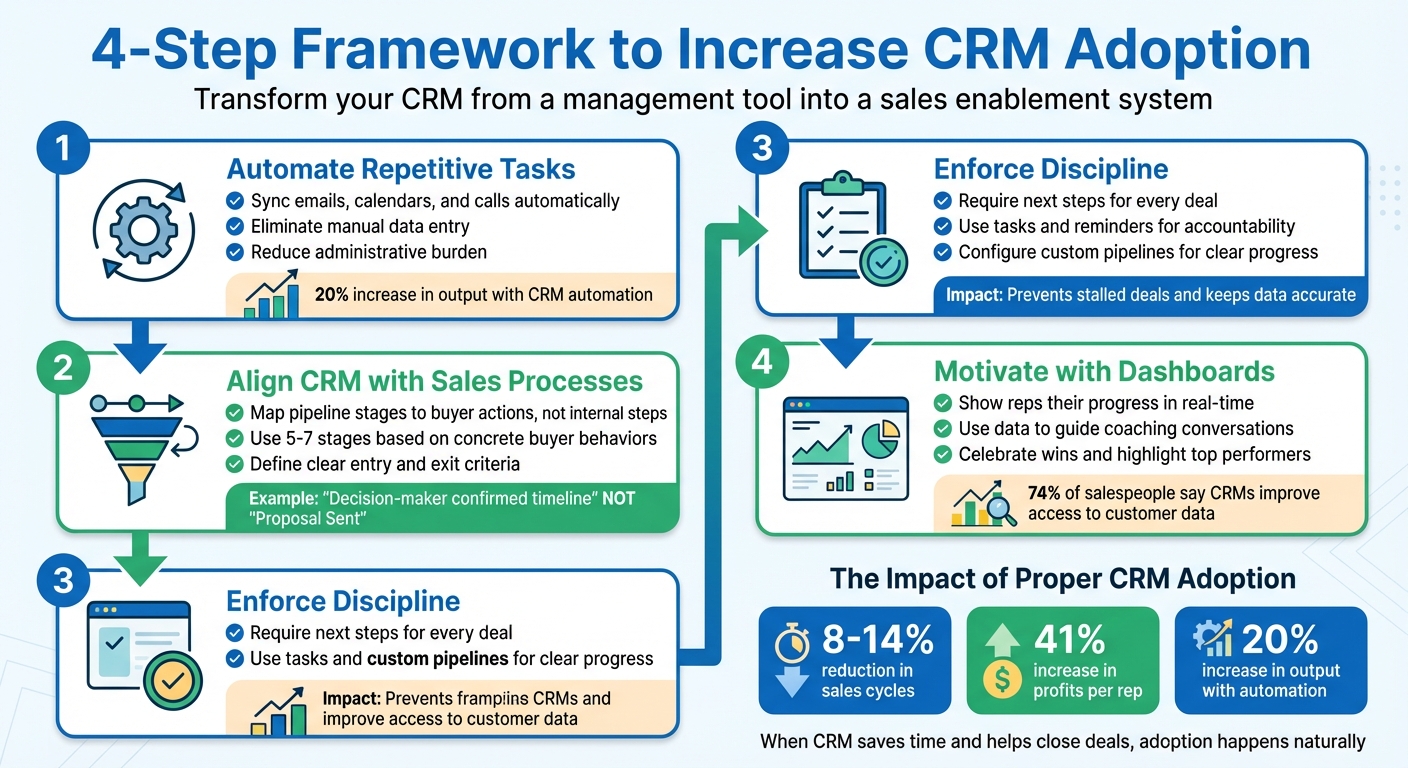
Most sales teams resist using CRMs because they see them as extra work with little payoff. The result? Missed follow-ups, stalled deals, and unreliable forecasts. The problem isn’t laziness – it’s that CRMs often feel like tools for managers, not tools that help reps close deals. To change this, you need to make CRM usage simple, useful, and directly tied to success.

Here’s how you can fix it:

  • Automate Repetitive Tasks: Sync emails, calendars, and calls to reduce manual data entry.
  • Align CRM with Sales Processes: Map pipeline stages to buyer actions, not internal steps.
  • Enforce Discipline: Require next steps for every deal and use tasks to maintain accountability.
  • Motivate with Sales KPI Dashboards: Show reps their progress and highlight wins to keep them engaged.

When the CRM becomes a tool that saves time and helps reps close deals, adoption happens naturally. Teamgate helps sales teams follow clear processes and trust their data – without turning CRM into a full-time admin job.

4-Step Framework to Increase CRM Adoption in Sales Teams

4-Step Framework to Increase CRM Adoption in Sales Teams

CRM Expert advice on how to increase CRM Adoption

Common Barriers to CRM Adoption

Sales reps often push back against CRMs that feel more like a hindrance than a help. When a CRM disrupts their established processes, piles on manual tasks, and fails to directly support closing deals, adoption rates plummet. This creates a cycle of poor usage leading to bad data, which then makes the CRM less effective – further discouraging its use. These challenges typically fall into three key areas:

Manual Data Entry and Administrative Burden

One of the top frustrations for sales reps is the extra busywork that CRMs can create. Switching between tabs, manually entering contact information, and updating fields that don’t directly contribute to closing deals makes the system feel like a chore. For field reps, who spend much of their time meeting prospects, the challenge is even greater. If keeping the CRM updated requires additional devices or extra steps, many revert to using sticky notes or spreadsheets. Yet, when used effectively, CRMs can reduce sales cycles by 8% to 14% and increase profits per rep by 41%.

"If you give your reps an easy-to-use tool that automates parts of their day-to-day workflows, freeing them up to complete higher-priority tasks, their CRM use rate will naturally go up." – Sam Queen, Sales Strategy and CRM Expert

Disconnected Systems and Missing Integrations

CRMs that don’t integrate with essential tools like email, calendars, or calling systems create fragmented workflows. Reps are forced to duplicate their efforts – manually logging emails, scheduling meetings, and recording calls separately. This extra work often leads time-strapped reps to skip CRM updates altogether, leaving managers without a clear picture of the pipeline or deal progress.

Reps See CRM as a Management Tool, Not a Sales Tool

Perception plays a huge role in CRM adoption. Many salespeople view the CRM as a "watchtower" – a tool for managers to monitor their activity rather than something that helps them close deals. When CRM interactions are limited to performance reviews or pipeline audits, reps start seeing it as a tool for oversight rather than support. While 74% of salespeople acknowledge that CRMs improve access to customer data, if the system feels like it’s imposed solely for tracking purposes, they’re less likely to engage with it.

"If your reps aren’t using the CRM, it’s not because they’re lazy. It’s because it feels like a burden. A time sink. A watchtower." – IMPACT Team

Set Clear Expectations and Provide Effective Training

From day one, CRM usage should be a core part of your team’s workflow. The most successful sales teams approach CRM adoption as a leadership initiative, not just a compliance task. This means involving your team in the decision-making process, earning buy-in from top performers, and clearly demonstrating how clean, accurate data can directly boost their earnings. As Sam Queen, a Sales Strategy and CRM Expert, explains: "Leading your sales team is making them a part of the process. It’s letting them get your hands dirty with you and making them feel like it’s their decision as well."

Make CRM Part of Onboarding from Day 1

Introduce new hires to the CRM on their very first day, presenting it as an essential sales tool – not an optional add-on. Provide a clear systems overview document that covers key integrations and core features, ensuring they understand its role in their success. To solidify this foundation, require new team members to pass a short test on CRM tools and processes before they begin using it. This ensures they’re ready to hit the ground running and see the CRM as integral to their work.

Tailor Training to Specific Roles

One-size-fits-all training doesn’t cut it. Different roles within your team rely on the CRM in different ways, so training should reflect those needs. For example:

  • Reps benefit from tools like deal management and pipeline visualization.
  • SDRs need features such as lead conversion analysis and integrated dialing tools for high-volume outreach.
  • Managers should focus on dashboards for coaching and decision-making rather than just reporting.

By showing each team member how the CRM simplifies their specific tasks – like using SmartDialers for outreach or pre-built email templates to save time – you make the system indispensable. Managers, in particular, should lead by example, using the CRM to drive team performance and align with the sales process.

Align CRM Usage with the Sales Process

To make the CRM a natural part of daily workflows, integrate it into all key activities. For instance:

  • Use CRM dashboards during weekly sales meetings, one-on-ones, and pipeline reviews. Avoid relying on slides or spreadsheets, as this can signal to reps that the CRM isn’t central to your process.
  • Map pipeline stages to buyer actions, such as “Decision-maker confirmed timeline,” rather than internal steps like “Proposal Sent.” This ensures data reflects real progress.
  • Sync external tools like Google Calendar so that all appointments and activities are visible in the CRM, reducing the need to switch between apps.

These steps help reinforce earlier training by showing reps the CRM’s practical benefits every day. When the CRM becomes the team’s single source of truth, it stops feeling like extra work and starts becoming a tool they rely on. With its rep-friendly design and built-in automations, Teamgate CRM simplifies daily tasks and ensures these best practices are easy to follow.

Integrate CRM into Workflows with Automations

Once you’ve set clear expectations for using your CRM, the next step is weaving it into your team’s daily workflow through automations.

Extra steps and manual work often discourage CRM adoption. If reps have to jump between apps, manually copy data, or remember to update fields after every call, chances are they’ll avoid it. As the IMPACT Team aptly says: "Until the CRM helps them win, they won’t use it. Period." Automation eliminates these hurdles by connecting your CRM to the tools your team already uses and taking care of repetitive tasks.

Sync Email, Calendar, and Calls

Integrating your CRM with tools like Gmail, Outlook, and Google Calendar can make life easier for your reps. Automatic logging ensures emails, meetings, and calls are recorded without manual input. Calendar sync through CalDav or direct integration ensures scheduled activities appear in both the CRM and the rep’s primary calendar, helping avoid double bookings. For calls, in-browser dialers like SmartDialer allow reps to make, record, and route calls directly within the CRM, capturing outcomes automatically and centralizing communication.

Automate Follow-Ups and Reminders

Deals often stall when follow-ups are missed or next steps are unclear. Automation can step in to keep deals moving. Configure your CRM to categorize tasks by urgency, set recurring check-ins, and define actions based on each deal stage using sales pipeline management tools. This ensures no opportunity gets overlooked. As Chase Horn, Sales Management at Teamgate, notes: "Task automation prevents stalled deals, keeps CRM data accurate, and turns pipeline hygiene into predictable revenue rather than guesswork."

Simplify Data Capture with Automations

Manual data entry is one of the biggest deterrents to CRM usage. Automations can reduce this burden by creating tasks, sending reminders, and triggering notifications based on deal progress or activity milestones. Features like pre-built email templates and one-click access to follow-up materials allow reps to stay productive without leaving the CRM. For more complex workflows, tools like Zapier can connect your CRM to third-party apps, automating specialized tasks. The goal is to make the CRM a tool that speeds up work – if it slows reps down, they’ll revert to spreadsheets and sticky notes.

Enforce Discipline Through Pipelines and Next Steps

Automation can get your team to start using a CRM, but discipline ensures they stick with it. Without a structured approach, even the most advanced system can lead to overlooked opportunities and forgotten follow-ups. By creating clear pipelines, requiring next steps, and leveraging activity tracking, you build a framework that makes daily CRM usage second nature – not through micromanagement, but by providing clarity and focus. Let’s break down how to set this up effectively.

Configure Custom Pipelines for Clear Progress

Your pipeline stages should reflect real, verifiable buyer actions – not just internal sales activities. As the IMPACT Team aptly says: "If your pipeline has stages like ‘Proposal Sent,’ but the buyer hasn’t even responded, you’re not tracking progress; you’re tracking hope." To avoid this, design 5–7 stages based on concrete buyer behaviors, such as "Decision-maker confirmed timeline" or "Budget approved." Define specific entry and exit criteria for each stage so reps know exactly what needs to happen before moving a deal forward.

Visual tools like color-coded deal boards and deadline tags make it easy to spot stagnant opportunities. This transforms pipeline management into a system for tracking real progress, rather than just another administrative task. A well-structured pipeline not only simplifies processes but also encourages consistent CRM use as part of daily routines.

Require Next Steps to Keep Deals Moving

Deals lose momentum when there’s no clear next step. To avoid this, make documenting next steps mandatory for every opportunity. Configure your CRM to prompt reps to log a next step immediately after calls or meetings. This ensures follow-ups aren’t left to chance but become part of a repeatable process.

Automating tasks tied to next steps keeps deals moving forward and helps maintain accurate data. Regularly review next-step coverage across your pipeline to spot deals at risk of stalling. Use this information in coaching sessions to emphasize the importance of maintaining momentum through documented actions.

Use Tasks and Reminders to Reinforce Accountability

Once your pipeline is structured and next steps are in place, accountability comes through effective task management and reminders. A centralized to-do list within your CRM helps reps stay on top of their responsibilities. Syncing CRM tasks with tools like Google Calendar or Outlook ensures reminders are visible wherever reps work – not just when they’re logged into the CRM.

During one-on-one meetings, ask pointed questions like: "What’s the next step, and is it documented?" This reinforces the CRM as the single source of truth for your team. It also promotes visibility across the team, reducing overlaps and ensuring everyone is aligned. By tying reminders and tasks to clear pipeline stages and next steps, you create a system that holds everyone accountable without adding unnecessary complexity.

Motivate Reps with Dashboards and Insights

Discipline keeps deals moving forward, but visibility is what keeps sales reps truly engaged. When reps can see their progress in real time, the CRM transforms from just another reporting tool into a resource that supports their success. This kind of visibility is essential for boosting daily engagement. The secret lies in creating dashboards that not only show reps their current status but also equip managers with actionable insights for effective coaching.

Here’s how dashboards can provide this much-needed clarity and motivation.

Give Reps a Clear View of Their Activity

Reps perform better when they can quickly gauge their progress. A well-designed dashboard includes an activity feed that tracks calls, emails, and meetings, along with a to-do list sorted by "due today", "overdue", and "due this week." By adding a performance tracker that updates targets and achievements in real time, reps can adjust their efforts as needed. Color-coded boards make it easy to spot deals that require immediate attention, ensuring nothing slips through the cracks.

Use Data to Guide Coaching Conversations

Dashboards aren’t just for reps – they’re a powerful tool for managers too. By using dashboard data during forecasts, one-on-one meetings, and pipeline reviews, managers can emphasize that the CRM is the single source of truth for decision-making. Instead of asking broad questions like, "How’s the quarter shaping up?", managers can dig into specifics with questions like, "What signals are we getting from the buyer?" or "What’s the next documented step for this deal?" Concrete data points – such as call recordings, next-step coverage, and deal velocity – enable managers to give precise, actionable feedback. Tracking key performance indicators (KPIs) like activity levels, outreach, booking rates, deal velocity, pipeline coverage, win rate, deal size, quota attainment, and follow-up consistency offers a clear picture of performance trends and areas for improvement.

Celebrate Wins to Reinforce Good Habits

Recognition is a powerful motivator. Highlighting reps who maintain clean pipelines and consistently cover next steps – whether during team meetings or through internal communication channels – sends a strong message about the importance of disciplined CRM use. Leaderboards showcasing top performers based on metrics like booking rates and follow-up consistency can further inspire the team to keep their data up to date. When managers themselves actively use dashboards, they set a strong example, reinforcing the value of CRM engagement. By tying disciplined pipeline management to visible, measurable successes, dashboards make the wins tangible and rewarding.

"Show reps that your CRM isn’t a reporting tool, it’s your decision-making tool. If you treat it like your compass, your team will too." – IMPACT Team

Conclusion

Transforming CRM use from a tedious task into a genuine advantage starts with removing obstacles, setting clear expectations, and automating repetitive work. When the CRM integrates seamlessly into daily workflows, supports selling rather than hindering it, and eliminates unnecessary admin work, adoption becomes natural. Reps are motivated to engage with the tool when it aids in closing deals rather than adding to their workload.

To make this shift, align pipeline stages with buyer actions, require clear next steps, and automate routine tasks. As Sam Queen notes, lacking proper pipeline structure means losing critical data. With these foundational changes, the CRM evolves into a powerful decision-making tool.

Consider this: CRM automation can increase output by 20% and boost individual sales rep profits by up to 41% when the system is intuitive, quick to update, and centered around actionable insights. These tangible results are at the heart of how Teamgate CRM empowers sales teams to succeed.

Teamgate is built with these principles in mind. Features like the SmartDialer for in-browser calling, Morning Muffin daily summaries, and automated task reminders ensure reps spend more time selling and less time on admin. Calendar sync keeps schedules organized automatically, while pipeline hygiene automation prevents deals from going stale without requiring constant manual intervention. The result? A streamlined, reliable pipeline that makes revenue predictable – not because managers are micromanaging data entry, but because the system encourages disciplined selling by design.

When a CRM protects and drives revenue rather than just tracking it, its use becomes second nature. Reps update it because it helps them succeed, managers coach with confidence using real insights, and leadership gains a dependable, trustworthy pipeline.

FAQs

How does automation help sales teams use CRM daily?

Automation streamlines CRM adoption for sales teams by handling repetitive tasks and cutting down on manual work. This makes the CRM more practical for everyday use. Features such as auto-generating quotes, creating "if-then" rules to manage deal stages, and automating follow-up reminders help keep deals progressing with minimal effort.

By taking care of routine tasks, automation frees up sales reps to concentrate on selling instead of administrative duties. It also delivers timely alerts and notifications about pipeline updates or aging opportunities, keeping reps informed and proactive. This combination of efficiency and usefulness fosters consistent CRM usage, embedding it naturally into the sales process.

How do dashboards encourage sales teams to use a CRM daily?

Dashboards play a key role in encouraging sales teams to actively use a CRM by transforming raw data into clear, actionable insights. They offer real-time updates on pipeline health, performance metrics, and deal progress, removing the need for tedious manual reporting. This allows sales reps to easily monitor their progress and concentrate on the tasks that truly matter.

By automating alerts and spotlighting critical activities – such as overdue tasks or aging deals – dashboards help keep sales reps accountable and engaged. When team members can clearly see how their efforts directly influence results, they’re more likely to stay consistent in updating the CRM. In essence, dashboards turn the CRM into an indispensable daily tool, promoting data-driven decisions and ensuring regular follow-ups, while fostering a proactive sales approach.

Why should CRM pipeline stages match the buyer’s journey?

Aligning your CRM pipeline stages with the buyer’s journey ensures your sales process reflects how customers actually make decisions. This approach simplifies tracking progress, highlights gaps, and makes it easier for sales teams to identify bottlenecks, focus on the right opportunities, and act quickly to keep deals advancing.

When pipeline stages are tied to buyer actions, forecasting becomes more precise, and follow-ups feel more relevant. This alignment not only strengthens pipeline accuracy but also promotes a structured and consistent strategy for driving revenue growth.

Related Blog Posts

Losing customers often starts with ignored feedback. Missed complaints, unresolved concerns, and forgotten follow-ups can silently drain revenue. Research shows that a 5% boost in retention can increase profits by 25% to 95%, yet 96% of unhappy customers leave without voicing complaints.

To prevent stalled deals, customer churn, and wasted opportunities, you need a system to track, prioritize, and act on feedback. Teamgate helps growing sales teams maintain clarity and structure by centralizing customer interactions and automating follow-ups – without overwhelming your team with admin tasks.

Here’s how feedback impacts revenue, the warning signs to watch for, and the steps to build a system that protects your bottom line.

Customer Retention: What Causes an 85% Loss In Revenue For Businesses

Spotting Revenue Loss from Poor Feedback Tracking

Revenue leakage often creeps in unnoticed when customer feedback goes untracked. The signs are subtle, hidden in your customer data and sales pipeline, and can easily be overlooked if you’re not actively paying attention.

Warning Signs of Neglected Feedback

One of the clearest indicators of ignored feedback is a decline in customer sentiment metrics. Falling Net Promoter Scores (NPS) and Customer Satisfaction (CSAT) scores are early warning signs that something is amiss. Alarmingly, 96% of dissatisfied customers never voice their complaints directly to the company. Instead, they quietly leave, giving you no opportunity to address their issues. By the time these scores drop, it’s often too late – those customers are already gone.

The statistics paint a stark picture. 86% of customers will leave a brand they once trusted after just two bad experiences, and nearly half of U.S. consumers (49%) reported abandoning a company in the past year due to poor customer experiences. Even more concerning, unhappy customers who don’t complain are 20-30% less loyal. These numbers not only highlight dissatisfaction but also point directly to revenue slipping through the cracks.

Your support tickets can also reveal problems. A surge in ticket volume, repeated complaints, and reopened "resolved" tickets are red flags that feedback isn’t being tracked or acted on. A low First Contact Resolution (FCR) rate suggests your support team may lack the necessary tools or insights to resolve issues effectively. Analyzing customer cohorts can help uncover patterns – specific groups of customers leaving due to recurring, unresolved feedback.

These issues in customer sentiment often have a ripple effect, creating bottlenecks in your sales pipeline.

How Feedback Problems Show Up in Your Pipeline

Neglected feedback doesn’t just affect customer satisfaction – it also disrupts your sales pipeline. Stalled deals, especially those lingering in stages like "proposal" or "negotiation", often point to unresolved customer concerns. As Andrew Martin, CEO of Teamgate, puts it:

"The real bottleneck is hidden behind your classic Sales Pipeline view… Examining pipeline movement can reveal which stages are qualifying most and which opportunities are loitering in stages".

To pinpoint these issues, track stage age and overall sales cycle length. When customer concerns are left unaddressed, deals tend to stall, dragging down your sales velocity. Tools like color-coded alerts for overdue follow-ups or missed closing dates can serve as early warnings that feedback is being overlooked. Regularly reviewing "Customer Loss Reasons" and "Unqualified Reasons" reports can also uncover patterns. Often, these reports reveal mismatches between your sales process and what customers actually need – a direct consequence of ignoring feedback.

Here’s a quick breakdown of key warning signs, their revenue impact, and how to diagnose them:

Warning Sign Revenue Impact Diagnostic Metric
High Churn Rate Loss of recurring revenue Customer Attrition Rate
Stalled Deals Missed forecasts and targets Deal Velocity / Pipeline Coverage
Repeat Complaints Rising support costs First Contact Resolution (FCR)
Reopened Tickets Lower productivity and agent burnout Ticket Reopen Rate

Setting Up Feedback Tracking with Teamgate CRM

Teamgate

Neglected feedback can lead to lost revenue. To prevent this, you need a system that ensures every customer interaction is captured and acted upon. Teamgate CRM centralizes all customer feedback, turning scattered comments into actionable insights that help protect your bottom line.

Organizing Feedback with Contact and Activity Management

Teamgate brings together all emails, calls, notes, and customer comments in one place. Its Activity Management system ensures that every interaction with a prospect is recorded, preventing duplicated efforts and unnecessary follow-ups. You can easily access a complete history of interactions through detailed contact cards.

Custom fields allow you to categorize feedback by type, urgency, or product focus. For example, you can attach documents like feature requests, complaint summaries, or support transcripts directly to deal cards. These custom fields also feed into real-time analytics, helping you spot trends in lost deals and uncover patterns in revenue loss. This structured approach lays the groundwork for sales pipeline hygiene and automated follow-ups.

Automating Alerts for Feedback and Follow-Ups

Once feedback is organized, automation ensures that no concern gets overlooked. Relying on memory for follow-ups can lead to missed opportunities, but Teamgate’s automated alerts make follow-ups a seamless part of your process. Visual alerts help your team stay on top of deadlines, ensuring every concern is addressed promptly.

For example, you can set an estimated closing date for each deal, and Teamgate’s color-coded warning system will flag overdue follow-ups before they risk slipping through the cracks. The SmartDialer captures missed calls as new leads, prompting your team to act immediately. Similarly, email requests are automatically added to the CRM, so they can be assessed and followed up on without delay. Task automation also helps keep deals moving by creating reminders and next steps – no extra data entry required.

Connecting Feedback to Deals and Pipelines

Feedback becomes powerful when it directly influences sales decisions. Teamgate links every piece of customer input to specific deals and pipeline stages, making it easy to see how feedback impacts revenue. The Sales Pipeline Movement report identifies deals that are stuck in particular stages – often an indicator of unresolved customer concerns.

Age tracking highlights deals that have been stagnant for too long, signaling your team to address lingering issues before they affect revenue. Reports like "Customer Loss Reasons" and "Unqualified Reasons" provide clarity on which feedback is tied to lost revenue, helping you prioritize the most pressing concerns. By connecting feedback to pipeline movement, Teamgate turns scattered comments into actionable insights that drive smarter, revenue-focused decisions.

Building a Feedback System That Protects Revenue

4-Step Feedback Tracking System to Protect Revenue

4-Step Feedback Tracking System to Protect Revenue

Gathering feedback is just the start. To truly safeguard revenue, you need a structured system that transforms raw input into actionable steps. This approach ensures no concern goes unnoticed and every piece of feedback contributes to improving sales and retention. Here’s how to make feedback work for your bottom line.

Step 1: Collect and Organize Feedback

Start by identifying all the ways customers share feedback – whether through NPS surveys, support tickets, emails, phone calls, or direct conversations. Use CRM tools to automatically integrate this data into a single, centralized database. Organize the feedback by type and urgency to keep your analysis focused and actionable. As Teamgate explains, their CRM "stores all the information about each interaction and makes automatic reports".

Step 2: Analyze and Rank Feedback by Priority

Once your feedback is centralized, the next step is to analyze it and prioritize the issues that have the most impact on revenue. Not all feedback is equally important. Tools like Teamgate’s Sales Dashboards and Lead Scoring can help identify at-risk customers and highlight the most urgent problems. Reports such as Customer Loss Reasons and Unqualified Reasons allow you to categorize feedback linked to churn. By monitoring activity goals and ratios, your team can maintain consistent follow-ups. This data-driven method ensures you focus on the feedback that most threatens revenue.

Step 3: Set Up Automated Follow-Up Actions

Relying on manual follow-ups often leads to missed opportunities. Instead, automate follow-up actions to ensure every feedback point triggers a response. For example, set up CRM workflows that activate after key events like a low NPS score, a closed support ticket, or a completed purchase. Use personalized templates that auto-fill customer details to make automated responses feel genuine. Automating task creation for follow-ups also prevents deals from stalling and keeps your CRM data accurate. This approach shifts your process from guesswork to predictable revenue.

Step 4: Track How Feedback Affects Revenue

Finally, measure the impact of feedback on key metrics like retention, renewals, and per-customer revenue. Teamgate’s reporting tools can help connect feedback trends to revenue outcomes. Research shows that boosting customer retention rates by just 5% can increase profits by 25% to 95%. Tracking these metrics ensures that your feedback system drives long-term growth and stability.

Conclusion

Customer feedback is more than just insights – it’s a window into what’s driving success and where revenue is slipping through the cracks. Ignoring or mishandling feedback can lead to stalled deals, disengaged customers, and missed opportunities. The result? Wasted marketing budgets and countless hours spent chasing deals that won’t close.

To avoid this, follow a simple four-step process: collect, analyze, automate, and track. This creates a feedback loop that prioritizes fixes with the highest impact, ensuring your revenue stays on course.

With Teamgate CRM, staying disciplined in feedback tracking becomes second nature. By centralizing customer interactions and automating alerts for at-risk deals, Teamgate keeps a clean sales pipeline, follow-ups consistent, and leadership informed – all without drowning your team in admin work. As Chase Horn explains:

"Task automation prevents stalled deals, keeps CRM data accurate, and turns pipeline hygiene into predictable revenue rather than guesswork".

Start protecting your revenue today by capturing customer feedback, setting up automated alerts for warning signs, and reviewing monthly reports. These small steps can lead to steady and sustainable revenue growth.

FAQs

How can failing to track customer feedback result in lost revenue?

When businesses fail to track customer feedback, they risk letting key issues fall through the cracks. Problems like missed follow-ups, deals stalling without progress, and overlooked opportunities can quickly pile up. This often leaves deals lingering in the pipeline without clear next steps, causes promising leads to lose interest, and makes pipeline forecasts unreliable.

The fallout? Missed revenue opportunities and wasted resources. Time gets spent chasing deals that are no longer viable, and marketing efforts fail to deliver results. By actively monitoring and responding to feedback, businesses can keep deals on track and safeguard their revenue from avoidable losses.

What are the main signs that customer feedback is being overlooked?

Ignoring customer feedback comes with consequences that businesses can’t afford to overlook. One of the first signs is growing customer dissatisfaction – when concerns go unaddressed or suggestions are dismissed, customers often feel unappreciated. This can lead to higher churn rates, as even the most loyal customers may decide to take their business elsewhere.

Another red flag is the appearance of negative reviews online. These can damage your brand’s reputation and discourage potential customers from engaging with your business. Over time, the combined impact of unhappy customers and public criticism can lead to revenue loss, as trust diminishes and opportunities slip away. Taking feedback seriously and acting on it is crucial to keeping customers happy and safeguarding your business’s success.

How does Teamgate CRM help automate tracking customer feedback and follow-ups?

Teamgate CRM makes managing feedback and follow-ups easier by bringing all customer interactions – emails, calls, meetings, and support tickets – into one place. This unified system provides a clear timeline of engagement, helping you stay on top of every opportunity without missing a beat.

The platform offers real-time insights into your pipeline, highlighting deal aging, neglected opportunities, and overall pipeline health. Automated alerts notify you about overdue tasks or stalled deals, while built-in reminders and simple automations ensure follow-ups happen on time with less manual effort.

By simplifying feedback tracking and automating responses, Teamgate CRM helps you stay organized and responsive, ensuring every lead and customer interaction is handled efficiently to support your revenue goals.

Want your sales incentive program to drive real growth instead of just adding costs? It all starts with measuring ROI. Without tracking ROI, you risk rewarding activities that don’t actually boost revenue. Here’s how to calculate it effectively:

  • ROI Formula: (Incremental Profit – Program Costs) ÷ Program Costs.
  • Key Data Needed:
    • Incremental Revenue: Sales above your baseline.
    • Gross Margin: The profit percentage on those sales.
    • Total Program Costs: Rewards, admin, software, and other expenses.
  • Steps to Measure ROI:
    1. Set a Baseline: Use past sales data or compare program participants to a control group.
    2. Calculate Incremental Revenue: Subtract baseline sales from actual sales during the program.
    3. Account for All Costs: Include rewards, admin fees, and hidden costs like error rates.
    4. Apply the Formula: Plug your data into the ROI calculation.
    5. Adjust for External Factors: Factor in seasonality, market trends, or other influences.

Example: A $50,000 program that generates $100,000 in profit would deliver a 100% ROI.

Tools like Teamgate CRM simplify ROI tracking with features like sales funnel analysis, activity monitoring, and sales forecasting. Teamgate helps reps follow a clear sales process and gives managers trustworthy data – without overwhelming you with unnecessary features.

5 Steps to Measure Sales Incentive ROI with Formula and Example

5 Steps to Measure Sales Incentive ROI with Formula and Example

How to Calculate Sales Incentive ROI

What ROI Means for Sales Incentives

The formula for ROI is straightforward: (incremental profit – program costs) ÷ program costs.

Here’s a quick example: If your incentive program generates $500,000 in additional sales with a 20% profit margin, that’s $100,000 in profit. Subtract $40,000 in program costs, and you’re left with a 150% ROI.

"The debate centers on ‘causality’ and isolating the sales incentive program as the ’cause’ from other possible influencers, such as increased advertising, improved marketing conditions, reduced pricing, etc." – Incentive Research Foundation

Data You Need to Calculate ROI

To calculate ROI accurately, you’ll need three main pieces of data:

  • Incremental Revenue: This is the extra sales your program generates. You calculate it by subtracting your baseline sales (what you would have sold without the program) from your actual sales during the program period.
  • Gross Margin: This is the profit percentage on those sales, which converts incremental revenue into actual profit.
  • Total Program Costs: This includes all expenses related to the program, such as reward payouts (cash bonuses, gift cards, travel), administrative costs, management time, communication expenses, and software fees. A common budgeting rule is allocating 80% to rewards and 20% to administration.
Data Category What You’re Measuring Why It Matters
Incremental Revenue Sales above baseline performance Shows the program’s impact on sales growth
Gross Margin Profit percentage on those sales Turns revenue into actual financial gain
Program Costs Total expenses (rewards, admin, software) Reflects the total investment made in the program

With these data points, a well-organized system can simplify the collection and analysis process.

Using Teamgate CRM to Track ROI Data

Teamgate CRM

To make ROI tracking easier, you need tools that reduce manual effort. Teamgate CRM is designed to centralize all your ROI-related data so you can focus on results.

  • Sales Funnel Analysis: This feature helps track total revenue opportunities and win rates, providing the incremental profit numbers you need.
  • Activity Reports: These reports monitor calls, meetings, and tasks, helping you confirm whether your incentive program is driving the desired actions.
  • Pipeline Forecasting: Teamgate uses historical sales data to set a baseline – your "what would have happened anyway" benchmark – so you can clearly isolate incremental gains. You can even create separate pipelines for different product lines, regions, or teams to measure ROI for specific segments.

Additionally, Teamgate tracks deal movement in real time, allowing you to monitor opportunity progression and see if your program is shortening the sales cycle. For more advanced ROI modeling, you can export data to Excel or integrate with tools like Zapier to automate reporting.

5 Steps to Measure Sales Incentive ROI

Step 1: Set Your Baseline Performance

Start by establishing a baseline using last year’s sales data. If your program involves multiple teams or regions, compare an experimental group (participants) with a control group (non-participants) operating under similar market conditions.

If you don’t have a control group, you can use post-hoc measurement. This approach compares salespeople who participated and claimed rewards with those who didn’t during the same time period. The more similar these groups are in terms of territory size, product line, or market conditions, the more reliable your baseline will be.

Once you’ve set the baseline, you’ll be ready to calculate the sales lift in the next step.

Step 2: Calculate Incremental Revenue and Profit

Now, measure the program’s financial impact by determining the sales lift – this is the difference between actual sales and the baseline. For example, comparing Teamgate vs HubSpot vs Salesforce or other participants with non-participants can help isolate the incremental gains.

Don’t stop at revenue; also calculate the impact on profits and operational improvements. For instance, a hand tools manufacturer ran a nine-month program in 2003 and achieved a 7.5% increase in net sales. They also reduced accounts receivable from 59 days to 32 days and cut inventory turnover from 89 days to 70 days, resulting in an additional $2.95 million in cash flow.

Step 3: Add Up All Program Costs

List every expense tied to the program. This includes reward payouts (e.g., cash bonuses, gift cards, or travel), administration costs (such as management time and communication), and software fees for tracking and automation. For a mid-sized program, costs might total $50,000: $40,000 for rewards and $10,000 for administrative overhead.

Don’t forget hidden expenses like error rates and compliance costs. Companies using manual tracking often face a 3% to 8% error rate in payouts, and audit compliance can cost approximately $10,000 for every 50 payees. Accurately accounting for all costs is crucial for calculating a precise ROI.

Step 4: Apply the ROI Formula

Use this formula to calculate ROI: (Incremental Profit – Total Program Costs) / Total Program Costs. For example, if your program generated $100,000 in incremental profit and cost $50,000, the ROI would be: ($100,000 – $50,000) / $50,000 = 100% ROI.

Here’s how different performance scenarios might look:

Performance Scenario Incremental Margin Total Program Costs ROI (%)
Low Performance $40,000 $50,000 -20%
Medium Performance $100,000 $50,000 100%
High Performance $250,000 $50,000 400%

For example, an office equipment company invested $3.5 million across two programs and achieved an ROI of 112.5% after factoring in all costs.

Lastly, adjust these figures to account for external influences.

Step 5: Account for External Variables

Fine-tune your results to account for factors like seasonality and market shifts. For instance, if your program launched during a peak sales quarter, part of the increase might have happened naturally.

To get a clearer picture, compare the program period with the same time frame in previous years. Also, factor in major changes like new product launches, pricing adjustments, or heightened marketing efforts. This ensures you’re measuring the actual impact of your incentive program rather than external growth.

How to Improve Sales Incentive ROI

Define Clear Goals and Metrics Upfront

Setting well-defined objectives and measurable metrics is critical to driving meaningful sales growth. Instead of rewarding routine activities, focus your incentives on achieving incremental improvements. Targeting the middle 60% of performers is particularly effective, as this group often has the most room for improvement, offering the best opportunity to enhance overall results. For instance, a BI WORLDWIDE client implemented personalized sales goals based on individual performance baselines, leading to a 4.1% overall sales increase, a 12.2% average boost in performance, and a 40% reduction in incentive costs per unit.

Leverage SMART KPIs – Specific, Measurable, Achievable, Relevant, and Time-bound – to track both financial and non-financial outcomes. To go beyond financial metrics, consider using Return on Objective (ROO) indicators, such as market share growth, customer satisfaction improvements, or training completion rates. A good rule of thumb is to allocate 5% to 10% of the incremental sales generated toward program costs, with 80% dedicated to rewards and 20% to administrative expenses. By setting clear and actionable targets, you ensure every incentive aligns directly with your ROI goals.

Use Teamgate CRM to Automate Tracking

Once your goals are clearly defined, automating data collection becomes essential to maintaining efficiency and accuracy. Integrating your incentive program with Teamgate CRM simplifies this process by automatically logging sales activities, minimizing the risk of errors. Manual tracking systems are prone to errors, with payout inaccuracies ranging from 3% to 8%.

Teamgate’s structured sales pipeline ensures every deal is assigned a stage and a next step, reducing the chances of revenue slipping through the cracks. Key sales activities, such as calls, meetings, and completed tasks, are automatically recorded and presented as real-time sales analytics, giving managers a clear view of progress.

The Sales Pipeline Movement report provides valuable insights by highlighting stalled deals. Its color-coded closing date indicators make it easy to identify aging opportunities before they expire, helping you take action to keep deals moving forward.

Review and Adjust Your Program Regularly

After setting clear goals and automating tracking, the next step is continuous evaluation. Regularly reviewing your program ensures it stays aligned with your objectives. Conduct weekly participation checks, monthly pipeline reviews, and quarterly ROI evaluations to refine quotas and reward structures as needed.

For example, a client running a group travel incentive program saw sales increase by 250% during the initiative and double again in the two months that followed. These results were made possible through consistent monitoring and a thorough post-program analysis.

Real-time reporting tools can help you identify and address issues early. If certain territories or product lines aren’t responding to incentives, make adjustments while the program is still active rather than waiting until it’s over. Additionally, gather regular feedback from your sales team to address qualitative concerns, such as rule clarity or perceived fairness. Companies that reward over half of their sales team annually report better sales outcomes and higher employee retention. By consistently reviewing and tweaking your program, you can maintain a strong connection between your incentive efforts and ROI goals.

How to best measure the ROI of special incentive programs

Conclusion

Measuring the ROI of sales incentives doesn’t have to be complicated. Start by establishing a baseline using past performance data, then calculate the additional revenue your program generates beyond that baseline. Factor in all program costs – both variable (like rewards) and fixed (like administrative expenses) – and apply the standard ROI formula. Don’t forget to consider external factors, such as market trends or advertising efforts, that might influence the results.

When you base decisions on data, incentive programs shift from guesswork to reliable revenue drivers. Tracking key sales metrics ensures you reward true growth instead of "business as usual." Companies that reward more than 50% of their sales teams annually see better performance and higher retention rates, but only when those rewards align with measurable, meaningful outcomes. This clarity paves the way for tools that automate tracking and amplify these benefits.

Automation plays a key role in turning raw data into actionable insights. Tools like Teamgate CRM simplify this process by automating data collection required for accurate ROI measurement. Every deal is tracked in a defined stage with a clear next step, ensuring no opportunities linger or fall through the cracks. Detailed activity tracking – such as calls, meetings, and tasks – provides the granular data needed to pinpoint what’s driving results. The Sales Pipeline Movement report highlights stalled deals early, allowing you to act before momentum is lost.

FAQs

What external factors can impact the ROI of sales incentive programs?

External factors play a significant role in shaping the ROI of sales incentive programs, as they can directly impact sales performance and the overall success of these initiatives. For instance, economic conditions – whether it’s a recession or a period of economic growth – can either suppress or boost sales, making it challenging to determine how much of the results are due to the incentives themselves. Likewise, industry trends and competitor actions, such as changes in market demand or aggressive pricing tactics, can either enhance or diminish the effectiveness of your incentive efforts.

In addition, factors like customer behavior, regulatory changes, and technological advancements can independently affect sales outcomes, potentially skewing ROI calculations. These variables might inflate or deflate results, leading to an inaccurate understanding of your program’s true impact. To evaluate sales incentives more effectively, it’s crucial to consider these external influences. Doing so helps ensure a clearer picture of their performance and supports smarter, more informed strategic decisions.

Why is it important to set a baseline for measuring the ROI of sales incentive programs?

Establishing a baseline is crucial for evaluating the success of sales incentive programs. It provides a reference point to measure performance before and after the program, allowing you to assess its actual impact on sales and revenue growth.

Without this starting point, it becomes challenging to determine if positive changes are a result of the incentive program or other unrelated factors. Clear benchmarks enable you to monitor progress, spot patterns, and make informed adjustments to ensure the program delivers the best possible results.

Why is it important to include all costs when calculating the ROI of a sales incentive program?

To truly understand your program’s profitability, it’s crucial to include all costs in your ROI calculation. This goes beyond just the incentives – you need to factor in administrative expenses, implementation costs, and any other related investments.

Taking a comprehensive view of expenses helps prevent underestimating costs and ensures your ROI assessment accurately reflects the program’s performance. Ignoring certain costs can lead to skewed results and may impact your ability to make well-informed decisions for future projects.

Related Blog Posts