Get a free sales audit to uncover hidden revenue opportunities!

Without extensive customer data, every CRM is nothing but a digital Rolodex. As a rule of thumb, the more data you gather about your customers the better informed your decisions will be. But beyond leads profiles and customers’ names lies a whole world of more detailed data. With this in mind, however, another problem surfaces: Organization.

From social media hashtags to HTML tags, Tags serve as the internet’s infrastructure. They organize information into sub-groups and make archiving and searching history a matter of few clicks. In addition, the endless possibilities of integrating Data and communicating it between different platforms are what make the Internet such a fertile space for innovation.

CRM segmentation using Tags works in a similar fashion. Although the segmentation techniques might differ from business to business, they rely on one shared premise:  Not all customers are the same.

Let us explore further why and how every business should implement effective CRM segmentation.

Why Implement Segmentation:

Knowing your Customers

Well managing customers’ relationships depends on better knowing your customers.  The more customer data you can populate your CRM with, the easier it will become to distinguish each customer and also group them with similar ones.

For example, you can segment customers or leads based on the following criteria:

  • Gender
  • Age groups
  • Purchasing Power
  • Spending Habits
  • Interests gathered from questionnaires or social media.

Now, you might ask yourself: If a business should not treat customers the same then wouldn’t sub-grouping them be counter-productive? Our next point illustrates why the answer is a no.

04 150p-01

Related: 4 Traits of a Trustworthy Customer Relationship Management Platform

Better Targeted Campaigns

Current and potential customers come with a lot of distinctive characteristics.  When you have a few customers, it is much easier to manage them separately from one another. But, as the number of your customers grows, the cloud of data (or tags) that represents each one starts to overlap with other ones. Now is when the need to sub-group customers arises.

With well-categorized customer groups, generic campaigns leave a way for effective targeted marketing and sales campaigns. It is the reason why “6 out of 10 small businesses are using their CRM for email marketing” according to MarketingCharts.com and why CRMS are known to increase sales and, consequently, customer retention.

Data Integration

Now that you have populated your CRM database with rich data, where do you go from here?

The free flow of data throughout your business should be the ideal goal. CRM segmentation can take relevant data from customer service through sales and marketing and deliver it all the way to development and key execs. The data that you have collected and properly processed using segmentation can prove an invaluable asset for other departments in identifying demands, improving your products and even adjusting your pricing strategy.

Furthermore, integration can help your analysts devise more accurate metrics and forecasting methods. In the case of CRMs equipped with such tools, like Teamgate, segmentation complements native analytics nicely.
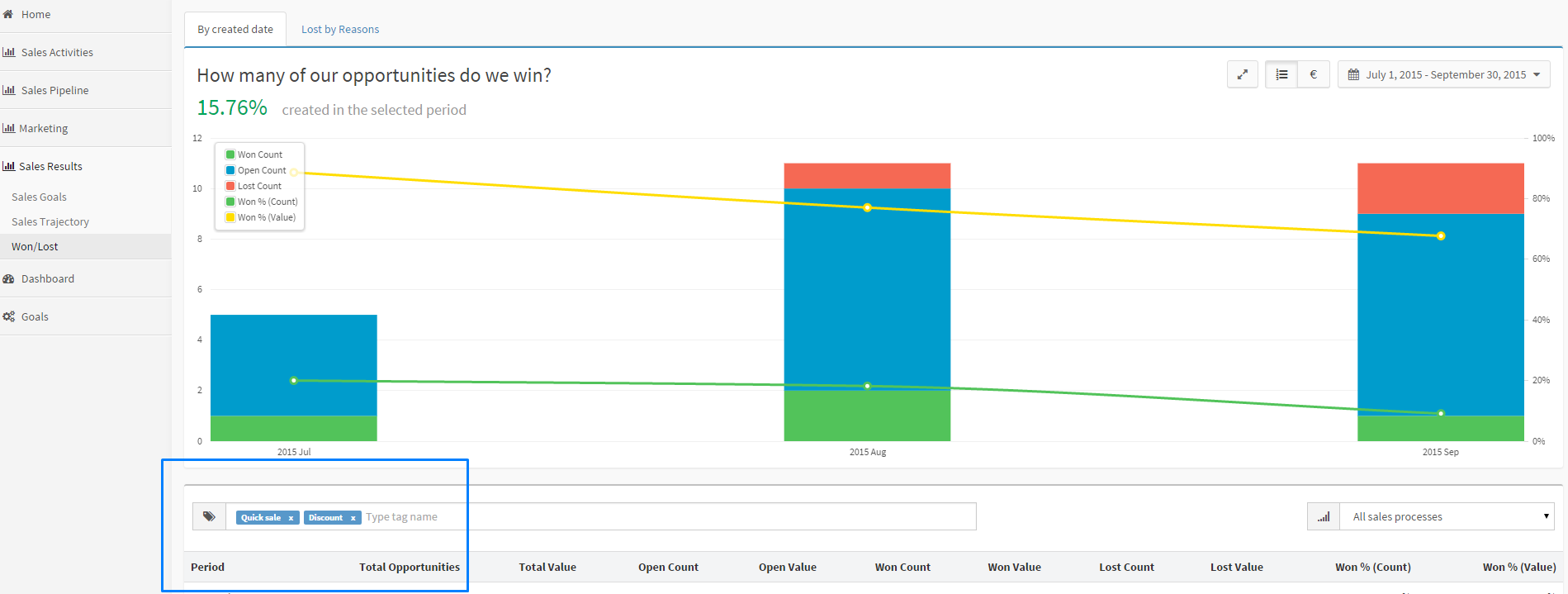
tags analytics

How to Segment:

Identify a specific goal

One of Big Data’s biggest problems is data clutter. In his book “The Signal and The Noise”, statistician Nate Silver refers to the challenge of “extracting signal from noise” as a hindrance to making accurate predictions from large data sets.

The same challenge presents itself for CRM users when collecting and segmenting customer data. The solution is to prevent the occurrence of noise in the first place by planning a CRM segmentation strategy.

When you identify a high priority goal like increasing sales in a particular demographic or 20% more customer retention, identifying the data relevant to the goal becomes an easy task. There won’t be a need for arbitrary customer sub-groups that serve no purpose but to add noise to already well-categorized data.

When a particular segmentation strategy meets your pre-determined results, you can choose to allocate more resources towards different goals.

This strategy is akin to the OKR method which stands for Objective & Key Result. OKR is currently in use to great successes by technology giants such as Google, Intel and Twitter.  Make sure to explore it further (or implement it) for your CRM segmentation strategies.

Do you have a CRM that keeps you organised?

The most user-friendly CRM on the market. 14-day free trial.

Start Free Trial

Painless setup, no credit card required
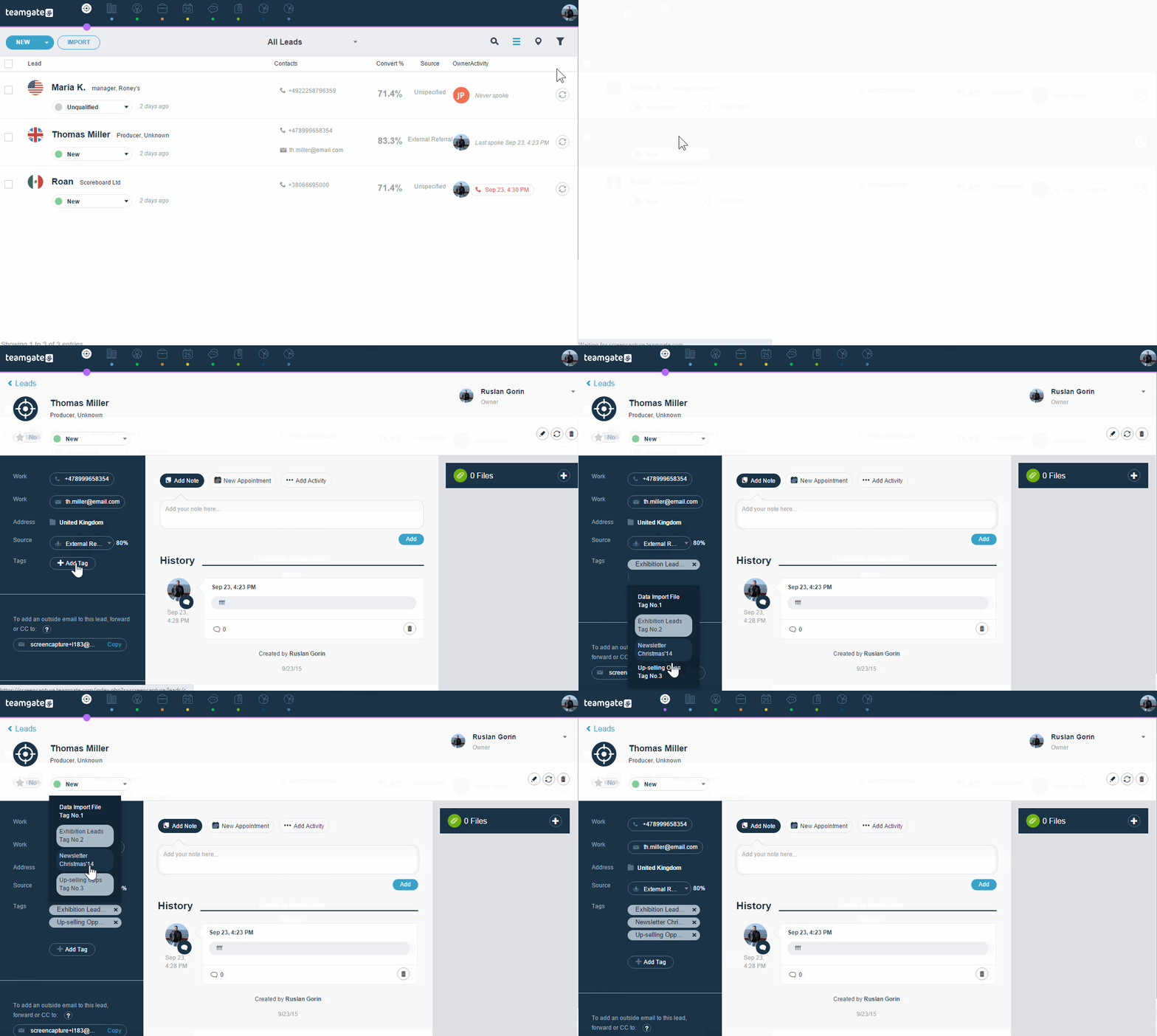
Teamgate Tags

Teamgate CRM allows you to not only tag leads and customers but also deals and companies, which adds to the latters the same level of complexity usually allocated to customers.

Tagging using Teamgate is easy and intuitive to deploy for any segmentation strategy.

To create a Tag:

  • Navigate to Settings > Customize > Tags.
  • Choose Contacts (for Customers, Leads and Companies) or Deals.
  • Click Add New and enter a clear and relevant tag.
  • Save

add_tag_GIF

Congrats! You have created your first tag. Editing tags can be done using the same tab by clicking on the Tag you want to edit.

Teamgate segmentation or tagging will help you implement and deploy targeted sales and marketing campaigns that work while keeping the satisfaction of your customers a priority.

GET READY TO OWN YOUR WORKDAY

with the most user-friendly CRM on the market.

Start Free 14-Day Trial

Painless setup, no credit card required
10 CRM Integrations You Need to Unlock Sales Growth & Efficiency

CRM (Customer Relationship Management) software provides businesses with customer insights and automation tools. These insights and tools help a business improve team efficiency, sales, customer service, customer retention, and more.

While a CRM tool is powerful on its own, you can get even more from your CRM software with integrations. CRM integrations are third-party applications connected to your CRM software to help you achieve more with your customer and sales data. With the right integration, you can save time and money and increase productivity by automating more of your functions.

Since several CRM integrations are available, picking the best ones for your team can be tricky. We’ve simplified your search for the right CRM integration by compiling the integrations every business needs to supercharge marketing and sales.

10 CRM Integrations Your Business Needs To Unlock Sales Growth

The best CRM integrations simplify handling sales processes, engaging with prospective and existing customers, and managing your business. Here are the top integrations that ease fulfilling these functions:

1. Zendesk Integration

Zendesk is a customer service software that businesses use for managing and storing customer requests. It also simplifies communicating with customers by allowing your team to interact with customers via their preferred communication channels, including social media.

A Zendesk CRM integration will let your team view and respond to all customer requests and queries from a single location. Your team will also see which customer requests have received a response, eliminating the danger of a customer query going unanswered. Other benefits of Zendesk CRM integration include improved cross-team collaboration and storage of customer communication history for easy reference.

You can also integrate Zendesk with Salesforce to further streamline workflows by connecting support and sales data in one unified system.

2. Email Integration

Email is among the top business outreach and marketing tactics because it delivers impressive results. With an email CRM integration, you can simplify your email outreach functions in several ways. For instance, you can use customer data from your CRM to automate creating and sending personalized emails to update customers or respond to queries.

You can also have email templates, which your team can modify to respond to queries and avoid the hassle of crafting emails from scratch. Lastly, an email CRM integration can provide a central sales inbox that you can connect to email providers like Gmail and Outlook. Your team can view and respond to all customer emails from the sales inbox, eliminating the need to switch between email platforms to check or answer emails.

3. Twilio Integration

Customers prefer seeking customer support via phone when they have urgent issues. A Twilio CRM integration will provide you with a phone system your team can use to call customers directly from your CRM. It’s more convenient because your customer details are already in your CRM. You can also log and record calls made with Twilio for analysis to improve future customer communications.

Lastly, Twilio offers the option to reach customers via SMS, MMS, and WhatsApp. You even have the option to schedule messages to send at specific times to market products, remind customers about upcoming appointments, or ask for feedback.

4. Nexmo Integration

The Nexmo CRM integration is a useful add-on for sending inbound and outbound SMS to customers or team members. You can also set SMS reminders to keep your teammates or customers updated about upcoming events.

Using the integration costs less than sending bulk SMS through traditional means, especially since sending international SMS with the platform is cheaper. It’s also more convenient because you and your team can use it from the comfort of your CRM, eliminating the hassle of juggling multiple messaging tools.

5. LinkedIn Integration

Social media is excellent for gathering customer insights and finding new leads. If you are a B2B company, one of the best social platforms for getting such results is LinkedIn. Fortunately, a LinkedIn CRM integration is available for maximizing your use of the platform.

With a LinkedIn integration, your team can find leads with less effort and avoid the hassle of manually entering, sorting, and storing data. The integration will facilitate the automatic gathering and storage of relevant data from the LinkedIn profiles of potential leads, and you can follow up with the most qualified ones.

6. Freshdesk Integration

Freshdesk is a customer support system that integrates with many CRMs. You can use the Freshdesk CRM integration to leverage customer data to improve customer services. Users can view the newest customer information and take appropriate actions to resolve customer issues quickly. Since the software is customizable, you can easily modify it to suit the unique needs of your business.

7. WordPress Integration

The WordPress CRM integration helps automate lead generation to bring about more sales. The integration accomplishes this by allowing you to create custom forms on WordPress and add the forms to your landing pages. Prospects can fill out the forms, providing you with the data you need to follow up with the prospects who are most likely to convert.

Examples of the forms you can create for smarter lead capturing are contacts and subscription web forms. You can monitor filled forms as new Lead, Contact, or Deal within your CRM.

8. QuickBooks Integration

Accounting and financial processes are typically time-consuming, and the slightest mistake during data entry can cause various problems. The QuickBooks CRM integration makes life easier by simplifying your accounting and financial processes.

The integration accomplishes this by providing a central location where you can manage invoices and view customer payments. Your team can access this central location remotely from any device, allowing sales and marketing people to collaborate from different locations.

Another benefit of the integration is two-way synchronization, which removes the need to enter the same data multiple times. Simply put, QuickBooks CRM integration eliminates tedious and out-of-date accounting practices, allowing your team to be more productive.

9. Zapier Integration

Zapier is one of the most beneficial CRM integrations you can have. It can serve as a CRM connector that allows you to connect even more tools to your CRM.

CRM connectors link your CRM to more applications to expand functionality. For example, thanks to the Zapier CRM integration, you can connect Teamgate to apps like Trello, Asana, and HubSpot and web form makers like Wufoo and JotForm.

Also, with Zapier, you can automatically transfer data from CRM connector integrations to your CRM and other third-party apps connected to your system. In summary, Zapier can turn your CRM into a central hub where your team can see, control, track, and manage all the customer data they typically rely on to function.

10. Mailchimp Integration

Businesses use Mailchimp CRM integration to simplify email marketing. The integration will give your team the power to send automated marketing emails, including targeted campaigns to leads and contacts you have in your CRM.

With the integration, your email marketing can become more accurate and yield a better return on investment because you are taking data-driven actions. You can also identify underperforming emails and modify them to deliver better results. Lastly, Mailchimp offers several email personalization options to help businesses increase email engagement and the potential to convert email recipients.

Start Using CRM Integrations to Supercharge Your Sales, Customer Support, and More

Now that you know about CRM integrations, which ones do you intend to use for your business? Remember that the best integrations for your team will help you simplify achieving your business goals and satisfying your customers.

However, the quality of your integrations won’t matter if you have the wrong CRM software. With a CRM like Teamgate, you can seamlessly integrate and use all of the integrations that made our list and more. See for yourself by taking Teamgate for a spin with its 14-day free trial.

Frequently Asked Questions

What is API integration in CRM?

API (Application Programming Interface) enables a CRM to connect or integrate with other software. Also, API transfers data between systems to facilitate data sync, allowing you to see and use the same data in your CRM and connected systems.

What does CRM mean?

CRM (Customer Relationship Management) is a software that allows businesses to easily track customer communications and nurture relationships with leads and clients. You can also use a CRM to collect sales leads and customer data in one place. With a quality CRM, you can use your customer data to automate many of your processes and avoid the hassle of relying on multiple spreadsheets, databases, and apps.

What must CRM be integrated into?

You can integrate your CRM with various software tools such as email, calendar, social media, calling, accounting, and data collection tools. The right combination of integrations to use with your CRM will depend on your organization’s unique needs.

What is the difference between API and integration?

Integration involves connecting two systems or applications over a network. On the other hand, API is the interface through which applications connect or integrate over a network. It also facilitates the transfer of data between connected devices or programs.

Should I use a native Intercom integration or a third party such as Zapier?

Whilst Zapier is an excellent tool, the purpose of integrating Intercom with your CRM is to facilitate efficiency and collaboration. The best CRMs offering a native Intercom integration can be found here.

Do all CRMs integrate with Mailchimp?

Mailchimp does integrates with various CRM systems to improve customer relationship management and email marketing. However, some integrations may be limited in functionality and efficiency they offer.

Which CRM offers the best Quickbooks Integration?

Quickbooks integrates with a select few CRM systems help businesses drive revenue and enhance your sales process. The best options can be found here.

Do CRMs integrate with all Email providers?

Many CRMs integrate with an email provider to add efficiencies and functionality. Whether is it Gmail, or another provider such as Outlook, the options and features will differ between CRMs.

What is Make?

Make is a seamless Teamgate CRM integration which automates and manages repetitive tasks that are killing your precious sales time.

To put it simply; Make is the simple online hub that gets your apps talking to each other, and performing a multitude of vital tasks every hour of every day – even while you sleep. And, it’s fully customisable to work EXACTLY the way you want.

Set the tasks you want Make to perform – manage contacts, send automated emails, track projects, manage your lead gathering – while you concentrate on the real important stuff – selling.

Triggers, searches, and actions explained.

The means by which Make connects your CRM apps, and removes those tedious tasks, can be broken down into three main categories.

Triggers

A trigger is an event which occurs in your CRM and causes a response from the Make Teamgate integration. This trigger could be as simple as creating a post on Facebook. Once you post to Facebook, Make performs the required next step. This next step might be as simple as sending a Slack notification to selected recipients.

Other examples of activities which could spark a trigger might be: When a new file is uploaded to your CRM; when a new product is created in the products list; when a new person is created; when a new lead is created; when a new event is created; when a new company is created, or when a new deal is created. In fact, the possibilities for triggers are endless.

Actions

As part of the CRM automation, a Make action does one single job and then passes the result to the next stage of the process. The process of sending the Slack notification about the Facebook post, to a specified recipient is the action carried out.

An action could also be any of the following scenarios; deleting a specified person; deleting a deal; deleting a product from the product list; creating a new product; creating a new event, task, call reminder, appointment, or note; creating a new lead, or deleting a lead; delete an event; create a new company or create a new deal; create a new person, or even delete a specified company or file.

Searches

So, according to the Make, CRM task you’ve automated, creating a new post on Facebook was the trigger; sending the Slack notification to a specified recipient was the action; and the act of selecting the person to receive the notification is the search. This recipient could be searched for, and selected using the following criteria; ‘Send notification to all people working in X company’.

Just like the ‘working in X company command’ the Teamgate Make integration can use a variety of search scenarios, such as; list all teams by given parameters; list all products by given parameters; list all deals by given parameters; list all users…; list all leads…; list all companies…; list all companies…; list all files…; list all people…; etc.

How about some Make examples?

As has been said, with the possibility of thousands of CRM integrations with thousands of independent apps, the bounds of CRM automation are limitless.

Let’s try to think of the process in the form of everyday life.

It’s morning and you need to go to work, but first you need to search for your car keys. Once you’ve found your car keys you need to take one key from the bundle and give it to a family member to have it copied. You now need to leave the house, enter your car, stop to fill up with gas, and make a phone call while you’re waiting. Once back en-route to work you discover that roadworks have forced you to take a detour, you ask your GPS navigator to work out the best route. Finally you get to work.

The whole process doesn’t just involve getting from A to B but involves a sequence of various components – triggers, searches, and actions – to complete the desired process as efficiently, and as quickly as possible. That’s the Make Teamgate CRM integration.

But, in case that little analogy wasn’t enough, some practical examples for sales professionals might be as follows:

E-mail – When you receive new leads and enter them in your Teamgate CRM, Make will automatically add these new leads to a selected MailChimp list.

Internal – Every time you win a new deal on Teamgate your Make CRM integration will send a customised or pre-defined message via Slack to a selected group, or individual.

Pipeline management – Create Asana projects automatically from new Teamgate CRM deals. Each time a new deal is created in Teamgate Make will create a new specified project in Asana. CRM automation simplified.

Marketing – Create Teamgate deals for new Intercom users. On every occasion a new user is created for Intercom, Make will create a new lead directly within your Teamgate CRM.

How Make makes your life easier

Why go looking for multiple solutions for existing problems when your Teamgate Make integration has the means to resolve all of these problems, from one ‘always on’ resource?

Create the integrations you need – by means of Make and the applications you use and trust. Simplify countless time-wasting tasks and processes, and get the results you want, in the way you want.

Your Teamgate Make CRM integration might just be the best thing that ever happened to your sales process

GET READY TO OWN YOUR WORKDAY

with the most user-friendly CRM on the market.

Start Free 14-Day Trial

Painless setup, no credit card required
It seems like every day, there’s some new something — some new tool or solution that’s supposed to make business leaders’ jobs easier, more productive, more fill-in-the-blank. And along the way, some tools have actually proven their worth, while others have lost traction and eventually been forgotten. Remember fax machines, floppy disks, and dial-up?

But a tool that’s not going the way of corded telephones is the customer relationship management (CRM) solution.

Well-designed and correctly installed CRMs are incredibly useful to sales teams. A CRM tracks every interaction your sales team has with potential and current customers. CRM software even alerts teams when an opportunity for lead nurture or follow-up presents itself.

At this point, however, you’ve likely read more blog posts than you can count, expounding on the benefits of CRMs. You understand there are advantages. You might even be more focused on the potential disadvantages. Or maybe you haven’t truly considered choosing a CRM program because you’re just not looking forward to learning yet another software program. If your business gets along just fine, you might even think, “Why do I need another tool?”

Article Summary:

  • A CRM program keeps every bit of data — from customer information to potential leads’ funnel history — centrally located and easily accessible.
  • All communication for every touchpoint, whether from sales rep to sales rep or from sales rep to customer or lead, is managed through the CRM.
  • A CRM program tracks leads and sales team interactions.
  • Your sales team can automate the entire sales process from pipelines to touchpoints and closed deals with a good CRM solution.

Reasons You Don’t Need CRM

We’re kidding of course, but business owners without a CRM are especially astute at crafting excuses for not implementing this software. Let’s take a look and see if any of these reasons sound familiar:

You enjoy Excel spreadsheets

Some leaders like spreadsheets. There’s nothing inherently wrong with a spreadsheet, but Excel isn’t attached to other tools you’re using. Spreadsheets require manual data entry. While your reps might enter new data in the CRM, they don’t have to filter a spreadsheet to find it the next time they speak to a customer — the entire history of interaction with that lead or customer is available with just a click.

You enjoy entering every single interaction manually

As much as you might love data entry, think about your reps and your customers. Without a CRM, your reps might ask the same customer the same questions at every interaction. Customers might not enjoy answering questions they’ve already answered with a previous rep. It frustrates the customer and sometimes even demoralizes the sales rep when customers express their frustration.

Even if every interaction is detailed manually every single time, how easy is it to find that info during a sales call?

Your organization’s communication is perfect as-is

Does your sales team have no complaints? What about your marketing team? Your HR department? Do you or your teams feel current communication methods adequately address your business’s needs? How easy is it for reps to hand off a sales call to another team member? Any time your sales team has to devote to putting together the interaction history of each prospect or customer is time they could better spend actually selling.

Your sales and marketing teams are already seamlessly synergistic

You’ve heard of businesses that have perfect coordination between their sales and marketing departments. Maybe you even think yours is one of them. But those other companies are 99.9% using a CRM so all departments are always on the same page. When marketing knows what’s coming down the sales pipeline, campaigns are executed more strategically. When sales knows the campaign that’s just about to drop, they can hit the ground running at the most opportune moment.

You don’t need to grow your business; it’s doing just fine

Most business leaders have an interest in growth and scalability. If your business is small — say you have around 5 to 10 customers — and you’re not looking to add to your roster, working without a CRM is pretty doable. But working without a CRM also means it will be next to impossible if you change your mind and want to branch out. CRMs help you review each salespersons’ activity, successful strategies, and touchpoints that work, which helps your team’s closing rate. This, in turn, grows your business and its revenue (not to mention team morale!).

Your business doesn’t need to be automated

So, let’s see — you’re tracking interactions in Excel or another spreadsheet program, you have an email program with leads and customer addresses, a live chat feature with remote staff answering questions, and customer service representatives manning the phones. Each department manually records its notes in the respective program. But those programs don’t “talk” to each other. If your business’s various departments are fine with this lack of interconnectedness, don’t worry about adding a CRM. If, on the other hand, your teams have expressed a need for some integration, it might be time to consider adding customer relationship management to your toolbox.

Your customers are happy…enough

You might serve your customers just fine. They may indeed be happy. But imagine how much happier they could be if your teams could identify trends and anticipate customer needs?

You think struggling to keep up with the flow of leads is normal

Business ebbs and flows. Sometimes, though, those flows are tidal waves that topple any sort of scalability that could have happened had your team been better prepared. Not having a CRM makes your team really good at losing potential customers. Having a CRM means your team is ready, right when the leads start funnelling through.

You love running manual reports

You might, but does your team? And how accurate are these reports when they’re not taking information from disparate tools into account? Imagine how much better you could get to know your business and its customers and how powerful your team might be with the right support.

You can maybe see how not having a CRM could affect your business. But like anything, even CRM software has positives and negatives.

Pros and Cons of Customer Relationship Management Software

The reasons outlined above about why you might not want a CRM were a little tongue-in-cheek. Below you’ll find a real look into the benefits and potential limitations of CRM software.

Let’s look at the limitations first:

  • A lot of manual data entry. Some CRM programs require manual data cataloging. This can eat into time spent selling.
  • Requires correct setup. Using a CRM tool can be tedious if the software isn’t properly set up from the start. If it’s not easy to use, employees may not use it.
  • Subscription fees can be costly. Some programs have monthly recurring subscription charges. Typically, these charges are based on how many users you have in your business. You might have to set aside time to train employees on how to use the program, and you might need someone in-house that can help oversee its use. This can be a hefty burden for a small- or mid-size company.
  • Requires a documented sales process. Implementing CRM is only one piece of the puzzle. You also have to have well-documented business processes in your sales department. If process steps aren’t clear, a CRM can hinder more than help.

Now assuming you’ve got a handle on the above, the benefits of CRM software far outweigh any of its negatives. Sales process improvements and the right CRM for your business are key.

Advantages of using a CRM include:

  • Automatic data entry. While ETL (Extract, Transform, Load) can be necessary when setting up a CRM solution, once it’s in place data entry is automated. Some CRM solutions can even integrate with your social channels.
  • Streamlined sales activity. A bad setup can do more harm than good, but a CRM that’s set up properly from the beginning puts all the information your sales team needs at their fingertips, arranged in the most beneficial manner.
  • Growing revenue. Yes, implementation of any tool is going to cost you to get it up and running. But, and this is huge, it’s been shown that using a CRM has a direct correlation to a growth in earnings.
  • Better collaboration. Putting all your data into one central location makes for better collaborative efforts across departments, such as your sales and marketing teams working together harmoniously. Plus, you can house any marketing materials for current and upcoming campaigns in the CRM’s content library, making access a breeze for the teams that need it.
  • Sales Insights. Whilst not a feature of all CRMs, data and analytics into your sales performance, goal achievement and key metrics have continued to prove useless in the sales management world. Make data driven decisions to target your true ideal customer profile (ICP) to close more deals and get ahead of the competition.

The advantages and limitations of CRM software depend on the organization and its needs. But again, overall, the side effects of implementing a customer relationship management program will ripple through your organization, from department to department, and you’ll see a transformation before your eyes.

From the excuses business leaders give for not implementing CRM software to the disadvantages it can pose, there’s really no denying that the benefits trump any negative.

So, what are the biggest benefits of using a customer relationship management tool?

The 6 Biggest Benefits of a CRM Program

Once you’ve found the Goldilocks CRM — you know, the one that’s just right for your business — it’s not long before you’ll see the results and reap these benefits:

#1. A central database

A CRM program keeps every bit of data — from customer information to potential leads’ funnel history — centrally located and easily accessible. Your sales team can quickly find the information they need, follow up with leads, and close those deals.

#2. Contact management

All communication for every touchpoint — whether from sales rep to sales rep or from sales rep to customer or lead — is managed through the CRM. Every interaction from the initial call throughout the customer journey is recorded. For instance, if Sales Rep A speaks to Customer 123 today, the conversation is noted in the CRM. So, when Sales Rep B calls Customer 123 next week to check in, there’s no rehashing of things Rep A already covered. CRMs enable a one-on-one conversation in which the prospect or customer never feels as though they’ve been ignored or forgotten.

#3. Follow-up reminders

While a CRM is especially designed for maintaining customer relationships, these programs also track leads and sales team interactions. By tracking sales team activity with prospective customers, reps can receive alerts when it’s time to follow up and close a sale. This helps lead conversion ratio and, ultimately, your bottom line.

#4. Customer segmentation

Sure, segmenting customers is nothing new. But a CRM’s advanced segmentation capabilities are surprising. Information you collect about your customers becomes criteria you can use later. For instance, segmenting by location or loyalty status is great, but segmenting by campaign is even better. Creating a list of customers segmented by products purchased on a particular day of a certain campaign? It’s the ultimate way to view your customers any way you choose.

#5. Customized reporting

Your other tools, like your accounting software, allow you to run reports — but those reports might not show an entire picture. In much the same way a CRM can segment your customers by any criteria you supply, a CRM can also run customized, detailed reports using built-in reporting features. Your sales team can automate the entire sales process from pipelines to touchpoints and closed deals. Reports can also show individual reps their performance over time to set, manage, and reach their sales goals.

Management can review reports to track quota attainment, while organization leaders can see how current stats measure up against projected numbers and how it all ties into revenue generation.

#6. Forecast automation

Speaking of projected numbers, successful businesses are ones that can plan ahead and make good business decisions based on both information at hand and forecasted future data. With those CRM reports above, you can discover your most important metrics and trends, and use the resulting information to create forecasts of future performance.

Your CRM software lets your reps and managers understand which sales activities are most profitable and which lead sources tend to generate the best returns. The information allows business leaders to project upcoming sales figures and adjust estimates.

The biggest benefit of CRMs is the automation of routine, repetitive, and mundane tasks so your team can spend time on the tasks that really matter. Admin tasks aren’t directly tied to revenue, but they still impact team schedules — there are only so many hours in a day, and the more time your reps can spend on cultivating real relationships with your customers and prospects, the better.

Still on the fence?

Empower Your Team with Teamgate

Teamgate CRM is the customer relationship management tool for today’s busy sales departments. The benefits of our CRM include:

Focus on the sale

Streamlined and customized sales pipelines enable you to remove the complexities of the process from your sales flow. Manage leads from prospect through to closure with one-click conversion, drag and drop interface and multiple, customizable sales pipelines.

Manage prospects and leads with ease

Schedule activities and tasks, dial customers or prospectssend emails, and access historical contact data directly from your lead list area.

Seamlessly integrated

Teamgate integrates with your favorite tools with ease. You can select the integrations you want displayed within your workspace, and access key information from multiple platforms all at once.

Manage customer accounts

With Teamgate’s in-depth insights and analytics, managers can track and obtain real-time data on their department’s performance and utilize key metrics to increase their sales growth and drive their decision making.

Convert leads

Gain in-depth insights into prospects with integrated sales intelligence tools, enabling you to personalize your approach and qualify your leads against your ICP.

To realize the potential of your organization, try us out with our 14-day free trial. Get started today.

Updated

Not taking long after being acknowledged as a market leader, we at Teamgate are proud to announce another significant achievement – becoming one of the Trusted Vendors according to Crozsdesk!

trusted vendor badge 202

High-quality service being our top priority, we don’t take trusted vendor badge for granted and continue basing all of our decisions on customer feedback and keeping our user satisfaction high.

**********

Who knows better how to grasp the value of a product than salespeople? They are aware of all the sales techniques and marketing tricks, hence, only a truly helpful and worthy product can get to them.

Therefore, Teamgate is happy that more and more businesses see the value in our product and choose to work with us and trust us with their sales processes and customer data storage.

We are proud to announce that it did not last long for Crozsdesk to acknowledge our achievements and recognize our efforts to keep clients satisfaction at its highest.

Crozcdesk named Teamgate among the Top 20 Sales Software providers in 2020.


sales management leader award 2020Crozsdesk is one of the leading platforms of such a kind where users can discover the best software for their needs, compare it, whether it is marketing, accounting or sales tools. 6 years after the initial launch of Crozsdesk, there is over a thousand software for buyers to choose from. Crozsdesk not only offers product descriptions but also provides customer reviews, ratings, pricing and other relevant information to make the choice easier.

How Was Teamgate CRM Chosen?

Teamgate was ranked number 5 in a category of Sales Management software. The ranking is solely based on the unbiased algorithm of Crozdesk which uses its unique methodology. In the listing, each software has its own category-specific crozscore as well as the universal crozscore.

Each software is shown in the list based on the score at the moment of publication.

This snippet provides the full list of Software products ranked as leaders in this category:


Top 20 Sales Management Software of 2020 Infographic

Final Word

Awards like this category leader award from crozdesk don’t come easily. It requires a lot of dedication, patience, and consistency in our daily operations.

However, it is a huge acknowledgment to be named among the top 20 Sales Management tools especially since it is an exceptionally competitive market in terms of both technology and the quality of service. Hence, Teamgate’s primary purpose is paying close attention to notes and criticism from clients and keeping up with the latest technological trends in order to provide a top-quality product able to compete with the market’s leaders.

In today’s world, email is such a central part of the modern working life. And we all know that the one resource which is super expensive for all of us is… time. Here at Teamgate, we are constantly trying to make our tool easier to use. It includes creating new functionalities that help to actually speed up the process and make sales more efficient.

One of our newest addition is Sales Inbox module which gives a possibility to send and receive emails directly from your CRM account. This new feature saves you a tremendous amount of time every day since you don’t have to switch between tools.


Email Templates Teamgate Social

This powerful integration works with your favorite email service providers – Microsoft Outlook, Gmail or Yahoo.

It syncs your personal mailbox with Teamgate CRM and allows you to have all of your client-related emails in your CRM with no manual work. Sales Inbox comes really handy when passing on client data to your colleagues.

This module allows you to track your conversations by attaching copies of emails you’ve sent or received to any customer’s contact card. Synced emails always keep you well informed of relevant Deals and help you to close them even faster.

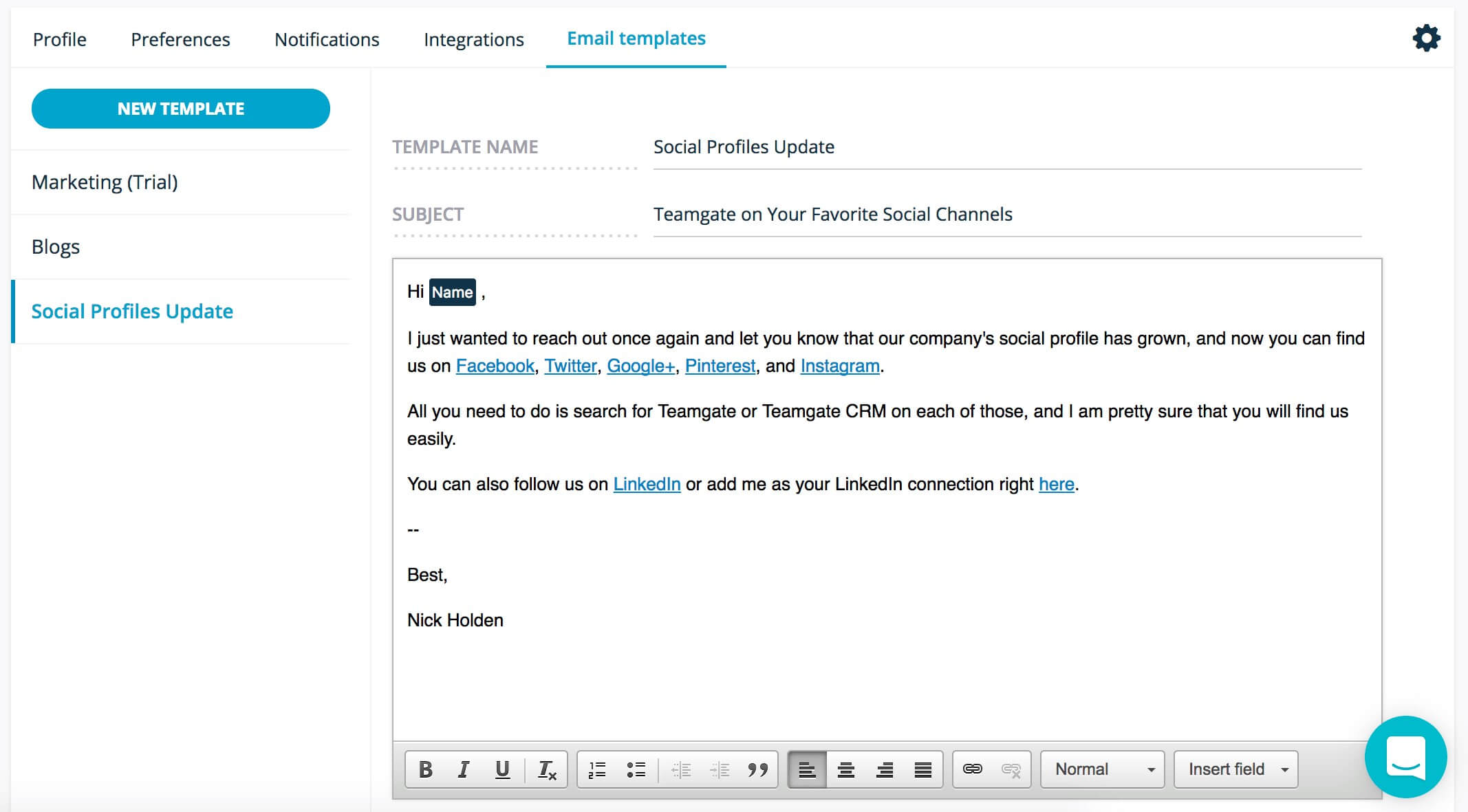
If that’s not enough, we added some more value. We have created email templates on Teamgate.

  • What if the user is sending the same email or series of emails to every lead or contact he has in CRM?
  • How can he send an email to introduce his product/service to all (or a part) of his leads?
  • What if the user wants to send a personalized update to the customer?

Do you have a CRM that keeps you organised?

The most user-friendly CRM on the market. 14-day free trial.

Start Free Trial

Painless setup, no credit card required
Everything is now possible with just a couple of clicks using email templates on Teamgate. They are available for all of these sections:

  • Leads
  • Contacts
  • Companies

Send Email Template to a Lead

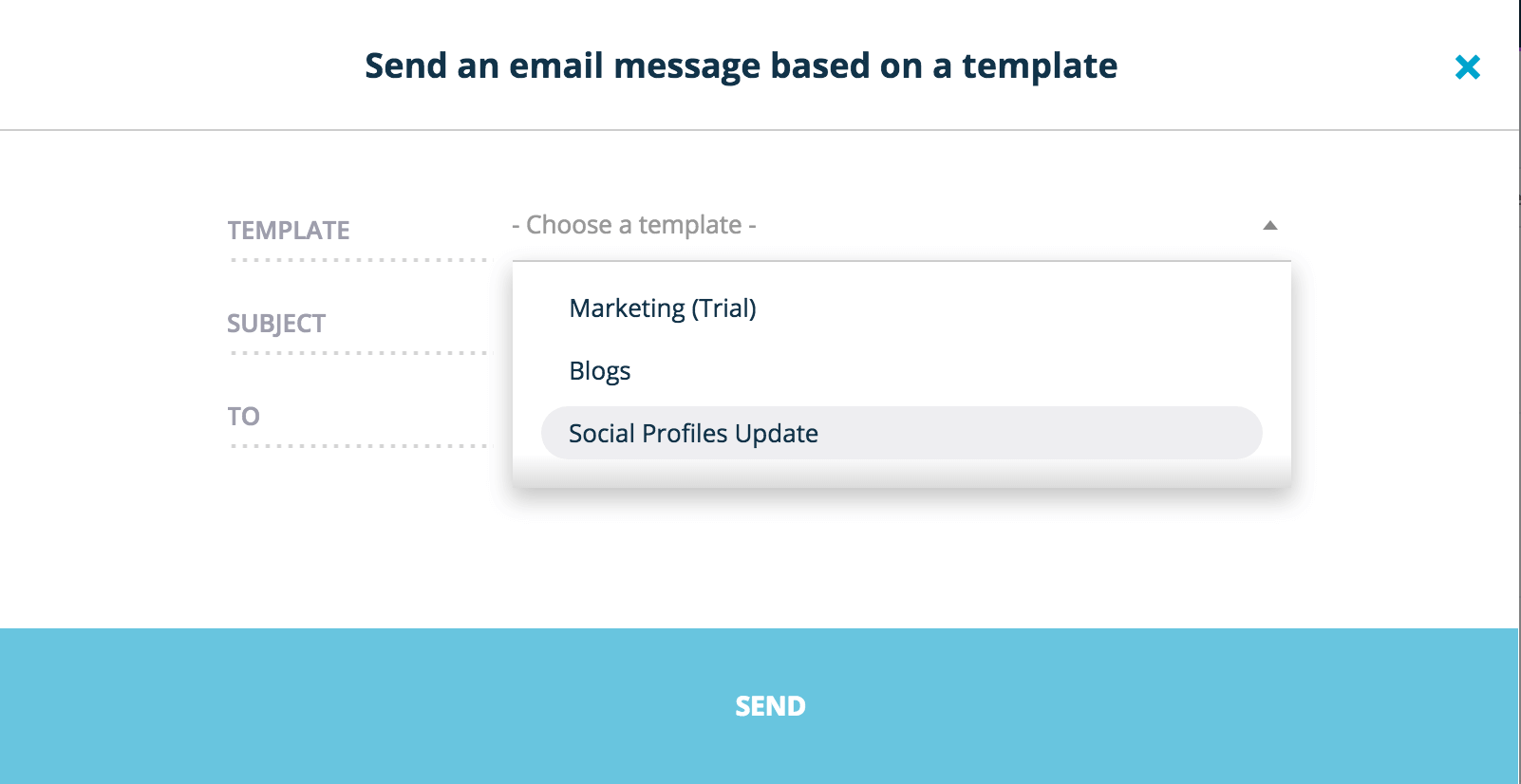
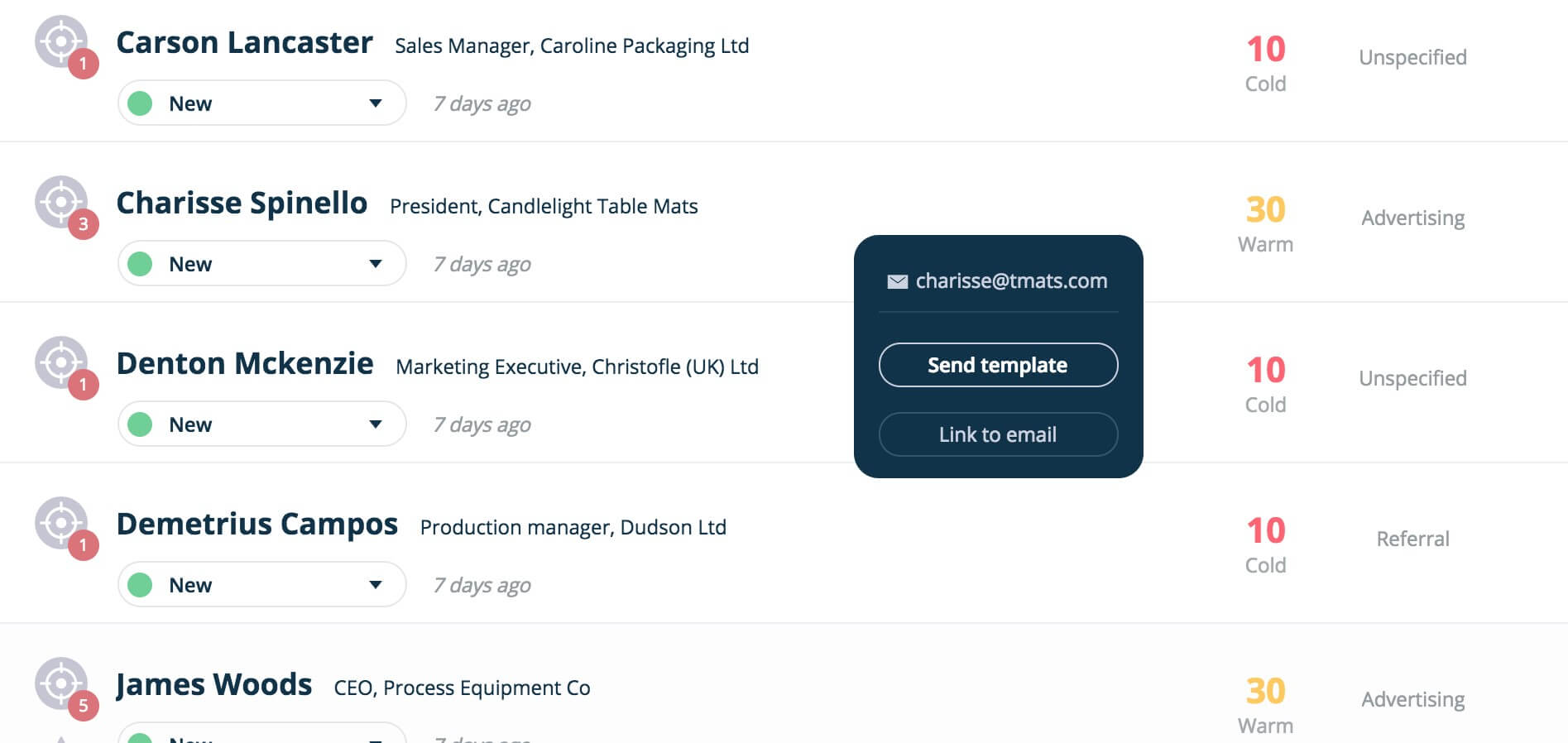
To send your email template, you just need to go to Leads / Contacts / Companies section, find the right person (or a company), click on an email address entered and select ‘Send template’. You did 2 clicks, what you need to do is another 2 clicks – select one of the templates you have and click SEND!

And you’re all set. Save even more time with Teamgate.

Email Templates Selection

F.A.Q: How to create email templates in Teamgate | How to use and send email templates in Teamgate