Designed for Growth: Scale your recurring revenue with the new Teamgate SaaS CRM. Explore SaaS Features →

Book a demo today and save 50% off your first month, or 20% off your first year.

Get a free sales audit to uncover hidden revenue opportunities!

In this article, you will learn about the importance of sales tracking and the different methods available, including traditional spreadsheets and modern CRM software. Discover the pros and cons of each approach and determine which method suits your business needs. By the end, you’ll understand how effective sales tracking can optimize your sales process and drive business growth.

Key Takeaways:

  1. Sales tracking is crucial for maintaining a profitable sales strategy and achieving sales goals.
  2. Traditional spreadsheets offer basic insights but require manual attention and lack advanced analysis capabilities.
  3. Modern CRM software automates sales tracking, provides real-time insights, saves time, and offers scalability.
  4. A quality CRM enables you to identify important stages in your sales pipeline, improve sales efficiency, and eliminate time-wasting activities.
  5. Smart sales tracking helps optimize sales performance, make accurate forecasts, and build stronger customer relationships.
  6. Choosing a powerful CRM solution can give you a competitive edge and support your business growth. Consider taking a demo to explore its benefits firsthand.

Contents:

What is sales tracking?

Sales tracking is the cornerstone of successful sales management, embodying the meticulous documentation and analysis of every facet of the sales process. This comprehensive approach ensures that sales managers are not merely overseeing transactions but are deeply engaged in a strategic orchestration of the sales journey from inception to closure.

The Essence of Sales Tracking

At its core, sales tracking involves a detailed and organized monitoring of every action within your sales pipeline. It’s about transcending the traditional view of sales as a series of discrete events to a holistic understanding of a continuous process. This shift in perspective enables sales managers to maintain a dynamic and profitable sales strategy that is both responsive and proactive.

The Strategic Advantage

The strategic advantage of effective sales tracking lies in its ability to keep sales Key Performance Indicators (KPIs) aligned with overarching business goals. It prevents the sales process from deviating unnoticed from its intended trajectory, ensuring that every effort contributes meaningfully towards achieving target outcomes.

Insight and Analysis: The Path to Optimization

Through diligent sales tracking, managers gain real-time insights into the nuances of their sales operations. This level of analysis fosters an acute awareness of each stage within the sales pipeline, illuminating the path from potential customer engagement to successful conversion. It’s this granular understanding that enables the fine-tuning of strategies, ensuring that the sales process is not just effective, but also efficient and customer-centric.

Traditional and Modern Sales Tracking Methods Comparison
Sales tracking software

In the realm of sales management, tracking methods have evolved significantly, moving from traditional manual systems to modern, automated solutions. Each approach has its strengths and challenges, making it crucial for businesses to choose the method that aligns best with their operational needs, sales volume, and growth aspirations.

Traditional Sales Tracking with Spreadsheets

For small businesses, startups, or those with limited sales volumes, traditional spreadsheets can serve as a practical and cost-effective sales tracking solution. They offer a straightforward and easily understandable representation of the sales process, providing insights into sales activities without the need for sophisticated software.

Pros of Using Spreadsheets:

  • Simplicity and Clarity: Spreadsheets present sales data in a basic, digestible format.
  • Centralized Insights: Gather insights into your sales process in a single location.
  • Ease of Management: When dealing with low sales volumes, spreadsheets are manageable and straightforward.
  • Customizability: Tailor your sales tracking system to meet specific needs without complex configurations.

Cons of Using Spreadsheets:

  • Basic Level Insights: The insights offered are fundamental, lacking the depth that sales tracking software provides.
  • Manual Maintenance Required: Spreadsheets demand significant manual input and upkeep.
  • Collaboration Challenges: Sharing and collaborating on spreadsheet documents can be cumbersome.
  • Inferior Sales Analysis: The quality of analysis is much lower compared to dedicated sales tracking tools.
  • Presentation Limitations: Spreadsheets lack visual appeal for detailed sales presentations.

Modern Sales Tracking with CRM Software

Leveraging CRM for Comprehensive Sales Management

Modern Customer Relationship Management (CRM) software revolutionizes sales tracking by providing a suite of advanced tools designed for comprehensive sales process management. From automated data collection to in-depth analysis, CRMs offer a holistic view of the sales pipeline, enhancing decision-making and strategic planning. Beyond internal sales processes, many growing teams also integrate their CRM data with other business systems—for instance, using Integrate.io, a low-code data integration platform, to connect sales data across multiple databases, warehouses, and applications, enabling more sophisticated analytics and reporting workflows.

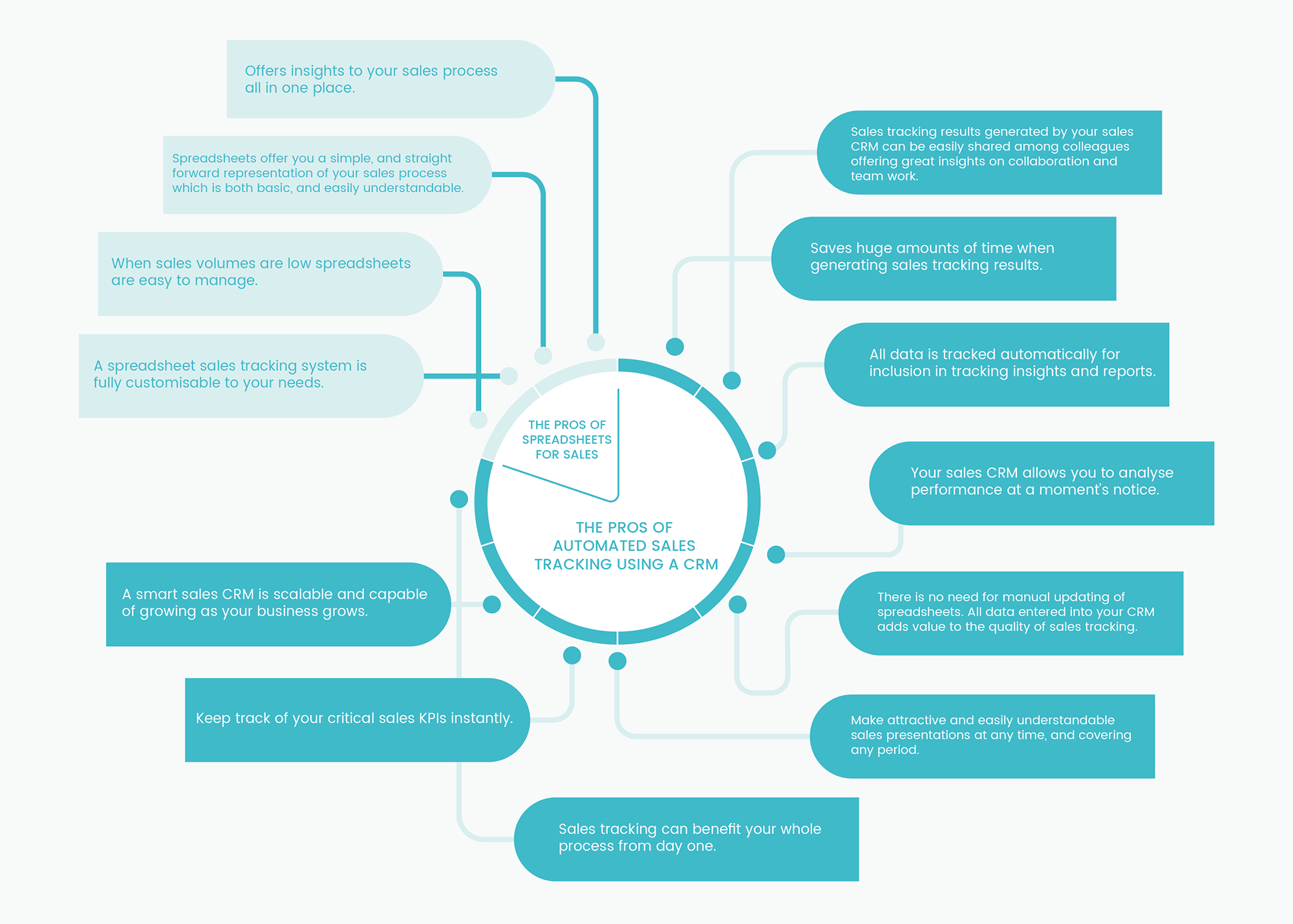
Pros of Automated Sales Tracking with a CRM:

  • Enhanced Collaboration: Facilitates easy sharing of sales tracking results among team members, promoting collaboration.
  • Time Efficiency: Significantly reduces the time required for generating and managing sales data.
  • Automated Data Tracking: Automatically collects and analyzes sales data, reducing manual errors.
  • Instant Performance Analysis: Offers the ability to assess performance metrics swiftly and accurately.
  • No Manual Updates Required: Data entered into a CRM enhances sales tracking quality without additional manual effort.
  • Engaging Sales Presentations: Enables the creation of visually appealing and detailed sales presentations.
  • Comprehensive Process Benefit: Benefits the entire sales process from the outset.
  • Real-Time KPI Tracking: Allows for instant monitoring of critical sales KPIs.
  • Scalability: Adapts and grows with your business, accommodating increasing complexity.

Cons of Using a CRM:

  • Cost Considerations: May represent a significant investment for small businesses or startups.
  • Dependency on Sales Process Definition: Requires a well-defined sales process for accurate tracking.
  • Data Entry Compliance: Relies on consistent and accurate data input by sales teams to ensure reliability.

Spreadsheets vs. CRM for Sales Tracking: Making the Right Choice for Your Business

When it comes to managing your sales process, the decision between using spreadsheets and adopting a Customer Relationship Management (CRM) software is pivotal. This choice not only impacts your daily operations but also your business’s potential for growth and scalability.

The Case for Spreadsheets in Small Businesses

For small businesses, especially those at the nascent stage or operating as a sole proprietorship, spreadsheets might seem like a natural choice. Their advantages are clear:

  • Cost-Effectiveness: Spreadsheets are a low-cost option, often available through free or existing software suites.
  • Simplicity: They offer a straightforward way to start tracking sales without a steep learning curve.
  • Flexibility: You can customize spreadsheets to your immediate needs, provided you’re diligent about updating the data.

However, this simplicity and cost-effectiveness come with limitations. While spreadsheets can serve adequately for basic tracking and small volumes of sales, they lack the scalability and depth required for a growing business. The manual effort required to maintain and update spreadsheets can also become a significant drain on time and resources as your business expands.

Transitioning to CRM for Growth and Scalability

As your business grows or if you’re already operating with a team, the need for a more robust, scalable, and efficient system becomes apparent. Here’s where modern CRM software shines:

  • Scalability: CRM systems are designed to grow with your business, accommodating increasing volumes of sales data and customer interactions without a hitch.
  • Automation and Efficiency: Automating data entry and sales tracking tasks saves time and reduces errors, allowing your sales team to focus on selling rather than on administrative tasks.
  • Insights and Analytics: CRMs provide powerful analytics tools, offering real-time insights, graphs, and charts that help you refine your sales process for better performance.
  • Enhanced Communication: With top-level communication features, CRMs facilitate better interaction within your sales team and with your customers.
  • Lead Prioritization: Features like lead scoring enable your sales team to focus their efforts on the most promising leads, improving conversion rates and sales efficiency.

Making the Decision: Spreadsheets or CRM?

The decision between spreadsheets and CRM software hinges on several factors, including the size of your business, your growth aspirations, and the complexity of your sales process. While spreadsheets may suffice for very small businesses or those just starting out, the benefits of CRM software become increasingly compelling as your need for scalability, efficiency, and comprehensive analytics grows. For businesses transitioning to CRM but seeking spreadsheet flexibility, tools like Coefficient Spreadsheet Connector bridge both worlds by syncing live CRM data directly into Excel or Google Sheets.

For Startups and Small Businesses:

  • Consider starting with spreadsheets if your operations are small and straightforward.
  • Evaluate the point at which the limitations of spreadsheets outweigh their benefits as your business begins to grow.

For Growing and Established Businesses:

  • Invest in a CRM system that offers the scalability and functionality necessary to support your business’s growth.
  • Look for CRM features that align with your specific sales processes and business needs.

Conclusion: Elevating Your Sales Tracking with Teamgate CRM

In the journey of sales management, while spreadsheets serve as a foundational tool for beginners, the dynamic capabilities of CRM software stand out as the beacon for scalability, efficiency, and deep analytical insight. The transition to a CRM system is not merely a step but a leap towards empowering your sales team, optimizing your sales processes, and propelling your business into a future of enhanced productivity and profitability.

Teamgate CRM emerges as a premier choice for businesses ready to embrace this transformation. With its intuitive interface, comprehensive feature set, and robust analytics, Teamgate CRM is designed to support your business’s growth at every stage. Whether you’re looking to streamline operations, enhance team collaboration, or gain actionable insights into your sales pipeline, Teamgate offers a solution tailored to your needs.

Why Choose Teamgate CRM?

As you contemplate the future of your sales tracking and management, consider the strategic advantage of integrating Teamgate CRM into your operations. With its user-friendly platform and comprehensive capabilities, Teamgate stands ready to help you achieve a level of oversight and insight that spreadsheets simply cannot match. Benefit from:

  • Scalability: Grow your business with confidence, knowing Teamgate CRM can adapt to increasing complexity and volume.
  • Efficiency: Automate mundane tasks and focus your efforts on building relationships and closing deals.
  • Insights: Leverage detailed analytics and reporting tools to make informed decisions and fine-tune your sales strategy.
  • Collaboration: Foster a collaborative environment with shared access to critical data, ensuring everyone is aligned and informed.

Taking the Next Steps with Teamgate CRM

Are you considering the transition to a CRM system, or do you have more questions about how CRM software can be tailored to fit your business’s unique needs?

Visit our website to learn more about our features, benefits, and how we can tailor our solution to meet your unique business needs. Elevate your sales tracking with Teamgate CRM and unlock the full potential of your sales team and process.

Contact us today to get started with a demo tailored to your specific requirements, or start your own free trial. Your journey towards more efficient, insightful, and profitable sales tracking begins with Teamgate.


FAQs: Sales Tracking

Q1: What is the purpose of tracking sales activities?

A1: Sales tracking is essential for monitoring all aspects of the sales process, from initial contact to closing a deal. It helps sales managers develop effective strategies, ensure sales KPIs are met, and gain insights for optimizing the sales pipeline.

Q2: Can spreadsheets be used effectively for managing sales data?

A2: Yes, spreadsheets can be an effective tool for managing sales data for small businesses or startups with limited sales volume. They offer a simple, customizable way to track sales but may require significant manual effort and become less practical as a business grows.

Q3: What advantages do CRM systems offer over spreadsheets for sales tracking?

A3: CRM systems offer scalability, automation, in-depth analytics, enhanced collaboration, and real-time access to data. These features make CRMs more efficient and insightful compared to the manual and time-consuming nature of spreadsheets.

Q4: Are there any downsides to using CRM software for sales tracking?

A4: The initial cost and the need for ongoing data maintenance can be seen as downsides. However, the benefits of improved efficiency, data accuracy, and actionable insights often outweigh these challenges.

Q5: How does sales tracking impact a business’s growth?

A5: Effective sales tracking allows businesses to identify opportunities for improvement, streamline sales processes, prioritize leads, and make informed decisions. This strategic approach can significantly impact a business’s ability to grow and remain competitive.

Q6: What should small businesses consider when choosing between spreadsheets and CRM for sales tracking?

A6: Small businesses should consider their current sales volume, growth goals, budget, and the complexity of their sales process. While spreadsheets may suffice initially, a CRM system can offer long-term benefits for scalability and efficiency.

Q7: How can a business transition from spreadsheets to CRM software for sales tracking?

A7: Transitioning involves evaluating CRM options that fit your business needs, planning data migration, training your team to use the new system, and gradually shifting sales tracking processes to the CRM. It’s important to ensure a smooth transition to minimize disruptions.

Q8: Can CRM software integrate with other business tools?

A8: Yes, modern CRM software often features robust integration capabilities with a wide range of business tools, including email platforms, marketing automation software, and accounting systems. This integration facilitates a more cohesive and efficient workflow.

Q9: How does Teamgate CRM enhance sales tracking for businesses?

A9: Teamgate CRM enhances sales tracking by providing an all-in-one platform for managing sales activities, analyzing performance, automating tasks, and fostering collaboration. Its features are designed to support businesses in achieving greater productivity and profitability.

Q10: Is it worth investing in CRM software for a startup?

A10: Yes, investing in CRM software can be highly beneficial for startups, as it sets a strong foundation for sales processes, enables efficient scaling, and provides valuable insights that can guide strategic decisions from the outset.

GET READY TO OWN YOUR WORKDAY

with the most user-friendly CRM on the market.

Start Free 14-Day Trial

Painless setup, no credit card required
Most CRMs don’t fail because they lack features. They fail because reps don’t use them properly, data gets messy, and the pipeline stops reflecting reality.

If your CRM feels like admin work instead of a selling tool, here’s what’s usually happening:

  • Deals don’t have clear next steps

  • Follow-ups rely on memory

  • Data is outdated or incomplete

  • Managers don’t trust the pipeline

The result is predictable: missed follow-ups, stalled deals, and forecasts you can’t rely on.

This guide breaks down 7 CRM best practices that actually improve how your team sells:

  • Keep your pipeline clean and current

  • Make next steps non-negotiable

  • Track what’s working and double down on it

  • Give reps clarity on what to do every day

Teamgate is built around this exact idea: disciplined selling, clear next steps, and pipeline visibility you can trust without adding admin overhead.

Let’s get into the practices that make the biggest difference.

use-of-crm-systems-amid-increasing-b2b-pricing-pressures

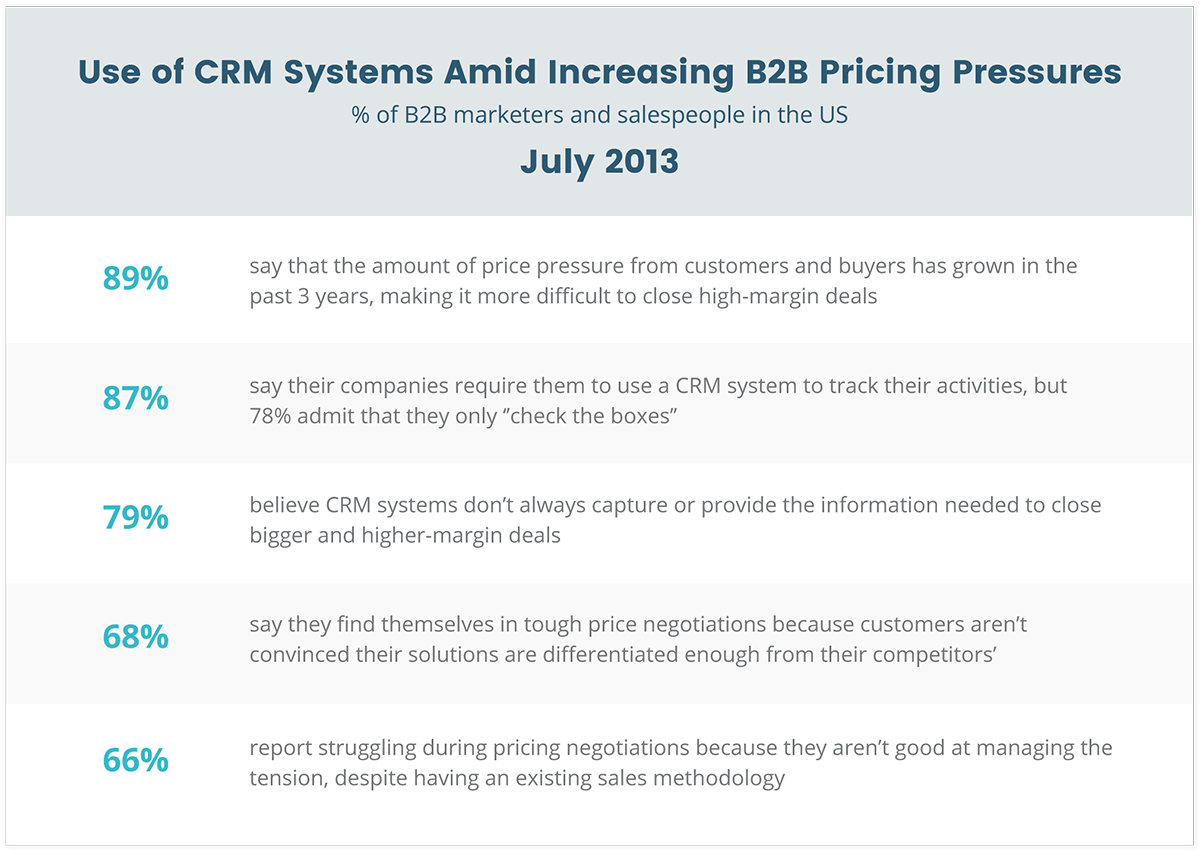
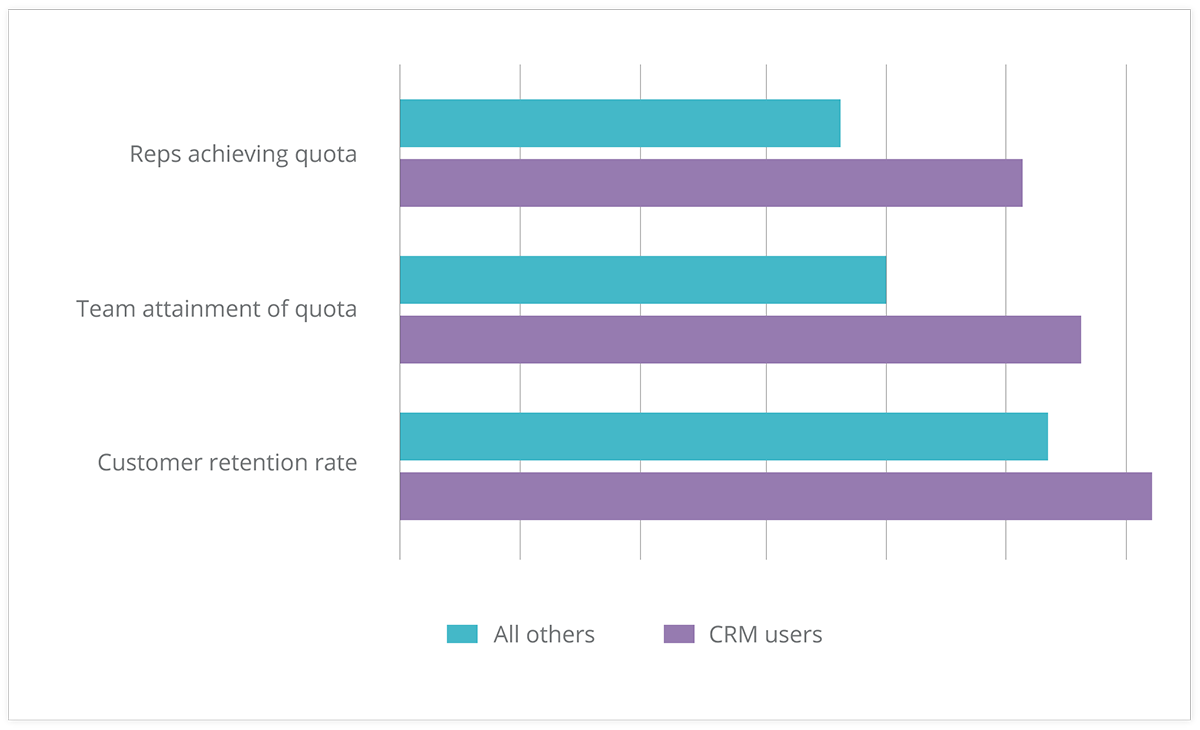
However, companies who adopt a Sales CRM as a tool for Sales Enablement achieve some pretty impressive results…
Check this out:

crm-results

These results from Aberdeen Research prove that by having the right mindset to use a CRM effectively, impressive results can be achieved… and consistently!

Sadly though, an estimated 25-60% of CRM projects fail to meet expectations.

But fear not…

In this article, I’m going to share seven CRM best practices for 2017. After reading all the way to the end, you’ll be able to identify the right sales solution to guarantee 2017 as your best year yet.

So let’s get into it:

#1 – Clean, Reliable, and Up-To-Date Data

clean-reliable-and-up-to-date-data

If your CRM data isn’t clean, nothing else works.

Forecasts become guesses. Pipeline reviews turn into debates. Reps waste time chasing deals that were never real.

Clean data isn’t about “tidying up.” It’s about enforcing habits that keep your pipeline accurate by default.

Here’s what that looks like in practice:

  • Every active deal has a clear next step

  • Stale deals are flagged automatically (no activity, no movement)

  • Duplicate contacts are prevented at entry

  • Deal stages reflect reality, not optimism

The problem is most teams try to fix this manually. They clean data once a month, then it breaks again a week later.

The better approach is system-driven hygiene:

  • Automatic duplicate detection

  • Deal aging indicators that highlight inactivity

  • Required next steps to keep deals moving

  • Activity tracking tied directly to deals

This is where a CRM should do the work for you.

Instead of asking reps to “update the CRM,” the system should:

  • Prompt the next action

  • Flag what’s falling behind

  • Keep data current through normal selling activity

When this is in place, your pipeline becomes something you can actually trust, not something you need to double-check.

Related: CRM Segmentation: Knowing Your Customers Better and Preventing Data Clutter

#2 – Company Wide Snapshot

company-wide-snapshot

Another CRM best practice: Clarity.

“Clarity affords focus.” – Thomas Leonard.

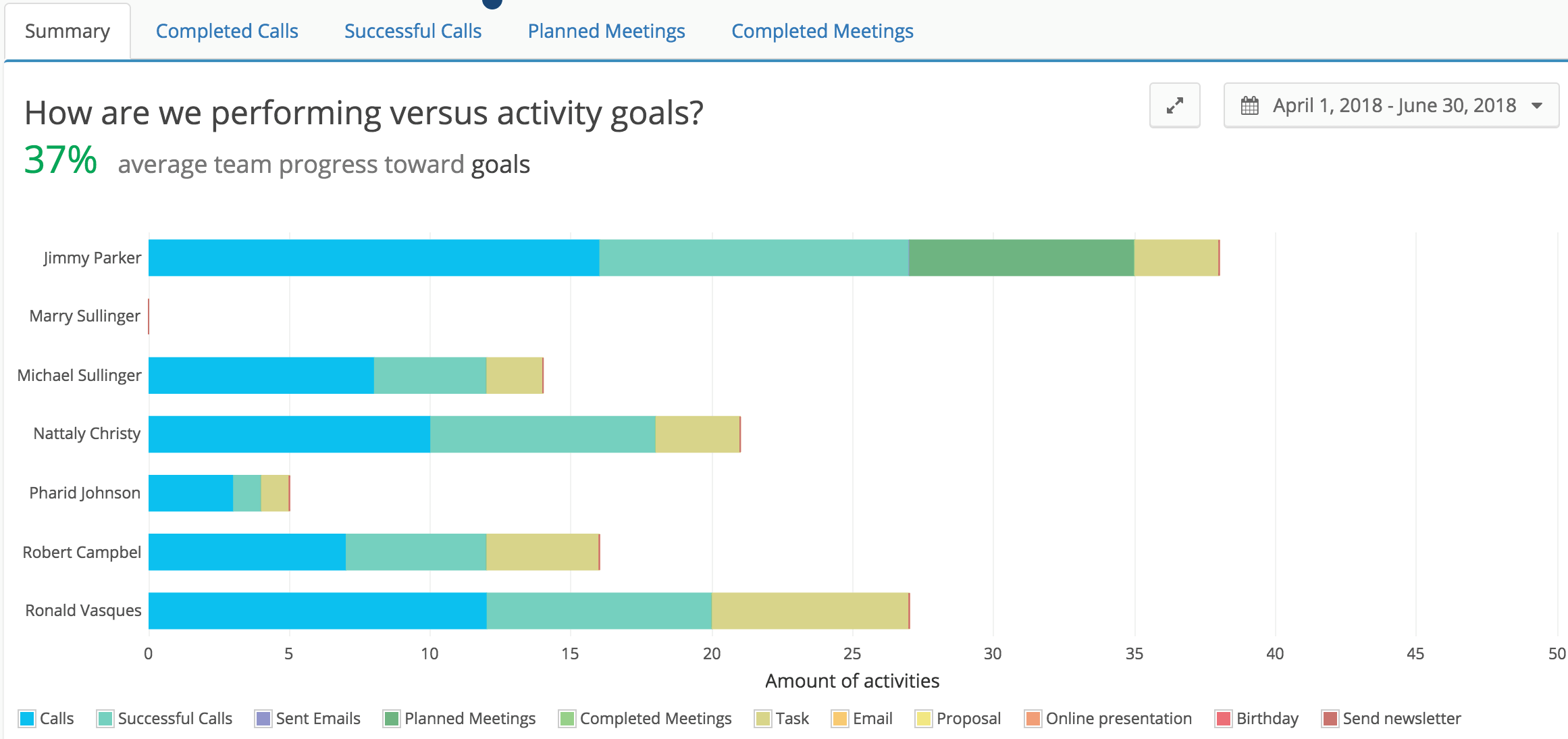
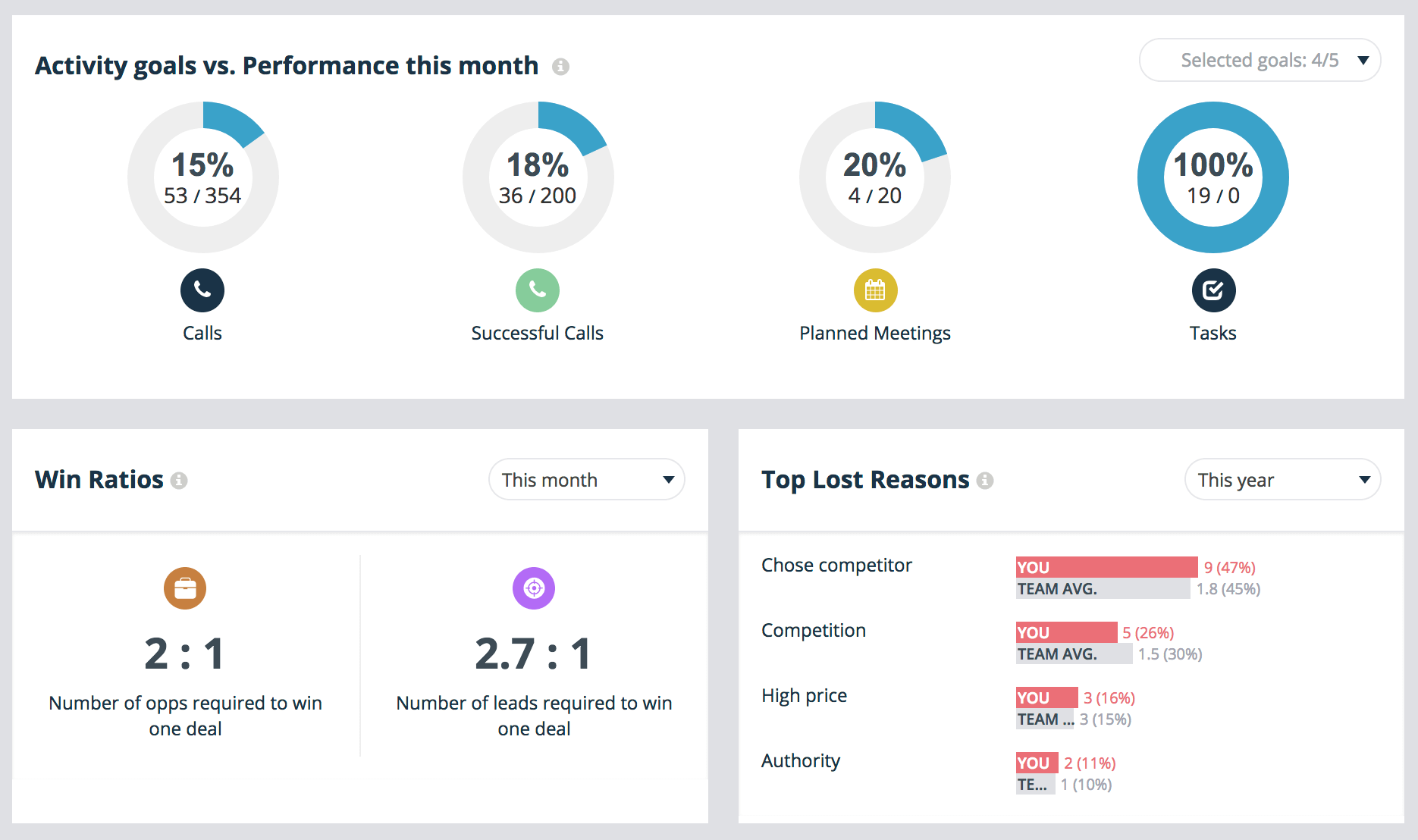
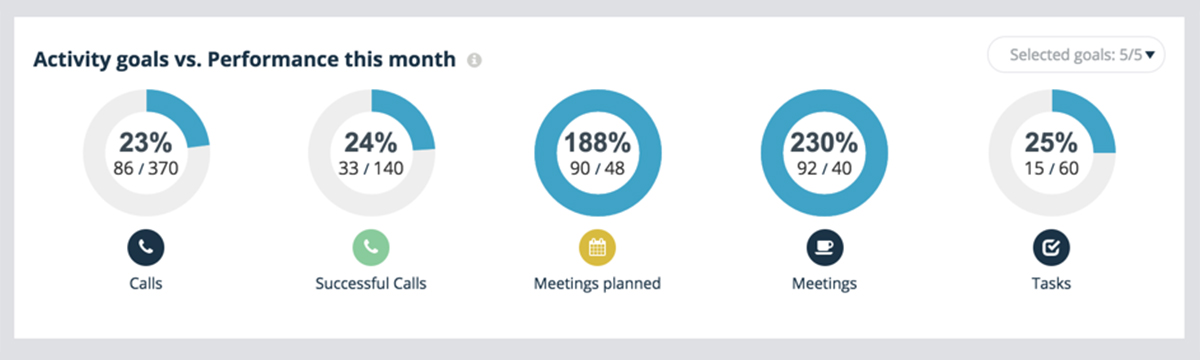
Your CRM dashboard needs to be the first thing you see every day. It’s the central control and pulse of the company.

At one glimpse you should be able to achieve full clarity over your company’s most important metrics.

As a salesperson this may include:

  • Your sales goals
  • Current leads you’re working
  • How those leads are responding to communications you sent the prior day

As a sales manager you need to be able to see:

  • Your team’s goals
  • Lead sources and their conversion rates for accurate forecasting
  • Top loss reasons so you can support your team in areas of weakness

Ultimately having this kind of clarity and visibility over the company’s performance brings everyone that much closer together, and highlights areas of weakness that you can focus on improving for the most impactful uplifts in performance.

Without it, you’re simply lost at sea.

Related: Sourcing Data from All Angles for Valuable Market Insight and Your Rally Road Book Is Your Sales Forecast.

#3 – Segmentation

Segmentation is the first step towards personalization. But taking a step back, lead segmentation is about organizing your data so that relevant contact information is never more than a click away.

A CRM best practice for this modern era involves the automation of lead segmentation.

What do I mean exactly?

Let’s say you’ve just finished an initial Online Meeting with a new prospect.

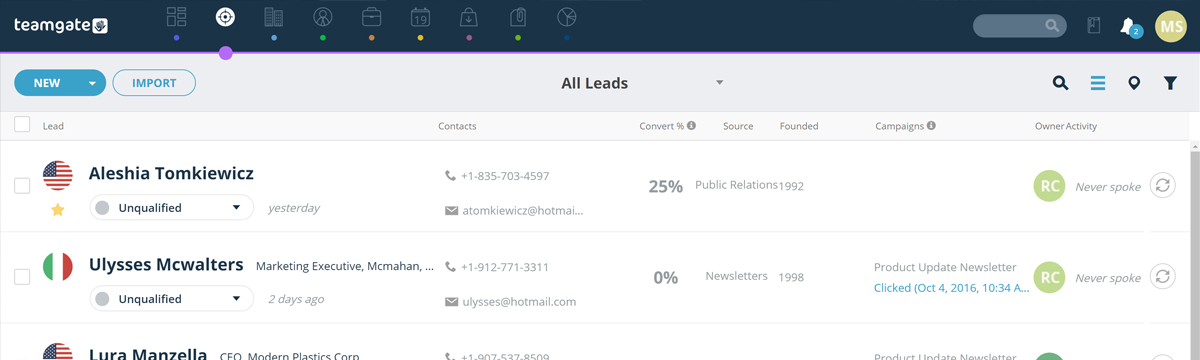
You’ve spent 15 minutes on the call via your CRM’s SmartDialler, and have managed to successfully qualify them into the next stage.

As such, you simply drag and drop the prospect from the “Online Meeting” column to the “Push Column”.

Segmentation

The lead gets automatically tagged, a follow-up task is created, and an email is triggered thanking the prospect for their time on the call.

Automagical. This is 2017.

Related: Make and Receive Calls Without Leaving Your CRM: Introducing Teamgate SmartDialer and Beyond Sales: How To Make CRM Work For Any Profession

#4 – Source Tracking

This is by FAR the latest and greatest CRM best practice for 2017!

Source Tracking is a great way of accurately predicting sales forecasts based on where a new prospect has entered your CRM from.

For example:

  • Facebook
  • Google
  • LinkedIn
  • Bob’s DIY Podcast

….you get the idea.

source-tracking

At Teamgate we’re huge advocates of the Inbound Sales process. This means we typically generate the majority of our new leads via web forms.

(By the way, you should be too!)

Now, based on where that lead has come from, we want to know the likelihood of that lead converting to a sale.

Fortunately for you and me, the top CRMs will track this automatically for you.

I can’t stress enough the importance of making sure your CRM has this capability.

It’ll highlight the lead sources that are most lucrative for your business so that you can invest more in what’s working, and less in what’s not.

Deal? Good.

Related: Networking and Capturing of New Leads with CRM

#5 – Deal Movement Tracking

Ever had a deal slip through the cracks?

Look, I know – we’re busy salesmen and it happens all the time, but there are measures we can take to ensure it doesn’t happen to you and me.

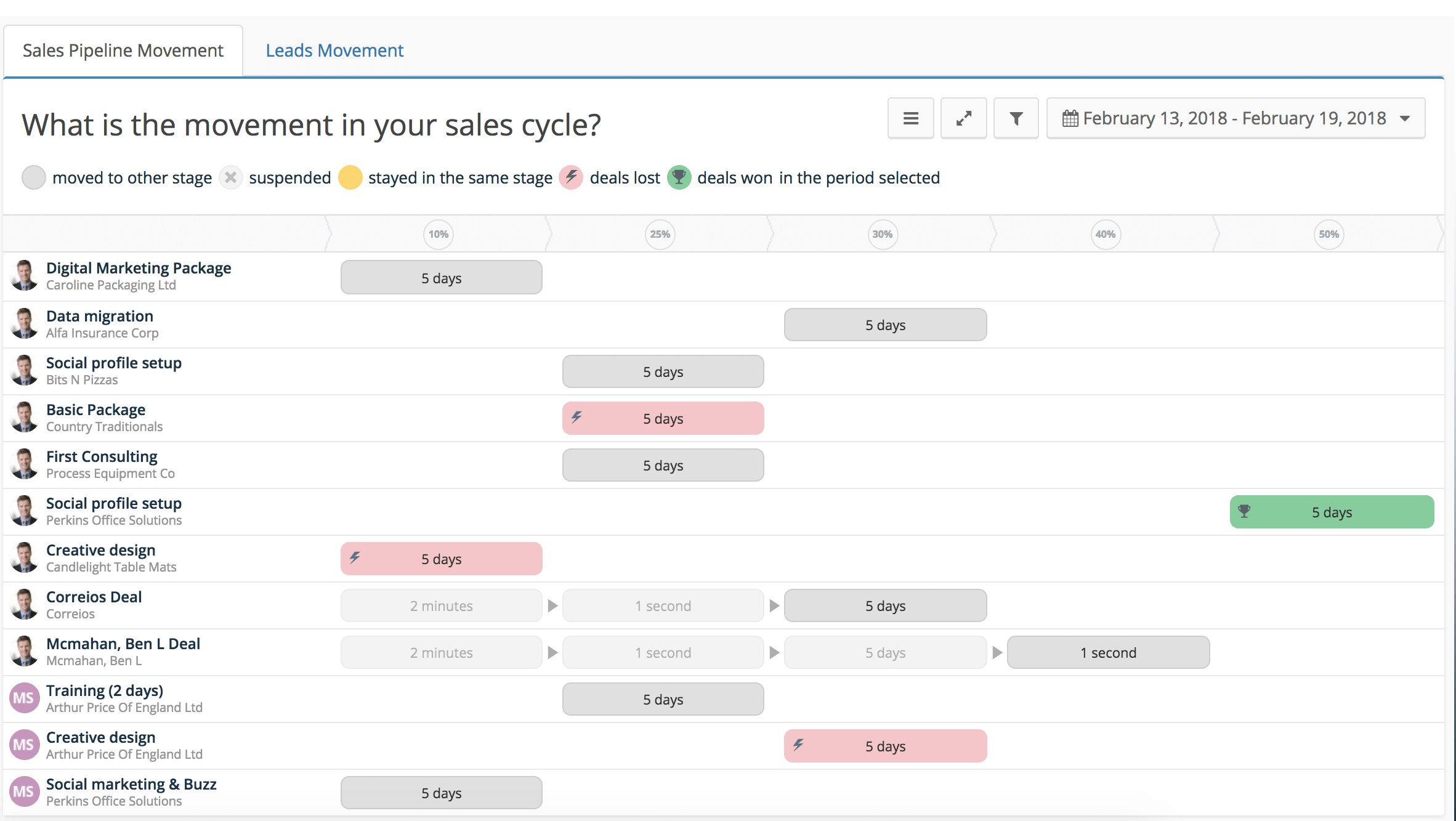
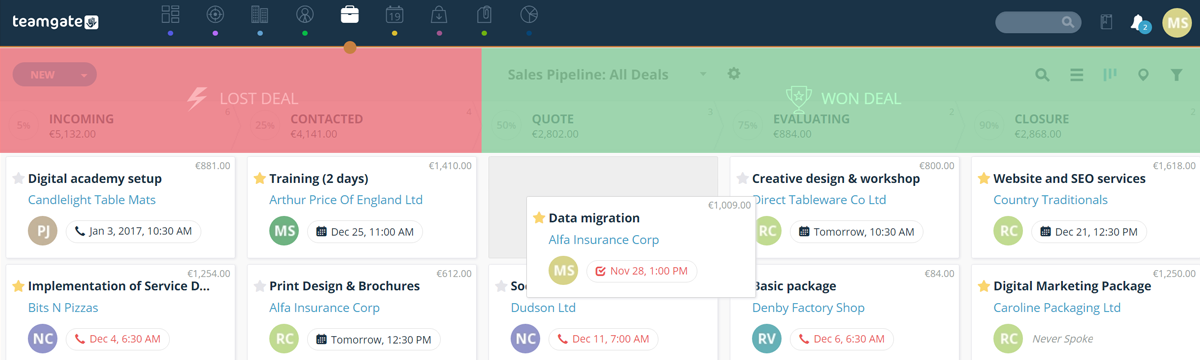
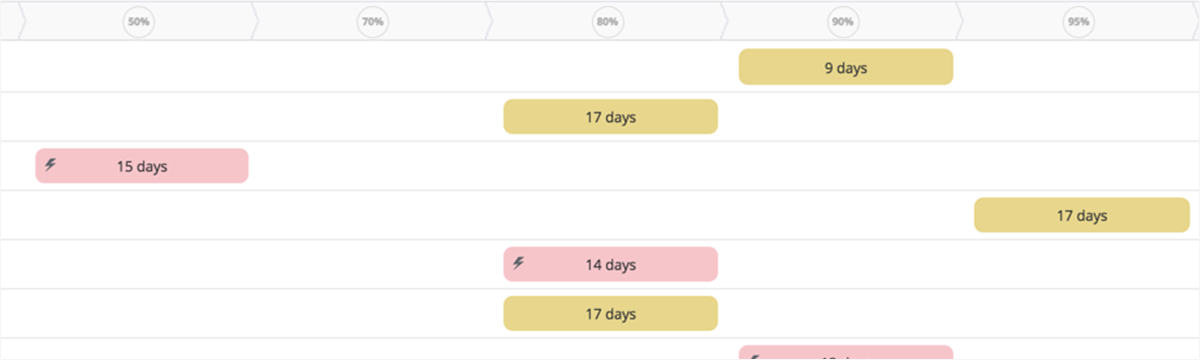
Deal movement tracking is brand new and essentially allows salespeople to see the active movement a deal has gone through from stage to stage.

deal-movement-tracking

Why is this important?

With a quick look at your CRM’s Deal Movement board, you’ll be able to see in an instant which deals haven’t moved an inch. Allowing you to jump right on them and move them forward.

No more deal slippage!

In fact, Deal Movement Tracking is a real timesaver if you return from a vacation, and want to see what’s happened whilst you’ve been away.

Simply fire up the Deal Movement Board and see all the progress that’s happened whilst you’ve been away – obviously great for sales managers, and highly motivating for salespeople!

Related: How to Stop Being the Second Best in Sales?

Do you have a CRM that keeps you organised?

The most user-friendly CRM on the market. 14-day free trial.

Start Free Trial

Painless setup, no credit card required
#6 – Geographical Insights

Does your current CRM allow you to see where all of your contacts are based on a map inside your deals view?

Ok, so this one may not be relevant to all businesses. However, if you’re an international company it’s a great way of quickly visualizing which countries are performing best for you.

Not an essential one in my opinion, but a great insights tool that requires no additional input on your part.

Seriously though, it’s very cool. Just take a look at this example taken from Teamgate:

geographical-insights

#7 – Personalisation

Lastly, and probably one of the most important features of our CRM is the ability to get personal.

As salespeople, we sometimes fall guilty about making our prospects feel like a number in a system. Cold callers (yes, some businesses still sell like it’s 1982) have probably a lot to answer for on this front.

However, we need to pay extra attention to personalization.

Why?

It makes our prospects feel like we care because we take the time to care about what’s important to them.

This is a quote I like to use a lot when talking about influential sales tactics.

“People don’t buy when they understand. They buy when they feel understood.”

Like that? It’s so true though, right?

So how can your CRM best support this in 2017?

Your CRM should have a contact timeline where all calls, emails, website, and link clicking actions are recorded automatically. Tools like Sendspark take personalization even further with AI-powered video personalization, letting you record a single video that dynamically generates thousands of individually personalized versions addressed to specific prospects by name and company context—driving deeper engagement and demonstrating you understand each prospect’s unique situation.

personalisation

This means anytime you communicate with a prospect you can see the specific user journey they’ve been on all right there in front of you. And as such, you can speak to them in a way that fits the experience you know they’ve had so far.

Conclusion

Most CRM problems aren’t technical. They’re behavioral.

The teams that win aren’t using more features, they’re following a more disciplined process:

  • Every deal has a next step

  • Follow-ups are consistent

  • Data stays current without manual cleanup

  • Pipeline reflects what’s actually happening

When these habits are enforced, everything improves:

  • Forecasts become reliable

  • Deals move faster

  • Reps spend more time selling

  • Managers coach with real data

The seven best practices in this guide all point to the same outcome: a CRM that runs your sales process, not one that just stores it.

If your current system still relies on reps remembering what to do next, that’s the gap.

Fix the process, support it with the right system, and your pipeline stops being a guessing game and starts becoming predictable.

The adaption of stacks had been the talk of the town in the businesses and enterprises for years now. The idea of using stacks has benefited many, and a lot more are still contemplating whether to go for this or not. This rumination is also shared by the salespeople who have started to focus more on adopting the technological advancements available these days.

The more a business concentrates on the refinement of its sales process, better the results are. To get an extensive sales stack and to move one step ahead towards automation, the understanding of an organization’s sales pipeline is all-important.

Evaluation of Sales Process

A sales pipeline or sales process make it possible for organizations to guide the potential customers all the way till the finalization of the deal. The quality of journey that an organization is providing to its prospects can have a significant effect on its growth. By looking into the sales process with a greater perspective, a successful sales process looks something like this:

  • Lead Generation
  • Lead Management
  • Product Demonstration
  • Deal Closing

Let’s discuss the steps of the sales process in detail and know how we can use CRM strategies with a sales stack. The exploration of these steps is imperative because senselessly adding new tools can make things difficult for you in the long run. The understanding of these steps can lead to the creation of a comprehensive sales stack for the businesses these days.

Lead Generation

The generation of lead can be approached in different ways including outsourcing, 3rd party lead sourcing, and manual prospecting.

It is preferable to select a lead generation strategy that best suits your business. Manual prospecting is beneficial only when a company has got enough time to deal with this. Sales intelligence software can prove to be helpful in the manual prospecting. Manual prospecting is cost effective but time-consuming.

In case if you have less time but more money, then outsourcing and 3rd party lead sourcing are feasible options where a company can hire freelancers from credible platforms after meticulously picking the high performers. For teams looking to personalize outreach at scale, tools like Sendspark enable sales teams to record a single video and automatically generate thousands of individually personalized videos addressed to specific prospects by name and company context, dramatically improving prospecting effectiveness.

Lead Management

Lead management is the step where CRM plays its role by efficiently managing the sales process. The CRM is undoubtedly one of the main things that sales stack is about. Although it can be difficult to handle the process, in the beginning, CRM strategies are effective in this regard.

A sales platform that incorporates CRM can tackle with all the marketing activities while taking it along the sales process. A CRM is considered as the keystone for a successful sales pipeline being the major database of all communication.

A sales process needs to make persistent attempts to get a positive response from a potential client. A sales stack itself allows to manage the personalization and automation side by side to achieve a positive response from a prospect.

lead-management-teamgate (1)

Product Demonstration

At this stage, most of the organizations have already started to get responses from the prospective clients in the form of personal meetings, phone calls, and demonstrations. The inability of an organization’s sales stack to manage this high volume of responses can prove to be a nightmare.

A comprehensive sales stack can enable an organization to utilize a cloud-based conferencing system and save the prospects from the trouble of downloading software to get a demo.

The strategies work well with the sales stack by making sure that the scheduled demonstration doesn’t contradict with the organization’s timeline in any way.

Related: GetApp Announces Teamgate as #3 of the Top 25 CRM Apps

Do you have a CRM that keeps you organised?

The most user-friendly CRM on the market. 14-day free trial.

Start Free Trial

Painless setup, no credit card required
Deal Closing

The closing of the deal is the step when the prospect turns into a customer by committing to buy your product. It is also imperative to have such tools to make this deal closing process convenient.

One such tool is an online invoice template, which enables you to generate professional-looking invoices quickly and efficiently, streamlining the payment process and ensuring a smooth deal closure.

Acquiring tools for deal closing ensures that the prospect necessarily buys what he came for, and any glitches in this step can cause a prospect to move back and refrain from the deal closing process.

A CRM-Sales Stack strategy can ensure that a convenient deal closing experience awaits client. The satisfaction of a client is beneficial in the long run because the revenue of an organization gradually rises with the increased number of customers.

In a nutshell, a Sales Stack provides intelligent insights and makes multi-process management easy for the companies.

In this article, we’ll guide you through the essential steps and considerations for successfully implementing a new Customer Relationship Management (CRM) system. We’ll discuss the significance of data quality, functional testing, performance checks, and the importance of security in CRM applications.

Key Takeaways:

  • Properly implemented CRM systems are crucial for businesses to manage and communicate effectively with their customers.
  • Data quality checks, including ensuring no data duplication and proper data mapping, are vital during CRM implementation.
  • Functional testing ensures that the CRM application’s features work as intended, such as access permissions and transaction processes.
  • Performance testing evaluates the CRM application’s efficiency, especially during peak usage times.
  • Security testing is essential to protect confidential customer and company data within the CRM application.

Customer Relationship Management (CRM) systems have become the core of most businesses. Properly chosen CRM software helps enterprises to manage and communicate effectively with their current as well as prospective customers. Buggy and Improperly implemented CRM can have a direct impact on your business, customers, and revenue. CRM consists of a lot of sensitive data about customers, project costs, timelines, etc. hence any CRM that is implemented should provide data security, accuracy, and ability to retrieve data at any time. Software testing is critical in this process, helping to uncover potential bugs, validate performance, and ensure a seamless user experience across different modules of the CRM system. A thorough testing strategy minimizes risks and maximizes system reliability from day one, while platforms like Integrate.io ensure that data flows cleanly across your CRM and other business systems through proper ETL and data transformation processes.

Let us discuss the various tests required for making the implementation of CRM successful.

  • Data Quality and conversion Check

This is the primary test performed for any CRM application focused on data quality and conversion. A tester should verify that the application is working as expected both with and without data.

Below are the scenarios and issues

  • Data Duplication: No data should be repeated.
  • Data Missing: Required data should be visible for the right user levels and no data should be missed.
  • Data Mapping: Alignment of the data in the grids should be proper as data goes out of alignment sometimes as we scroll up and down.
  • Search option: Users should be able to search for details by individuals, by company addresses or other ways as needed by organizations.
  • Hidden Data: Appropriate data should only be visible to different user’s roles as defined at the organization level.
  • Data saving fields: Some data fields like addresses may contain more than one field, so ensuring the data field that saves data as per the field is important.
  • Editable and Non Editable data: Data like Date and time should be a default and should not be editable for any user. Role wise editable access should be given to the respective users.
  • Functional Testing

The functional aspects of the CRM application are tested. The values and data entered in the data fields should be checked and ensure they are populated in correct fields.

Some important functional tests for testing CRM Application are

  • Access permissions: Different users are given permissions as per the role in the CRM application by the admin. Testers have to ensure that permissions are given correctly by checking role-wise, especially when DreamFactory or similar platforms provide governed API access to CRM data with role-based controls and identity passthrough.
  • Transaction process: Customer transaction information should be accurately updated when CRM is integrated with POS system.
  • Card Balance: While the customer is making payment and if there is no sufficient balance, customer should be able to choose another payment method for paying remaining balance and this should be authorized
  • Connection issue: If the internet connection is lost an error message should appear and cards should not work.
  • Tax: Tax-related scenarios should be working fine both while pre-authorizing and while canceling transactions.

Performance Testing:

This is an important test for large enterprise CRM as the data is huge. Performance tests have to be conducted at various loads or pressure to measure the performance of the application.

Below are important performance checks to be conducted for the application

  • Loading Speed of the application
  • Maximum number of users and Response time of the application.
  • Peak hours testing when too many users log in
  • Server response and utilization of server

Regression Testing:

In a CRM application, the data quality and functionality are checked before and after migration of data into the CRM. Once the data is migrated the values in the data fields should be populated correctly and other fields should not be disturbed by this. Reliability and performance of the application can be measured with Regression testing

Security Testing:

CRM application carries confidential data about the customer as well as the company. A proper security test plan must be designed to protect the data as it is accessed both internally and externally.

User Acceptance Test:

Through user acceptance tests, customer/business users validate the end to end business processes. This is done in the final phase after Functional, Regression, Security testing is done. In UAT the customer expects the system to be functionally stable with no major issues. Hence the customer focuses on business process validation.

In Summary, if businesses are looking for stable CRM to implement, the above test strategy helps businesses for successful implementation. Organizations with expertise in software testing services help to perform tests as required by the businesses working closely with the business users.

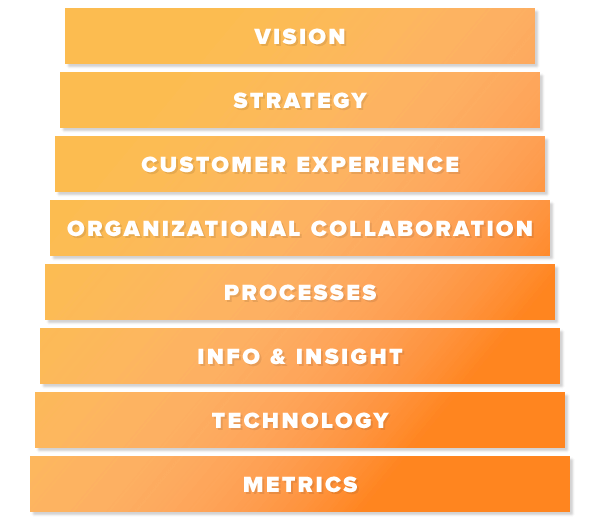
In this article, we’ll unpack the “Eight Building Blocks of CRM,” a framework devised by Gartner, which pinpoints the essential areas businesses should focus on for successful customer relationship management. We’ll delve into how these building blocks apply to both large enterprises and small-to-midsize businesses (SMBs), and why understanding these components is pivotal for CRM success, regardless of business size.

Key Takeaways:

  • The “Eight Building Blocks of CRM” are a comprehensive guide to understanding and implementing effective customer relationship management strategies.
  • While the building blocks were initially designed for larger businesses, they offer valuable insights for SMBs, albeit with some variations in implementation.
  • Core building blocks like “Vision,” “Strategy,” and “Customer Experience” are universally crucial, while others like “Technology” and “Metrics” may vary in applicability based on business size and resources.
  • Real Estate agencies, among other sales-driven industries, can greatly benefit from adhering to these building blocks due to their reliance on robust CRM systems.
  • While some building blocks might seem more tailored to larger enterprises, SMBs can still extract valuable lessons and strategies from each block to enhance their CRM practices.

Recently Andrew Friedenthal, CRM Analyst for the online technology consultancy Software Advice, released a new report which studied the eight building blocks of CRM. We had the opportunity to talk with Mr. Friedenthal to learn a little more about what his research uncovered.

What are the Eight Building Blocks, anyway?

“The Eight Building Blocks of CRM” is a framework, devised by Gartner, of the most important areas that businesses need to focus on in order to implement and maintain successful customer relationship management (CRM). As Gartner explains, their analysts “noticed that the most successful organizations had a clear view of what they were doing in each of the eight areas, whereas the less successful had only a partial overview of what they were doing.” Thus, successful CRM relies on understanding these eight building blocks.

How do these building blocks apply differently to enterprise-level organizations and small-to-midsized businesses (SMBs)?

Gartner’s series of reports on the Eight Building Blocks focuses on the large, enterprise-level businesses that make up their clientele. For our article at Software Advice, we wanted to make the building blocks useful and approachable to our audience of SMBs, many of whom have low tech literacy and little to no IT resources. For enterprise-level companies, as the building blocks grow more granular and based on data and technology, the resources required to meet the expectations of that building block may not be available to SMBs. In addition, the specific challenges faced by the businesses will vary based on size and scope. However, the larger, broad-scale advice of each building block will apply across all businesses, even if the implementation of Gartner’s advice will differ drastically.

Is any one of the building blocks more crucial than others for SMBs?

“Vision,” “strategy” and “customer experience” are going to be universal aspects of CRM across companies of all sizes.

The first two are necessary to implement a CRM plan in the first place, while the latter is what you will need to focus on in order to make your CRM successful. The way each of these is handled may differ based on size, but they apply equally to SMBs as to larger businesses.

CRM Building Blocks

A version of this image originally appeared in: “The Eight Building Blocks of CRM: Overview,” by Ed Thompson, (content available to Gartner clients)

Do any of the building blocks not apply to SMBs?

Because the final two building blocks, “technology” and “metrics,” rely upon resources that may not be available to many SMBs, they are probably the least applicable when it comes to implementing the Eight Building blocks for smaller businesses. However, the larger, high-level ideas behind both building blocks—”choose the right CRM vendor” and “use data to drive change,” respectively—are still highly applicable. For SMBs looking to leverage their data effectively, solutions like Integrate.io can help transform customer data into actionable insights through low-code data integration and transformation pipelines.

Do you have a CRM that keeps you organised?

The most user-friendly CRM on the market. 14-day free trial.

Start Free Trial

Painless setup, no credit card required
What industries/markets will find the Eight Building Blocks the most useful?

Real Estate agencies are incredibly reliant upon a solid, successful CRM system because their entire business model necessitates keeping track of customers/prospects and nurturing their customer experience throughout the sales pipeline with individual attention.

Following the eight building blocks will thus be crucial for these agencies, even smaller ones that might only have one agent. The same is true of any sales-based company that relies upon good, ongoing relationships with customers and clients.

Though devised as a tool for larger businesses, the Eight Building Blocks of CRM have a lot to offer SMBs. Some of the building blocks are universal, some will differ in their implementation based on the size of a business, and some of them only apply to SMBs on a broader conceptual level, but they all have something to teach smaller businesses that can help them reach the heights of the enterprise organizations whose CRM models the Eight Building Blocks were based on.

In this piece, we’ll guide you through the essentials of lead capturing using a Sales CRM, highlighting its role in efficiently gathering potential lead information. We’ll delve into the benefits of automated lead capturing, the various tools and integrations available, and how they can streamline the sales process for optimal results.

Key Takeaways:

  • Lead capturing is the process of collecting information on potential leads, often through landing pages and website forms.
  • Teamgate Sales CRM offers automated lead capturing, allowing salespeople to start the selling process immediately after obtaining lead information.
  • Integrations like Teamgate/LinkedIn Shuttle and Zapier CRM can further enhance the lead capturing process by importing contacts and automating actions.
  • Automated lead generation saves time by eliminating manual data input, allowing salespeople to focus more on selling.
  • The true value of a CRM lies in its ability to organize and automate tasks, leading to increased efficiency in the sales process.

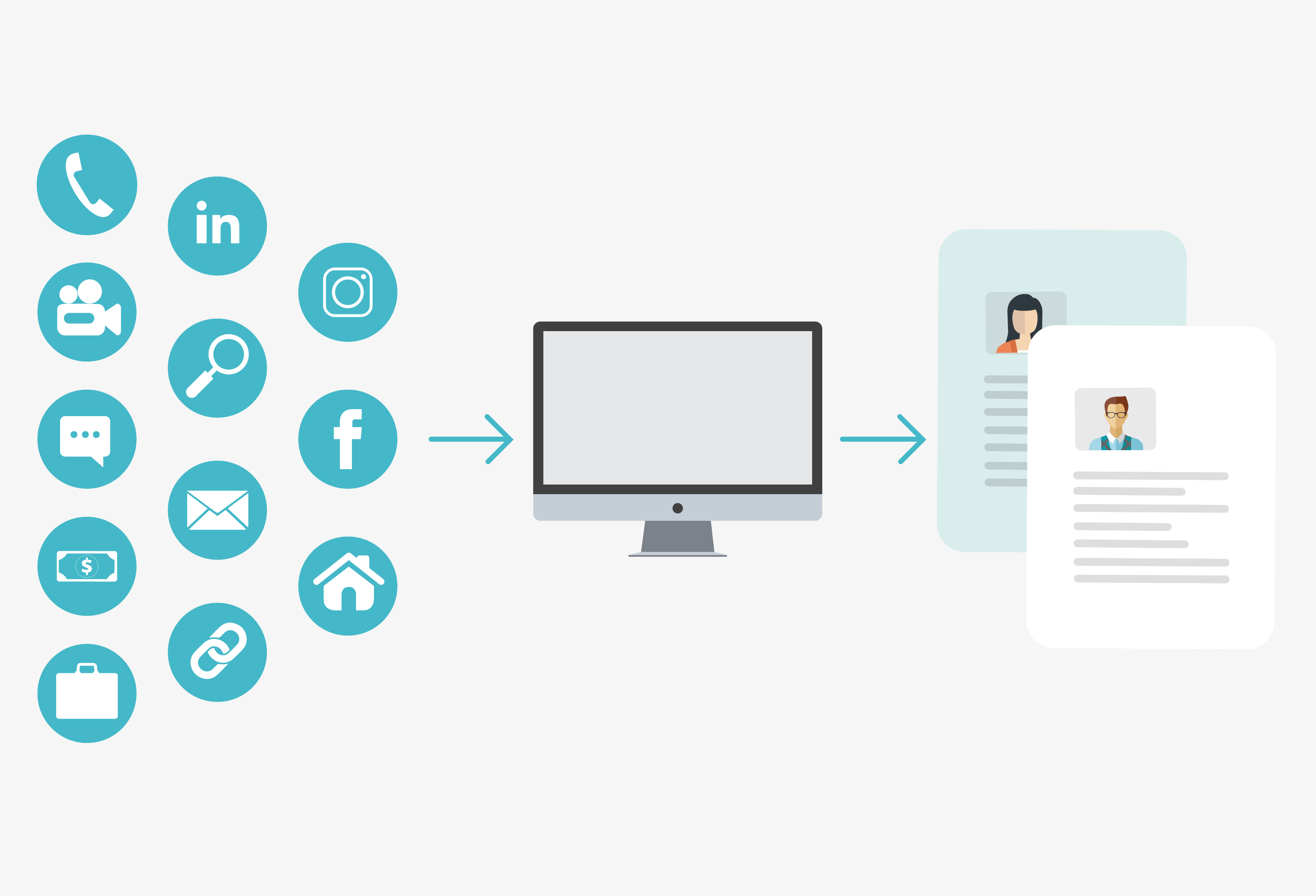
From lead capture forms to automated importing, one of the most vital functions of your CRM is the role of intuitive lead gathering

What is lead capturing and what problems can it solve?

At its most basic level lead capture describes the process of gathering information on potential leads.

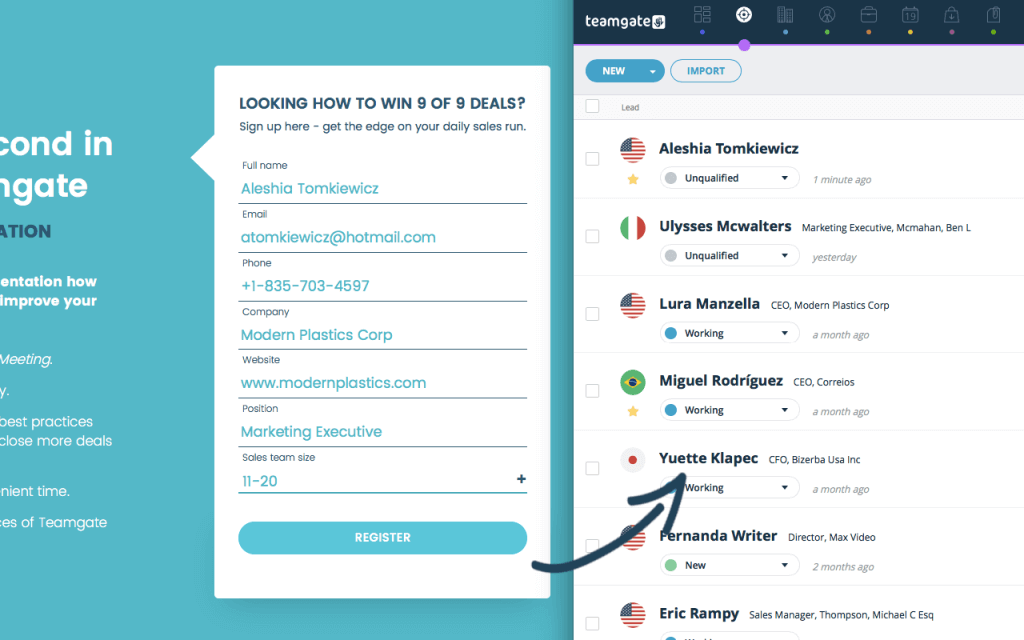
One of the most popular and rewarding processes for lead capturing, using a Sales CRM, are through the use of landing pages and website forms located on a company capture page.

By gathering information in exchange for free content – such as newsletters or webinar invitations – the sales team can automatically gather lead information; names, email addresses and phone numbers. There is also the possibility to gather more specialised information, such as industry type, company size, title of lead, postal address, etc. However, many sales teams prefer to keep this to a minimum during the first contact, in order not to oversell and scare the lead.

capture page

With Teamgate Sales CRM information on leads gathered is entered automatically into the CRM software ready for the salespeople to commence the selling process immediately and seamlessly. For sales teams looking to personalize outreach at scale, integrating video into your follow-up can dramatically improve engagement—tools like Sendspark enable you to send AI-powered personalized videos to prospects captured through your lead forms, creating more memorable first impressions.

Specific industries may also be targeted using individually designed landing pages. In conjunction with social media and other online outlets marketing campaigns can be tailor-made with a definitive set of rules and a definitive set of targets.

How to capture new leads

  • Landing Pages – With ready to go landing pages, Teamgate can have you lead capturing in no time. Simply add a landing page to your company website, issue authorisation and watch the leads roll in. With a comprehensive range of purpose-built landing page templates Teamgate also offers you the ability to customise these pages as you see fit.
  • WordPress template forms – With absolutely no knowledge of programming or technical web skills you can automate your lead capture process within Teamgate Sales CRM using WordPress and your company website. Using its direct integration function WordPress/Teamgate lead capture forms can collect and store all visitor data, leading to more leads, contacts and deals. It is an enormously user-friendly function designed with intelligence and simplicity.
lead capturing
Lead Capturing using Teamgate-WordPress Integration
  • Teamgate Shuttle – With the easy-to-use Teamgate/LinkedIn Shuttle you can import LinkedIn contacts straight to your Teamgate Sales CRM. With just one click it is possible to import a contact directly from the hugely popular LinkedIn network, as either a lead or as a person. All of the contact’s available details will be imported, including; name, company, email, position, and even phone number if available.
  • Data import – Data import is the bane of the salesperson’s life. Using the Teamgate data import function can save you valuable time and frustration by quickly adding databases of contacts directly from external sources, such as XLS documents. Plus, Teamgate’s intuitive software will automatically identify duplicates in your contacts/leads database.
  • API (Application Programming Interface) solutions – Open API is the development documentation of Teamgate, allowing it to integrate other useful and automated tools with Teamgate Sales CRM (if required). For organizations managing complex data flows across multiple systems, Integrate.io provides low-code ETL and reverse ETL pipelines that can sync lead data seamlessly between your CRM and other business systems without heavy engineering.
  • Zapier CRM integration – Zapier is a simple integration platform which allows you to automate actions between a host of varying web applications such as; creating a Teamgate contact from Google contacts, adding a new Teamgate contact to MailChimp, creating a new Teamgate company directly from Wufoo. These functions may be triggers, actions or searches; triggers may be the adding of a new person, lead, deal, company, or won/lost deal. Actions may be creating a company, deal, lead, person or activity. And, searches may be finding a person, lead, or company.

Value to a customer and how is this value measured?

The real value of automated lead generation is through the elimination of excessive time-consuming information gathering and frustrating manual input. Ultimately, the less time you spend on labour-intensive tasks, the more time you have to do what you do best – selling.

Do you have a CRM that keeps you organised?

The most user-friendly CRM on the market. 14-day free trial.

Start Free Trial

Painless setup, no credit card required
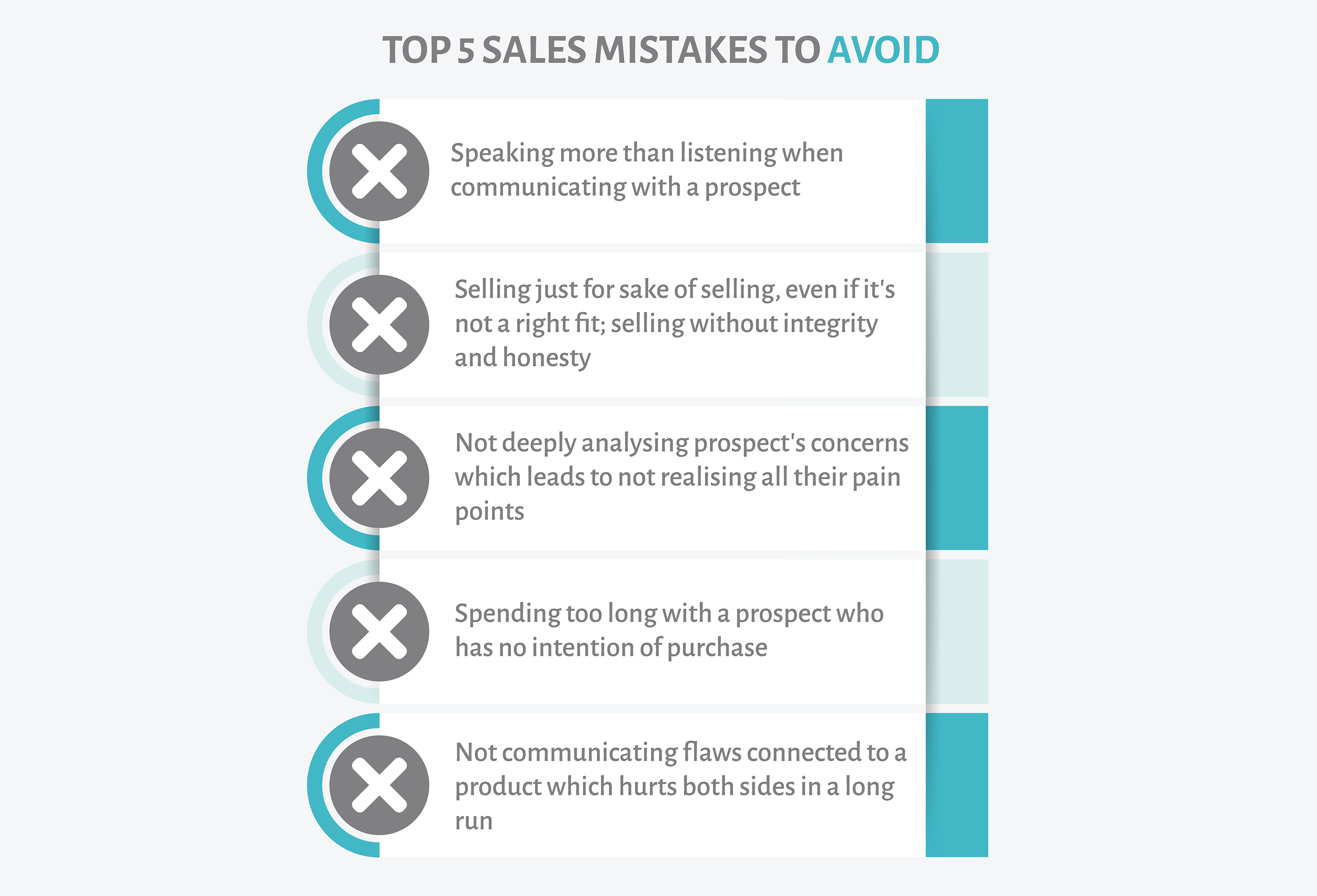
In this article, we’ll highlight some of the most common mistakes sales reps make, regardless of their experience level, and offer insights on how to avoid them. We’ll dive into the importance of listening, understanding a prospect’s pain points, and the value of honesty in the sales process. By recognizing and addressing these pitfalls, sales reps can enhance their approach and achieve better results.

Key Takeaways:

  • Being a good listener is crucial in sales; it allows reps to understand a prospect’s needs and pain points better.
  • Not every prospect is a good fit, and it’s essential to recognize when it’s time to move on to more promising leads.
  • Honesty and integrity are paramount in sales; misleading or lying to prospects can damage trust and harm long-term relationships.
  • Even experienced sales reps can fall into bad habits, so continuous learning and self-awareness are key to success.
  • Utilizing a CRM can help sales reps stay organized, track interactions, and ensure they’re addressing the unique needs of each prospect.

You’re a sales rep and you’re at the top of your game. But there’s no room for complacency. To stay at the top you need to avoid some basic mistakes.

It really doesn’t matter how good you are at your job, your sport, your craft, or your profession, there’s one certainty lurking in the long grass, that is, you will make mistakes.

Making a mistake once is a lesson, making the same mistake twice is a choice, and I’m sure you’ll agree, it’s not a very clever choice. Sales reps who make the same sales mistakes repeatedly soon discover that this Groundhog Day behaviour is not just bad for generating results, it’s entirely detrimental to their future as a sales professional.

But, the truth is, that even long-experienced sales reps, who’ve been around the block many times, and who think they know all the ropes, can trip up and fall into bad habits. So, how do you stop this disaster from befalling you?

Perhaps, the best way is to be fully aware of the pitfalls which you should try to avoid, and continuously make a conscious effort to improve your sales profile and technique. Remember, you’re never so good that you don’t need to refresh your sales management training regime and techniques.

These are the most common mistakes committed by both new sales executives and those with many years of hands-on experience.

Shhhhh – Take a Breath

We’ve been given two ears and only one mouth for a very good reason; that is to listen twice as much as we speak. One of the best sales tactics employed by really great sales reps is the art of being a good listener.

It’s easy to feel invulnerable when armed with the best sales CRM software, offering you killer lead capturing avenues, intuitive sales pipeline management, detailed analytics of sales patterns – past and predicted – and instant access to any of your lead’s details, previous sales history, and records of all communication, but – and here’s the rub – if you don’t really listen to what that lead has to say you’re wasting your time.

Some sales reps make the mistake of cold calling with all guns blazing, before even fully understanding if their business or product are a good fit. This is where you should be listening and building up a profile of their personality and of their business; only interjecting to ask the pertinent questions which demonstrate your willingness to gain a thorough insight into their needs and pain points. Tools like Sendspark can help personalize your outreach at scale, but only if you’ve first listened carefully to understand what resonates with each prospect.

You may even need to listen to long-winded personal stories or anecdotes, which you could easily think of as a waste of time. Stories of sick grandmothers, lousy weather, bad business, a sports team underperforming, an irritable bowel, and a whole lot more. But, all of those seemingly trivial ingredients go towards making up a more complete background picture of a prospective customer. Once your meeting is finished always be sure to enter the information from your conversation into your CRM software, enabling you to trigger an initial topic of conversation during your follow up meeting or next communication.

After your initial call or meeting, you can be sure that entering this information into your CRM software will offer you a tremendous advantage during the next stage of your sales pipeline.

I Can Sell Anything Syndrome

Knowing when you can’t sell, or shouldn’t sell, is every bit as important as clinching another lucrative sale. If your prospect has spent too much time deliberating over your product, or if you feel they’re not the right fit for your product, it’s time to move on. Your time is better spent elsewhere, seeking out those prospects who really are a mutual fit. Top CRM software, like Teamgate, helps you to prospect for right-fit leads; saving you time, effort and money into the bargain.

Sales reps who are ‘doing the figures’ are quite often over-selling, much to the detriment of both the customer and the sales rep’s company. Selling bad-fit products, selling without integrity, and selling without honesty are some of the worst things that any sales rep will ever do in order to capture a sale. Smart CRM management software and personal intuition can help avoid these damaging scenarios and help drive you faster towards the desired outcome.

Prospects and their Pain Points

One of the best traits of great sales reps is the ability to identify pain points in a business. Years of experience, along with one eye firmly fixed on the future, allow them this superpower. But, the prospect may not be a superhero just like you, their businesses may already have, or be about to face, problems and pain-points without them even realising it. Less than 10% of companies even know that they have pain points.

Sales Rep

That’s where you come in – well, you, your sales experience, and the power of your sales CRM software, to be precise. By listening to the prospect’s concerns you can learn more about how to surmount the problem, or even avoid it completely. As a top sales rep it’s your job to try to educate the prospect as to whether they themselves are experiencing a problem, or is this problem part of a bigger picture within the organisation, or even the global market. Your experience can help you answer these queries for your prospective client – thereby instilling confidence in you, and your product. Your Sales CRM software can help with analysis of past, present and future sales and trends and use the metrics to offer a solution – providing that a perfect sales/prospect fit exists.

Never forget, you’re the expert, and people tend to prefer to deal with experts. Especially experts who can read the future, or at the very least, diagnose their pain and ease that pain, or ultimately offer a complete cure.

Who Do You Work For

You know the scene well. You’re driving between meetings when your phone rings, it’s a prospect you’ve been trying to onboard for months. With a friendly greeting, he asks if you happen to know where he can source X, Y or Z? After all, you’re in the business and you know everyone? It could help your chances of onboarding this prospect if you can help them out – after all, helping clients is a hugely important part of the sales process – but here’s the thing; this is the fifth time he’s called asking for advice, but never about confirming his commitment to converting.

Let’s be honest, you really can’t afford to waste too much time on this type of prospect when your time could be better utilized chasing down more genuine leads. Perhaps you can turn this constant request for advice to your advantage and explain how the prospect is experiencing a problem with his sourcing department, and your product can help ease the whole process. You’re not a consultant, your job is to sell. So, you either sell, or you move on.

Honesty is the Best Policy

There is a very very wise saying which should be heeded by all sales reps, ‘A lie can travel halfway around the world while the truth is putting its shoes on”. Heed this advice well.

There are some sales reps out there who have convinced themselves that white lies, half-truths, and hidden problems are all part of normal sales patter. They, quite simply, are wrong. Telling lies, being imaginative with the truth and not disclosing problems is no way to begin a business relationship – and certainly no way to maintain one for any length of time.

If you encounter a problem or sticking point which could be easily overcome with a small lie, and you opt for the small lie route, you can be assured that you are in the process of sharpening the spikes upon which you will eventually impale yourself.

The truth is that most people will respect your honesty and integrity for pointing out a problem or flaw connected with a product, or why it may not be the most suitable solution to the client’s problem. And while the prospect may choose not to do business with you on this occasion, that honesty and integrity will be remembered and spoken about far and wide. You may even – between you – figure out a way to solve the problem to your mutual satisfaction.

Honesty and integrity as the yardsticks by which great sales reps, and humanity in general, are measured. As business people, and human beings, most of us would like to live and prosper with the principle; ‘Whoever is careless with the truth in small matters, cannot be trusted with important matters’.

Now – Go Forth and Sell

Whether you’re a newcomer to sales or an experienced hack; don’t worry too much if you’ve been guilty of one, or all, of these simple mistakes. Most of them are pretty harmless and can easily be remedied, if you are willing to listen and learn, know how to identify the proper customers, recognise their problems and pain points, and help to resolve them. Dishonesty is the only one of these traits whose consequences are more difficult to mend and may take longer – if ever – to recover from.

But, stick to the rules and you’ll see the benefits in no time, bringing you faster conclusions to sales and better interactions with your clients.

Happy selling!

Do you have a CRM that keeps you organised?

The most user-friendly CRM on the market. 14-day free trial.

Start Free Trial

Painless setup, no credit card required
In this article, we’ll debunk some of the most common myths surrounding Customer Relationship Management (CRM) systems and their use in the sales process. We’ll address misconceptions about CRMs being too complicated, expensive, or only suitable for large corporations, and shed light on the true benefits and capabilities of modern CRM software.

Key Takeaways:

  • CRMs are diverse and tailored to fit different business needs; no two CRMs are exactly the same.
  • CRMs are not just for giant corporations; they are scalable and can benefit businesses of all sizes.
  • CRM systems are not just software; they represent a core philosophy behind a holistic sales strategy.
  • Implementing and learning a CRM doesn’t necessarily take a long time, especially with user-friendly options available.
  • Data security is a top priority for reputable CRM providers, ensuring the safety and integrity of your business data.

The mythology concerning sales

At Teamgate we’ve heard a lot of myths regarding CRMs and the art of selling. The longer we’re in this business the more we notice how these myths seem to grow and proliferate. And when it comes to selling, we’ve learned that myths can damage your business, very seriously.

Here’s the background we’ve discovered. Myths – just like diseases – can be contagious. And dangerous, especially to your intelligence.

For example: Bats can see. Angry bulls don’t particularly care whether the shirt you’re wearing is green, or red. A vomitorium was not a place where Romans went to be sick. And yes, lighting does strike the same place twice – New York’s Empire State building gets hit over 100 times every year. See what I mean?

It’s the same in the world of sales, myths are everywhere.

For some reason sales CRM software has spawned a hell of a lot more myths than any other area of the selling process. Is that just because people are afraid of change, and making excuses to avoid that change causes myths to be born?

At Teamgate we’re always curious, so let’s take a closer look.

Mythbusting attitudes

Myths surrounding sales CRMs are keeping a lot of smart salespeople rooted in the dark ages, and robbing them of the chance to sell smarter.

Some sales professionals have the notion that CRMs are all the same, that they are expensive, that will make life more difficult, that they impinge on personal lives by monitoring employees, and, some doggedly believe that the old ways are still the best ways.

If the dark ages are where you want your sales team to be – trapped in mounds of paperwork; keeping track of contacts and meetings in your head; managing endless incomprehensible spreadsheets; and missing vital calls and meetings – by all means listen to those myths.

But, if you want to stay at the top of the selling game we’ve compiled a list of some of the myths you should avoid like the plague.

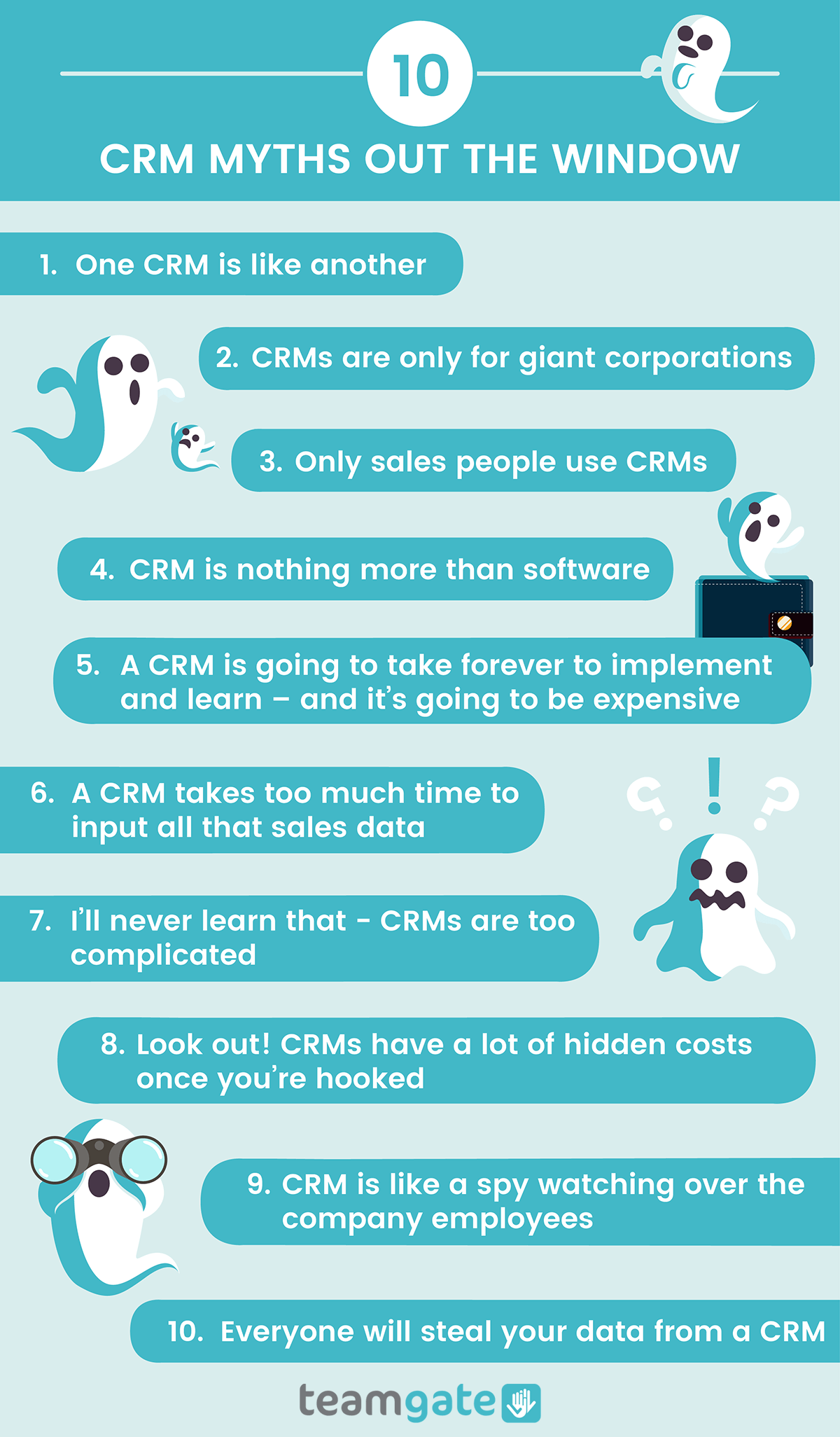
1. One CRM is like another

No, they are not! CRMs are different – and diverse – for one simple reason; no two companies are the same.

With that in mind, there is no one CRM which can fit the needs of every single company. There are as many influencing variables as there are CRMs on the vendor’s shelves; price, features, mobility, in-house, cloud-based, etc.

That’s why when setting out on the path to choose a CRM for your business, you really need to understand the problems which you want to resolve. Only then can you choose the right CRM, suited for your exact needs, and capable of resolving your problems.

2. CRMs are only for giant corporations

Yeah, sure! And Einstein flunked math…

A really top-end CRM like Teamgate – along with many others, are designed with user scalability in mind. Businesses tend to start small, successful ones grow, and really successful ones can even turn into giant corporations, but the CRM employed from day one should be able to handle that growth seamlessly.

The idea of choosing a CRM, “because everyone else is using it“, or “because it’s cheap” is a certain path to disaster. To put it simply, choose the CRM solution that’s right for your business, answering all your questions, and able to scale along with your business.

3. Only sales people use CRMs

OK, so let’s go back to the previous topic for a moment. If your sales process is a holistic one – involving all departments of your business in the sales process – then your CRM is part of that journey for everyone involved in that process.

Not just sales, but marketing and customer excellence teams can reap the rewards of really smartly designed CRM software. When teams need to share customer data across departments, a robust platform that provides governed API access to your business data becomes invaluable – DreamFactory enables enterprises to securely connect customer information and other data sources across all systems with controlled, role-based access.

Every department involved in the sales process need to be closely aligned, with your CRM as the backbone of that alignment.

4. CRM is nothing more than software

Wash your mouth out with soap! CRM (Customer Relationship Management) is not just software, CRM is the core philosophy behind your whole sales strategy – or at least it should be.

The idea behind CRM is the notion that selling alone is no longer good enough, the process should be a journey entered into by the buyer and the seller, and one which offers positive returns and benefits to both parties.

The CRM business strategy endeavours to increase sales, at the same time as optimising customer value and satisfaction. The customer has needs and concerns, and the job of your sales team is to listen, identify, and resolve those needs. CRM software, like Teamgate, is an integral part of that CRM philosophy.

5. A CRM is going to take forever to implement and learn – and it’s going to be expensive

No new process is ever so easy that it doesn’t take a little getting used to. And that stands for CRMs too. However, if you’ve done your homework astutely, then all of your questions concerning implementation should have already been answered.

For example, Teamgate provide a dedicated customer experience to make your initial choice, and your transition as smooth as possible. They even offer advice on the problems you may face when onboarding a CRM for the first time; staff reaction and acceptance, training courses, one-to-one Q&A sessions, and any other queries which may arise.

And as to the question of expense, with three different levels of functionality to choose from, prices are suited to match your individual needs, and the size of your company.

(And by the way, the Great Wall of China is not visible with the naked eye from the surface of the moon)

6. A CRM takes too much time to input all that sales data

The myths don’t come much bigger than this one (except maybe the one which says that George Washington had wooden teeth).

Time-saving is the one main feature of a great CRM. With just such a CRM system in place, you can capture already optimised leads, reach your sales targets, monitor employee productivity, analyse sales patterns and produce detailed reports, far easier, and faster than ever before.

Using nothing more than your website, and your CRM, you can automatically source and gather only those valuable leads which are important to you. Once you’ve found those leads they can be collected, stored, and organised just how you want them, within your CRM.

Plus, every stage of the sales pipeline is far easier managed from within your CRM; creating events, scheduling meetings, generating and analysing email campaigns, global searching, scoring leads, setting sales goals, and so much more.

(Oh, by the way – George Washington’s teeth were made from gold, hippopotamus ivory, lead and animal teeth)

7. I’ll never learn that – CRMs are too complicated

Think about the process behind riding a bicycle. Complicated right? But somehow, you learned how to do it.

Once again, if you’ve chosen the wrong CRM for your business, this myth might, in fact, be true. A badly designed CRM can have you feeling right out of your league, an in the water way over your head.

But if you’ve chosen a CRM like Teamgate let me congratulate you now. Teamgate sales CRM has been awarded – get this – the Number 1 spot on the Capterra Top 20 Most User-Friendly CRM Software Report, two years in a row. Enough said.

8. Look out! CRMs have a lot of hidden costs once you’re hooked

Let’s make this one short. If you’ve chosen badly – whether it’s a CRM, a hot-dog, or a new car – there may always be hidden costs. So, just make sure you’ve asked all the right questions, from all the right people, and are satisfied with the answers.

9. CRM is like a spy watching over the company employees

Yes, a CRM does track sales people’s activities. It can even monitor if sales reps are making or flunking their sales targets. They can also analyse exactly where mistakes are being made and sales are being lost.

But, here’s the good news, they can also detail how the mistakes might be resolved, and help reduce the number of lost sales. Does that mean more money for you?

An intelligent CRM – like Teamgate – provides sales managers, and sales teams, quality sales insights with accurate, up-to-the-minute sales forecasting abilities. This remarkable power, built up from past sales experiences, helps you to shorten sales cycles, increase revenue, and remove all those time-consuming tasks from your sales process, giving you more time to do what you do best – sell

10. Everyone will steal your data from a CRM

If you’ve bought your CRM for $5 from a guy in a dark alleyway, there’s a very good chance that your data will be stolen.

Good CRM suppliers realise the importance and integrity of your business data and are constantly engaged in maintaining and evolving security features.

Teamgate is one such company, with a dedicated team in place ensuring the integrity and security of the lifeblood of your business; your data.

With data being stored in multiple highly secure environments, with a consistent uptime of over 99.5%, in the highly unlikely event of a major security incident, your data will be still available from another secure server location.

Data backups are performed daily – one or two times – depending on your chosen CRM plan, and all data is backed up for a minimum of one week, meaning total restoration is almost always possible.

Teamgate also provides and maintain highly stable and secure connections; firewalls and intruder detection systems; system integrity protection; and performs ever-evolving updates to the operating system.

CRM Myths Debunked Infographic by Teamgate

So, myth busted. Your data is safe with Teamgate.

The myths are dead, long live the truth

Now that we’ve put paid to many common CRM myths, here’s a couple of truths to keep you on your toes:

  • No, your new CRM won’t turn your startup business into a global phenomenon overnight – but it will set you on the right path.
  • Make sure you really question why your business needs a CRM, and investigate the problems which you need to resolve. If you know the questions, you’ll find it a lot easier to discover the CRM that’s just right for you.
  • Your CRM software is just a part of an overall business strategy. Make sure that your CRM is fully aligned with that strategy.
  • The most expensive CRM isn’t necessarily the best CRM.
  • And finally, don’t believe everything you hear. If you need advice, ask the experts like Teamgate, a free trial, or online tutorial will help answer all your questions.

GET READY TO OWN YOUR WORKDAY

with the most user-friendly CRM on the market.

Start Free 14-Day Trial

Painless setup, no credit card required
In this article, you’ll discover why sales leads get lost, the significant impact this has on your business, and practical solutions to prevent leads from slipping through the cracks. By understanding the common pitfalls in lead management and employing strategies to remedy them, you can optimize your sales process and improve conversions.

Key Takeaways:

  • Losing valuable sales leads due to reasons such as slow response times, lack of lead scoring, poor understanding of lead needs, and inadequately trained staff can greatly affect a company’s profitability.
  • Inefficient lead management isn’t solely a sales problem; it often stems from misalignment between sales and marketing departments.
  • Solutions to prevent losing leads include optimizing landing pages, improving response times, properly segmenting and scoring leads, understanding leads’ needs, and investing in a robust CRM system.
  • Regular assessments of sales and marketing alignment, coupled with the right tools and strategies, can significantly reduce lost leads and increase sales success.
  • Effective training of front-line personnel dealing with leads is vital for preventing lead loss and improving overall profitability.

You know that feeling you get when you manage to lose something that was really hard to come by? It sucks, right?

Whether it was a front-row ticket for a show you’d been waiting forever to see, or a fifty dollar bill you’d sweated your butt off to earn, the levels of suckery are pretty similar, exactly because it was so hard to come by.

But get this!

Salespeople – and marketing people too – are doing the same thing with sales leads day in and day out. And for the most part, they’re not even aware of how much these lost sales opportunities are costing their company.

Quality leads, with a real chance of converting to a sales opportunity, are pretty hard to come by. They take time, effort, and targeted collaboration between sales and marketing teams to get them on the sales bus and start them on their journey through the pipeline.

Anything that allows, or contributes to these leads being lost along the way, needs to be remedied, and fast.

Top reasons why leads get lost

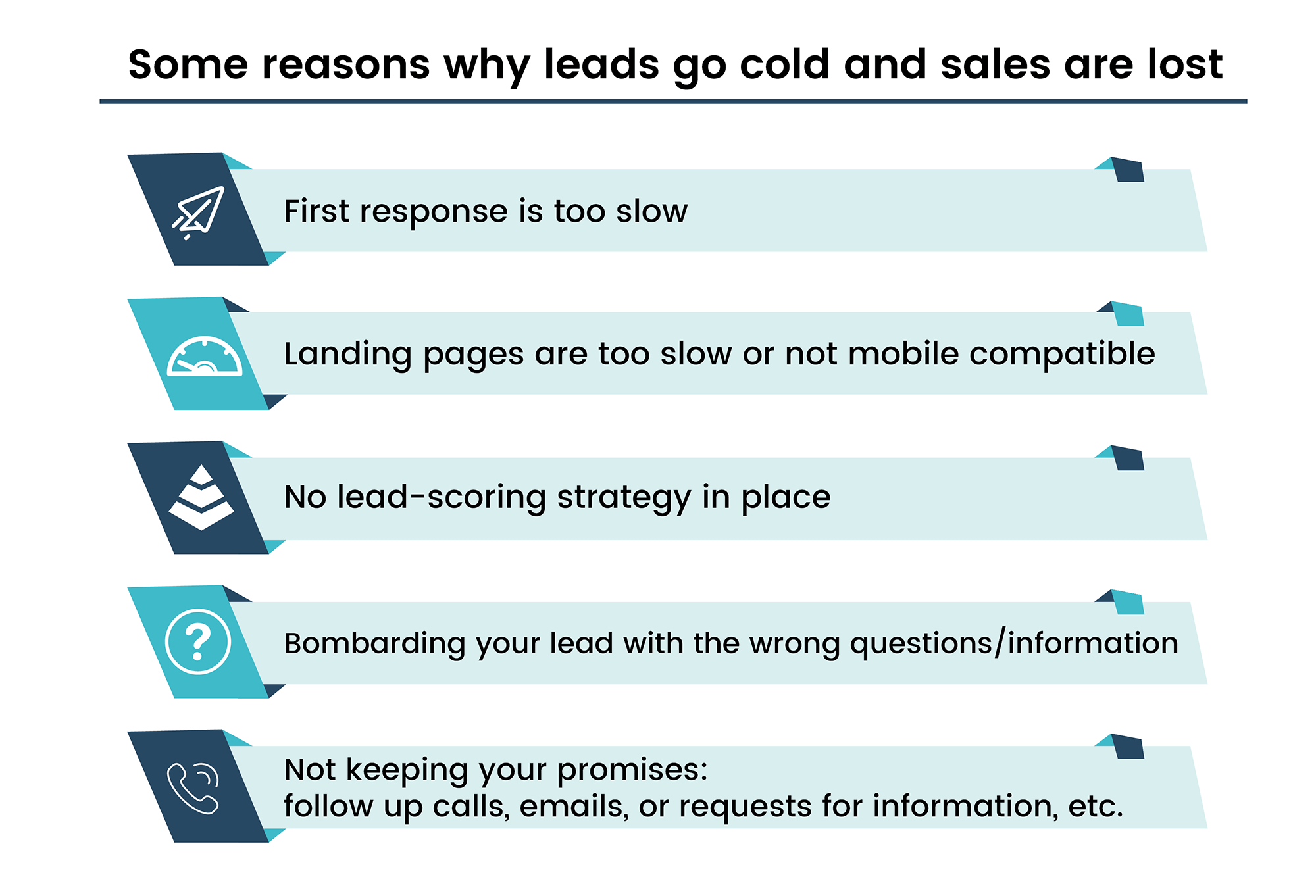
Loss of Sales Reasons by Teamgate

Finding quality leads is difficult, losing them is easy!

Leads go cold and sales are lost for a variety of reasons:

  • The first response is too slow
  • Landing pages are too slow or not mobile compatible
  • Not filtering leads properly – sending generic information
  • No lead-scoring strategy in place
  • Wasting time on the wrong leads
  • Not understanding the lead’s needs
  • Bombarding your lead with the wrong questions/information
  • Not keeping your promises – follow-up calls, emails, requests for information, etc.
  • Allotting too much or too little time for lead conversion
  • Poorly trained sales staff

All it takes is one of the above reasons for a valuable lead to fall between the cracks. The resulting loss of sales does little for the company’s profitability and for a responsible salesperson’s morale.

Losing leads is not only a sales problem

Lost sales opportunities might not be the fault of the salesperson alone. Leads may have been badly targeted and sourced by external means; either from in-house marketing teams or outside contractors.

  • The content promised from search engine results may not match the actual content provided. This can affect your company’s trust rating.
  • The targeted landing page may be slow to load, or may not be optimized for mobile users.
  • Presenting the wrong information at the wrong stage of the pipeline – for example: offering product demonstration videos during first contact.
  • Not marketing presents relevant information where the lead regularly frequents – using Instagram instead of LinkedIn, or vice-versa.
  • The lead’s interaction with your company on Social Media goes unresponded.
  • There are no visible endorsements from satisfied customers.
  • Landing page forms are too long and too complicated or ask the wrong questions.

The resulting lack of alignment between sales and marketing departments can mean only one thing – lost sales!

Sometimes you don’t even know that you’ve lost a lead. A potential customer with a question in their mind visits your website and then disappears never to be heard from again. They slip silently through the cracks and you’re left with another lost sales opportunity.

That’s why the sales and marketing departments need to be singing from the same sheet at all times.

Each department needs to keep each other aware of the strategies being employed, the changes being made, the reasons behind the decision-making process, and any other actions which are likely to affect the outcome of the lead sourcing and nurturing process.

How to fix the problem of lost leads

Let’s work from the list of how sales leads get lost and see how the situation might be reversed.

Slow landing pages – A prospect is searching for an answer to a question and it appears that your company website has the answer.

However, when they arrive at your website the information takes far too long to load, and your lead is gone without you knowing. Test your website regularly and be sure that every new upload is optimized to work both fast and mobile.

Slow response times – When a prospective lead makes contact, either directly or indirectly, a positive first-contact is essential. By making sure that the right personnel or the right technological response is in place – via automated tasks in your sales CRM – prospective leads are always made aware that their attention is valued. Sendspark can also help by enabling your sales team to send personalized, AI-powered video outreach that demonstrates immediate engagement and makes prospects feel valued from the very first interaction.

Filtering/Segmenting leads – A lead has submitted his contact details and is ready to engage in conversation.

Firstly, it’s vital that you research this lead carefully and build up as much background information as you can on the lead, the company, and the possible problems they might be experiencing. All of this information can be gathered in the pre-qualification stage with a series of non-invasive and low-pressure questions.

With this knowledge, you can now segment the lead into the right funnel, allocate them to the right sales rep, and be sure that they only receive the information targeted towards their specific needs.

No lead-scoring strategy – Knowing the priority of leads goes a long way to ensuring that time is never wasted on leads with a low percentage chance of converting to a deal.

Lead scoring uses past experience and other criteria such as the lead’s source to ‘rank’ the probability of a successful conversion. This allows sales reps to spend the necessary time on leads that have been ranked higher and are more likely to convert to a deal.

Not understanding a lead’s needs – There’s no surer way of guaranteeing a loss of sales than through not understanding what your lead is really looking for and what problem they need to resolve.

Listen before you speak and when you do speak make sure that every question elicits an answer which makes your lead feel secure that ‘someone is finally listening’, and that you fully understand their needs.

Lost Sales Can Be Treated

Information overload – Bombarding your lead again and again with too many questions, at the wrong times, or offering the wrong information is a big no-no. One way to avoid this is with intelligent sales CRM software. A really good CRM will keep you reminded and up to date with all the information you need to ensure that all contacts with your lead are timely, and offer only the most relevant information.

Not keeping your promises – Saying you’re going to do something and then not doing it sends a really bad signal to your leads. A promise to follow up on a call or email, or provide the information requested in a timely manner should be treated with the utmost respect. CRM software can help you stay on top of all events, meetings, calls, and reminders, and more importantly, it demonstrates to your prospects that you, and your company, are trustworthy and reliable.

How much time is enough? – Allocating too much or too little time for a lead to convert can be a recipe for lost sales. Using experience, lead scoring, segmenting, and a process that allows you to dictate how much time to allocate to a lead, can go a long way toward making sure that your sales pipeline never suffers blockages. Teamgate CRM comes with mechanisms to help you estimate sales turnaround times and offers timely reminders as to when the lead needs to be contacted or removed from the pipeline.

People are the key – If customer sales reps, receptionists, first-contact personnel, or anyone else on the frontline of dealing with your leads and prospects is poorly trained it can reflect badly on the whole team and your profitability. The right CRM software can help you to constantly appraise staff performance and highlight areas where leads are getting lost in the pipeline, and react accordingly.

Sealing the cracks

Leads are getting lost, whether you know it or not. But you NEED to know it.

A smart sales CRM – armed with an array of smart technical tools, features, integrations, and automation – will help you to identify and permanently seal every single one of the cracks that are swallowing your valuable leads, and resulting in the loss of sales.

Also, constant reviews of how closely marketing and sales departments are aligned and committed to reducing lost leads are paramount to your sales success. There is rarely one reason why leads don’t convert.

But, at least if you’re armed with the right knowledge and the right tools you can make sure that those cracks in your sales process, and their causes, don’t become the reason for your business crumbling to ruins.

FAQs: How to stop losing sales

Q: What are the top reasons for lost sales?
A: The top reasons for lost sales often include slow first responses, unoptimized landing pages, failure to properly filter leads, absence of a lead-scoring strategy, spending time on the wrong leads, and lack of understanding of the lead’s needs. Poorly trained sales staff and failure to keep promises can also contribute to lost sales.

Q: How does a slow first response contribute to lost sales?
A: A slow first response can lead to lost sales because it can make a potential customer feel undervalued. In today’s fast-paced world, consumers expect quick and timely responses. If they don’t get them, they may move on to another company that can respond more quickly.

Q: How does not understanding the lead’s needs lead to lost sales?
A: Not understanding a lead’s needs can result in lost sales because it makes it difficult to offer them the right solutions. If a sales rep doesn’t fully understand what a lead is looking for or what problem they need to resolve, they may end up offering irrelevant solutions, causing the lead to lose interest.

Q: How can a poorly trained sales staff result in lost sales?
A: Poorly trained sales staff can lead to lost sales by not handling leads effectively. They may lack essential skills, such as how to quickly respond, effectively communicate, and thoroughly understand a lead’s needs. Additionally, they may not be equipped to use lead nurturing tools effectively, leading to lost opportunities.

Q: How does failing to keep promises contribute to lost sales?
A: Failing to keep promises, such as following up on calls or providing requested information, can lead to lost sales by eroding trust. When a company doesn’t follow through on its commitments, it can send a signal to leads that the company is unreliable, causing them to take their business elsewhere.

GET READY TO OWN YOUR WORKDAY

with the most user-friendly CRM on the market.

Start Free 14-Day Trial

Painless setup, no credit card required
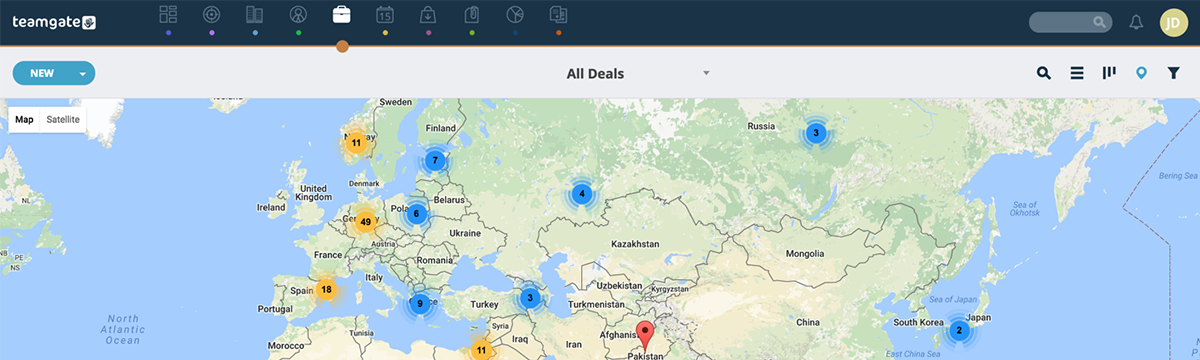
In this comprehensive guide, you’ll learn to master sales management strategies that can propel your business to new heights. From understanding key sales management terms to formulating precise sales tasks, acquiring sales talent, and analyzing sales performance, this guide provides the knowledge and tools you need to streamline your sales operations, boost team performance, and enhance overall productivity.

Key Takeaways:

  • Sales management involves crucial aspects such as strategy planning, operations, and analysis, similar to coaching a sports team.
  • The sales management process requires precise definition of sales tasks, effective acquisition and training of sales talent, and strategic motivation of the sales team.
  • Sales performance forecasting can be performed manually or automatically, aiding in efficient planning and decision-making.
  • Effective sales team management involves nurturing top talent, treating every member uniquely, and creating a conducive environment for growth and success.
  • Regular measurement and analysis of sales performance data are critical to making informed, data-driven decisions and improvements in sales strategies.

Excellent sales management can elevate your company to the next level. It does not matter if you represent a young start-up or have been in the field for years, you must acknowledge that sales are the single most important thing at the end of the day.

Whatever your current business situation is, it is important to remember that great sales managers always try do their best with what they have. This sales management guide is designed to help you do exactly that.

What is sales management?

Sales management refers to all activities, processes, and decisions involved in managing sales function within a business.

However, for a sales manager, it only means one thing: coordinating and developing a successful sales team.

Like every management cycle, it is built on continuous observation, coaching, decision making, forecasting and making adjustments.

Essentially, we can break down sales management into three key areas:

  • Sales strategy
  • Sales operations
  • Sales analysis and reporting

Sales management is a lot like coaching a sports team. You have a roster of players that must be turned into a championship team.

The cycle starts by acknowledging your current situation. Sales are a practical extension of marketing strategy. So to start on the right foot, you have to know everything about:

  • What products do we sell?
  • Who are we targeting?
  • What is our unique selling proposition?

After you become familiar with the company’s marketing plan, it is time to get real with the sales strategy. Sales managers primary function is to convert marketing objectives into a specific and measurable sales task and supervise its execution. In other words, come up with a game plan and stick with it. Just like a coach does.

In the following parts of this guide, we will walk you through the next steps and issues that typically arise during the sales management process:

  1. Key terms
  2. Defining the sales task
  3. Acquiring sales talent
  4. Conducting sales training
  5. Motivate sales team
  6. Defining a sales force structure
  7. Forecasting sales performance
  8. Creating sales territories
  9. Setting sales quotas
  10. Managing sales team
  11. Designing sales compensation
  12. Communication sales compensation
  13. Managing underperforming reps
  14. Measuring sales performance

Key Terms

Account A regular, paying client.

Buyer persona – fictional, generalized profile of an ideal customer with specified age, job, gender or other relevant demographics.

CRM – Customer Relationship Management. It typically includes CRM software that helps to manage customer data or sales pipeline.

Client relationship management system – Customer relationship management software that helps an organization determine the preferences and needs of their customers by tracking, recording, organizing and managing all customer interactions.

Closing – Convincing a prospect to make a definitive buying decision.

Cold Calling – The process of approaching potential customers for the first time, without prior introduction, relationship or contact.

Conversion – Turning a prospect into a customer.

Deal – An agreement on something with a client or prospect

Decision-maker – A person who is in charge of making buying decisions.

Demo – Demonstration of your product or service.

Demographic – Characteristics of the population or particular groups in it, such as age, gender, hobbies or lifestyle choices, etc.

Filtering – A step between lead generation and lead qualification where new lead information is filtered for validity.

Funnel – Also called sales funnel or sales pipeline. A designed systematic process that customers go through on their way to closing.

Gate keepers – People who screen your attempts to approach a decision-maker.

Inbound calls – Business calls initiated by the clients. It includes most of the customer support calls.

Inbound marketing – Marketing approach focused on attracting leads through relevant and helpful content.

Key Account – A client with a large budget that makes up a large portion of purchases and is significant for the business.

Lead – A potential client that could be interested in doing business with you, usually with little information about you or your business.

Lead generating – Initiation of consumer interest in business products or services via advertising media.

Lead management – A process designed to generate new leads via various marketing campaigns or programs.

Lead management software – A computer program designed to streamline lead management process. It can be integrated as a feature in a CRM software.

Lead qualification – A screening process to figure out whether a lead has a motive and ample buying power to become a prospect and later an opportunity.

Opportunity – A qualified prospect that has shown interest in your products and has presented his needs and requirements for you.

Prospect – A qualified lead that is interested to know more about your products and services.

Quota – Monthly, quarterly or yearly sales targets used to measure sales success.

Sales analysis – Measuring, analyzing, reporting and making decisions based on sales results.

Sales operations – Building and maintaining the sales team.

Sales enablement – The process of ensuring that sales representatives have all the tools, skills and information needed to sell.

Sales force – People responsible for selling products and services.

Sales forecasting – Estimating future sales volume to predict company’s performance in the future or to make better, information based decisions.

Sales management – A comprehensive set of activities to create and manage a sales team.

Sales management planning – Organising a plan to achieve the established sales objectives.

Sales management strategy – Defining the sales process and finding the best way to approach it.

Sales manager – A person responsible for leading, managing and coaching a sales team and supervising the sales process.

Sales pipelineSystematic and visual representation of your sales process.

Sales process – a Systematic approach that enables sales force to map out and track interaction with prospects from the point of engagement to a close.

Sales representative – Or simply sales rep. Your sales team member who is responsible for specific accounts or territories.

Sales target – Objectives that business or individual sales rep expect to meet per sales period.

Sales tracking – Keeping tabs on, recording and detailing all aspects of your sales process and activities.

Sales tools – All means that help you to improve your sales management process, such as CRM software, lead generation instruments, sales pipeline, funnel and others.

Sales Velocity – simply put, sales velocity is a marketing and sales metric used to measure the speed at which opportunities and leads turn into revenue, month over month.

Targeting – Reaching out to the segments and groups of the population that are similar to the buyer persona.

Territory – The area which is sales representatives responsibility.

Warm calling – Opposite of cold calling. Approaching customers with whom you have an already established relationship and experience.

Whale – A massive new lead that is at least ten times larger than your average sale.

Defining the Sales Task

A sales task formulation is first and the most important step in the sales management process as it sets a direction for your team. Here you establish your sales goal and describe how are you going to achieve it. A well-defined sales task includes a definition of your product, target audience, selling tactics and how are you going to communicate with your team.

A clear and measurable sales task helps your team to work more efficiently, reduces anxiety and increases overall team’s motivation. The more precise your sales task is, the better. The clarity of your sales task can significantly improve if you:

Sales Management Cycle

  • Assign a particular number of accounts for each rep. Sometimes geographical allocation can be ambiguous and unclear. The more accurate the account coverage is, the easier it is to act on them.
  • Set precise and attainable account management goals. It includes personal sales targets, activity goals, different quotas for different products, etc.
  • Use trustworthy information system. A poor system may distort sellers perception of input and results, all while simultaneously skewing accuracy of feedback.
  • Assess and correct field sales on the go. Make use of field sales management tools, such as management by objectives, scheduling field time or monthly feedback sessions. Your team will perform better if you deliver consistent coaching and guidance.

Acquiring Sales Talent

When you know what and how are you going to achieve, it is time to assess your team and, if necessary, make changes. Every sales manager needs people who are the best at carrying out the sales task.

To fill your all star roster with the best players, make sure to:

  • Look for the best talent amongst your competitors and establish a relationship with them.
  • Find good candidates where best workers usually go: industry conventions, conferences, and meetings.
  • Scan for the in-house talent: people who already know your enterprise and product.
  • Create a profile and work closely with your human resources staff.
  • Even when all the positions are filled, make sure to have a few extra candidates ready in case of unforeseen circumstances.
  • Maintain a good reputation, offer an excellent compensation package and if necessary, engage senior management in the process. Best sales people know how valuable they are and they love to be appreciated.

Conducting Sales Training

“Train people well enough so they can leave, treat them well enough, so they don’t want to.” Richard Branson

No matter how impressive your team members might be, they still need to be on the same page when selling your product.

First, outline your sales process – funnel. Emphasize how long your sales cycle should take. Then, recognize the skills needed to manage it effectively.

As a sales manager, your job is to enable your representatives to sell. As a coach, you also have to guide them through your sales funnel. Your team consists of different people, so sometimes, formal training is not enough. Make use of metrics to identify individual struggles and develop your players.

Best sales managers usually lead by example, but you may not always be able to teach the necessary skills or expertise yourself. Consider hiring a professional sales trainer, expert speaker, or author. Other alternatives, including cube alternatives, include sharing good books, online courses, or attending live events.

Whatever training strategy suits you and your team best, put time and effort to make it something out of the ordinary. Don’t make it just a routine in the office, make it stick.

Most importantly, training is an ongoing process. Learned skills need to be constantly refreshed and built on, especially during this time of changes.

Motivating Sales Team

Even in such an exciting field as sales, employee motivation can be an issue. However, being a decent manager as you are, you can tackle it in numerous ways:

  • Build trust with your team. Trust is a cornerstone of motivation and the best way to create trust between you and your subordinates is by being transparent. Share your stories, failures, and disappointments and build on the real experience.
  • Encourage your team to follow a balanced and healthy lifestyle. Show them that you care not only about their sales stats but also about their general well-being.
  • Ask individuals how they would like to be managed. While it may sound comfortable, it is known that one size does not fit all and adjusting to the individual needs can go a long way.
  • Distinguish between their personal and professional goals. Provide them with solutions that truly make a difference by identifying what is truly important for your employees.
  • Hand out great rewards. Awesome rewards inspire people, and we are not talking about the money here. As part of an effective employee rewards system, do something personal for your employees. Modified sentence: organize a contest, invite them to the BBQ, give them canvas photo prints & wall art, bring them food to work, or go to see movies together. Manage creatively and remember, that great management is more about earning respect and having fun instead of just trying to buy it off with a better salary.

Defining a Sales Force Structure

In this step of sales management process, you decide how many sales reps you need. There are two methods that you can use.

A top down approach:

1) Divide total annual revenue by the average sale sum per client. That gives you a rough idea of how many customers you need.
2) Then, figure out how many calls per customer you need to close a deal and multiply it by the number of clients (1). That helps you to estimate the number of calls required to meet your yearly target.
3) How many calls is a single rep capable of making per year? Divide (2) by this number and you will have your estimated number of employees.

A bottom up approach:

  1. Lookup the total number of accounts you have in your area.
  2. Decide how many calls you need per account to generate a sale. Multiply it by the number of accounts to get the yearly number of calls needed.
  3. Calculate how many calls a representative can make per year and divide it by the total number of calls required per year (2).

That should help you to estimate how many team members you need.

Sales Management Guide

Forecasting Sales Performance

These days sales performance forecasting can be done in two ways: manually and automatically.

The manual approach includes analyzing the market potential and sales potential.

Market potential is the size of the market. In other words, how much demand there is for you and your competitor’s product in your area? How much you and your competitors can expect to earn?

Forecasting sales potential is about claiming your share of the market. How much of the market potential can you win?

You can base both of these metrics by looking at either objective or subjective data. Objective data is based on past metrics and data. Subjective data stands for industry experts forecasts and opinions.

Automatic sales performance forecasting is based on external systems and services. That is the most attractive solution for businesses today. For a comprehensive view of sales operations and customer data, you can leverage solutions like DreamFactory, a self-hosted platform providing governed API access to any data source, or tools such as Teamgate.

Creating Sales Territories (Optional)

Sales territories are about allocating initial prospects. The main question here is who will sell where.

As mentioned previously, it is very important to point out as many details about the accounts as possible.

Another tip in assigning territories is to make them equal in sales potential, not physical size. If it is possible, make use of geographical boundaries, but be sure that they same similar numbers of customers.

Lastly, be ready to change and improve your territories constantly. The number of customers and the abilities of your salespeople tend to change over time.

Setting Sales Quotas

Every rep in every area should have an annual sales goal for the year. Quotas are a key metric to evaluate how well a salesperson did in his area. When setting sales quotas, it is important to remember, that data driven approach always guarantees more precision.

In contrast, inaccurate or unattainable sales quotas create a negative view of the managers, cause frustration, unfairness and can hurt you other ways.

The best technique to set sales quotas is the bottoms-up approach. It is based on real reps capabilities and historical team results. The key questions here are:

  • What are the stages of our sales funnel?
  • What are our conversion rates before each stage?
  • How do our conversion rates look like per territory?

To help you with the bottoms-up approach you can make use of Yesware’s quota calculator.

If you have a variety of products, you should create a different quota for all of them. And most importantly, keep track of them and address issues on the go. Even if the quota is annual, good managers break them down to smaller periods. As a result, they enjoy better insights.

Managing Sales Teams

Great teams have great coaches and great sales teams have excellent sales managers. There are many books with tips and tricks on how to handle the teams and it would be impossible to fit them all in one paragraph. However, several important things you should know about sales teams management are:

  • Take care of your top talent first. Many managers tend to take their eye off top performers and focus on the lesser ones. It only seems logical to help others. But in reality, top talent strives for attention and recognition, so you should consider dedicating even more attention to them along with some perks.
  • Treat everyone fairly but not the same. There is a big difference between discrimination and unfair treatment. Every one of your employees is a different person and what works for some will not function with the others.
  • Create winning environment. Encourage your team. Challenge them. Surround your subordinates with the best people and information available. Create an environment where they can do their best.
  • Give your salespeople all the attention they deserve.
  • Empower your people to grow. Growth is an essential element of job satisfaction. Make sure that your people feel like they are learning something new every day.

Sales Management Top Performers Chart

Designing Sales Compensation System

Another critical area of management is rewards. In other words, how much do you value your team members?

In general, there are two ways to design compensation plan: flat salary plans and variable commission programs.

Flat salary is fixed so your rep will get agreed amount no matter what.

Variable commission payment is linked with the number of generated sales and offers no limits. However, nothing is guaranteed as well.

The best approach in sales is to use the combination of both. Establish a competitive base salary and on top of it offer some bonuses for the reps or teams that achieve their target levels or quotas.

Communicating Sales Compensation

Great managers make sure that their reps are getting paid enough. Implementing sales compensation system consists of three steps:

  1. Communicate. Your reps want to know how they are getting paid. Consider creating a document that explains everything about how the plan works.
  2. Administer. Share the plan with HR or financial department, since they will have to process it, too. Using a sales commission software can make this step seamless by automating calculations and ensuring transparency across teams.
  3. Measure. Observe how your plan operates and receive continuous feedback. There is nothing worse than figuring out that your plan was not working at the end of the period.

Managing Underperforming Reps

Your superstars are getting the best rewards, but what about underperformers?

There can be a million reasons why a sales representative struggles.

However, like in every other management issue, you should start by searching for the root cause of the problem. The 5 Why’s model can you to discover it.

Amongst the most popular reasons for lagging performance are the following:

  • An employee lacks specific tools or skills.
  • An employee is unmotivated.
  • An employee is not the right fit.

There are many ways to stimulate underperforming reps once you identify the right reason. Possible options include leading by example, accepting responsibility for the problems or creating a culture of motivation.

In the worst-case scenario, you have to fire someone, which is never easy. However, it is the only viable option if the employee continues to perform way below the standards.

Measuring Sales Performance

No matter what kind of coach, planner, or analyst you are, data-driven decisions are the most reliable ones. Therefore, performance tracking and measurement are sales managers’ best friends.

To measure well, you have to measure right things. For a sales rep, the most important number is conversions. Of course, to see the bigger picture, there are many other numbers that you should take into account, such as total revenue, gross margin, the number of initial prospects or won accounts. Also, mind that raw numbers can be deceiving, so take advantage of the ratios.

Data analysis can consume a lot of your time, but smart managers know how to free up their time. Make use of intelligent data management systems designed to help your decision-making. After all, numbers are just indicators and you need to be out there for your team.

At the end of the sales management cycle, you should report the results back to your reps, senior management, and marketing department. Good sales managers know how important insights are for the business and their team. From here, it is time to repeat the cycle again. Good luck!

FAQs: Sales management

Q: What is sales management and why is it important?
A: Sales management refers to all the activities, processes, and decisions involved in managing the sales function within a business. It’s crucial as it helps streamline sales operations, boost team performance, enhance productivity, and propel a business to new heights.

Q: What are the key areas of sales management?
A: The key areas of sales management are sales strategy planning, sales operations, and sales analysis and reporting. These areas are crucial for coordinating and developing a successful sales team.

Q: How can sales performance forecasting aid in sales management?
A: Sales performance forecasting, either done manually or automatically (via sales forecasting tools including cube alternatives), provides valuable data for efficient planning and decision-making in sales management. It estimates future sales volumes to predict a company’s performance and aids in making informed, data-driven decisions.

Q: What strategies are effective for motivating a sales team?
A: Effective strategies for motivating a sales team include building trust, encouraging a balanced and healthy lifestyle, asking individuals how they would like to be managed, distinguishing between personal and professional goals, and offering great rewards.

Q: How is sales performance measured in sales management?
A: Sales performance in sales management is measured by tracking and analyzing various key metrics such as total revenue, gross margin, the number of initial prospects, won accounts, and conversion rates. Regular measurement and analysis of sales performance data are critical to making informed, data-driven decisions and improvements in sales strategies.

Q: What role does sales training play in sales management?
A: Sales training is vital in sales management as it ensures that all team members are on the same page when selling a product or service. It helps to equip sales representatives with the necessary skills and information to sell effectively and also identifies individual struggles to aid in personal development.

Q: How can the sales management process impact a business?
A: The sales management process, when done effectively, can greatly impact a business by improving sales operations, boosting team performance, and enhancing overall productivity. It can also assist in defining precise sales tasks, acquiring and training sales talent, and strategically motivating the sales team.

Measuring and tracking the performance of sales teams is imperative for the overall well-being of any company. How do CEOs and sales leaders go about this task?

In this article, you will delve into the world of sales team performance tracking, understanding its importance and impact on your company’s success. You will discover the role of goal setting, CRM software solutions, and both long- and short-term targets in effectively monitoring and improving sales performance.

Key Takeaways:

  • Comprehensive knowledge of your sales metrics and sales KPIs is essential in painting a complete picture of your sales team’s performance.
  • Effective goal setting and use of CRM software solutions, like Teamgate, can significantly enhance the visibility and control of your sales process.
  • Balancing short-term and long-term goals provides a comprehensive approach towards fostering a more productive work ethic within sales teams.
  • Tracking metrics such as activities completed, communications, deals won and lost, and future forecasts can offer a holistic view of your sales process.
  • Personal conversations and meetings that provide valuable insights derived from performance metrics can greatly improve the performance of individual salespeople.

One of the main talents great sales leaders possess is the ability to see and understand the overall picture clearly. This vision and knowledge of sales performance metrics are the core of a company’s success.

But, what happens if those with overall responsibility don’t have the complete picture? The answer is not good.

This incomplete picture is built from not being armed with the following disciplines:

  • Not tracking the sales team’s collective performance
  • Inadequate appreciation of both long- and short-term goals
  • Viewing sections of the pipeline and not the whole picture
  • Lack of streamlining ability
  • Not managing individuals

By possessing full knowledge of your sales metrics and sales KPIs, account owners can regain control of that full picture. A smart, and intuitive sales CRM software – such as the multi-award winning Teamgate – can greatly improve clarity, by intuitively tracking and measuring your sales team’s performance. For teams seeking to enhance their outreach efforts alongside performance tracking, Sendspark‘s AI-powered video personalization can help sales leaders engage prospects more effectively and measure engagement alongside traditional sales KPIs.

CRM and sales performance remedies

Goal setting as standard

Setting achievable goals for sales teams is imperative. Setting unjustifiable goals can stifle their abilities. Goals should be set in unison between your sales team, and results gleaned from your CRM software solution.

A CRM like Teamgate allows you to analyse past performance, and to set actionable goals. The CRMs results can offer insights that help evaluate any improvements required.

Sales performance
Activity Goals insight on Teamgate CRM

Sales which take too long to close steal time. Your CRM can offer valuable advice on optimum time-framing – how long a sale can be held in any particular stage of the sales process, or in the complete pipeline.

The long and the short of it

Sometimes it can be overlooked, but both long- and short-term goals have their individual merits. To sales teams and individuals, short-term goals can be fraught with frustration – inevitably there will be bad days and weeks.

For this reason, setting long-term goals can offer more incentive, and a realistic outlook, while helping facilitate a more productive work ethic.

Some sales teams like to set these goals in reverse; if you have a monthly target multiply it by 12, giving you an easier to manage – and less stressful – long-term target. Keep this target in mind, and things won’t feel so depressing at the start of each new weekly, or monthly sales cycle.

As with all sales metrics and goal setting, a capable sales CRM can analyse many factors across the sales process in order to determine the most achievable long- and short-term goals.

The bigger picture

A clearly defined sales pipeline offers managers the visibility needed to instantly analyse the complete sales process. Teamgate CRMs user-friendly interface offers access to the metrics which the ability to measure productivity minutely.

Sales performance
Sales Pipeline Movement on Teamgate CRM

Your CRM should offer the customisable ability to conduct tracking of metrics such as; activities completed; communications; deals won and lost; and future forecasts. All of these individual metrics go towards making up the overall picture.

Keep it running smoothly

Teamgate is a highly intuitive sales CRM which hands sales managers the benefit of automating time-consuming tasks and permitting them to focus on the metrics required for constant assessment, and tweaking of sales performance.

Fully customisable analytics, make all aspects of tracking and measuring the various segments of the sales process, quicker and more productive. Teamgate offers instant access to reports and sales KPIs which once stole much of a manager’s time resources.

Every aspect of your sales team’s KPIs can be automated and measured instantly – new leads, sales volume, client acquisition, stage lengths, communication targets, etc.

How to measure sales team performance
Dashboard on Teamgate CRM

The human factor

Meetings which offer no real insight or value, are a waste of time to all salespeople. Your CRM measures and tracks so many components of your sales performance metrics, it would be a shame to waste such findings.

Meetings which offer valuable information, garnered from measuring and tracking your sales teams performance, can offer not just the team, but the individual salesperson rewarding feedback. They can learn from their strengths and weakness in easily understandable charts and illustrations provided by your CRM.

There may be factors involving the individual which lie outside the metrics, these factors can best be resolved and discussed in one-to-one meetings and the presentation of the analytical data.

The best governance for tracking and measuring the success of your sales team can be achieved by the following:

  1. Use your CRMs reports wisely, but use your people just as wisely. Don’t forget to have those conversations with the individual.
  2. Setting goals is a collaborative process, involving a connection between your CRM and your people on the ground.
  3. Don’t forget the human aspect – your salespeople are the eyes and ears of your company, but be sure to keep them engaged in conversation, and involved in all stages of the sales process.

Measuring and tracking sales performance metrics gained from your CRM can help you monitor the health of your sales process anytime and anyplace, and instantly resolve any occurring bottlenecks.

FAQs: Tracking sales performance

Q: What is the significance of tracking sales performance in business success?
A: Tracking sales performance provides insights into how well your sales team is performing, which directly affects your business’s success. Understanding these metrics can help you make data-driven decisions, enhance productivity, and streamline your sales process.

Q: How can CRM software help in tracking sales performance?
A: CRM software, such as Teamgate, offers features that automate the tracking and measuring of various sales metrics. This includes activities completed, communications, deals won and lost, and future sales forecasts. It offers a detailed and accessible view of your sales process, enabling efficient monitoring and management.

Q: What role does goal setting play in tracking sales performance?
A: Goal setting is crucial in tracking sales performance as it provides a benchmark for what your sales team needs to achieve. A CRM can help analyze past performance and set actionable goals, offering insights to evaluate necessary improvements. Balancing short-term and long-term goals also aids in managing productivity and creating realistic outlooks for the team.

Q: How can tracking sales performance benefit individual salespeople?
A: Tracking sales performance can provide valuable feedback to individual salespeople about their strengths and weaknesses. This can be presented through charts and illustrations provided by your CRM, aiding in personal growth and performance improvement.

Q: What are some best practices for tracking sales performance?
A: Best practices for tracking sales performance include using CRM reports wisely, setting collaborative goals using your CRM and sales team input, considering the human aspect in the sales process, and continuously monitoring the health of your sales process to resolve any bottlenecks promptly.

Do you have a CRM that keeps you organised?

The most user-friendly CRM on the market. 14-day free trial.

Start Free Trial

Painless setup, no credit card required
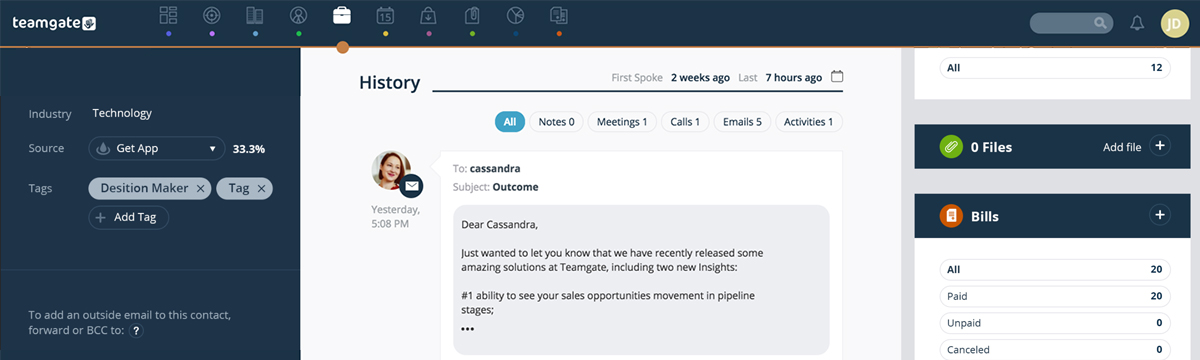
In this article, you’ll learn how to increase your chances of having your sales emails read and responded to positively. By understanding the behavior of your prospective customers and crafting your emails smartly, you can swing the odds in your favor. We’ll provide you with practical guidelines, share the importance of using an intelligent CRM like Teamgate, and walk you through the four key steps to writing engaging sales emails that attract attention and prompt action.

Key Takeaways:

  1. The subject line of your email is crucial for sparking interest and attracting attention.
  2. Starting your email on a personal note can help you establish a human connection with the recipient.
  3. The content of the email should be relevant, addressing a need that the prospect might have.
  4. Your call-to-action should be clear and instructive, guiding the recipient on what to do next.
  5. Utilizing a CRM like Teamgate can significantly enhance your email campaigns, making them more organized, trackable, and effective.

Wouldn’t it be great if you could write sales emails that get read every time? And wouldn’t it be even better if you could write sales emails that not only get read but provoke a positive response every time?

It sounds like a dream.

With over 125 billion business sales emails sent every day, the likelihood of the above happening with every email you send… Well, it’s pretty slim.

But, if you’re smart, and you really understand the behaviour of your prospective customer, you can swing the odds and increase the chances of your prospects opening, and responding to your sales emails more frequently than your competitors.

Knowing how to write sales emails that work is the first step. And it’s not as difficult as you might think. A few simple easy-to-follow guidelines, a little common sense, and an intelligent CRM like Teamgate, will go a long way.

Once you know how to create those killer sales emails, your Teamgate CRM is ready and waiting to help you take the next step and begin the whole sales nurturing process.

Teamgate lets you connect your email account directly to the CRM software, to help you effectively track, schedule, automate and report on all your email communications, and marketing campaigns. Plus, with the Teamgate MailChimp integration, you get to see who’s actually reading your emails.

The 4 steps to writing sales emails that grab the attention

Writing a cold email can be a daunting task. But it doesn’t have to be. There are a simple set of rules to follow when writing every effective sales email.

Sales Email Writing Tips Teamgate

#1 The Subject Line

If your email never gets opened – no matter how great the content is – it hasn’t done its job. That’s where great subject lines come in, especially with sales introduction sales emails.

The objective of the subject line is to create interest and attract attention. Try to keep in mind how many sales emails busy business people get every day.

Give them a reason why yours should be the one they choose to open.

Keep it short, with a pinch of intrigue – enough to get you to the next stage. Avoid words associated with spam – Free, Discount, Solution, Act Now, Enhance, Final Reminder. (A good tip is to check your own spam folder and see what’s lurking in there)

Good Examples:

  • Marianne, our mutual friend Lynn recommended I contact you
  • Alan, I have a suggestion you might like
  • Lisa, you might find this [white-paper/video/report] useful
  • Have you thought about [idea/pain-point/recommendation]?
  • Did you ever consider [solution to their problem]?
  • Live CRM solutions webinar Friday 17th
  • Our sales game-changer is ready for launch
  • Be first to read – 10 killer sales tips for 2019

Subject lines can also come under a variety of diverse topics – urgent, personal, listicles, how-to guides, trending, and many more – but the basic principles remain the same. Offer something of interest, something to grab their attention, and never let your subject line be a mere afterthought. To have a complete picture of how to compose attractive subject lines, take a look at Sales Handy latest article.

A/B testing is a great way to see if your subject line is working. Send out the same content, with two different subject lines to a group of prospects, then measure and compare the actual open rate using your Teamgate-MailChimp integration (but more of that later).

#2 The Opening

Cold Email in Teamgate CRM

If you start your email with ‘Hi, my name is_______‘, you’re probably wasting your time.

We’re all human, just trying to do some business and live our lives, so use that humanity when you reach out to others. Most human beings love to be noticed, to have their name used, and to be the centre of attention. You’ll make more friends by listening to what they have to say than by telling them how great you are.

  • Dear Marianne,
    I just saw news of your companies great win at the European Business Awards over on LinkedIn. What a great achievement and really well done.’

It’s no longer a cold email, you’ve created human contact, and the recipient most likely wants to read on.

#3 The Content

The content, or body, of an email, is where the offer is made, and decisions are made. But, you don’t have a lot of time to accomplish that.

If you’ve already created that human connection with your opening, now’s your chance to introduce the business of your email.

  • ‘As you’re such a progressive company you might have some questions about [whatever your subject may be]’.

or

  • ‘It seems that you and your company are constantly striving for the best. That got me thinking that perhaps our [name solution or proposition] might be of real value to you and your goals’.

The most important part of this content is that you have already identified a need in the prospect that you have the ability to resolve. Using your CRM’s landing pages, you can identify the precise issues that prospects were investigating, and with tools like Sendspark‘s AI-powered video personalization for sales outreach, you can create even more compelling, personalized content that stands out. The emailed prospect quickly realizes that this is not some random cold email, but a real connection – that even if not useful at present – may be of use in the future.

#4 The Call to Action

The call to action (CTA) is the real business end of any sales introduction email – or even cold email – it’s the real reason why you’re here in the first place.

If you’ve created a great email and the reader is still with you at this point, it would be a shame to mess up here. Be sure you don’t mess up, offer clear instruction as to what you want the next course of action to be.

If you’ve identified that this is the person you need to talk to, in order to get a result, be firm with your proposal. The amazing Teamgate-LinkedIn shuttle lets you target specific leads from LinkedIn and import all of their contact details directly into your CRM, with just one click.

  • ‘It would be great if you could let me know if [solution or proposition] is on your agenda at present, or if it’s something you may give thought to in the future?

Like a good journalist, leave your prospect with a question that requires more than a simple Yes, or No answer.

  • ‘Would it make sense for us to talk further? If not, could you direct me to the right person to talk with?

Or

  • ‘I understand how busy you must be and want to respect that. Perhaps you have time to take a ten-minute call on [date/time]. I’m sure I can answer quickly any questions you might have?

You’ve written the perfect sales emails now let Teamgate make them work

Teamgate, as a powerful and modern CRM, is perfectly designed to work in conjunction with email campaigns and to manage all email communications.

You no longer have to spend hours trying to track who has answered or reacted to your sales emails. With Teamgate you have instant access to all your sent emails – and other communications – directly from your contacts’ cards. Plus, there are a host of other ways Teamgate CRM software can smartly manage all aspects of your email campaigns.

Here’s how Teamgate can manage your emailing smarter

Connect your email with Teamgate

  • Connect your business email provider with Teamgate CRM and be certain that your entire email process is under control. Teamgate email integration lets you keep track of all communications by storing copies of all sent and received sales emails directly in your contacts’ cards. With an advanced filter and search facility, you know where everything is and stay email organised at all times.

MailChimp/Teamgate Integration

Cold Email in Teamgate

Teamgate’s integration with the leading email automation platform, MailChimp, manages every stage of your email marketing and lead-generation campaigns.

  • Personalize the message – Send personalized, targeted emails to specific groups of prospects, or leads. Using your contacts in Teamgate, pick the groups you want to target, write your killer email, and schedule the time for automatic sending (Your Teamgate/MailChimp integration will help you determine which is the best time for your business).
  • See the reaction to your email – Again, using your Teamgate MailChimp integration you have instant access to the actions taken by email recipients; were they opened, subscribed, unsubscribed, or clicked on? All valuable information to help you determine your next course of action.
  • Integrated communications – The integration also simplifies tracking every marketing or lead-sourcing email. Each email is updated to your contacts card and includes the status of campaigns, dates, and all other important data. Know the status and result of every email, instantly, using the integration.

Directly from Teamgate

  • Use Teamgate to manage lead capture campaigns directly from your CRM
  • Track actions from all email campaigns directly within your leads cards
  • Store all your sales emails where they’re mostly easy to access – in your contacts’ cards
  • Send emails directly from your CRM, even while mobile
  • Receive and organize all inbound email communications in one place

See who’s opening your sales emails

Now that you know how to create the type of effective sales email that your prospects are more likely to open and respond to, take your entire emailing strategy to the next level.

Teamgate CRM software can greatly increase the effectiveness of all sales email and communications strategies.

No more sitting and wondering if a prospect saw your email, or how they responded. Use your Teamgate CRM to take control NOW of what happens next in your marketing and sales process.

Teamgate sales CRM gives you that power. Why not try it today, and see who’s opening your sales emails, and when.

FAQs: Writing sales emails

Q: How can I write sales emails that get read?
A: First, write an intriguing subject line to spark interest. Make your opening line personal, creating a human connection with the recipient. Ensure the content of the email is relevant and addresses a need that the recipient might have. Lastly, include a clear call-to-action that guides the recipient on what to do next.

Q: What role does the subject line play in sales emails that get read?
A: The subject line is crucial for grabbing the recipient’s attention. It should create interest and give them a reason to open your email. Keeping it short and adding a pinch of intrigue can increase the chances of your email being read.

Q: How can I personalize my sales emails to ensure they get read?
A: Personalizing your sales email starts from the opening line. Make sure to use the recipient’s name and mention something relevant to them, like a recent achievement or shared interest. This establishes a human connection and makes the recipient more likely to read on.

Q: How can the content of my sales email increase the likelihood it gets read?
A: The content should be relevant and address a need that the recipient has. It should demonstrate that the email isn’t just a random cold message, but a real connection that could be beneficial for them, now or in the future.

Q: How does a CRM like Teamgate help in writing sales emails that get read?
A: Teamgate CRM allows you to track, schedule, automate, and report on all your email communications. With its integration with MailChimp, you can also see who’s reading your emails, allowing you to tweak your approach as necessary and improve the effectiveness of your email campaigns.

GET READY TO OWN YOUR WORKDAY

with the most user-friendly CRM on the market.

Start Free 14-Day Trial

Painless setup, no credit card required

In this article, you will learn about the importance of CRM (Customer Relationship Management) in modern businesses. By integrating CRM into your sales process, you can increase sales, improve customer service, enhance internal communication, gain valuable insights, automate tasks, save costs, modernize the sales process, and boost customer retention. Discover how CRM can revolutionize your sales approach and help you achieve better business results.

Key Takeaways:

  • CRM helps rationalize sales moves by streamlining the sales cycle and improving tracking and follow-up with leads.
  • It enhances customer service by improving communication and optimizing the customer experience.
  • CRM provides valuable insights by centralizing and analyzing data for informed decision-making.
  • Integrating CRM saves costs by streamlining operations and reducing the need for additional resources.
  • CRM modernizes the sales process, increases sales closures, and facilitates upselling and cross-selling opportunities.

CRM has become the heart of any business. The technology platform helps unlock the valuable information from the customer data, so that you could plan the right strategy for targeting the right customer. It gives a 360 degree of the customer data, necessary for all the levels of customer interaction.

For the sales team, it is a boon as it helps in various aspects such as:

How can a Fully Integrated CRM improve revenue and profitability?

The major benefits, are that it empowers to:

  • Increase the number of sales
  • Induces the customers to return
  • Helps to cross-sell and upsell the products

So how does it do?

Rationalizing each of the sales moves: The biggest challenge which most of the sales representatives face is keeping track of the sales activities and following up with the leads. CRM helps to a great extent in rationalizing each of the sales moves. It streamlines the complete sales cycle so that every team member could reach their target faster.

Improving customer service: Every organization nowadays put a higher emphasis on customer service.

If you look after your customers, your customers will look after you!!!!

44% of the businesses are planning to increase the IT budgets in 2020. They are going to spend this, on customer-facing products additionally. Find the below image:

https://www.infoclutch.com/data-appending-services

CRMs which are designed to manage customer relationships could also help in other aspects of businesses, such as the productivity of an employee that indirectly impacts customer satisfaction and higher revenue. For enterprises with multiple data sources, platforms like DreamFactory can enhance CRM capabilities by providing governed API access to any data source, ensuring that customer data is securely integrated and accessible across all systems.

Improving internal communication: With the integration of CRM, organizations have better internal communication between all departments. The sharing of customer data between each of the departments becomes a seamless process. It also helps the members to work as a team and optimize the customer experience, termed as one of the major benefits of CRM.

In many cases, businesses rely on CRM consulting and support to ensure the CRM system is properly integrated with existing workflows, data sources, and internal processes, enabling smoother collaboration across departments and maximizing the return on investment.

Reducing the number of lost leads: Many times, the sales teams are too focused on interacting with the customer who has actively engaged with them that they lose track of some high-potential customers, who browsed their website. A good CRM system helps in collecting all the information which the sales team missed out, to plan the next strategy for increasing the customer base. For sales teams looking to scale their outreach, platforms like Sendspark offer AI-powered video personalization that can help engage high-potential prospects with individually customized videos distributed through CRM platforms and email channels.

Gaining valuable insights: As the CRM stores the complete information in a single centralized location, it is easier for analyzing the performance as a whole. You could gain access to the information whenever you like, and analyze it further to gain valuable insights.

CRM with automation: When CRM is combined with automation, it helps in providing targeted and interactive email campaigns. Marketing automation is known to make use of email marketing campaigns and web forms to drive the process in the right direction. On the floor, these two tools complement each other and generate good business results.

The CRM automation facilitates in automating repetitive and manual tasks for improving productivity and streamlining the work. Automation helps to encompass a range of different functions such as service, marketing, and sales activities.

Saving the investment: Integrating CRM in the company’s process is not cheap, but it could help you save money in the long-run. As CRM helps to streamline, organize, and automate day-to-day business operations, it saves you from investing money on more resources.

Modernizing the sales process of the organization: A CRM software helps to automate the sales process of the organization. As acknowledged, technology facilitates the right modernization and has a greater role in generating good revenue for the organization. So, when a CRM is completely integrated into the process of the organization, it streamlines the entire sales cycle, further, resulting in closing a higher number of sales deals.

Helping to upsell: A fully functional CRM also helps the sales team to upsell the products to the existing customer. For example, when a customer buys a new shoe, a sales representative might ask whether he needs the branded one. If the customer says “yes,” then this is the right upsell at the right time.

Upsell could be easily achieved through the CRM as it helps to keep track of the entire sale process and identifying the timely sales opportunity.How can a Fully Integrated CRM improve revenue and profitability?

As a sales representative, you could also efficiently carry out the cross-selling process by selling them additional products.

  1. Improving customer retention: Increasing the customer retention rate by 5% increases the profit by 25% to 95%.
  2. CRM helps to retain customers as the sales team would have complete information on all the potential customers who reached out to them. Visibility across all the relationships could help the teams proactively address the risk accounts and satisfy the new customers with the best opportunities at the right time.
  3. Helping to sell faster: The manual entry which many of the representatives do in small businesses kills the productivity of the sales team. The job of any salesperson is to generate revenue by speaking to the customer. So, if they do not get the time to do the real job, then the organization could see a drastic decrease in revenue, sales, and profit.

CRM is a savior in such instances and removes the job of repetitive and manual tasks. A standardized sales process gives the team a well-planned roadmap for closing more sales deals and reducing the length of the sales cycle. With this, you can accurately predict the sales and improve the sales methods for implementation. The sales team can now entirely focus on interacting with customers.

The Power of a Fully Integrated CRM for Organizations

A fully integrated CRM is the way to go for many organizations. Many small businesses do not have a distinct and dedicated sales team. Without a fully integrated CRM, most of the leads do not get converted into sales.

The CRM system helps employees to increase revenue by streamlining the entire process. When you have a systematic and steady flow of information, it becomes easier to contact the potential customer at the right time, to get them converted and improve the business results of the organization.


FAQs: Fully integrated CRM

Q: What does it mean for a CRM to be fully integrated?

A: A fully integrated CRM refers to a CRM system that seamlessly connects and syncs with other key systems and tools used within an organization, such as marketing automation, customer support, and sales analytics. It allows for the sharing of data and information across departments, providing a comprehensive view of customer interactions and enabling efficient collaboration.


Q: What are the benefits of using a fully integrated CRM?

A: The benefits of using a fully integrated CRM are numerous. Some key advantages include:

  • Streamlined operations: Integration eliminates the need for manual data entry and enables automated processes, saving time and reducing errors.
  • Enhanced customer experience: Integrated systems provide a holistic view of customers, enabling personalized and consistent interactions across multiple touchpoints.
  • Improved decision-making: Access to comprehensive data from integrated systems allows for better analysis, reporting, and informed decision-making.
  • Increased productivity: Integration eliminates silos and enables seamless information flow, improving team collaboration and productivity.
  • Scalability and growth: A fully integrated CRM supports business growth by adapting to changing needs, integrating with new tools, and accommodating increased data volumes.


Q: Can a fully integrated CRM be customized to fit specific business requirements?

A: Yes, a fully integrated CRM can be customized to align with specific business requirements. Organizations can configure the CRM system to match their unique workflows, data fields, reporting metrics, and automation rules. Customization ensures that the CRM solution supports the specific needs and processes of the business, maximizing its effectiveness and usability.


Q: Does implementing a fully integrated CRM require technical expertise?

A: While technical expertise can be helpful during the implementation process, many CRM providers offer user-friendly interfaces and guided setup to make the process accessible to non-technical users. Additionally, CRM vendors often provide customer support and training resources to assist with the initial setup and ongoing maintenance of the fully integrated CRM.


Q: Can a fully integrated CRM work with existing systems and tools in my organization?

A: Yes, a fully integrated CRM is designed to work seamlessly with existing systems and tools in an organization. Through APIs (Application Programming Interfaces) and integrations, the CRM can connect with other software, such as email marketing platforms, customer support systems, accounting software, and more. This integration allows for data synchronization and a unified view of customer interactions across different platforms.

In this comprehensive article, you’ll discover how integrating Mailchimp, a widely-used email marketing platform, with various CRM (Customer Relationship Management) systems can streamline your marketing efforts and enhance your decision-making process. You will learn how this integration can help with segmenting potential customers, personalizing email messages, analyzing marketing data, managing subscribers, and generating custom reports, all to increase your marketing success.

Key Takeaways:

  • CRM integration with Mailchimp enables targeted email marketing strategies by segmenting potential and existing customers in your CRM.
  • CRM data can be used to personalize email messages, enhancing the overall customer experience.
  • Analytical tools provided by CRM integrations offer valuable insights into patterns and trends in email data, aiding in more informed marketing decisions.
  • Integrating CRMs with Mailchimp makes managing subscribers and unsubscribers more manageable and efficient.
  • CRM systems like Teamgate, Pipedrive, and SugarCRM offer different levels of integration with Mailchimp, with each offering unique features and pricing options.

Read more: 8 of the Best Sales CRM Software Programs

The Benefits of CRM Integrations for Mailchimp

Mailchimp is a service that specializes in marketing automation and email marketing. This comprehensive platform lets you communicate with prospects, leads, and existing customers to promote products and services via email.

Mailchimp says on its website:

“Our approach to marketing focuses on healthy contact management practices, beautifully designed campaigns, and powerful data analysis. We’re here to help you become an expert marketer. Ready to get started?”

Many marketers think Mailchimp is merely a web-based application that works in internet browsers. However, you can now integrate this platform with various CRMs, including Teamgate. That lets you centralize your customer relationship management and email marketing practices.

There are various things you can do when using Mailchimp CRM integrations:

  • Segment potential and existing customers in your CRM and send them targeted email marketing messages.
  • Use the information in your CRM to personalize email messages to customers.
  • Design, send, and save email templates based on CRM information.
  • Use analytical tools in your CRM to identify patterns and trends in email data and use these insights for better marketing decision-making.
  • Use Mailchimp’s analytical tools to view open, click-through, conversations, and success rates for email campaigns.
  • CRM integration with Mailchimp also lets you manage subscribers and unsubscribers.
  • Generate custom reports based on CRM and Mailchimp information and become more successful at email marketing.

Integrating your CRM with Mailchimp Integrations can be a long, laborious process that involves complex code and data engineering—skills your business might lack. The best CRM for Mailchimp will have out-of-the-box no-code/low-code connectors and a simple drag-and-drop, point-and-click interface that makes integration easy. Alternatively, platforms like Integrate.io provide fixed-price, low-code data integration and transformation pipelines that can simplify connecting your CRM data with Mailchimp and other marketing tools without requiring extensive engineering resources. You won’t need to build complex data pipelines or enlist the services of a data engineer, saving you time and money.

Note: To confuse things, Mailchimp now contains some CRM functionality of its own. (It has evolved from a simple email marketing tool to all-encompassing marketing automation and email marketing service platform.) However, in Teamgate’s opinion, no successful business in the SaaS industry should rely on Mailchimp for customer relationship management as there are far better tools that achieve this goal. At the most, Mailchimp aggregates and organizes customer information like phone numbers, physical addresses, and email addresses. A growing enterprise couldn’t count on Mailchimp for identifying and nurturing leads from customer account information in a busy call center, for example. You could use Mailchimp as a CRM if you have a very, very small business with a couple of hundred customers, but that’s about it. CRM integration with Mailchimp is better suited to an actual CRM system!

Learn more about the best CRM for Mailchimp below:

1. Best CRM for Mailchimp: Teamgate

Teamgate is, hands down, the best CRM for Mailchimp overall. It lets you send personalized, targeted email marketing messages to prospective and existing customers in the Teamgate CRM system with a few clicks of a mouse. That streamlines workflows and boosts productivity. For Teamgate-Mailchimp integration to happen:

  1. Export contact information from Teamgate lists.
  2. Define your segmentation criteria.
  3. Click on the Mailchimp icon at the top of lists.
  4. Export the contacts into Mailchimp.

This simple four-step process lets you use customer contact information for more effective email marketing outcomes.

Another use case for Teamgate-Mailchimp integration is the ability to merge custom fields in Teamgate with fields in Mailchimp. You can do this by clicking “Create a new field” under “Mailchimp” fields on the Mailchimp integration page on Teamgate. This process lets you quickly merge Teamgate and Mailchimp custom fields for current and future email marketing campaigns.

Sometimes a CRM makes it difficult to transfer records between that CRM and Mailchimp. Pipedrive, for example—the next entry on this Best CRM for Mailchimp list—requires a lengthy sync process that many small businesses in the SaaS sector might not understand. Teamgate is different. It simplifies record transfers and even sends you an email confirmation every time you move records between its CRM and Mailchimp. There’s no guesswork.

Also, Teamgate assigns all exported contacts a tag, allowing you to filter those contacts when required. If there’s a problem with transferring records, any error information will show up on the Export History page in Teamgate (in the Data Migration sections in Settings). Teamgate will also assign a tag to these failed-to-transfer contacts, making it easier to find this information. Merging a CRM with Mailchimp has never been this easy!

Learn more information about Teamgate and Mailchimp CRM integrations here.

Teamgate CRM Integration With Mailchimp Key Features

  • Segment and filter customers by Mailchimp campaign.
  • View the read, clicked, and unsubscribed status of each lead/customer from within the Teamgate lead/customer contact page.
  • See which Mailchimp campaigns have been sent to which leads and customers within Teamgate through automatically applied, custom tags – removing workflow complexities.
  • Automatically dial potential and existing customers.
  • It’s not just Mailchimp. Teamgate integrates with numerous digital tools for better marketing results in your enterprise. You can select which integrations display in your Teamgate workspace and access information from multiple platforms on one monitor.
  • Support email marketing with in-depth lead conversion insights about prospects with Teamgate’s suite of sales intelligence tools. These tools personalize your marketing objectives and help you qualify leads against your ideal customer profile (ICP).
  • Manage leads for Mailchimp campaigns with specialized sales and performance tools that monitor organizational performance. You can quickly discover which email marketing methods work (and which don’t) via a simple drag-and-drop, point-and-click user interface. That empowers sales teams to prioritize marketing efforts.
  • Teamgate’s in-depth insights, sales dashboards, and analytical tools supplement Mailchimp marketing campaigns. Track and obtain real-time data about departmental performance. Also, use key metrics to increase sales pipelines and growth, streamline lead management, and improve overall account management in your growing organization.
  • You don’t need to integrate Teamgate with Mailchimp for improved email marketing. This CRM has its own in-built email marketing features that work with various email service providers, helping you connect with potential and existing customers.

Teamgate Pricing for Mailchimp CRM Integrations

Teamgate pricing plans start from just $9 per month per user (billed annually), making this platform an affordable choice for your organization. The Professional plan, which costs $26 per user per month, includes one integration (in this case, presumably Mailchimp.) You can also use the Mailchimp CRM integration (and other unlimited integrations) in Teamgate’s Enterprise plan, which only costs $65 per user per month.

All these reasons and more make Teamgate the best CRM for Mailchimp!

Learn More About Teamgate

2. Pipedrive

Pipedrive is arguably more well-known than Teamgate as a CRM. However, that doesn’t mean it’s a better fit for companies wanting to combine customer relationship management with email marketing. That’s because CRM integration with Mailchimp isn’t as extensive as on Teamgate. You won’t receive emails after encountering Mailchimp transfer errors, for example. Plus, setting up the transfer process is far more complicated than on Teamgate, making the latter a better fit for smaller SaaS businesses with limited resources.

That’s not to say Pipedrive is useless for CRM integration with Mailchimp. Far from it. This CRM has an easy-to-use interface that almost anyone can understand quickly, and the integration process is pretty simple.

Pipeline says on its website about its Mailchimp CRM integrations:

“Nearly half of our customers liked our simple yet powerful approach so much, they switched from an existing CRM tool. The other half? Well, they didn’t even know they needed Pipedrive until they tried it.”

Pipedrive CRM Integration With Mailchimp Key Features

  • Handle basic customer relationship management and Mailchimp email marketing tasks from a single platform.
  • Like Teamgate, Pipedrive lets you filter and segment Mailchimp campaigns based on customer data. That helps you create more segmented campaigns that target specific customers based on location, shared characteristics, purchasing habits, and other factors. While Teamgate remains the best CRM for Mailchimp, Pipedrive can still achieve some successful marketing outcomes in your organization.
  • Send personalized emails to customers based on information in Pipedrive. Deliver emails with customers’ names and locations, for example.
  • As previously mentioned, Pipedrive-Mailchimp integration is pretty easy. Just click on the Mailchimp button within Pipedrive to export contacts. Pipedrive has a video on its website that explains the integration process really well, making this task simple for SaaS businesses of all sizes.

Pipedrive Pricing for Mailchimp CRM Integrations

Pipedrive’s cheapest plan costs $14.90 per user per month (billed annually), making it more expensive than Teamgate. However, it’s unclear whether this tier allows for CRM integration with Mailchimp or whether users will need to upgrade to one of the more expensive pricing models, ranging from $24.90-$99 per user per month (billed annually).

Read more: The 6 Biggest Benefits of CRMs

3. SugarCRM

SugarCRM is a beast of a CRM system, boasting features that benefit SaaS businesses of all sizes. It actually has its own marketing automation tool, which might make integrating the product with Mailchimp an unnecessary task. However, if you are already familiar with Mailchimp’s features and interface, you might want to give integration a shot.

It’s important to note that SugarCRM itself doesn’t offer any Mailchimp CRM integrations, unlike Teamgate and Pipeline. However, many users achieve successful integration with Mailchimp’s connector or a third-party product.

Mailchimp says about this integration:

“With powerhouse platforms like SugarCRM and MailChimp, businesses can produce timely, hyper-relevant campaigns to grow sales and drive more revenue.”

Note: Using a third-party tool for SugarCRM-MailChimp integration can open up a can of worms, especially if that tool is open source. That’s because developers might not update or secure their connectors, increasing the chances of a data breach. You might also fail to adhere to data governance frameworks such as GDPR when transferring data from Sugar to Mailchimp. Non-compliance with these frameworks might result in expensive government penalties your business can’t afford.

SugarCRM: CRM Integration With Mailchimp Key Features

  • Remove data silos by integrating SugarCRM with Mailchimp. Connect customer relationship management and email marketing automation workflows and use customer information to drive email marketing results.
  • Updating customer information in SugarCRM automatically updates that same information in Mailchimp. Updating campaign management information in Mailchimp automatically updates that same information in SugarCRM.
  • No need to manually export data from Sugar to Mailchimp. The latter’s connector (or a third-party tool) will do all the hard work for you.

SugarCRM: Pricing for Mailchimp CRM Integrations

To benefit from all of SugarCRM’s features, you’ll need to opt for the platform’s Marketing Mavericks tier, which costs $1,000 per month for 10,000 contracts. Whether this works out cheaper or more expensive than Teamgate or Pipeline depends on the scope of your business. SugarCRM doesn’t have a “per-user per-month” pricing model, making it difficult to compare to the other two products on this best CRM for Mailchimp list.

Read more: The Ultimate Guide to Inbound vs Outbound Marketing

4. SuiteCRM

If you’re looking for an open-source (free!) CRM with Mailchimp CRM integrations, look no further than SuiteCRM. This popular system integrates with Mailchimp, allowing you to optimize email campaigns while aggregating data for customer relationship management. Like SugarCRM, there are no in-built CRM integrations for Mailchimp. Again, you’ll need to combine the two platforms through Mailchimp or via a third-party connector. The latter, of course, increases the risk of data breaches and data governance non-compliance.

Mailchimp says about its SuiteCRM connector:

“See up-to-date campaign and subscriber information within CRM and segment in MC based on CRM data using the SuiteCRM and Mailchimp Integration.”

SuiteCRM: CRM Integration With Mailchimp Key Features

  • View email campaign activity such as open, click, and bounce rates directly in SuiteCRM. Now team members don’t need to waste time switching between a CRM and Mailchimp!
  • Schedule customer record transfers from SuiteCRM to Mailchimp at a frequency that suits your SaaS business needs and data infrastructure capabilities (or limitations!).
  • CRM integration with Mailchimp lets you add and remove Mailchimp lists and campaigns from SuiteCRM with a few clicks of a mouse.

SuiteCRM: Pricing for Mailchimp CRM Integrations

You won’t need to review different pricing tiers and weigh up the costs of each on SuiteCRM, which remains 100 percent open source and completely free to use. Of course, you’ll still need a subscription to Mailchimp to combine the two platforms. Because it’s open source, don’t expect advanced CRM functionality on SuiteCRM like you would find on Teamgate, SugarCRM, or HubSpot—the next entry on this best CRM for Mailchimp list. In Teamgate’s opinion, an open-source CRM can never replace a paid-for one, especially for user support, documentation, customization, data privacy, data security, data governance, and service level agreements (SLAs).

5. HubSpot CRM

Still looking for the best CRM for Mailchimp? HubSpot is one of the most popular CRM systems in the world, used by many Fortune 500 companies. It offers an incredible range of features for customer relationship management, enabling its users to aggregate, organize, share, process, and analyze customer information for sales, marketing, customer service, and business growth. But how do HubSpot’s Mailchimp CRM integrations compare with those of other systems on this list? How does HubSpot CRM integration with Mailchimp benefit your business?

HubSpot CRM probably sits somewhere between Pipedrive—which offers the most basic capabilities for CRM integration with Mailchimp—and Teamgate, which offers the most extensive Mailchimp features. HubSpot also has a free pricing tier—something that Teamgate and Pipedrive lack. (However, you’ll need to upgrade to a paid plan to integrate HubSpot CRM with Mailchimp.)

Note: HubSpot has two Mailchimp CRM integrations, which can confuse its users. The first, Mailchimp HubSpot integration, syncs CRM contacts with Mailchimp and logs email campaign activity, such as open, send, click, and bounce rates. The second, Data Sync, doesn’t specifically cater to Mailchimp but enables users to sync customer lists on HubSpot CRM with the email marketing application. However, it doesn’t log email campaign activity.

HubSpot CRM Integration With Mailchimp Key Features

  • As previously mentioned, HubSpot Mailchimp integration (the first HubSpot CRM integration for Mailchimp) tracks email campaign activity, making it a worthwhile tool if your business wants to improve the effectiveness of its marketing messages. You can view this activity—clicks, for example—directly in HubSpot, which reduces screen-switching for team members. As a result, HubSpot CRM integration with Mailchimp lets teams focus on sales instead of navigating CRM and email marketing tools.
  • HubSpot CRM integration also monitors any sync errors when transferring data from HubSpot to Mailchimp. (Pipedrive doesn’t do this at all.) If customer records fail to transfer over to Mailchimp, you can take quick action and not jeopardize imminent email marketing campaigns.
  • Both HubSpot CRM integration and Data Sync effortlessly sync CRM data with Mailchimp through pop-up forms. You can sync all kinds of data, including contacts and timelines (HubSpot) and list members, email sent dates, email opened dates, email clicked dates, and email bounce dates (Mailchimp).

HubSpot CRM Pricing for Mailchimp CRM Integrations

There’s the aforementioned free tier on HubSpot, but that pricing model won’t let you integrate this CRM with Mailchimp. For that objective, talk to HubSpot to get a personalized quote about your CRM integration needs. (HubSpot has a complicated pricing system with several tiers/features.) It’s also important to note that HubSpot has a usage pricing model, meaning it works out more expensive for lots of contacts. Depending on your requirements, HubSpot could be one of the most expensive platforms on this best CRM for Mailchimp list.

Read more: Sales Process: How to Build an Effective Sales Machine

Why Teamgate Is the Best CRM for Mailchimp!

While the other CRMs listed above integrate with Mailchimp, only Teamgate helps you fully realize your email marketing goals. Successfully combine your customer relationship management and email marketing goals in one system and make communicating with and sending highly-targeted email marketing messages to prospective and existing customers easier. With segmentation through custom tags and fields, you can easily export your CRM contacts. Automatically allocated tags for each Mailchimp export and campaign makes performance tracking and filtering a breeze. Additionally, filter down on the status of each campaign for specific individuals by viewing open rates, click rates, and unsubscribe statuses from within your Teamgate CRM contact area.

Other reasons why Teamgate is the best CRM for Mailchimp include its simple drag-and-drop, point-and-click interface, out-of-the-box no-code Mailchimp connector, and affordable per-user per-month pricing. You can benefit from Teamgate’s Mailchimp CRM integrations by signing up for a Professional or Enterprise plan.

If you still want more information, why not contact Teamgate for a product demo?

Teamgate currently offers a 14-day free trial, which includes full functionality and integrations. Claim your trial and learn why this platform is, hands down, the best CRM for Mailchimp!


FAQs: CRMs that integrate with Mailchimp

Q: Which CRMs integrate with Mailchimp?

A: There are several CRMs that integrate with Mailchimp to enhance email marketing and customer relationship management. Some popular options include:

  • Teamgate
  • Pipedrive
  • SugarCRM
  • SuiteCRM
  • HubSpot CRM
  • And others

Q: How do CRMs integrate with Mailchimp?

A: CRMs integrate with Mailchimp through connectors, APIs, or built-in integration features. The integration allows for seamless data transfer, segmentation of customer lists, personalized email campaigns, and synchronization of campaign performance metrics. Each CRM may have its own integration process, but generally, you’ll need to authorize the connection between your CRM and Mailchimp, configure settings for data transfer, and map relevant fields between the two platforms.

Q: What are the benefits of integrating a CRM with Mailchimp?

A: Integrating a CRM with Mailchimp offers several benefits, including:

  • Streamlined workflows
  • Personalized marketing
  • Enhanced analytics
  • Efficient data management
  • Improved customer engagement

Q: Can I use Mailchimp as a standalone CRM?

A: While Mailchimp has expanded its services beyond email marketing, it is primarily designed as a marketing automation platform rather than a comprehensive CRM. While you can store customer information in Mailchimp, it may not provide the robust features and functionalities of dedicated CRMs. For more advanced customer relationship management capabilities, integrating Mailchimp with a CRM like Teamgate, Pipedrive, SugarCRM, SuiteCRM, or HubSpot CRM is recommended.

Q: How do I choose the best CRM for Mailchimp integration?

A: When selecting a CRM for Mailchimp integration, consider factors such as:

  • Integration capabilities
  • Features and functionalities
  • Ease of use
  • Pricing and scalability
  • Customer reviews and support


After reading this article, you will learn how a smart CRM like Teamgate can help streamline and enhance your sales lead management process. From lead generation to nurturing and conversion, Teamgate provides a range of tools and features to effectively handle opportunities and improve sales outcomes.

Key Takeaways:

  • Teamgate, a smart CRM, offers intelligent sales lead generation tools and allows for the tracking of email marketing campaign results.
  • With Teamgate, you can streamline lead management by importing leads from various sources and avoiding data duplication.
  • The CRM assists in lead nurturing through scheduling, note-taking, and attachment management.
  • Lead segmentation in Teamgate helps target specific segments and improve lead management efficiency.
  • Lead scoring enables prioritization of leads based on conversion potential.
  • Teamgate’s SmartDialer feature enhances phone-based sales activities.
  • The convert button seamlessly transfers lead information to deal cards, saving time and ensuring data continuity.
  • Integration with OpenStreetMap mapping facilitates face-to-face meetings and visualizes geographic locations of leads and deals.

The aptly named Mark Hunter (Sales Hunter), speaking on the subject of the sales and lead management process had this to say, “It’s not about having the right opportunities. It’s about handling the opportunities right.” – Mark Hunter

This short quote really hits the nail on the head, the key words being, “…handling the opportunities right.” A smart CRM, such as Teamgate, really helps you to handle those opportunities, and the whole lead management process perfectly.

So how can a CRM help your sales lead management process?

In order to have leads to manage you first need to discover those leads. Your Teamgate lead management process gives you a multitude of intelligent sales lead generation tools. Once you’ve launched your email marketing campaign you can track the results and commence your interactions with those whom you’ve managed to engage.

From smartly designed email sales campaigns you can track the results and follow up with targeted communication to any leads captured. It can also help the sales team to manage and import leads garnered from other sources, such as; trade shows, events, advertising campaigns, personal networking, Google Contacts, Excel, and a host of other methods. For teams managing leads across multiple platforms and data sources, Integrate.io offers a low-code data integration solution that can streamline the import and consolidation of lead data from various channels into your CRM.

Nurture your leads smarter

Your CRM should assist you with the lead nurturing process – the actions you take on the journey from converting a lead to a qualified deal: schedule meetings and meeting reminders, add recurring events, note actions and all communications. Effectively take intuitive control of your diary and activity management.

A sales CRM like Teamgate can automatically attach email communications directly to the lead card, eliminating time wasted in the search for missing documents, information, and attachments.

Teamgate further simplifies your lead management process by allowing to you segmentalize your leads under a variety of categories. This eliminates the effort and time-wasting of searching through a mountain of files and allows you to simply target a selected segment. Lead segmentation adds a hugely valuable feature to your whole lead management process.

lead management process

Lead scoring is the process of ranking the value of a prospect as measured against a scale of probability that the prospect will convert to become a deal. In other words, it’s a scale measuring the chances that a prospect is worth spending time on. This allows your sales team to prioritize the most important leads in the pipeline. You are in control of the criteria used when lead scoring, and the criteria you use are usually based on past insights of leads who have converted. Chasing bad leads is a waste of time for sales teams, that’s why having the ability to employ lead scoring in your sales CRM reduces time wasted barking up the wrong trees.

Enhancing your phone as a weapon

Sales teams spend a lot of time on the phone, and that’s a fact. A sales person’s phone is their lifeline and their number one connection tool. With the Teamgate calling feature – SmartDialer – you come armed with an auto-dialer, call-recording, call routing, missed call reminder, and many other useful communication tools. With SmartDialer and Teamgate you’re always available, even when you’re busy and on the go.

The act of changing the status of a lead to that of a deal is just a matter of clicking the ‘convert’ button, which automatically transfers all communication history to the deal’s card with no loss of information or valuable time.

Another feature to assist with your lead management process in Teamgate integration with OpenStreetMap mapping. OpenStreetMap can provide a comprehensive view of your leads’, deal’s and customers’ geographic locations. This facility allows you to manage face to face meetings and to combine meetings within selected geographic locations.

Lead management process in a nutshell

Lead management can be a complicated process if you’re not well organised. Using the assorted combination of tools and functions available in Teamgate, your whole lead management process is both streamlined, and effortlessly handled, right across every stage of the complete sales pipeline.

FAQs: Lead management process

Q: What is a lead management process?

A: The lead management process refers to the systematic approach of capturing, tracking, and nurturing potential sales leads from their initial contact to the point of conversion or becoming qualified deals.


Q: Why is a lead management process important?

A: A lead management process is crucial because it helps businesses effectively manage and organize their leads, ensuring that potential customers receive timely and relevant communication. It improves sales efficiency, increases conversion rates, and maximizes the value of marketing efforts.


Q: How can a CRM like Teamgate help with lead management?

A: A CRM like Teamgate provides valuable tools and features to streamline the lead management process. It offers intelligent lead generation tools, tracks email marketing campaign results, enables lead segmentation, facilitates lead nurturing through scheduling and note-taking, and allows for lead scoring to prioritize valuable leads.


Q: How does lead segmentation benefit the lead management process?

A: Lead segmentation in Teamgate allows businesses to categorize leads based on specific criteria, such as demographics, interests, or behavior. This segmentation helps tailor communication and marketing strategies to different segments, ensuring personalized and targeted interactions, which improves the overall efficiency and effectiveness of lead management.


Q: What is lead scoring, and why is it important in lead management?

A: Lead scoring is the process of evaluating and ranking leads based on their likelihood to convert into deals. It helps sales teams prioritize leads by focusing their efforts on the most valuable prospects. By using predefined criteria and past insights, lead scoring helps save time and resources by avoiding chasing leads with low conversion potential.


Q: How does a CRM assist with lead nurturing?

A: A CRM like Teamgate supports lead nurturing by providing features such as scheduling meetings, tracking communication history, attaching relevant documents to lead records, and facilitating personalized follow-ups. These capabilities help build relationships, stay organized, and guide leads through the sales pipeline more effectively.


Q: Can a CRM help with phone-based sales activities in the lead management process?

A: Yes, a CRM like Teamgate can enhance phone-based sales activities. It offers features like SmartDialer, which includes auto-dialer, call recording, call routing, and missed call reminders. These tools enable sales teams to efficiently manage phone communications, improve productivity, and ensure timely follow-ups.


Q: How does integrating mapping tools benefit the lead management process?

A: Integrating mapping tools, such as OpenStreetMap in Teamgate, allows businesses to visualize the geographic locations of leads, deals, and customers. This feature helps in planning face-to-face meetings, optimizing travel routes, and managing interactions within specific geographic areas, enhancing the overall lead management process.


Q: How can a well-organized lead management process benefit my business?

A: A well-organized lead management process ensures that leads are properly tracked, nurtured, and guided through the sales pipeline. This results in improved conversion rates, increased sales efficiency, better customer relationships, and overall business growth. It helps businesses make the most out of their marketing and sales efforts while maximizing the potential of their leads.

Do you have a CRM that keeps you organised?

The most user-friendly CRM on the market. 14-day free trial.

Start Free Trial

Painless setup, no credit card required