Get a free sales audit to uncover hidden revenue opportunities!

This article explores the concept of sales qualification and its significance in the sales process. The reader will learn about the importance of effectively qualifying leads, asking the right questions, disqualifying leads when necessary, developing an ideal customer profile, different qualification frameworks, effective questioning techniques, utilizing CRM for lead qualification, and identifying red flags in the qualification process.

Key Takeaways:

  • Sales qualification is crucial for determining the suitability of leads and prioritizing those with genuine sales potential.
  • Asking the right questions is essential to understand prospects’ needs, pain points, and motivations.
  • Promptly disqualifying leads that don’t meet the criteria helps optimize resources and focus on high-quality opportunities.
  • Developing an ideal customer profile aids in targeting the right prospects and customizing the sales approach.
  • Different qualification frameworks, such as BANT, CHAMP, MEDDIC, ANUM, and FAINT, provide structured methods for qualifying leads.
  • Mastering questioning techniques, including open-ended and closed questions, enables effective information gathering from prospects.
  • Leveraging CRM software streamlines lead qualification, supports lead nurturing, provides valuable analytics, and centralizes customer data.
  • Recognizing red flags, such as a reluctance to engage, unrealistic demands, or avoidance of budget discussions, helps identify poor-quality leads and avoid wasted efforts.

Differentiating Between Prospects and Leads in Sales Qualification

Think about qualifying as dating.

Before you put a ring on it, you want to make sure you’re hanging out with the right person. There is probably a dozen of things that you want to ask and understand about the potential mate, and there’s that inexplicable yearning for trust and harmony before you settle down for the foreseeable future. That’s exactly what happens during sales qualification. You engage in a sort of courtship to determine whether a lead is worth pursuing further.

Not every lead is worth your time, energy and money because not every lead is a good fit for your product or service. The process of sales qualification allows you to quickly differentiate between prospects with a mere interest in your business and actual leads that represent a real sales opportunity. Knowing which leads have the potential to become paying customers will help you better inform your decisions, allocate your resources appropriately and often shorten the sales cycle.

Time and time again we are reminded about the importance of talking to the right kind of people. Once a lead completes the qualifying process, a sales rep can predict the closing timeline and forecast his sales revenue more confidently and accurately. By focusing on the leads that are worthy of your attention, you are making the most of your time and resources, which leads to higher productivity and ultimately, a higher return on investment.

But like dating, qualifying is a process that requires a thoughtful and strategic approach. Through years of practice and experimentation, salespeople have constructed and now religiously follow a clear-cut qualification process. Want in on the industry secrets? Then read on, because we’ve got them for you.

The Art of Asking the Right Questions in Sales Qualification

The door-opening power of asking the right questions

Image Source: Unsplash

You don’t ask someone to marry you on the first date (at least we hope you don’t), so you must see the point in choosing your words carefully when the relationship is just unfolding. Asking the right questions is probably the most important element of sales qualification. A good sales rep is first and foremost a skilled listener. Only by getting the customer to engage in an open conversation can you figure out their pain points, challenges, and motivations quickly and determine whether they’re a good fit for your product or service.

Do you have a CRM that keeps you organised?

The most user-friendly CRM on the market. 14-day free trial.

Start Free Trial

Painless setup, no credit card required

Ultimately, the sales qualification process comes down to two simple questions: Can you help them? And can they help you? What seems like a pretty simple task can quickly turn into a nightmarish experience if you fail to drive the conversation in the right direction. Qualifying questions must elicit information that helps you nudge the lead down the funnel and highlight those features of your product or service that promise to solve their problem. Needless to say, you’ll use different questions to qualify leads at various stages and provoke relevant conversations. There is no one simple script to follow here, but we have a list of conversation-starting questions that will give you a good taste of what counts as appropriate.

  • What is the problem or challenge you’re trying to solve? What has triggered your search for the right solution?
  • Why are you acting now? How long have you had this problem?
  • How will it affect your business if the problem is not solved? How quickly do you need to find a solution?
  • Have you tried to solve this problem in the past? Why didn’t it work?
  • Who, besides yourself, is involved in the decision-making process?
  • Do you have a budget allocated for this solution? What is the budget signoff process like?
  • Have you thought about a deadline for this project? When would you like to have a solution in place?
  • Are you evaluating any other similar solutions?
  • Based on what you’ve seen so far, do you feel that our product/service can solve your problem?

Discovering your prospect’s challenges and identifying their needs is the most important step in this process. The moment you have the answers you’re looking for, you’ll be able to put the other questions in order and tailor your pitch accordingly.

The Importance of Qualifying Leads: Don’t Waste Time on Non-Opportunities

Because winning business is so damn hard, we tend to linger over poor opportunities in hopes of converting at least a portion of them. Sadly, that (almost) never happens. The great efforts are usually met with “Thank you, we will come back to you” type of response. So instead of wasting your time on working cold leads, implement a robust qualifying process to eliminate non-opportunities as soon as possible. This will help you to ensure you’re pursuing leads that have potential and have a clearer picture of your sales pipeline.

It’s okay to disqualify leads quickly, really. However, if you notice that your pipeline is mostly filled with poor quality leads and that by the time you’re done asking questions, there is barely anything left to work with, take it as a red flag. Don’t subscribe to the outdated “a bigger pipeline is always better” kind of thinking. It’s not. A tighter pipeline with better quality leads is by far more effective than overinflated but essentially empty one. If most of your leads are coming up cold, then you have a problem in your lead generation process. Understand how and why your product sells, and you won’t need to waste another minute on a non-opportunity.

Develop your Ideal Customer Profile (ICP)

Develop your Ideal Customer Profile (ICP)

Image Source: Unsplash

Unlike an ideal partner, an ideal customer actually exists. In fact, every business that wants to optimize its sales process should develop an ideal customer profile. It is the one and only way to ensure you’re focusing your efforts on generating high-quality leads. There are three main elements that make up an ideal customer profile.

An ICP is a description of an imaginary person or company that gains great value from using your product and, in return, also provides value to your business. Let’s examine these elements a little closer.

How does this imaginary person or company provide value to you?

The most important point to mention is that they have a need for and are willing to pay for your product or service. But they can also help your company flourish by referring your service to a friend, becoming an evangelist for your company, providing you valuable insights into new opportunities, or giving you access to resources to grow your business. Ideal customers are typically pleasant to deal with and don’t require too much support. They know what they want and are happy to pay for it.

How does this imaginary person or company benefit from using your product or service?

The answer to this question is key to a fruitful sales process. Knowing what drives your buyers to convert can help you to hone in your pitch and fine-tune your lead sourcing efforts. Buyer motivations vary, but the most important ones are:

  • To earn more money
  • To reduce expenses
  • To increase productivity
  • To solve a pain point
  • To raise morale
  • To improve customer service and experience
  • To become more successful

How real is this imaginary person or company?

Just because it’s imaginary, doesn’t mean it should be plucked out of thin air. The ICP should be based on solid facts and data gathered over time. This means you need to look at your best customers very closely and identify shared traits and characteristics. The customers that have experienced great success or improvement when using your product or service will most likely have something in common – whether that’s their industry, their company size, their goals,  challenges, or something else – it will give you a better idea of where to look for similar leads.

Learn the difference between BANT vs CHAMP vs MEDDIC vs ANUM vs FAINT

Salespeople use qualification frameworks to determine how likely a prospect is to become a paying customer. Although every deal and every customer is unique, all closed-won opportunities have something in common. Methodologies for qualifying sales leads, such as BANT or FAINT, help sales reps to distill the shared characteristics into general traits and use them to qualify leads more efficiently.

Let’s look at the most popular qualification frameworks and how they differ from one another.

BANT

Most sales professionals are familiar with the BANT framework, which has originally been developed by IBM. It focuses on four elements:

  • Budget: does the prospect have the right budget?
  • Authority: is the contact in charge of signing off on the deal? If not, who is?
  • Need: does the prospect have a need for your product?
  • Timing: when is the prospect planning to buy?

The fundamental flaw of the BANT methodology is that “Budget” comes before “Need”. In fact, “Need” is only in the third place here, while, in reality, the pain point is the first thing a sales rep must identify and qualify.

CHAMP

CHAMP is a more modern lead qualification acronym that focuses on uncovering the prospect’s challenges before progressing any further into the conversation.

  • CHallenges: what’s the biggest challenge the prospect is facing right now?
  • Authority: who is involved in the decision-making process?
  • Money: does the prospect have a budget allocated for this?
  • Prioritization: how important/urgent is this solution?

Using the CHAMP methodology is a great way to add structure to your lead qualification process, but it’s not enough to merely go through the motions – they key to qualifying your opportunities is to ask questions with genuine interest and actively listen.

MEDDIC

The MEDDIC qualification process is best suited for companies whose average sales price is very high. It is particularly valued for its impact on improving forecasting accuracy.

  • Metrics: what economic impact will the solution have on the prospect’s business?
  • Economic buyer: who has profit and loss responsibility for this?
  • Decision criteria: what is the prospect’s technical, vendor, and financial criteria?
  • Decision process: what is the signoff process like?
  • Identify pain: what are the primary business objectives?
  • Champion: is there an internal champion who can sell your product?

ANUM

ANUM is an updated version of BANT and works in pretty much the same way. The most important thing for the sales rep to find out is whether they’re speaking to the right person.

  • Authority: are you speaking to a decision-maker?
  • Need: is it a good fit for your product/service?
  • Urgency: how high up the priority list is this challenge?
  • Money: Does the prospect have enough money to purchase the solution?

FAINT

The FAINT framework recognizes that unplanned purchases don’t have an allocated budget and better focuses on determining whether the prospect is financially capable of making a purchase.

  • Funds: Does the prospect have the capacity to buy?
  • Authority: are you speaking to a decision maker?
  • Interest: does the prospect show genuine interest in your product?
  • Need: have you established a need for your product?
  • Timing: does the prospect have a deadline?

Mastering the Art of Questioning: Open-Ended Questions for Deep Engagement
Sales Qualification

Image Source: Pexels

Unless you ask the right questions, you won’t know what pains to address. It is vital to learn how to gauge information and prompt your prospects to share their goals, concerns, and objections. However, it’s not enough to cover certain topics to elicit information. There’s a kind of art to asking questions, and you must pay attention to it.

Open questions

Encourage the prospect to elaborate on certain topics by asking open-ended questions. To avoid getting a mere yes or no answer, use the five W’s principle, which uses interrogative words – what, who, where, when, why – to get a full picture.

For example, “What prompted you to look for a solution now?”

Closed questions

Closed questions are often used to follow up open-ended questions and qualify the responses. They can be exceptionally helpful if you’re trying to increase your alignment with your prospects.

A good example of a closed question can be, “From what you’ve learned so far, does it look like the right solution for you?”

Impact, effect, and risk questions

To gather more information about these areas, you must avoid close-ended questions and focus on the outcomes. A simple example can include, “How important is this solution to your business?”

Conditional questions

Conditional questions are powerful stuff and can cut through the fluff very quickly. They are typically used to leverage deals, as you’re offering on the condition of acceptance, which gives you a certain degree of protection. If you decide to use conditional questions during negotiations, it’s important that you lead with the benefit to the consumer because it becomes the focus of the negotiation. That’s the way the brain picks up and processes information. If you lead with the commitment you’re asking for, it will most likely spook and turn the customer away.

An example of a conditional question could be something like, “If I extend a 20% discount for you, can we get the deal signed off today?”

Learn how to identify red flags

The lead qualification process can get messy if you fail to notice warning signs. Not all leads are going to convert, we know that already, but if you get yourself involved with lukewarm leads, they’re going to suck you dry and walk away. There are a few red flags you should always look out for.

  • They don’t want to talk to you. Not everyone enjoys talking on the phone, especially with a sales rep, but if a prospect refuses to jump on a 5-minute phone call, you can get suspicious. The discovery call is extremely important and is your only way to confirm product fit, so if you can’t get the prospect to tell you what they need, you most likely won’t be able to make them pay either.
  • They want all the features in the world. Understanding your prospect’s needs and challenges is key, but if you’re getting a sense that the prospect doesn’t really know what they need or they need everything (“just in case”), it is very likely the deal will go cold because of lack of motivation on their side. Educating your prospects about the available solutions is a great way to build a relationship, but it won’t help you hit your targets.
  • You can’t get your prospect to talk about money. Yes, the budget is always an awkward question that no one wants to deal with. However, if the prospect is serious about making a purchase and you have reached the point in your conversation when it’s appropriate to discuss it, the topic should not be avoided. If they refuse to disclose their budget or try to avoid the question, take it as a red flag. They might be window shopping or gathering data rather than looking to buy.

Every deal is different, so you can’t rely on a template to help you spot warning signs. The most important part of selling is listening — pay attention to what and how your prospect is communicating, and you’ll quickly read into the situation.

Utilize CRM to help you qualify leads easier

It’s not news that lead qualification can be executed more easily and effectively with the help of a CRM tool. Among the various benefits that come with using a CRM, the most notable ones include better lead nurturing, insightful lead analytics, centralized customer data, relationship building, and reduced churn. These are some serious benefits that can have a tremendous impact on your qualification process and eventually, your bottom line.

Let’s look at them more closely.

Better lead nurturing

A modern CRM is much more expansive, smarter, and more powerful than in earlier days and can be easily hooked up to other tools, such as email or smart forms on your website. By connecting to other technologies, a CRM can channel and consolidate all lead data allowing you to automate lead nurturing and ensure that the right communication messages go out to the right people at the right time.

Insightful lead analytics

The data analytics capabilities of modern CRMs are fairly impressive. Marketers can immerse themselves in data to search for behavioral patterns and triggers that indicate pivotal points in the buyer’s journey, such as disengagement. The ability to slice dice such a wealth of information gives marketers and sales teams a much better contextual understanding of their funnel and the entire customer base. Since the algorithms are getting more and more clever and the lead scoring becomes automated, you can easily place leads into smaller groups and have more granular control over how you qualify and disqualify them.

Centralized customer data

Having all customer data in one place and easily accessible makes reporting and decision making so much easier. Anyone in your company can quickly pull up the information they need to measure the effectiveness of their campaigns, address weak points in the sales cycle or identify new opportunities. Since most of today’s CRMs have apps, it’s easy for people to access all this data and metrics on the go via their smartphones or tablets, reducing the time and human effort required to get everyone on the same page.

Relationship building

Personalization is everything, and with such a wealth of data at their fingertips, marketing and sales teams have a fantastic context for every engagement they have with their leads. It’s easy to gauge the sentiment and preferences and learn about the lead’s previous experiences with the brand before reaching a new offer or message. Making the communication more targeted and more human increases the likelihood of leads responding positively.

Reduced churn

Because you have a clever algorithm recording data about your customers, continuing to engage the leads that have converted to become customers becomes more manageable. Long-term relationships have the best ROI, so it’s just as (if not more) important to look after closed-won opportunities as it is to generate and nurture new leads. Keeping an open line of communication will help you steer your product in the right direction, collect feedback about new features and identify potential updates that customers would like to see in the system.

There’s a serious data overload that’s bogging down most sales and marketing teams. A CRM is a tool you can use to make sense of all the bits of information scattered across different channels and systems. Getting a realistic view of your pipeline and understanding your funnel better will lead to improved conversion rates and higher return on investment.

FAQ: Sales Qualification 

Q: What is sales qualification?

A: Sales qualification is the process of determining whether a lead or prospect is a good fit for your product or service and has the potential to become a paying customer. It helps you differentiate between prospects with a mere interest in your business and actual leads that represent a real sales opportunity.


Q: Why is sales qualification important?

A: Sales qualification is important because it allows you to allocate your time, energy, and resources effectively. By focusing on leads that have the potential to become paying customers, you can make informed decisions, shorten the sales cycle, and achieve a higher return on investment (ROI).


Q: How does sales qualification relate to dating?

A: The analogy of dating is used to highlight the importance of getting to know and understand a potential mate before committing to a long-term relationship. Similarly, sales qualification involves engaging in a sort of courtship to determine whether a lead is worth pursuing further.


Q: What are some key questions to ask during sales qualification?

A: Some key questions to ask during sales qualification include:

  • What is the problem or challenge you’re trying to solve? What has triggered your search for the right solution?
  • Why are you acting now? How long have you had this problem?
  • How will it affect your business if the problem is not solved? How quickly do you need to find a solution?
  • Have you tried to solve this problem in the past? Why didn’t it work?
  • Who, besides yourself, is involved in the decision-making process?
  • Do you have a budget allocated for this solution? What is the budget signoff process like?
  • Have you thought about a deadline for this project? When would you like to have a solution in place?
  • Are you evaluating any other similar solutions?
  • Based on what you’ve seen so far, do you feel that our product/service can solve your problem?


Q: How can CRM help with sales qualification?

A: A CRM (Customer Relationship Management) tool can assist in sales qualification by providing better lead nurturing, insightful lead analytics, centralized customer data, relationship building, and reduced churn. It helps streamline the qualification process, automate lead nurturing, analyze customer data, and enhance communication with leads and customers.


Q: What are some red flags to watch out for during sales qualification?

A: Some red flags to watch out for during sales qualification include:

  • Prospects who are unwilling to engage in a conversation or discovery call.
  • Prospects who express a need for all possible features without a clear understanding of their specific requirements.
  • Difficulty in discussing the budget or prospects avoiding the topic altogether.
  • Lack of motivation or commitment from the prospect.
 

This article explores the concept of sales cycle length and its importance in sales forecasting and revenue growth. It discusses different methods of tracking the sales cycle and offers tactics to decrease its length, ultimately increasing revenue. Readers will gain insights into the various approaches to measuring sales cycle length and strategies to optimize their sales process.

Key Takeaways:

  • A sales cycle refers to the step-by-step process of closing a deal, and its length can vary across industries and companies.
  • Different methods of tracking the sales cycle include starting from lead creation date, opportunity creation date, or conversion start date.
  • Shortening the sales cycle can lead to increased revenue, and strategies such as better lead qualification, lead nurturing, and disqualifying unlikely prospects can help achieve this.
  • Effective communication with decision-makers and aligning with their objectives can also expedite the sales process.
  • Analyzing sales cycle data provides insights into inefficiencies and opportunities for improvement.

What is a sales cycle?

There are many variations of the sales cycle definition, but not a single one of them pertains to all industries. That’s mainly because every company has different steps and actions in their sales cycle that determine how they define it.

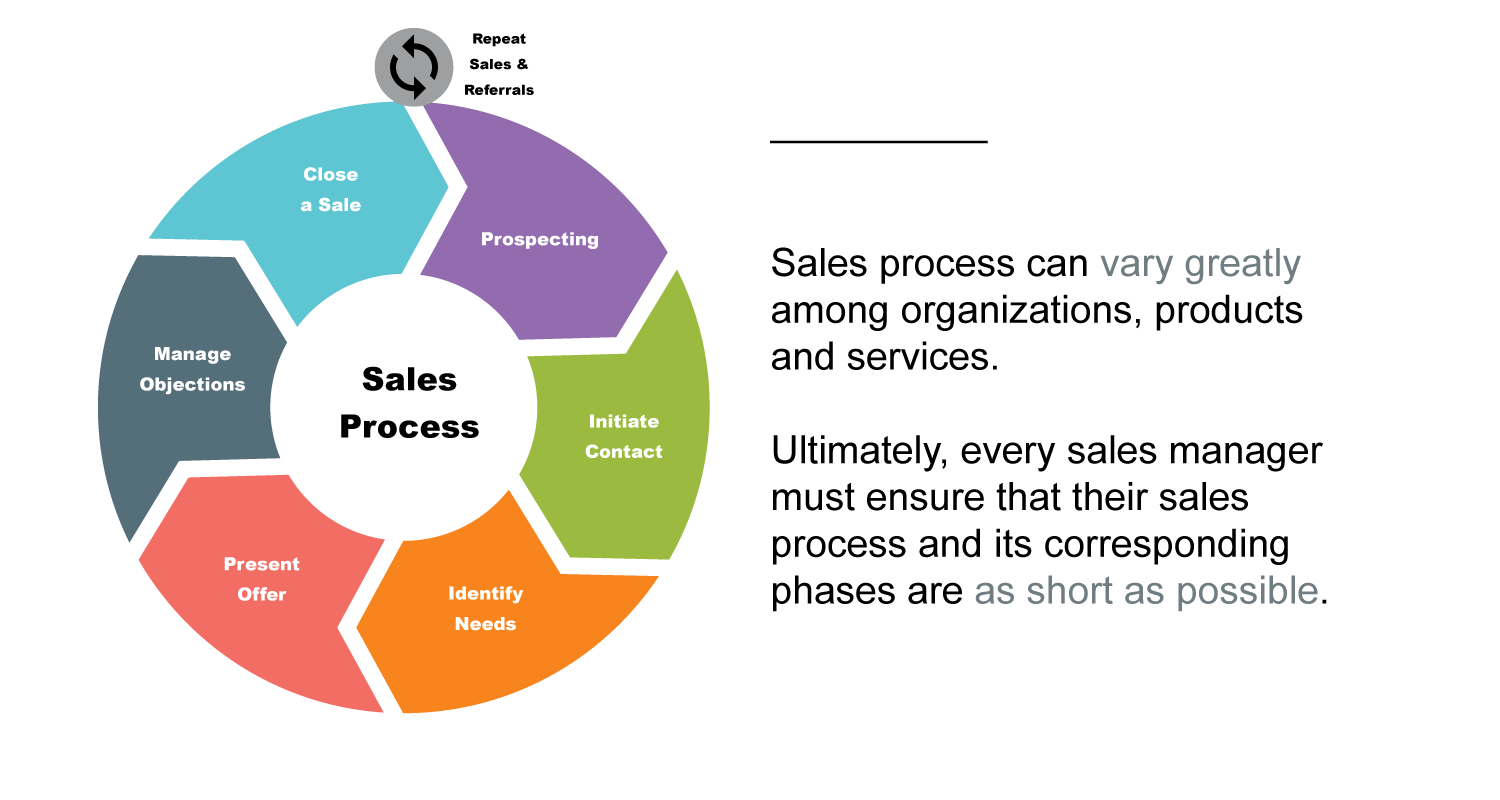
In general, a sales cycle refers to a step-by-step process of closing a deal. It can be described as a series of events that take place from the initial contact with a prospect up to the moment when the sale is closed. Others define sales cycle as the time it takes to convert a qualified lead to a won deal.

The average length of a sales cycle is a hugely important sales metric and it is closely related to the Sales Velocity Formula. It can help you make your sales forecasting more predictable. By looking at a number of leads you have in the pipeline, you can confidently project weekly, monthly and even quarterly sales figures. High-growth companies often set themselves a KPI to reduce the Average Sales Cycle Length to accelerate sales and consequently their revenue growth.

Sales Cycle Guidance

Lead creation date

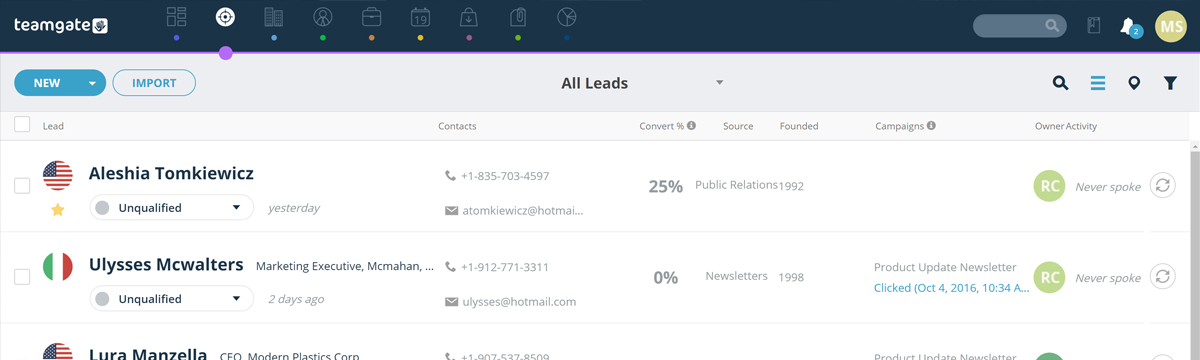
One of the most obvious ways to track the sales cycle is to start from the moment a lead is created in your CRM, and end when the sale is closed. It’s a well-liked method of many sales operations managers because it gives them a clear and structured view of a customer’s buying journey – from the first touchpoint to the final ‘yes’. Pinpointing areas in a sales cycle where leads slow down and even drop off or identifying the stages where the process speeds up, allows sales teams to learn, iterate and shorten the sales cycle to achieve sales faster.

However, this method is not without its shortcomings. The biggest issue is that a lead can be created at any time, but it can stay dormant in your CRM for weeks, months or even years. It usually happens with companies that want potential customers to be well-educated about their solution before a sales rep gets in touch. They can buy leads and use content marketing or other lead nurturing techniques to prep them for the sale. Once leads start engaging with the company (download an ebook, sign up for a webinar, request a trial, etc.), duplicate leads may start popping up in the CRM at every new touchpoint. It greatly complicates how the sales cycle length is measured. With several leads attached to one opportunity, how can you decide where the “real start” of the sales cycle is?

Sales Cycle Fully Explained

To make sure the analysis is not skewed and the sales cycle length is accurate, sales operations managers need to keep a close eye on the CRM, constantly checking in with their sales reps to ensure there are no duplicate leads and to clean the CRM when needed.

Opportunity creation date

To avoid having to deal with inaccurate data and unreliable analysis, some companies choose to consider the beginning of a sales cycle as the moment when a lead is converted into an opportunity.

The trouble with this method is that it completely ignores the entire top of the funnel. For established companies that have strong marketing and sales processes in place, it doesn’t make much of a difference. However, for businesses that are still trying to figure out and constantly iterate their sales cycle to create the most efficient buying journey, the touch points that bring a lead to when it is converted into an opportunity can be truly illuminating.

Another struggle that comes with this method is the need for strict rules defining when a lead should be converted into an opportunity. It’s not uncommon for leads to be converted into sales opportunities right before the sale is closed, which throws off the data and makes it almost impossible to make accurate sales forecasts.  

Conversion start date

The last method is probably the most laborious. It allows companies to measure the sales cycle length from the moment when an opportunity is converted into a deal. This requires sales reps to manually update the CRM for every email and call leading up to a sale, even those leads that get qualified out. It often takes several emails and calls before a sales rep decides that a lead is an opportunity, and the data for those leads that are lost is largely irrelevant. However, for the deals that get closed, the data recorded in the CRM is the most accurate way to gauge the actual sales cycle length.  

How to decrease your sales cycle length?

Shortening the length of your sales cycle is one of the most straightforward tactics you can use to increase your revenue. The faster leads come in and out of your pipeline, the more sales you can make. Driven by the desire to find the most effective method for shortening the sales cycle, sales teams have discovered a number of methods, ranging from better lead qualification, to lead nurturing, to faster follow-ups.

Here are a few ideas that can get the ball rolling:

  • Execute lead qualification better. Many businesses have opted for automated lead scoring and grading to ensure that only top-quality leads are passed on to sales reps. If sales and marketing can work together to define what a qualified lead means to their business and set a threshold score, sales reps can really focus on closing instead of wasting their time on leads who aren’t good matches for the product.
  • Implement lead nurturing. CRMs enable marketers to craft “drip campaigns” that automate lead nurturing and ensure every prospect is being engaged with content that’s timely and relevant to their place in the sales cycle. It’s a surefire way to help prospects complete their research and reach the sales-ready stage much faster. When sales reps take over, the leads are much easier to work. 
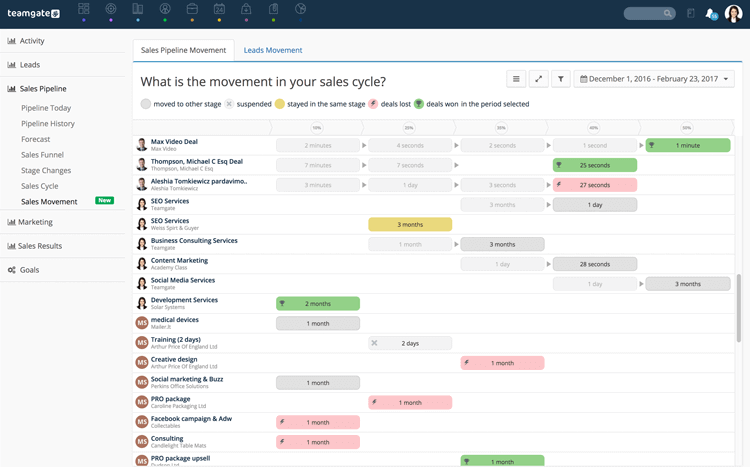
Sales Cycle Teamgate Sales Movement
Shorten your Sales Cycle with “Sales Movement” by Teamgate
  • Disqualify prospects that are unlikely to close. The more your sales team is obsessed with the health of your pipeline, the easier it will be to shorten the sales cycle. The biggest favor you can do for your business is to closely examine all won, lost and “no decision” opportunities to learn to recognize their specific characteristics as early in the deal as possible. Once you master the art of telling apart a winner from a time-waster, your sales team will be able to breeze through dead leads and focus on closing winners instead, thereby decreasing the length of your sales cycle.
  • Communicate with all decision-makers. What was once the responsibility of a manager or the business owner, is now a decision reached through a consensus process. Today buying decisions involve all stakeholders – from departmental heads to implementers, to users. For sales reps, it means their ability to communicate the right benefits to the right people in the right language is a crucial factor of success. A smart sales rep will keep the process upbeat and moving forward by providing everything a prospect might need to make the decision – from relevant data to case studies. Ensuring your prospects are spending their time and energy on deliberating the decision, not gathering data that you can provide, is an effective tactic to close deals faster. 
  • Align with their objectives, not your solutions. The popular belief is that selling solutions to problems is the best way to make people commit. But there is another school of thought that claims prospects are much more inclined to buy if the product is aligned with their key objectives. Essentially, it’s a matter of framing the pitch to fuel the prospect’s desire to achieve their goals, instead of addressing their pain points. The risk of focusing on a problem is that the prospect might not be aware of it or does not think solving that problem is a priority. Aligning with their objectives and enabling them to achieve the objectives faster, easier or using fewer resources, will require less vigor and time on your side to close the deal.

Conclusion

Shortening your sales cycle allows you to bring in more revenue, hit your goals and even spot the inefficiencies of your sales process that are stalling your growth. The best thing about this metric is that it is completely in your control. If you decide to overhaul your sales process to enable your sales reps to close deals faster, you can dig deeper and analyze the data by sales stage, for individual reps, and by Won-Lost deals. This will give you a complete, 360 view of your sales cycle.

To learn more about how Teamgate can help shorten your sales cycle length, request a demo today, or get started with a 14-day free trial.  

FAQs: Sales Cycle Length

Q: What is sales cycle length?

A: Sales cycle length refers to the time it takes for a lead to progress through the sales process and convert it into a closed deal. It measures the duration from initial contact with a prospect to the final sale.


Q: Why is sales cycle length important?

A: Sales cycle length is important because it affects sales forecasting and revenue growth. By understanding the average length of your sales cycle, you can make more accurate sales projections and identify opportunities to shorten the cycle, leading to increased revenue.


Q: How can I track the length of my sales cycle?

A: There are different methods to track the length of your sales cycle. You can start from the lead creation date, the opportunity creation date, or the conversion start date. Each method has its own considerations and advantages, depending on your specific sales process.


Q: What are some strategies to decrease the length of the sales cycle?

A: There are several strategies you can employ to shorten your sales cycle. Better lead qualification, implementing lead nurturing campaigns, and disqualifying prospects that are unlikely to close can help streamline the process. Additionally, effective communication with decision-makers and alignment with their objectives can accelerate the sales cycle.


Q: How can analyzing sales cycle data help improve my sales process?

A: Analyzing sales cycle data provides valuable insights into inefficiencies and bottlenecks in your sales process. By examining the data by sales stage, individual reps, and won-lost deals, you can identify areas for improvement, refine your strategies, and optimize the sales cycle for better results.


Q: Can shortening the sales cycle lead to increased revenue?

A: Yes, shortening the sales cycle can lead to increased revenue. When the sales cycle is shorter, more deals can be closed in a given time period, resulting in higher revenue. It allows you to capitalize on opportunities faster and achieve sales goals more efficiently.


his article explores the significant role of Customer Relationship Management (CRM) in non-profit organizations. It covers what CRM is, its importance, key features for non-profits, top tools, how to select and implement the right CRM.

Key Takeaways:

  1. CRM systems are vital tools for non-profits, helping manage and analyze donor interactions and data.
  2. Key features of CRM for non-profits include contact, fundraising, and volunteer management, along with donor tracking and event coordination.
  3. Several top CRM tools are designed for non-profits, each with unique offerings.
  4. Choosing the right CRM involves assessing needs, budget, usability, and scalability.
  5. Successful CRM implementation can significantly enhance a non-profit’s efficiency and impact.

Table of Contents

  1. Introduction
  2. Understanding CRM and Its Importance in Non-Profits
  3. Key Features of CRM for Non-Profits
  4. Top CRM Tools for Non-Profits
  5. How to Choose the Right CRM for Your Non-Profit
  6. Implementing CRM in Non-Profit Organizations
  7. Conclusion
  8. Frequently Asked Questions (FAQs)

Introduction

In the realm of non-profits, efficiency and organization are vital. Customer Relationship Management (CRM) systems, typically associated with for-profit businesses, offer these attributes and more. CRM systems are multifunctional platforms that manage and analyze interactions and data throughout a customer’s lifecycle. The purpose? To improve relationships, retain customers, and drive sales growth. However, for non-profits, this translates to better donor relations, streamlined fundraising efforts, and effective volunteer management.

Understanding CRM and Its Importance in Non-Profits

CRM, in essence, is a comprehensive tool that consolidates all customer-related data in a centralized location. It automates various processes and provides valuable insights, thereby enhancing the organization’s efficiency and effectiveness. For non-profits, donors are customers, and the sales are successful donation drives, campaigns, and events.

A CRM system is critical for non-profits as they often deal with an extensive network of donors, volunteers, and beneficiaries. Managing these relationships can be complex, requiring a solution that provides a holistic view of all interactions. CRM makes the management process easier, fostering stronger relationships, improving donor retention, and ultimately, increasing the non-profit’s impact.

Key Features of CRM for Non-Profits

CRM systems offer several essential features for non-profits:

  1. Contact Management: CRM stores detailed contact information, including donation history, volunteer hours, event participation, and communication records. This data aids in personalizing interactions and building strong relationships.
  2. Fundraising Management: CRM tracks donations, manages fundraising campaigns, and provides reports on their success. It can automate gift acknowledgments, ensuring donors feel appreciated.
  3. Volunteer Management: CRM helps organize and track volunteer information, including availability, skills, and hours worked. This assists in effective volunteer utilization.
  4. Donor Tracking and Engagement: CRM provides insights into donor behavior, helping to identify trends, engagement levels, and opportunities for increased donations.
  5. Event and Project Management: CRM can coordinate events, track project progress, and measure outcomes. It ensures nothing falls through the cracks.

Top CRM Tools for Non-Profits

Several CRM tools are tailored for non-profit organizations, including:

  1. Teamgate CRM: An easy to use, yet powerful and data-driven CRM platform that offers hand-held onboarding and customer support.
  2. Donorbox CRM: An all-in-one, AI-powered donor management system that centralizes email, segmentation, reporting, and supporter insights to help nonprofits build stronger relationships with less effort.
  3. Salesforce Nonprofit Success Pack: A customizable CRM platform that offers a 360-degree view of constituents.
  4. Blackbaud Raiser’s Edge NXT: A comprehensive, performance-driven tool that manages fundraising, supporters, and programs.
  5. NeonCRM: A cloud-based platform that automates time-consuming tasks and integrates with many popular non-profit tools.
  6. Bloomerang: A donor-focused CRM, providing retention insights and engagement opportunities.

Choosing a CRM tool requires careful analysis of its features, usability, scalability, and cost-effectiveness. Each non-profit has unique needs, and the CRM system should align with those needs.

How to Choose the Right CRM for Your Non-Profit

Selecting a CRM system involves considering several factors:

  1. Needs and Objectives: Identify what you need from a CRM. Whether it’s improved donor management, streamlined fundraising, or better volunteer coordination, your objectives should guide your choice.
  2. Budget: CRM systems come at various price points. Assess what you can afford and the ROI of the investment.
  3. Ease of Use: The CRM should be user-friendly. It must be easy for your team to learn and use.
  4. Scalability: Choose a CRM that can grow with your organization. It should be able to handle increased data and complexity over time.

The right CRM aligns with your non-profit’s needs, budget, and future plans. It should be an investment that brings significant returns in terms of improved efficiency and relationship management.

Implementing CRM in Non-Profit Organizations

The implementation of a CRM system involves several steps:

  1. Planning: Identify your organization’s specific needs and set clear objectives for what you want to achieve with the CRM.
  2. Selection: Choose a CRM system that aligns with your objectives and budget.
  3. Data Migration: Move all existing data into the new CRM system. Ensure data is clean and organized to make the most of the CRM’s capabilities.
  4. Training: Educate your team on how to use the CRM effectively. The more your team understands the system, the more beneficial it will be.
  5. Evaluation: Regularly assess the CRM’s performance to ensure it’s meeting your needs and adjust as necessary.

Implementing a CRM can bring challenges, such as resistance to change and data management issues. Address these proactively with thorough planning, training, and ongoing support.

Conclusion

CRM systems are not just for profit-driven businesses. Non-profits stand to benefit significantly from the organization, efficiency, and insights a robust CRM system provides. From better managing donor relationships to streamlining fundraising efforts, CRM can elevate a non-profit’s mission, leading to more significant impact and success.

At Teamgate CRM we not only value our customers, but also their growth. That’s why for all new customers we offer a free, white-gloved onboarding which includes a full review of our customer’s sales processes and practices. Speak to one of our team member’s today about what we can offer for non-profits.

Frequently Asked Questions (FAQs)

What is CRM?
CRM, or Customer Relationship Management, is a system that manages and analyzes interactions and data throughout a customer’s lifecycle. It aims to improve relationships, retain customers, and drive growth.

Why do non-profits need a CRM?
Non-profits need CRM to manage their vast network of donors, volunteers, and beneficiaries. CRM systems streamline and automate processes, foster stronger relationships, improve donor retention, and ultimately, increase the non-profit’s impact.

How can a CRM improve a non-profit’s operations?
CRM can improve a non-profit’s operations by automating time-consuming tasks, providing valuable insights into donor behavior, enhancing relationship management, and streamlining fundraising and event management.

How to choose the right CRM for a non-profit?
Choosing the right CRM involves considering your non-profit’s specific needs, budget, ease of use, and scalability. The right CRM aligns with your organization’s objectives and can grow with it over time.

In this comprehensive guide, we delve into the world of Sales CRM and its pivotal role in small and medium-sized businesses. We’ll explore CRM types, why SMBs need them, key features, top tools, and measuring their success.

Key Takeaways:

  1. CRM systems, divided into operational, analytical, and collaborative types, are essential for streamlining sales processes.
  2. SMBs, due to their unique challenges, can significantly benefit from implementing a sales CRM.
  3. Essential features of a good sales CRM include contact management, interaction tracking, and sales forecasting.
  4. Top-rated CRM tools for SMBs include Salesforce, HubSpot, Zoho, Pipedrive, and Freshsales.
  5. Measuring the success of a sales CRM involves evaluating key performance indicators like conversion rates, customer retention rates, and customer satisfaction scores.

Table of Contents

  1. Introduction
  2. Understanding CRM
  3. Why SMBs Need Sales CRM
  4. Features to Look For in a Sales CRM
  5. Top 5 Sales CRM Tools for SMBs
  6. Implementing Sales CRM in SMBs
  7. Measuring the Success of Sales CRM
  8. Conclusion
  9. FAQs

Introduction

Every SMB (small and medium business) craves growth. The key to unlocking this growth often lies in managing customer relationships effectively. Enter CRM, or Customer Relationship Management, a strategic tool that can transform the way businesses interact with their customers. For SMBs, the sales CRM becomes a crucial cog in the machinery that drives sales, fosters relationships, and ultimately accelerates growth.

Understanding CRM

At its core, CRM is a system that manages a company’s interactions with current and potential customers. It leverages data analysis about customers’ history to improve relationships, focusing on customer retention and driving sales growth.

CRM systems are usually classified into operational, analytical, and collaborative. Operational CRM streamlines the business processes, including sales automation, marketing automation, and service automation. Analytical CRM supports management, strategic level decisions, utilizing a customer data platform for insights. Collaborative CRM, on the other hand, deals with all the necessary communication, coordination, and collaboration between customers and stakeholders.

CRM software specifically targets improving sales processes. It accomplishes this by organizing and automating tasks like contact management, lead tracking, sales forecasting, and performance analysis. With these tools at their disposal, sales teams can focus more on selling and less on administrative tasks.

Why SMBs Need Sales CRM

SMBs face unique challenges in their sales process. Limited resources, high competition, and the need for rapid growth make managing customer relationships even more crucial. Herein lies the value of sales CRM.

Sales CRM can streamline sales processes, improve data organization, and provide a clear view of the sales pipeline. This leads to better customer interaction, improved cross-selling and upselling opportunities, and ultimately, increased sales.

For instance, an SMB in the retail industry implemented a sales CRM and observed a 20% increase in their sales within six months. This was primarily due to better lead tracking and improved customer engagement facilitated by the CRM.

Features to Look For in a Sales CRM

When selecting a sales CRM, SMBs should consider key features that align with their sales goals. Contact management is crucial, providing a central place for tracking customer information. Interaction tracking enables sales reps to document conversations and interactions, ensuring no detail falls through the cracks.

These features streamline the sales process, freeing up time for teams to focus on closing deals. Moreover, tools like email marketing, social media management, and reporting help in customer retention and acquisition by providing insights into customer behavior and engagement.

Top 5 Sales CRM Tools for SMBs

While numerous sales CRM tools are available, five stand out as particularly beneficial for SMBs:

  1. Teamgate – Known for its extensive onboarding and hand-held approach,  Teamgate offers an easy to use and cost-effective solution for SMBs.
  2. HubSpot – Offers a free CRM with a focus on simplicity and user experience. Paid plans provide more advanced features.
  3. Zoho – A cost-effective solution with a broad feature set, suitable for SMBs looking for affordability and functionality.
  4. Pipedrive – Designed with sales teams in mind, it excels at managing and visualizing the sales pipeline.
  5. Freshsales – Offers a comprehensive suite of features with a focus on AI and automation, at competitive pricing.

Implementing Sales CRM in SMBs

Implementing a sales CRM in an SMB involves a series of steps, starting with identifying needs, selecting the right tool, migrating data, configuring the system, and finally, training the staff. Challenges may arise, such as resistance to change or data migration issues, but these can be mitigated with proper planning and communication.

Training is crucial in the implementation process. It ensures that all staff can effectively use the CRM tool, maximizing its benefits. Vendors often provide training resources, but internal workshops and hands-on practice sessions can also be useful.

Measuring the Success of Sales CRM

To gauge the success of a sales CRM, SMBs should look at key performance indicators (KPIs) like conversion rates, customer retention rates, and customer satisfaction scores. The CRM tool itself can often track these metrics.

It’s also essential to regularly evaluate these KPIs. By monitoring trends over time, businesses can identify areas of success and potential improvement. This continual assessment enables them to fine-tune their sales process, ensuring that their sales CRM is a tool for growth, not just management.

Conclusion

Sales CRM isn’t just a tool; it’s a strategic asset for SMBs. It streamlines the sales process, provides valuable insights, fosters customer relationships, and drives growth. By choosing the right CRM, implementing it effectively, and measuring its success, SMBs can unlock their potential and set themselves on a path to success.

At Teamgate CRM we not only value our customers, but also their growth. That’s why for all new customers we offer a free, white-gloved onboarding which includes a full review of our customer’s sales processes and practices. Speak to one of our team member’s today about what we can offer for SMBs.

FAQs

What is a sales CRM?

  • A sales CRM is a system that helps businesses manage their interactions with current and potential customers, streamline sales processes, and drive sales growth.

Why does my SMB need a sales CRM?

  • Sales CRM can help SMBs overcome unique challenges like limited resources and high competition. It can streamline sales processes, improve customer interaction, and increase sales.

What features should I look for in a sales CRM?

  • Key features to look for include contact management, interaction tracking, sales forecasting, email marketing, social media management, and reporting.

What are some top-rated sales CRM tools for SMBs?

  • Top-rated sales CRM tools for SMBs include Salesforce, HubSpot, Zoho, Pipedrive, and Freshsales.

How can I implement a sales CRM in my business?

  • Implementing a sales CRM involves identifying needs, selecting the right tool, migrating data, configuring the system, and training staff.

How do I measure the success of my sales CRM?

  • You can measure the success of your sales CRM by looking at key performance indicators (KPIs) like conversion rates, customer retention rates, and customer satisfaction scores. Regular evaluation of these KPIs is essential for ongoing improvement.

If your sales aren’t mobile, they’re static

Modern sales professionals need to be both mobile and connected at all times. That’s where the Teamgate mobile CRM idea came to mind.

Sales professionals need a fully mobile sales CRM to keep them in-touch and connected with their entire sales process. If something changes, anywhere in the sales pipeline, your sales team need to have access to that information, office-bound or not.

By bringing Teamgate CRM to mobile, your sales team will benefit from all of the features and tools that they need to take their sales office with them wherever they go. 

Why a Mobile CRM?

Sales professionals can benefit greatly from having a mobile app for their Customer Relationship Management (CRM) system for several reasons:

  • Accessibility: With a mobile app, sales professionals can access their CRM data from anywhere, at any time, as long as they have their mobile device with them. This means they can quickly check customer information, update contact details, and track sales progress while on-the-go, without needing to be at their desk or in the office.
  • Efficiency: Mobile CRM apps can help sales professionals be more efficient by enabling them to quickly input data and update customer information while they are still fresh in their minds. This can help reduce the chances of forgetting important details or making mistakes when entering information later on.
  • Improved Customer Interaction: Mobile CRM apps can provide sales professionals with instant access to customer data, allowing them to personalize their interactions and respond to customer needs more effectively. This can help build stronger relationships with customers and improve the overall customer experience.
  • Real-Time Updates: With a mobile CRM app, sales professionals can receive real-time updates on leads, deals, and customer interactions. This can help them stay on top of their sales pipeline, prioritize tasks, and make better-informed decisions.
  • Analytics: Mobile CRM apps can provide sales professionals with analytics and reporting capabilities, enabling them to track their performance and identify areas for improvement. This can help them optimize their sales processes and improve their overall effectiveness.

 Mobile CRM features

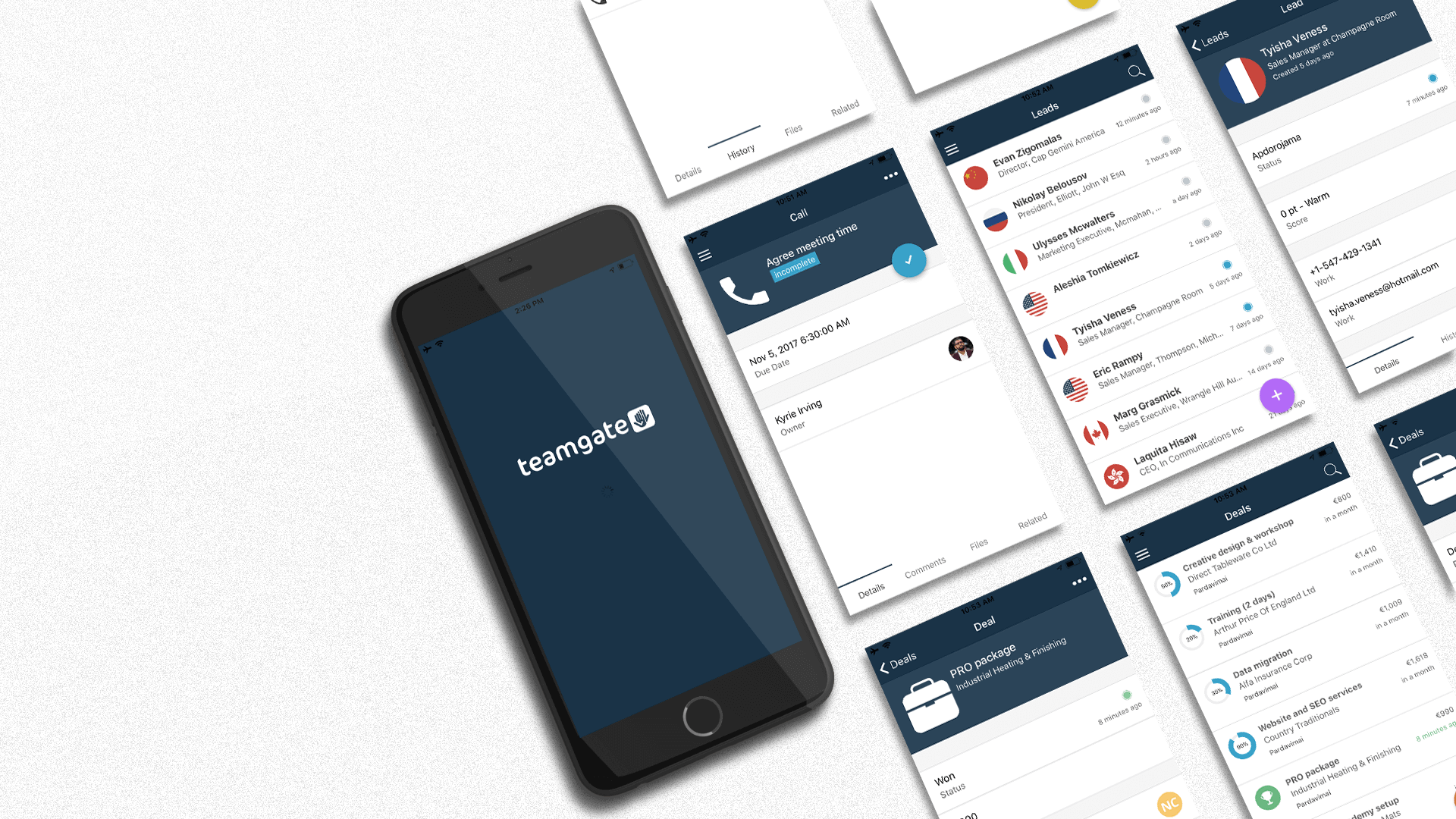
Mobile Sales App Teamgate

A mobile CRM sales solution needs to come with all the time-saving tools sales professionals need to keep the sales pipeline flowing smoothly. With Teamgate CRM, our mobile plan is packed full of features to keep your sales team active:

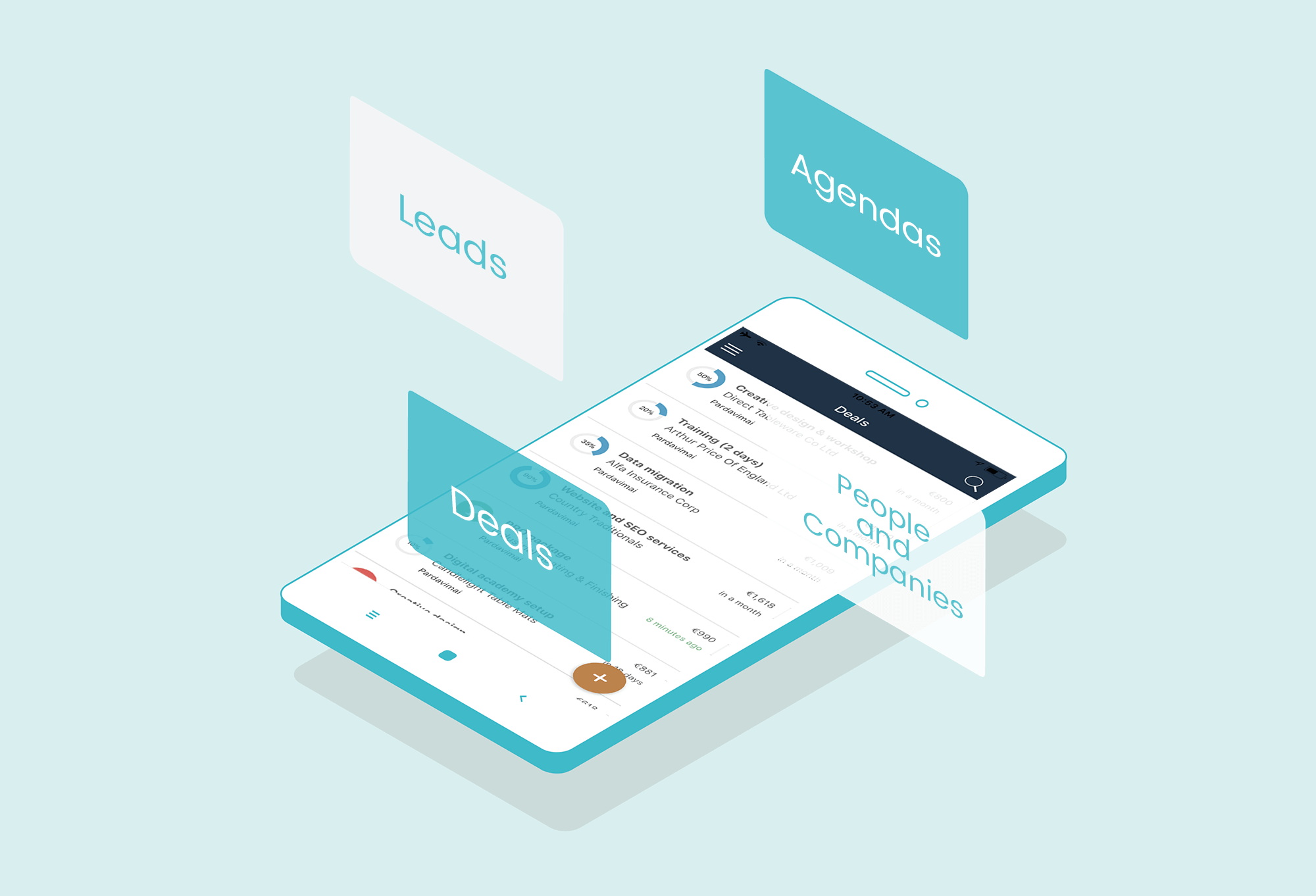
Agendas – Manage all aspects of your agenda.

  • Check to see what’s on, where, and when.
  • Edit the activity as the situation changes.
  • Change the activity owner.
  • View any files attached or associated with the activity.
  • Add or read personalized comments associated with the activity.
  • Check all of the activity’s related contacts.
  • And finally, remove an activity when no longer needed.

Leads – Your leads are the lifeblood of your sales process so they need to be managed with great care. But that’s no problem with Teamgate mobile CRM

  • Teamgate gives you access to your full leads list.
  • It lets you search your entire leads list.
  • Add new leads and change the status of those leads.
  • Email or call your leads directly from the mobile CRM.
  • Check your lead’s location on the map.
  • Review all communication history and attached files.
  • Change the owner of the lead.
  • Create new tasks.
  • Convert your leads while on the road.

People and Companies – Being away from your desk is no obstacle to managing the people and companies who populate your CRM.

The Teamgate mobile sales solution helps you manage your contacts intelligently and gives you all the options you need.

  • Review your entire contacts list.
  • Add a new person/company.
  • Search for persons/companies
  • Edit or change your customer’s status.
  • Email or call the contact directly from your CRM.
  • Change the owner of the account.
  • Check their entire communication history.
  • View all attached files and documents.
  • See all related deals or contacts.
  • Create new related deals as you need them.

Deals – Deals are always to hand with Teamgate mobile CRM.

  • Search your deals list.
  • Add new deals.
  • Change their status.
  • Change the deal owner.
  • Review communication history.
  • See all attached files.
  • Inspect related contacts or companies.
  • Edit or remove deals.

Take your entire sales office on a road trip

Mobile Sales Solution Teamgate CRM

Teamgate’s mobile sales solution means never being stuck for the information you need, even when away from the office.

Whether you want to arrange meetings or take notes, call clients directly from the mobile app, or update your customer’s detail as they change, Teamgate gives you all that power using your mobile phone. Try a 14-day free test drive today before our mobile app is launched in H2 of 2023!

How would you describe your sales CRM?

  • Easy to use?
  • Insightful?
  • A great time saver?

Probably not, right?

The fact is that most CRMs are a pain to use.  They suck valuable time from your day-to-day and are rarely kept up to date.

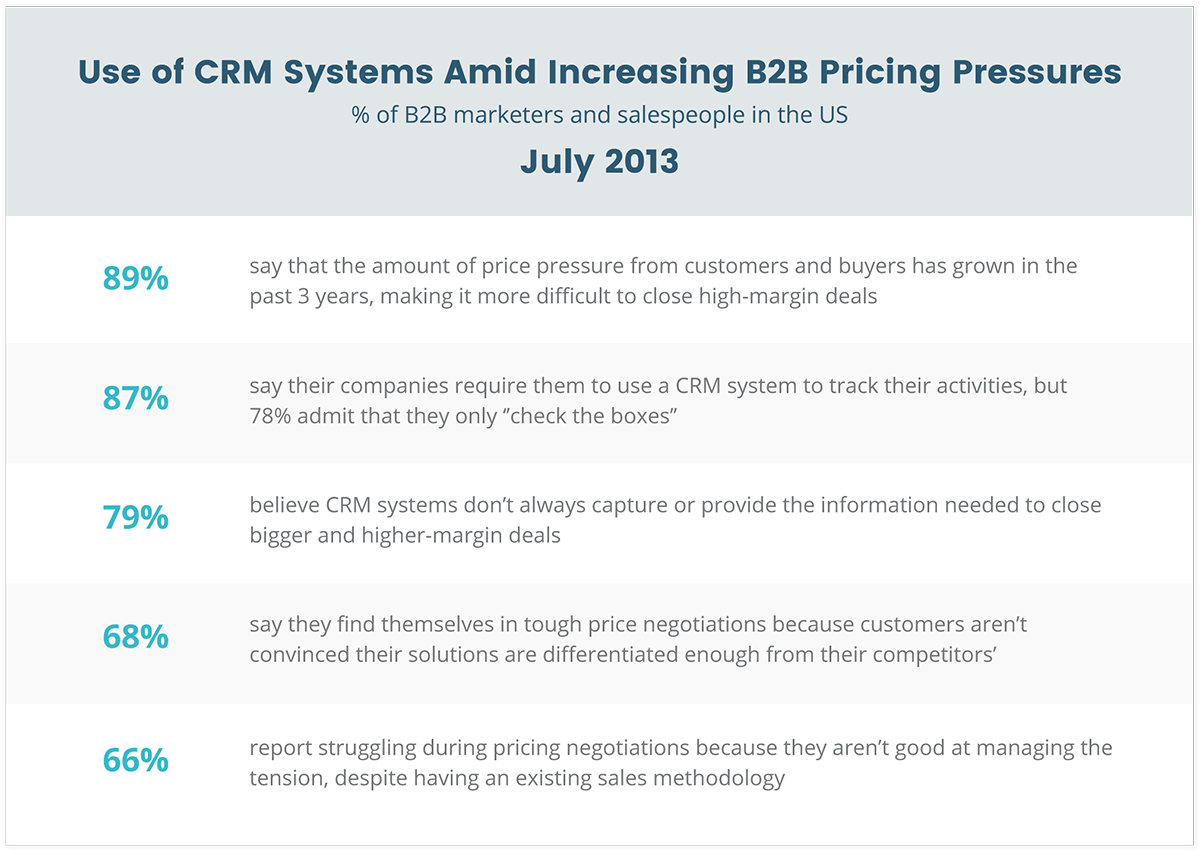
In fact, 87% of salespeople believe the reason they’re forced to update their CRM is so that their manager can police their activities.

This often results in salespeople just checking boxes, and doing the bare minimum to pass off as having completed their “obligatory CRM update”.

use-of-crm-systems-amid-increasing-b2b-pricing-pressures

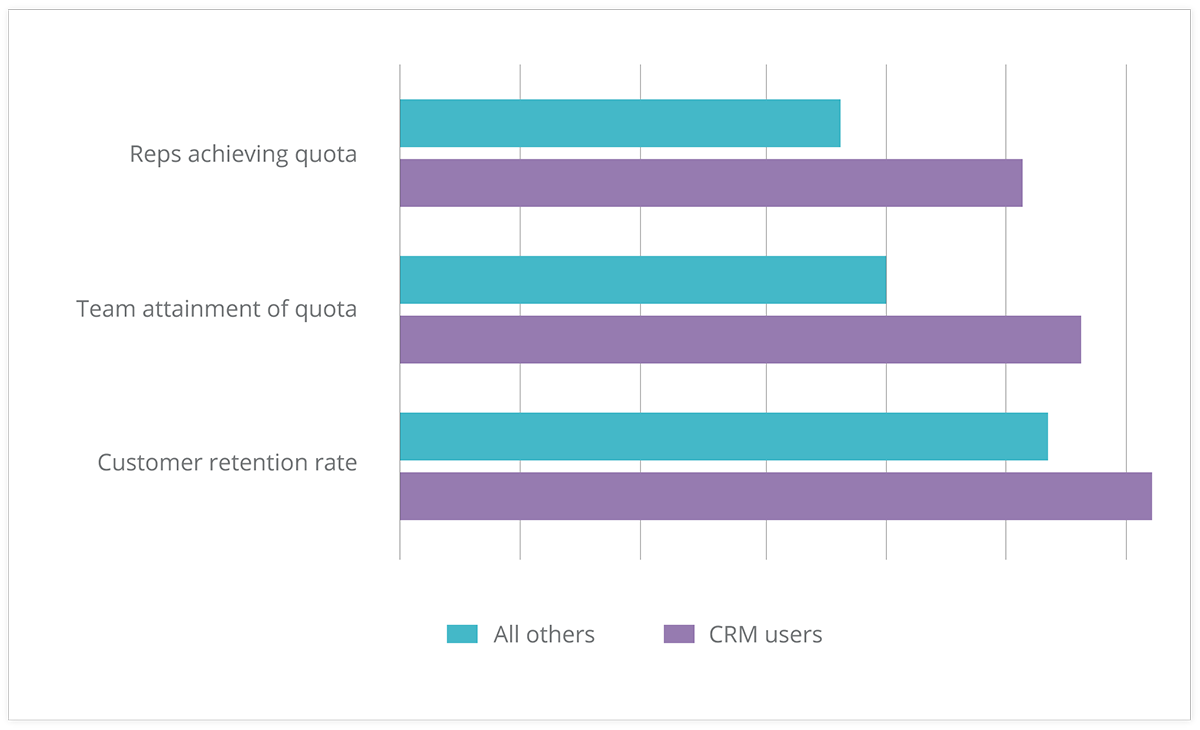
However, companies who adopt a Sales CRM as a tool for Sales Enablement achieve some pretty impressive results…
Check this out:

crm-results

These results from Aberdeen Research prove that by having the right mindset to use a CRM effectively, impressive results can be achieved… and consistently!

Sadly though, an estimated 25-60% of CRM projects fail to meet expectations.

But fear not…

In this article, I’m going to share seven CRM best practices for 2017.  After reading all the way to the end, you’ll be able to identify the right sales solution to guarantee 2017 as your best year yet.

So let’s get into it:

#1 – Clean, Reliable, and Up-To-Date Data

clean-reliable-and-up-to-date-data

Having clean, reliable, and up-to-date information in the CRM is essential for team collaboration.

But let’s be honest… do you really want to spend your time checking through last month’s data, and cleaning it up?

Of course not…

This is why it’s essential you choose a CRM that does this automatically.  Some beneficial features that’ll save you time and keep things in check automagically include:

  • Duplication Prevention
  • Lead Age Indicators
  • Deal Movement Tracking – more on this later.

Unless you enjoy data entry, I urge you to check whether your CRM is capable of all of the above.  It’s 2017 and it’s about time your CRM acted like it!

Related: CRM Segmentation: Knowing Your Customers Better and Preventing Data Clutter

#2 – Company Wide Snapshot

company-wide-snapshot

Another CRM best practice for 2017: Clarity.

“Clarity affords focus.” – Thomas Leonard.

Your CRM dashboard needs to be the first thing you see every day.  It’s the central control and pulse of the company.

At one glimpse you should be able to achieve full clarity over your company’s most important metrics.

As a salesperson this may include:

  • Your sales goals
  • Current leads you’re working
  • How those leads are responding to communications you sent the prior day

As a sales manager you need to be able to see:

  • Your team’s goals
  • Lead sources and their conversion rates for accurate forecasting
  • Top loss reasons so you can support your team in areas of weakness

Ultimately having this kind of clarity and visibility over the company’s performance brings everyone that much closer together, and highlights areas of weakness that you can focus on improving for the most impactful uplifts in performance.

Without it, you’re simply lost at sea.

Related: Sourcing Data from All Angles for Valuable Market Insight and Your Rally Road Book Is Your Sales Forecast.

#3 – Segmentation

Segmentation is the first step towards personalization.  But taking a step back, lead segmentation is about organizing your data so that relevant contact information is never more than a click away.

A CRM best practice for 2017 involves the automation of lead segmentation.

What do I mean exactly?

Let’s say you’ve just finished an initial Online Meeting with a new prospect.

You’ve spent 15 minutes on the call via your CRM’s SmartDialler, and have managed to successfully qualify them into the next stage.

As such, you simply drag and drop the prospect from the “Online Meeting” column to the “Push Column”.

Segmentation

The lead gets automatically tagged, a follow-up task is created, and an email is triggered thanking the prospect for their time on the call.

Automagical.  This is 2017.

Related: Make and Receive Calls Without Leaving Your CRM: Introducing Teamgate SmartDialer and Beyond Sales: How To Make CRM Work For Any Profession

#4 – Source Tracking

This is by FAR the latest and greatest CRM best practice for 2017!

Source Tracking is a great way of accurately predicting sales forecasts based on where a new prospect has entered your CRM from.

For example:

  • Facebook
  • Google
  • LinkedIn
  • Bob’s DIY Podcast

….you get the idea.

source-tracking

At Teamgate we’re huge advocates of the Inbound Sales process.  This means we typically generate the majority of our new leads via web forms.

(By the way, you should be too!)

Now, based on where that lead has come from, we want to know the likelihood of that lead converting to a sale.

Fortunately for you and me, it’s 2017 and the top CRMs will track this automatically for you.

I can’t stress enough the importance of making sure your CRM has this capability.

It’ll highlight the lead sources that are most lucrative for your business so that you can invest more in what’s working, and less in what’s not.

Deal? Good.

Related: Networking and Capturing of New Leads with CRM

#5 – Deal Movement Tracking

Ever had a deal slip through the cracks?

Look, I know – we’re busy salesmen and it happens all the time, but there are measures we can take to ensure it doesn’t happen to you and me.

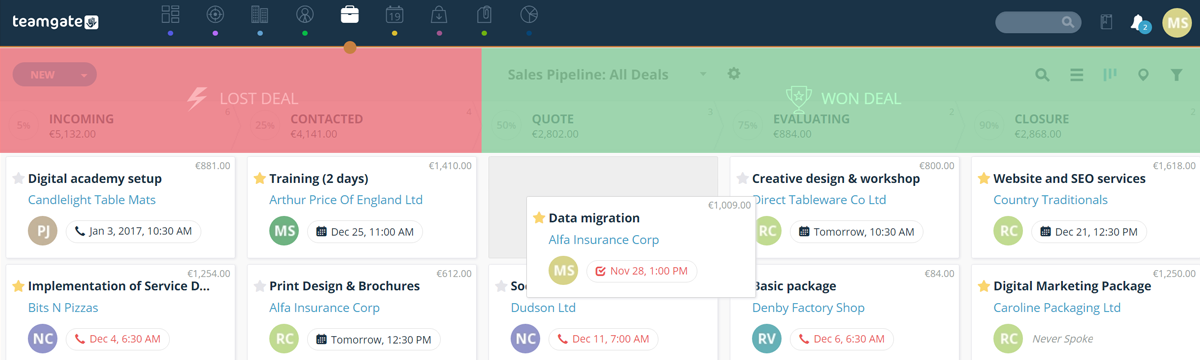
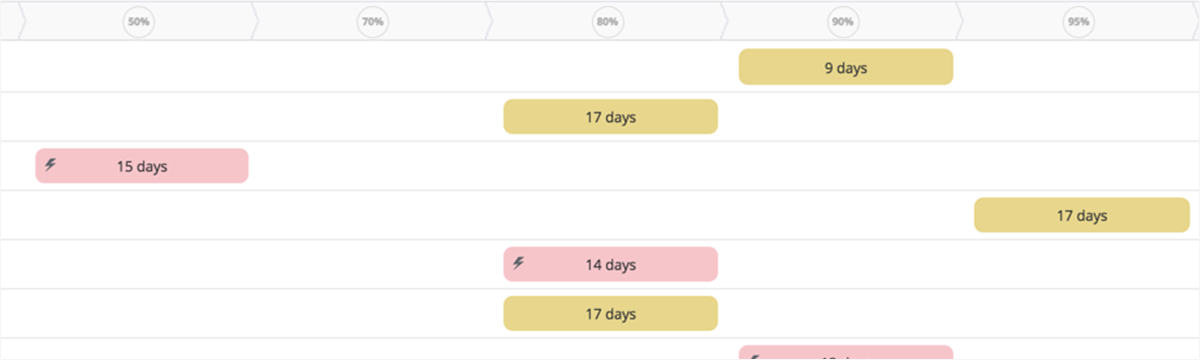
Deal movement tracking is brand new for 2017 and essentially allows salespeople to see the active movement a deal has gone through from stage to stage.

deal-movement-tracking

Why is this important?

With a quick look at your CRM’s Deal Movement board, you’ll be able to see in an instant which deals haven’t moved an inch.  Allowing you to jump right on them and move them forward.

No more deal slippage!

In fact, Deal Movement Tracking is a real timesaver if you return from a vacation, and want to see what’s happened whilst you’ve been away.

Simply fire up the Deal Movement Board and see all the progress that’s happened whilst you’ve been away – obviously great for sales managers, and highly motivating for salespeople!

Related: How to Stop Being the Second Best in Sales?

Do you have a CRM that keeps you organised?

The most user-friendly CRM on the market. 14-day free trial.

Start Free Trial

Painless setup, no credit card required

#6 – Geographical Insights

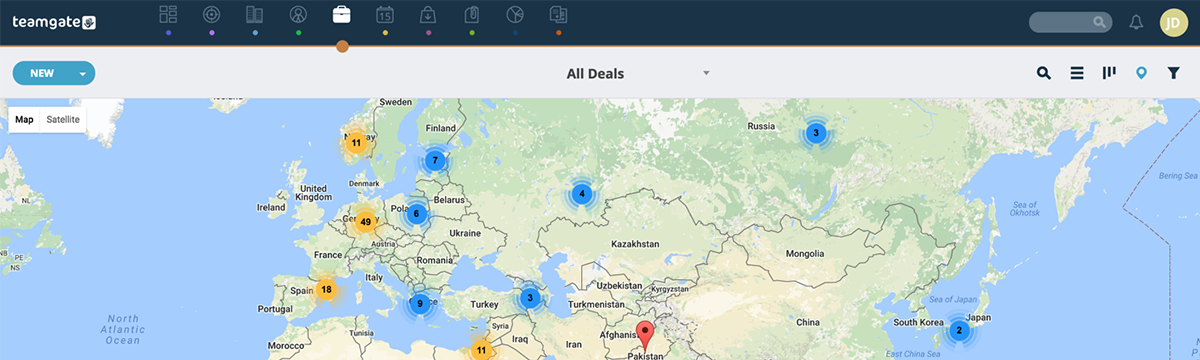
Does your current CRM allow you to see where all of your contacts are based on a map inside your deals view?

Ok, so this one may not be relevant to all businesses.  However, if you’re an international company it’s a great way of quickly visualizing which countries are performing best for you.

Not an essential one in my opinion, but a great insights tool that requires no additional input on your part.

Seriously though, it’s very cool.  Just take a look at this example taken from Teamgate:

geographical-insights

#7 – Personalisation

Lastly, and probably one of the most important features of our CRM, as we move into 2017, is the ability to get personal.

As salespeople, we sometimes fall guilty about making our prospects feel like a number in a system.  Cold callers (yes, some businesses still sell like it’s 1982) have probably a lot to answer for on this front.

However, 2017 is the year to pay extra attention to personalization.

Why?

It makes our prospects feel like we care because we take the time to care about what’s important to them.

This is a quote I like to use a lot when talking about influential sales tactics.

“People don’t buy when they understand.  They buy when they feel understood.”

Like that?  It’s so true though, right?

So how can your CRM best support this in 2017?

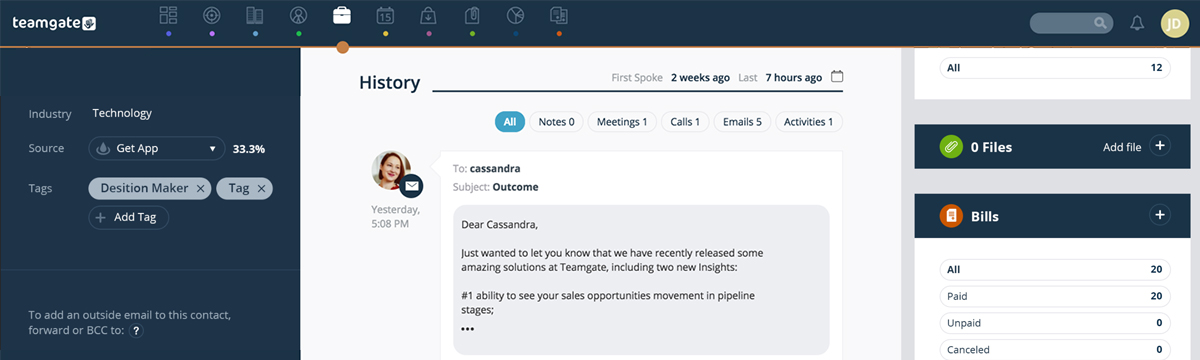
Your CRM should have a contact timeline where all calls, emails, website, and link clicking actions are recorded automatically.

personalisation


This means anytime you communicate with a prospect you can see the specific user journey they’ve been on all right there in front of you.  And as such, you can speak to them in a way that fits the experience you know they’ve had so far.

Conclusion

Like anything, there are two types of people in regards to Sales CRMs.

  1. Those who blame it for their inability to perform to their highest level.
  2. Those who embrace is it as a Sales Enablement tool.

Hopefully, these CRM best practices for 2017 have got you thinking about all the things you could be leveraging from a modern-day sales tool in your own sales team or business.

In summary, our top performers are going to be capitalizing on all of the following:

  1. Clean, Reliable, and Up-To-Date Data
  2. Company-Wide Snapshot for instant Clarity
  3. Contact Segmentation
  4. Deal Source Tracking
  5. Deal Movement Tracking
  6. Geographical Insights
  7. Personalization

Let’s make 2017 your best year yet!

Just what is a sales dashboard, and why do you need it?

As Peter Druker – the father of modern business management – so famously proposed, ‘If you can’t measure it, you can’t improve it’. 

A sales dashboard is a visual representation of your sales data, allowing you to easily track key metrics and identify areas for improvement whilst providing a wealth of information, including:

Sales targets and progress towards them
Sales by region, product, and salesperson
Lead generation and conversion rates
Average deal size and win rate
And much more.

By having all this information at your fingertips, you can quickly identify trends and patterns in your sales data, and make data-driven decisions to improve your sales performance.

But a sales dashboard is not just for sales managers. Sales reps can also benefit from having access to a dashboard, as it allows them to track their own performance and see how they compare to their peers.

In addition to providing valuable insights, a sales dashboard can also help to streamline your sales process. Many sales dashboards come with built-in CRM functionality, allowing you to manage leads, track customer interactions, and close deals more efficiently.

Why Teamgate CRM Dashboards?

The all-in-one Teamgate dashboard solution was created specifically for Sales Leaders, Sales VPs, and Heads of Sales – who need on-demand access to the health of their sales pipeline. Teamgate CRM sales dashboard displays every one of the measurements needed to analyse, understand, and improve the entire sales process, and more importantly – it can be created in seconds.

Teamgate gives you the dual option of both ‘Real-Time’ and ‘Historical Data’ dashboards.

Real-time dashboards give you an up-to-date view of the peaks and troughs of your current live sales pipeline. This gives you the power to react to any urgent situation which may require tweaking or complete overhaul.

Among the different dashboard types, historical data dashboards are precisely what they claim to be, offering overviews of all past activities over selected time periods. With the historical data dashboard, you have to select the metrics you wish to view and use the results to both compare and predict future sales trends.

You Get Solutions

No confusion, no jargon, and no unnecessary information, Teamgate Sales Dashboard gives a clear and graphic representation of the sales pipeline, at any given point in the process.

The sales dashboard – as a vital component of your CRM – gathers all the most relevant information gathered by your sales team, and presents the results in an easily digestible manner.

If you can measure it, you can improve it – so let’s find out how.

Sales Dashboard Teamgate CRM Alt

Teamgate Dashboards: The How

Inside your Teamgate CRM software, there’s a lot of things going on across your sales pipeline. Your sales team are nurturing leads, converting them to deals, closing those deals and recording all the information that it takes to navigate through each stage of the sales process.

Teamgate sales dashboard gathers all this information and returns it neatly packaged in easily understandable bit-sized reports.

These combined reports give sales leaders detailed knowledge of what’s happening in every stage of the pipeline, and they also graphically illustrate of any issues requiring immediate attention – like blockages occurring in the pipeline, or targets not being met.

Other CRMs allow the user to customise their dashboards, at Teamgate we don’t allow that to happen, and for a very good reason.

Teamgate believes that we’re the experts in this field, we really understand what you need to see, and how you need to see it. That’s no arrogant boast, it’s just a fact. We’ve focused a lot of energy on making our CRM software the most results-orientated and user-friendly on the market.

We went a long way to create the ultimate sales dashboard, and then we went even further. We created the ultimate business dashboard, the ultimate sales KPI dashboard, the ultimate sales metric dashboard, the ultimate sales report dashboard, and so much more.

We understand, 100%, that being able to measure means being able to improve.

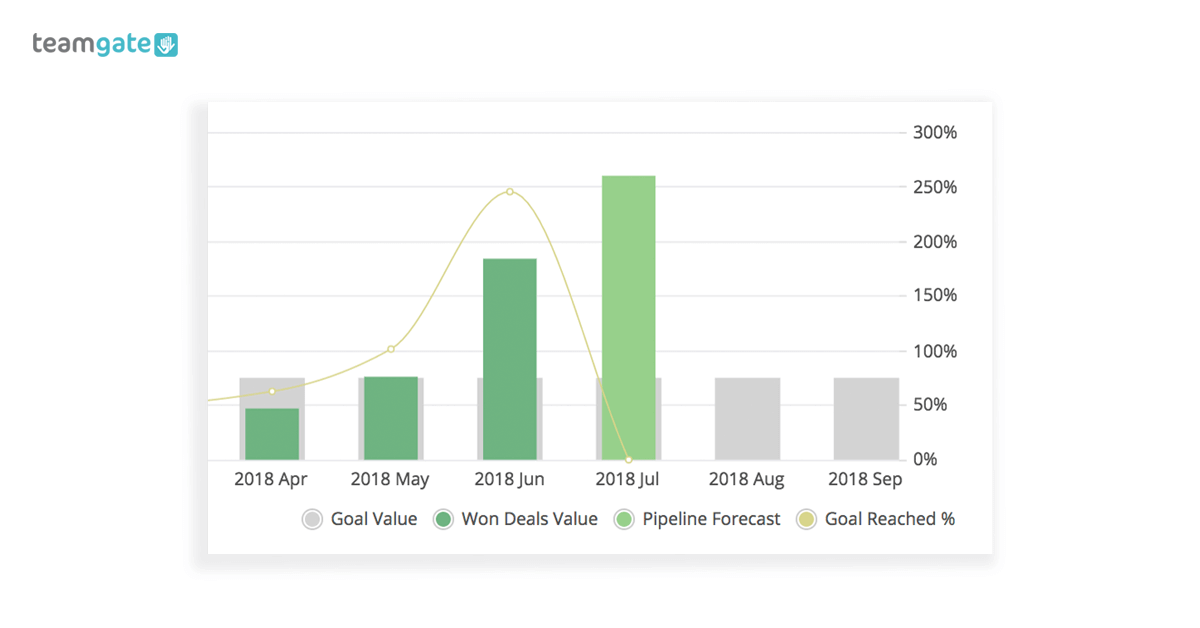
#1 Goal Management

Business Dashboard Sales Goals

Sales leaders need to be able to set goals and to manage those goals. Your Teamgate CRM lets you create sales goals directly within the sales pipeline and by means of one simple graph – and three simple metrics – to analyse if your sales results have matched those goals, and to illustrate exactly how much those results are worth. It’s not just a sales dashboard, it’s a complete business dashboard.

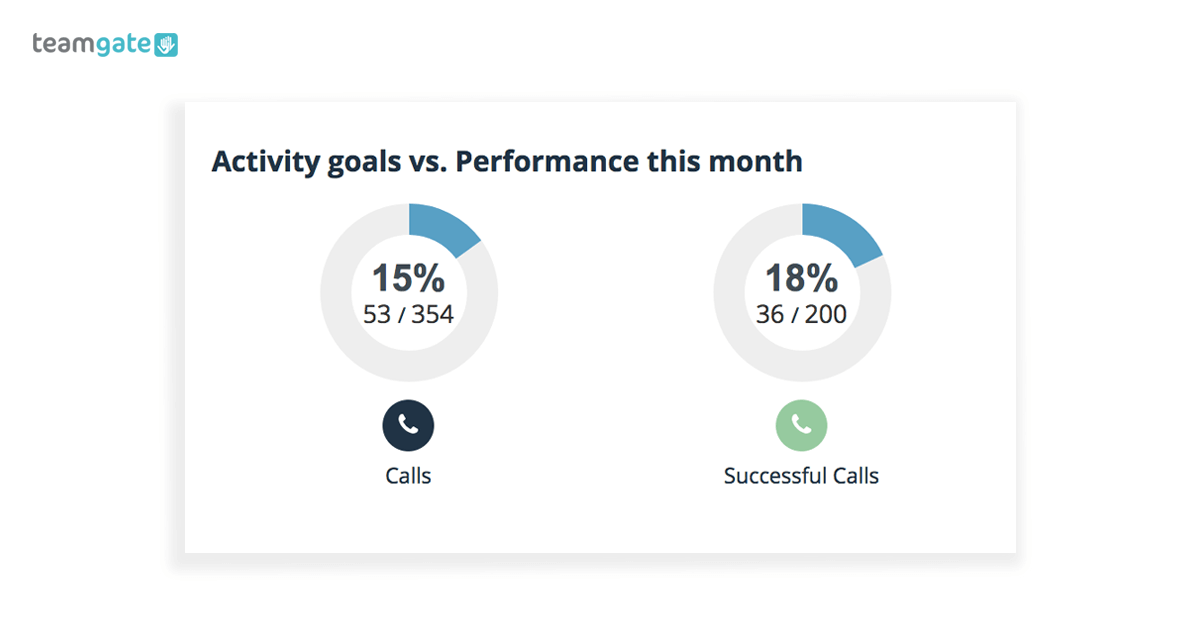
#2 Sales team performance

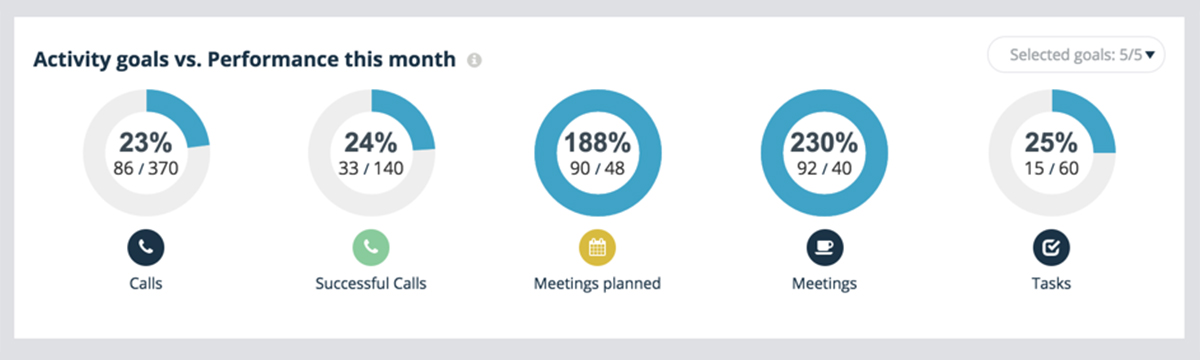
Business Dashboard Activity Goals

Want to see what your sales team are up to, and set goals for them to reach? That’s no problem with your Teamgate dashboard.

Your sales KPI dashboard gives you a detailed overview of all of your sales team’s activities – calls made, meetings attended, deals won/lost, closed deal ratios, and a whole lot more. From here you can set goals for individual sales reps, and continuously track the progress towards those goals.

These metrics can be used to identify individuals who may be struggling to reach their goals and the reasons behind this. Measured against the success of your top performers the dashboard can be used, as part of a results-centred incentive, to help nurture individual rep’s selling skills.

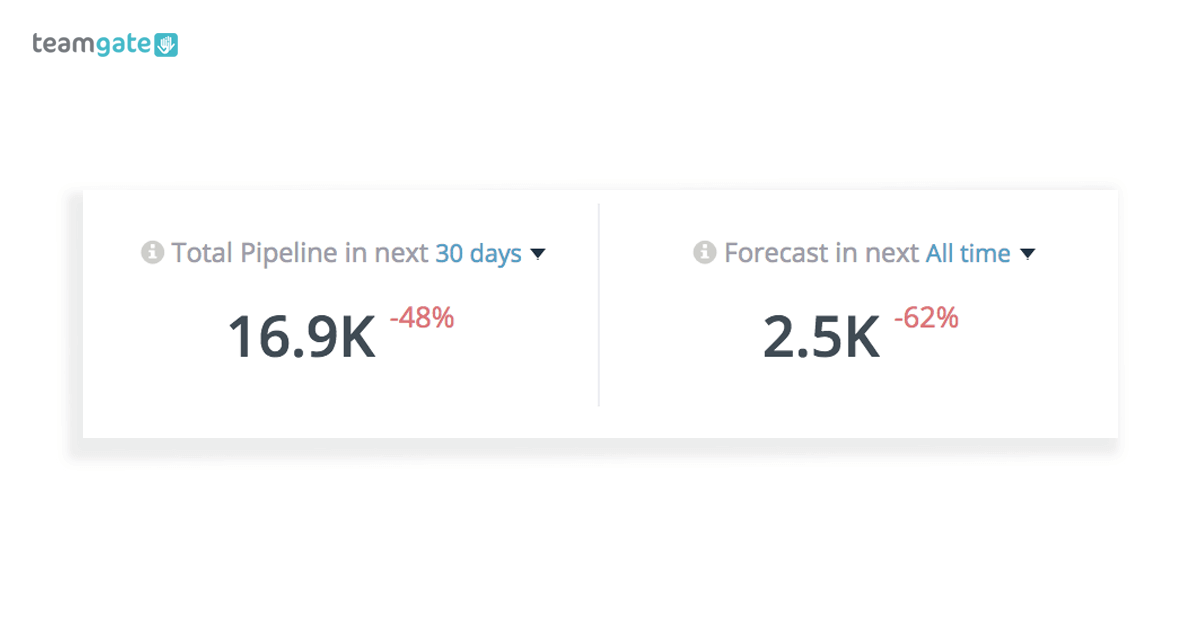
#3 Sales forecasting

Sales KPI Dashboard Forecasting

Sales forecasting is at the centre of growing your business. Using the benefits of past sales data, your Teamgate CRM’s sales metrics dashboard gives you a simple visualisation of your sales forecast for the next 7 to 90 days.

If targets are not being reached as expected, the dashboard helps highlight stages of the pipeline where you may need to deep-dive and take the steps needed to relieve blockages.

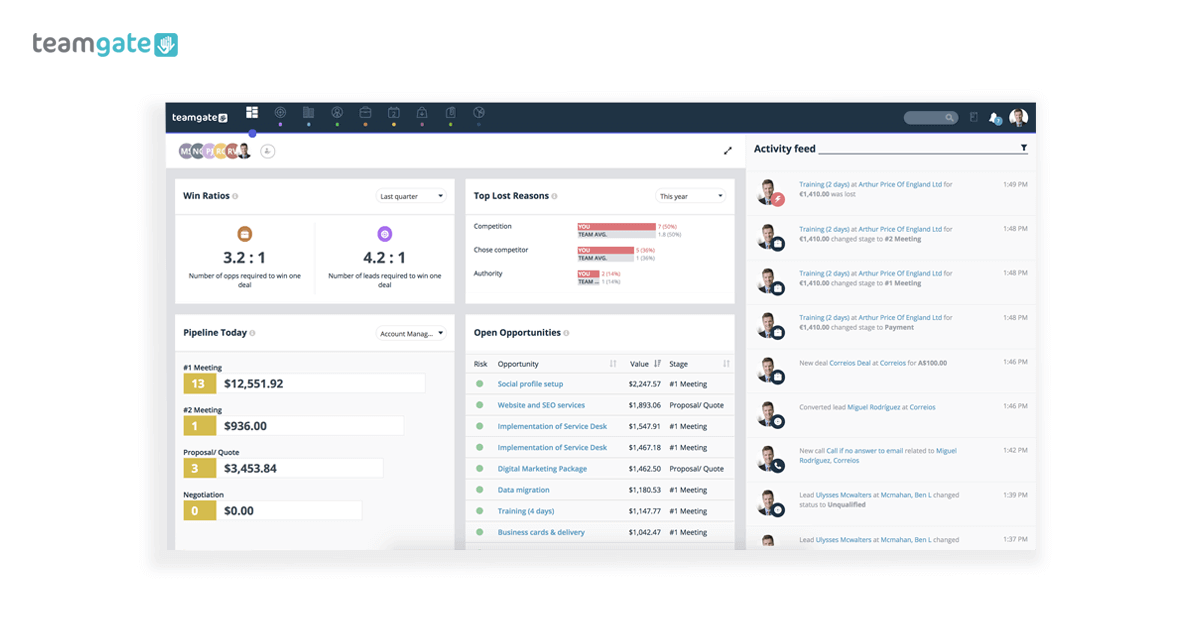
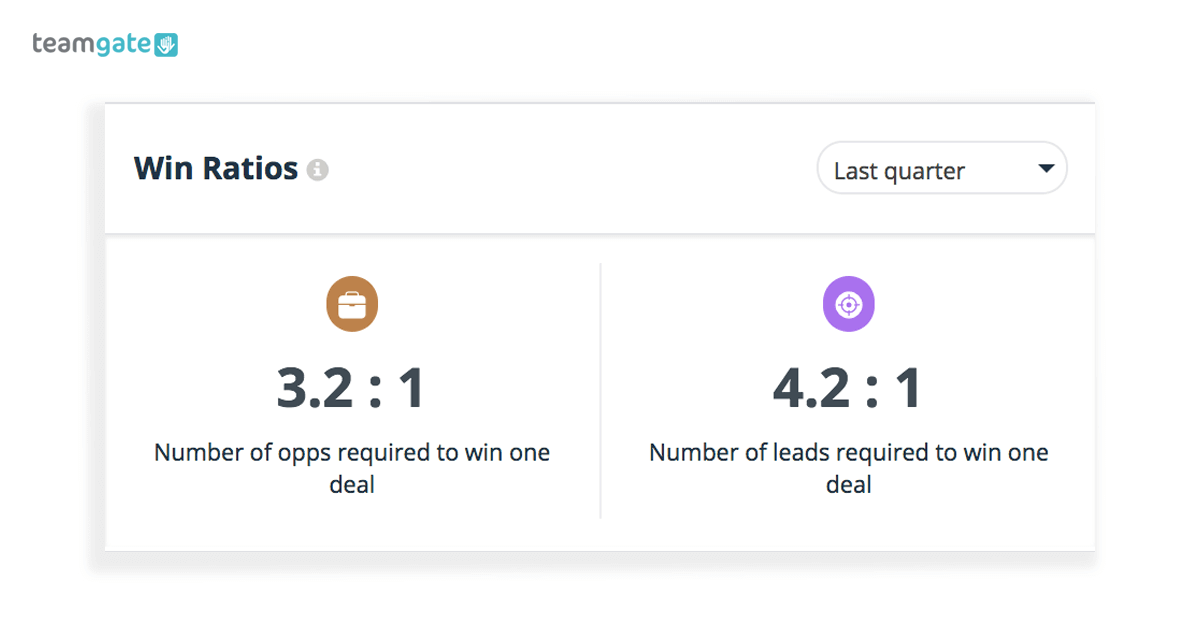
#4 Win Ratios

Sales KPI Dashboard Win Ratios

This simple Teamgate dashboard breakdown helps you to identify and correct actions which need to be taken in order to close a deal successfully.

Armed with the knowledge of your win ratios at each stage of the sales process you can then take the necessary steps to rectify and improve the stages which are not living up to their promise.

Using the Teamgate dashboard the process couldn’t be simpler. Select a period of time you wish to analyse and instantly receive a metric outlining the movement of all won and lost deals throughout the pipeline. See the number of opportunities you need to win one deal, plus the number of leads you need to win one deal. One of the most important metrics in your whole sales process.

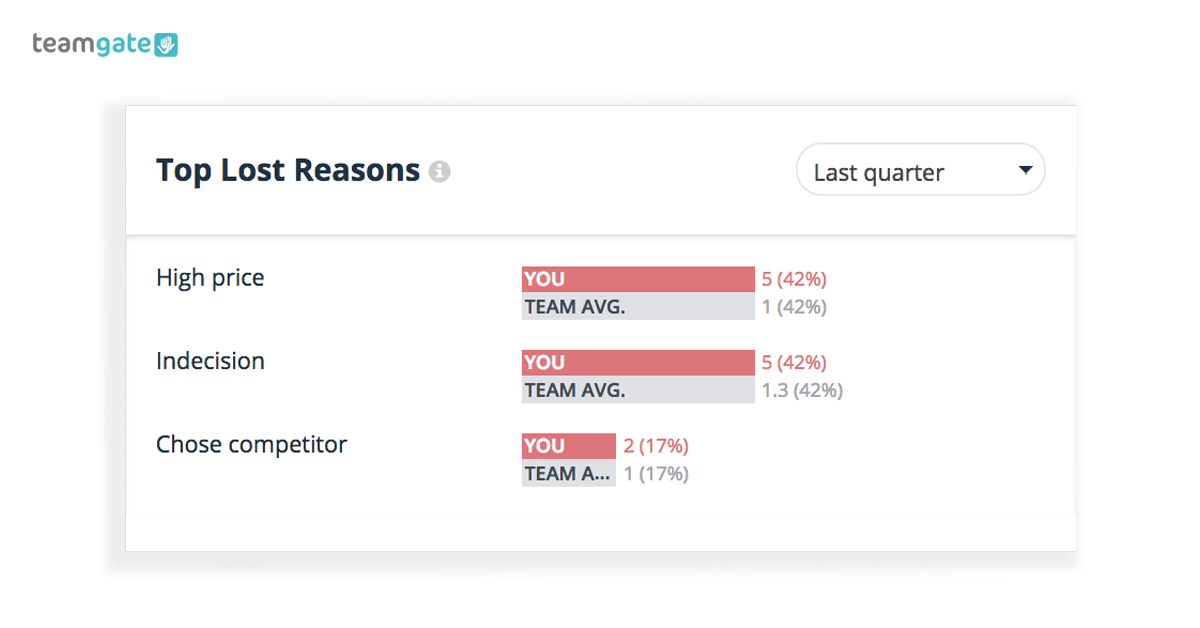
#5 Top Loss Reasons

Sales metrics dashboard Loss Reasons

Not closing deals can be the most frustrating part of the sales process. If your deals are not closing, you’re going to want to know exactly why.

Thanks to your Teamgate dashboard you get an easy-to-interpret overview of the most common reasons why deals are being lost in your pipeline.

When sales reps are entering loss reasons into your CRM software it all combines to create an overall picture of all won and lost deals and guides you towards taking corrective action, instantly.

If you have an issue with dissatisfaction in your product, pricing concerns, more persuasive competitors, or any other regularly occurring reason for a loss, your dashboard analysis lets you move swiftly to counter the problem.

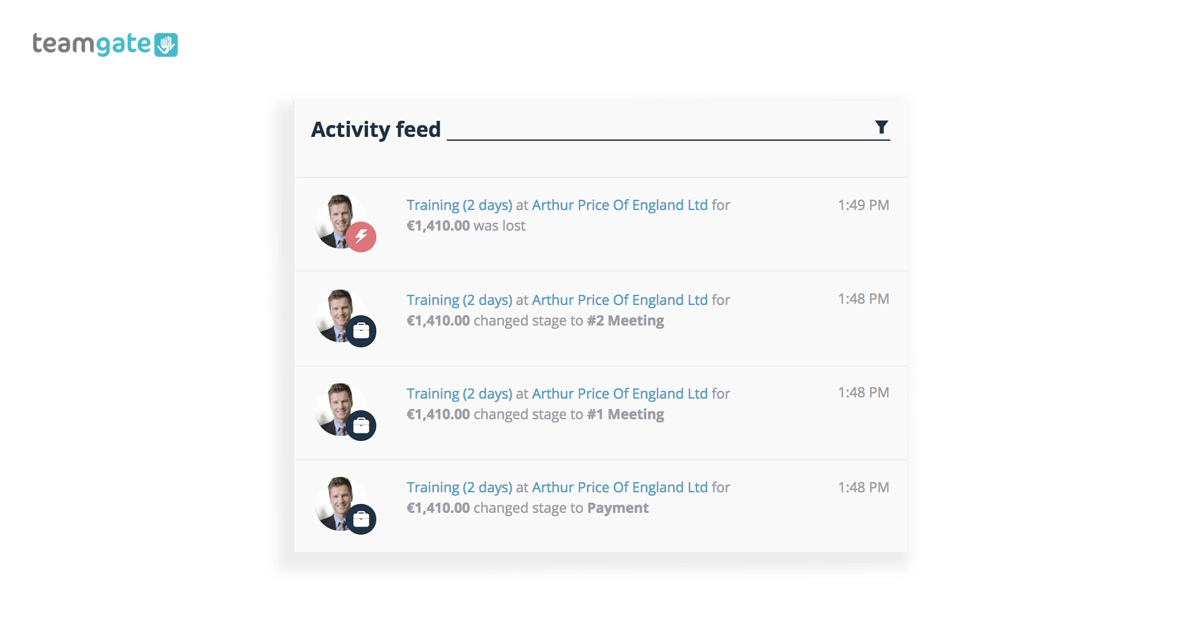
#6 Activity Feed

Sales metrics dashboard Activity Feed

Think of your Teamgate dashboard activity feed as the crystal ball that lets you see inside the heart of your entire sales process.

See, and understand every activity, action, and movement within the pipeline and complete the bigger picture using all of the components and metrics that you have at your disposal.

Using the information that you have in front of you in your dashboard, you can join easily join the dots between all actions and their reactions. You can also quickly identify your top personnel across different markets, in different geographic locations, and across various time frames.

And most importantly for any sales leader, you quickly get to understand if sales targets are being met, and if not, why not.

Teamgate Dashboards: The Why

Teamgate dashboard is the simple, and understandable visual expression of all the information in your CRM. This information is compiled in layouts you can instantly ‘read’ and ‘understand’. A vital array of tools for sales leaders to fully understand the complete sales model on a moment-by-moment basis. Gathering all the information needed to make a presentable, accurate, up-to-date, and actionable sales report is no easy task, and takes a lot of time – time you could be spending selling.

So if you’re ready to elevate your sales performance with the most comprehensive, yet easy to use dashboard solution, contact Teamgate today for your free trial.

GET READY TO OWN YOUR WORKDAY

with the most user-friendly CRM on the market.

Start Free 14-Day Trial

Painless setup, no credit card required

Every company looks for the different ways to increase its revenues. How are you planning to edge past your competitors?

The amount of revenue you generate depends on upon different factors, including the strategies used, the product you’re selling, as well as your marketing efforts. It’s the sales team and the sales marketing strategies that you use that can make a considerable difference at the end.

Understanding Sales Metrics – Making Informed Decisions

As a business, you would see your sales increase and decrease at times. If things aren’t going the way it should be, it’s important to identify the problem.

And that’s exactly where your sales metrics can help. Understand how you could improve the parameters to boost your sales. Here, we have listed some of the most important sales metrics that will help you in analyzing your performance.

1. Optimum Time Utilization

Your customers wouldn’t wait for you. You need a marketing team, which can reach out to your customers and close in on the deal as soon as possible. The lower the time, the better.

Monitor the time spent by the sales representative (rep) on the deals. If the rep successfully closes the deal, analyze the time needed for it.

Check the number of opportunities handled by a rep in an interval. This will help you in allotting more leads to the sales rep.

The response time for a query is equally important. According to a survey, if you answer the query within an hour, it increases chances of converting lead by seven times. The more time you take to respond, the lesser are the chances for a conversion.

Do you have a CRM that keeps you organised?

The most user-friendly CRM on the market. 14-day free trial.

Start Free Trial

Painless setup, no credit card required

2. Sales Cycle

It is directly proportional to the time taken to close the deal. You can analyze different deals. Some deals will take more time to close while others will take less time – check on the parameters responsible for the deal to close.

Your aim is to close the deal sooner than later. When you analyze a sale cycle, you will know the number of leads to send a sales rep to help them perform to their best.

Related: Could The Traditional Sales Model Really Be Hurting Small Businesses?

3. Analyzing Results

The results help us to take decisions regarding the future deals. Some deals are easier to close while others can be more difficult. Understand the common problems so that you can address them.

This includes understanding the strengths. Remember, different deals require a different amount of time investment. Consider working on the opportunities according to the time requirements.

Some of the sale reps are better with certain types of deals, and take less time. Some sales reps perform better with small deals while some are good at bigger deals.

Analyzing the types of deals a sales rep closes quicker will help you to assign similar deals to them, to enable faster conversions.

Allot deals according to the ability of the sales rep. In addition, identify the weaknesses, and work on them. It will strengthen your team, directly or indirectly, for the future dealings.

Teamgate has a perfect insight tools for all the most important metrics your business needs.

Related: Your Rally Road Book Is Your Sales Forecast

Teamgate Insights

4. The Deal Size and Amount

If you find that the majority of deals are smaller amount deals, it’s important to identify the problem. You need to work to bag in bigger deals. That’s where Teamgate can also help you – with the most important deals view, you can see a clear picture of deals you need to focus on the most.

While the deal size is important, the other question is the number of deals you have in queue. You don’t want too many to avoid missing deadlines – but you do need some to keep your employees engaged.

As a manager, work hard to attract as many deals as possible. If you’ve too many deals in queue, it’s a happy problem that you can deal with and increase your team size.

5. Cost to Revenue Ratio

Don’t just look at generating revenues – instead, look at the cost to revenue ratio as well.

Calculate the costs of your inputs like salaries, expenses, marketing costs, commission rates, and the total revenue you earned from all the deals. This will provide an insight on how to manage your investments.

Optimize your investments – it will help in boosting the efficiency of your team and garnering maximum productivity.

Doing More by Looking At the Sales Metrics Data

The aim is to be able to harness the power of your sales representatives. You can achieve this by managing your time efficiently, allotting opportunities according to rep’s capability, boosting the morale of your sales team, and maximizing net revenue.

There are other factors as well including the lead response time. The quality of leads will always matter and the marketing team can help you get the perfect leads who are interested in your products. You can even keep a track of the number or percentage of opportunities you are winning. For every ten opportunities that you are getting, how many have you been able to successfully convert? Aim to improve the opportunity win rate.

No matter what business you’re in, focusing on these metrics will surely yield better results and help improve overall performance.

Related: How CRM Helps Companies in Logistics Industry to Improve

What is Make?

Make is a seamless Teamgate CRM integration which automates and manages repetitive tasks that are killing your precious sales time.

To put it simply; Make is the simple online hub that gets your apps talking to each other, and performing a multitude of vital tasks every hour of every day – even while you sleep. And, it’s fully customisable to work EXACTLY the way you want.

Set the tasks you want Make to perform – manage contacts, send automated emails, track projects, manage your lead gathering – while you concentrate on the real important stuff – selling.

Triggers, searches, and actions explained.

The means by which Make connects your CRM apps, and removes those tedious tasks, can be broken down into three main categories.

Triggers

A trigger is an event which occurs in your CRM and causes a response from the Make Teamgate integration. This trigger could be as simple as creating a post on Facebook. Once you post to Facebook, Make performs the required next step. This next step might be as simple as sending a Slack notification to selected recipients.

Other examples of activities which could spark a trigger might be: When a new file is uploaded to your CRM; when a new product is created in the products list; when a new person is created; when a new lead is created; when a new event is created; when a new company is created, or when a new deal is created. In fact, the possibilities for triggers are endless.

Actions

As part of the CRM automation, a Make action does one single job and then passes the result to the next stage of the process. The process of sending the Slack notification about the Facebook post, to a specified recipient is the action carried out.

An action could also be any of the following scenarios; deleting a specified person; deleting a deal; deleting a product from the product list; creating a new product; creating a new event, task, call reminder, appointment, or note; creating a new lead, or deleting a lead; delete an event; create a new company or create a new deal; create a new person, or even delete a specified company or file.

Searches

So, according to the Make, CRM task you’ve automated, creating a new post on Facebook was the trigger; sending the Slack notification to a specified recipient was the action; and the act of selecting the person to receive the notification is the search. This recipient could be searched for, and selected using the following criteria; ‘Send notification to all people working in X company’.

Just like the ‘working in X company command’ the Teamgate Make integration can use a variety of search scenarios, such as; list all teams by given parameters; list all products by given parameters; list all deals by given parameters; list all users…; list all leads…; list all companies…; list all companies…; list all files…; list all people…; etc.

How about some Make examples?

As has been said, with the possibility of thousands of CRM integrations with thousands of independent apps, the bounds of CRM automation are limitless.

Let’s try to think of the process in the form of everyday life.

It’s morning and you need to go to work, but first you need to search for your car keys. Once you’ve found your car keys you need to take one key from the bundle and give it to a family member to have it copied. You now need to leave the house, enter your car, stop to fill up with gas, and make a phone call while you’re waiting. Once back en-route to work you discover that roadworks have forced you to take a detour, you ask your GPS navigator to work out the best route. Finally you get to work.

The whole process doesn’t just involve getting from A to B but involves a sequence of various components – triggers, searches, and actions – to complete the desired process as efficiently, and as quickly as possible. That’s the Make Teamgate CRM integration.

But, in case that little analogy wasn’t enough, some practical examples for sales professionals might be as follows:

E-mail – When you receive new leads and enter them in your Teamgate CRM, Make will automatically add these new leads to a selected MailChimp list.

Internal – Every time you win a new deal on Teamgate your Make CRM integration will send a customised or pre-defined message via Slack to a selected group, or individual.

Pipeline management – Create Asana projects automatically from new Teamgate CRM deals. Each time a new deal is created in Teamgate Make will create a new specified project in Asana. CRM automation simplified.

Marketing – Create Teamgate deals for new Intercom users. On every occasion a new user is created for Intercom, Make will create a new lead directly within your Teamgate CRM.

How Make makes your life easier

Why go looking for multiple solutions for existing problems when your Teamgate Make integration has the means to resolve all of these problems, from one ‘always on’ resource?

Create the integrations you need – by means of Make and the applications you use and trust. Simplify countless time-wasting tasks and processes, and get the results you want, in the way you want.

Your Teamgate Make CRM integration might just be the best thing that ever happened to your sales process

GET READY TO OWN YOUR WORKDAY

with the most user-friendly CRM on the market.

Start Free 14-Day Trial

Painless setup, no credit card required

In an organization, sales and marketing teams are both parts of the same section. Though both the teams run independently, they work towards the same goals. It is pivotal to bridge the gap between the sales and marketing teams as both are the running force for any organization. 

By combining the best of both sides, companies can develop a more holistic marketing approach with the help of CRM (Customer Relationship Management). Most of the established and successful organizations follow the rule of unity to work for one goal by all.


Source: https://www.pinterest.pt/pin/339388521891970909/

The CRM (Customer Relationship Management) is one of the significant factors that unite the sales and marketing team. As we can see below, various fields like retail, government, finance, education, manufacturing, etc. use CRM software for their respective industries.

Even in specialized sectors like manufacturing, pairing CRM with a seamless design-to-production process ensures that insights from customer interactions translate directly into efficient product development workflows.

Below are the few hacks that help in bridging the gap between the sales and marketing teams, along with the dedicated help of CRM. 

Create a Bigger Purpose: 

By finding a common purpose and bigger goal, companies can delve their teams in unification. The sales and marketing departments primarily work on brainstorming and challenging part of the business. Once the top leading managers create a more significant purpose that brings them close like, the satisfaction of clients through sales, the job will be done. Together, these departments can quickly identify more substantial opportunities and ease of achieving objectives.

Build Strong Cross-Functional Synergy: 

Sharing the goals between the two teams can manifest a synergy that bridges the gap better. Regular joint plan making sessions can clearly define the goals for the good of the work and workforce. Allow collaborations to help create a better exchange of synergy and information. As per the tech UK report, only 41 percent of marketing material is useful by the sales. Therefore, there’s a clear need for the two teams to sit together for building strong cross-functional synergy. Like for example, the goal of the marketing team is to research the target market, the audience, and it’s drastically changing demands. Similarly, the aftermath is in the hands of the sales team, which supplies the final product to the customers and seeks a positive response. The two teams work for different levels of the same funnel. Henceforth, it is essential to match the synergy.

Alignment Of Strategy And Direction: 

The best way to align the sales and marketing team is through regular meetings for designing the strategy and direction of CRM. When the groups meet regularly, they accomplish priorities to work towards bettering the client base, their experience, and function accordingly as one unit.

Gather Around For CRM: 

The fundamental objective of the sales and marketing team is a common one; to improve CRM. If the marketing team wants to know the present statistics of the sales and make alterations to the strategies, they have to consult the sales team. In the same manner, the sales team has to discuss the marketing strategy from all sides to ensure they are on the same page. By sharing the responsibility of growth, they can boost leads.

Image Source: https://newsignature.com/articles/crm-for-banking-a-few-special-considerations/

Avoid Miscommunication: 

This is a common issue in any organization. The sales and marketing teams hold differences due to miscommunication. However, having a common access point for both will improve their collaboration and limit miscommunication too. To create a better cliental experience, the sales and marketing teams need to have a clear vision of the ongoing and excel in future marketing campaigns. Due to a lack of communication, they might harm the marketing campaign and end up losing leads. To have a better mode of communication, an integrated chat function in CRM can be extremely helpful. This will keep the conversation in the loop and synced to the previous chat history for reference.

It is exceptionally pivotal to maintain healthy relationships at the work front. Misunderstanding of the business process, company policies may impact business. A span of eight hours is spent in the organization every working day. It is vital to bridge the gap between the sales and marketing team. To unify them, various practices that can take place. Due to misunderstanding and lack of communication between the employees, the company, and its business suffer.

One such practice, especially relevant for EMS providers and public safety teams, is the implementation of EMS scheduling software. These platforms streamline workforce coordination, automate shift planning, reduce scheduling conflicts, and ensure optimal coverage 24/7.

Client Interaction and Feedback: 

Mostly, the marketing team never gets the opportunity to interact with the client base and only rely on the ideas of the sales team. The sales team directly interacts with the customers. Thus, it is an excellent opportunity for the organization to bring them to one table to discuss the client’s response and expectations. This will enhance the relationship between the two teams and boost growth. CRM acts as a connecting tool between the two teams. It has integrated email marketing tools that establish feedbacks of clients. These pivotal feedbacks can be checked through a single CRM dashboard, which will keep the two teams in sync and better clarity.

Feedback is the spine of customer relationship. In B2B sales, the client relationship is very valuable. You need to ensure the client is happy with your services and you are capable enough to retain the client. Many established companies assign a team that solely takes care of client retention, customer relationship management, and client service. This will yield results at much faster rate in comparison to generating new clients.

One Team, One Goal

It is not an easy job to put the two teams together. However, if you show put them into question, “what’s in it for me” hack, chances are high they will seek each other’s back for working as one team with one goal. The CRM tools help the sales and marketing teams to unite and work efficiently without any delay in the process. It syncs the operational dashboards. This keeps the groups focused on bettering their performance. To drive better outcomes, sales, and CRM, the gap can be bridged.

Conclusion: 

The culture of any organization is mainly responsible for the perspective of its employees. To bridge any gap between the sales and marketing teams, the environment of the organization plays a significant role. Undoubtedly, CRM brings the two groups closer as they work for improving the cliental experience, generating new leads, brand awareness, and boosting sales growth. All the marketing campaigns are dependent on the sales reports and vice versa. Therefore, the job of CRM is primarily to bring the sales and marketing team in proximity. 

You’ve heard the tips: every B2B and B2C company benefits from sales CRM. Through this software, you can manage contacts and drive leads through the sales funnel in the most effective way possible. 

Collecting and managing user data is a time-consuming task. It’s also not the kind of task that’s forgiving of mistakes. That’s why it’s so important for brands to invest in a top-level CRM tool. 

These are only a few of the many benefits you’ll get:

  • Improved customer support
  • More efficient communication between the brand and its customers
  • Automation of repetitive tasks
  • Improved teamwork
  • Insightful reports that help you make business decisions

Essentially, a well-implemented CRM will improve the brand’s profitability.

But it’s not as easy as getting a random CRM tool and using it straight away. You should think about the implementation process. It’s what sets you up for successful results. 

Tips: How to Implement a Sales CRM Tool

  • Explain the Tool to the Sales Team

If you get a tool and tell your team to start using it, you’ll get them confused. 

In essence, the system is designed to help your sales team connect with the customers in a more effective way. The customers are supposed to get answers to their questions ASAP. The support should be relevant, quick, and problem-solving. 

However, the system will come with various details:

  • One aspect will define the team’s goals and activities. You must guide your team through the chart, so everyone will understand how it works. 
  • You’ll have to teach them how to use the lead scoring feature. They will need to provide updates on the ongoing sales processes, too.
  • Your team members should also understand the analytics. You can’t expect them to look at a report and intuitively understand what it means. 

Once you choose a CRM tool, explain how it works. 

It might be a good idea to hire an essay writer, who will craft a useful eBook for your team. Whenever they encounter a problem, they will go back to those guidelines and figure out a solution. 

  • Take Everyone through a Pilot Run

When you introduce the idea for implementing a CRM tool, the members of your sales team may doubt your intentions. Not all of them will welcome the change. They will be concerned that you’re trying to control them more. Without explaining your intentions, they will assume you’re aiming for micromanagement because you’re not happy with the work they’ve done so far. 

So you need to strategize. Right after you explain what the CRM is, you should implement it through a pilot run. It’s an opportunity for your team members to learn how to use the system, analyze the data, and feel comfortable with it. 

There will be no warnings and lecturing during this process. You’ll make them feel comfortable through an easy transition.  

  • Train an In-House Expert

If you choose a great CRM tool, you will get constant support as a user. That doesn’t exclude the need for you to train an in-house expert, who will take care of all minor issues. 

Whenever someone has a question about the tool, they will go to this person. You will introduce them to the tool early on. In the ideal situation, you should connect them with the CRM support, so they will discuss the features and troubleshooting in detail. 

The business leader can be this person. But if you don’t have enough time to learn everything about the tool and observe the process of implementation through all steps, it’s best to get someone else trained. 

  • Set Clear Expectations

The internal user guidelines should include a few points:

  • How the sales team members can set up a new user
  • How they can create workflows based on a user’s profile
  • How they can document results and figure out what the best practices are
  • What data they should collect
  • What format they should use for representing data
  • How they can collaborate with other team members through the system
  • How they can analyze the data they have and use it to make better decisions in the future
  • How they can input lead information

In other words, you should teach them how to do everything that the CRM allows them to do. However, you shouldn’t present these as features that they are allowed to use. You should set clear expectations around each feature. For example, when you’re teaching them how to set up a new lead, tell them how many leads you would expect from a successful sales team per month. When you explain what data they should collect, give precise points on how you want them to present it in a report. 

Your expectations shouldn’t be overwhelming. Give them in small bites and provide a reasonable period of time for your team to get used to them. 

  • Set a Clear Date for Going Live

All those preparation steps must come to an end. 

You’ll give your team a couple of months to get prepared. It’s a complex tool, after all. 

But set the date to go live right from the start. It will give your team a clear target, so they won’t prolong the training process. 

Let’s be honest: you won’t implement the entire solution in a day or two. You may face some issues. However, you’ll easily solve them with great support. Don’t be afraid to go live. If your team went through the pre-launch steps with success, they are ready to handle the real deal. 

You should be prepared for some negative attitude among your team members. Any change within a company is hard. Your sales team members will heavily rely on a tool, and they aren’t used to it just yet. You should expect some level of rejection but respond to it with optimism and support. Your in-house expert will help a lot with any arising issues. 

Don’t Worry; The Implementation Will Go Easy

You get consistent support when you choose a great CRM tool. Its team will make sure that the software blends well into your brand’s sales ecosystem.

Your choice of a tool is critical. It must cover the entire sales process, and it should be easy for your team to use. Of course; it should be affordable, too. 

Once you make the right choice, the rest is easy. You will get instructions on how to implement it in the sales team processes, and you’ll get support during the training part. 

Get your team excited about this! It’s a tool that makes their work more effective. Everyone benefits from it!                                  

We live in a fast-paced environment. To thrive in the continuously evolving business landscape, you need access to critical business information at a moment’s notice. 

The customer relationship management (CRM) system has revolutionized the way we do business today. With the advent of technology, your employees can easily access information at any time using any device. 

Customer Relationship Management (CRM) acts as a centralized database for all your business-related data. It allows you to retrieve, create, and even edit every information you need and gives you a real-time update of your records. 

In short, the power of CRM software can’t be undermined. 

The Most Common CRM Mistakes and How You Can Avoid Them

Even though CRM has been around for quite a long time, its successful adoption and usage can still be tricky. 

In the 2017 report, CIO magazine stated that around one-third of all CRM projects fail. Why? 

With a wide array of options, features, and prices, choosing the right CRM software can be a total nightmare. 

Whether you are a small business looking for a new CRM installation or an established company looking for a switch, both have their own challenges. CRM plays an important role in your day-to-day operations. That’s why it’s crucial to properly plan for your CRM project implementation to ensure good outcomes. 

1. Jumping In Without a Defined Business Process

The most significant mistake that most companies make is that they fail to create a proper business plan. 

You need to lay down your goals and objectives beforehand so that you can set the system up to accomplish them.

Typically, companies use CRM to store basic contact details. But the main value comes in terms of better sales productivity and making marketing more effective by grouping the customer information and how they relate to each other. 

Defining your priorities can help you manage your work effort. Without a proper roadmap, you will get caught in the whirlwind and never visit your priorities. And when things don’t work out, people usually end up blaming the software or technology. 

2. Lack Of End-User Value

A good CRM install can quickly go down if the end users don’t like the system. 

To succeed with CRM, you need to involve your people and explain to them how using a CRM solution will benefit them, as well as the company to achieve their goals. As an owner or manager, your employees look up to you. You can create a culture that depicts the positive usage of CRM software. 

You can discuss how CRM as a tool can help reduce costs, automate redundant tasks, increase revenue, and save time. If your end users see value in it, they will take ownership and try to create an impact from CRM. 

3. Implementing the System Without Proper Training

The whole process of selecting a CRM software and getting it up running can take more than six months. 

CRM software takes an investment of both time and money. However, even after a deliberate amount of consideration, the current CRM adoption rates are below

50%.

This is mainly because employees aren’t trained on how to use the system or why it is essential. And thus, they don’t take the software seriously. 

In fact, training is the most forgotten part of the CRM set up process. People are resistant to change, and if you look at it, 95 percent of the people who will be using the CRM software aren’t made to get involved in the process. 

Training should be adequately incorporated into the installation system. 

4. Overloading CRM With Unnecessary Features

CRM not only manages your contact records, but it can integrate with other systems, including ERP, accounting and invoice software, social media, and more. 

People get lured by the number of features it has to offer. But in reality, you don’t need all of them. 40% of companies use fewer than half the features they have on their CRM platform. 

Don’t try to make your CRM complicated by deploying features that are only going to confuse or intimidate users. It will only lead to more costs and more headaches and eventually become the reason for your failure. 

Rank the features based on value and cost. You can then remove those features that you don’t use or won’t need anymore. This way, you will be able to reap the maximum benefits out of it. 

5. Choosing a Solution That Lacks Scalability

It goes back to what we discussed in the first point — the lack of a defined business plan. 

Many business owners choose CRM software based on their present scenario of the business. They only take into account what seems to be the right fit for the current state. The CRM you choose might be well off for the first few years, but once your organization starts to expand, will it be able to adapt to the scalability? 

While choosing CRM software, you need to know how you can increase user adoption. 

Conclusion

All business segments, including marketing, sales, human resources, finance, and customer service, can benefit from CRM software. 

When you use CRM correctly, it can redefine the way your business operates and help your business grow. Make good use of CRM and watch your business flourish.

In the words of the great American business and leadership influencer, Dale Carnegie: 

To win a customer you need to create a relationship. To influence a customer you need to make him feel important.

Nice, but what’s that got to do with CRM? You might ask.

Believe it or not, the answer is probably, ‘everything’.

In his iconic 20th century book, ‘How to win friends and influence people’, Carnegie listed six simple traits which he believed go a long way towards making people like you:

  1. Become genuinely interested in other people.
  2. Smile.
  3. Remember that a person’s name is, to that person, the sweetest and most important sound in any language.
  4. Be a good listener. Encourage others to talk about themselves.
  5. Talk in terms of the other person’s interest.
  6. Make the other person feel important – and do it sincerely.

These six tenets of relationship-building might sound obvious, and even over simplistic, but the real meaning behind these words are the foundations and cornerstones on which all great modern CRM software is built. Teamgate is one such CRM company, solidly founded on this doctrine of stability, nurturing, and growth.

What is CRM?

So, let’s discover just what is a CRM system? – its definition, importance, benefits, its place in the world of the modern sales process, who is it for, how does it work, are there any downsides, does it take long to onboard, and can it grow as a company grows?

CRM, in case you weren’t aware, stands for Customer Relationship Management – you see, the pieces are coming together already.

When we talk about CRM meaning – whether we’re talking about software, hardware, or even the principle behind how you relate with your customers – CRM is the manner in which you manage and nurture interactions with past, current, and prospective customers.

Traditional CRM; regardless of whether it was the original process of knowing your customers’ first names, their family background, or any other snippets of information which developed from a well-nurtured relationship, are the basis of all modern CRMs.

But just what is CRM software? CRM software has modernised Carnegie’s tenets for relationship building; the principles are the same – be nice, listen, and make the other person feel important – but the methodology has significantly improved.

Why might YOU need CRM software?

A company thinking about using a CRM has faced one or more of the following questions:

  • Is your sales team being overstretched and losing sales through missed calls and leads?
  • Do you feel that your sales process needs to be trackable, offering valuable insights into its daily running?
  • Does your sales team need access to all customer information even when on the go?

What is CRM Software

Great CRM software, like Teamgate, give sales teams the ability and the time to really focus on the relationship with their customers. It helps them to concentrate on listening closely to the client, evaluating their needs, and providing the exact solution which the client demands. Great customer relationship management puts the customer to the fore, and makes them feel important, and valued.

Now, more than ever, sales professionals need to keep track of every action within their customer nurturing process. They need to have all the information to hand, such as:

  • How many calls were made
  • What was discussed
  • How many emails were sent, when, by whom, and what files were attached
  • How many meetings were held, and when is the next meeting
  • What presentations were delivered, and to whom
  • Why are we losing so many sales
  • Why are some sales taking longer than others to close
  • What are the next steps required to close the deal
  • Who is underperforming

These are all vital elements which go towards keeping your customer aligned, and assured that you are on their side, that you are interested, that you are listening, and that you are sincere.

Everything in one place

Teamgate CRM ensures that you have all the information you need to hand, when you need it, even while mobile.

Leads, which have been sourced through CRM integrations – such as, MailChimp, Forms for WordPress, and the Teamgate-LinkedIn Shuttle – are automatically stored in your CRM. You can then ‘score’ those leads for priority attention, enabling sales teams to work on deals most likely to close.

As your contact with the lead is developed and nurtured, the lead may be qualified and moved through the sales pipeline as a deal, by means of a simple drag and drop process. Using your CRM nothing gets lost, all information is easily viewable instantly. Plus, sales managers have access to the health of the sales pipeline at any given moment, enabling them to pinpoint successes or possible pain points.

The benefits of a CRM – A virtual handshake

Knowing your customer – To go back to Carnegie once again, the purpose of the whole sales process is to develop a lasting relationship with the customer. The ease by which a salesperson can capture all the relevant customer information is the very thing which allows them the luxury of time spent on listening to the customer, in an attempt to understand their pain-points and solve their problems.

Never miss a trick – There can be a lot of data generated during this nurturing process, and it’s vital that this information is managed minutely. With the help of your CRM, you can be sure the meetings, appointments, or follow-up calls never get missed or overlooked. It is the virtual handshake that assures your customer that you have their interests at heart.

Managing performance – Teamgate CRM also allows sales managers to compare sales individuals’ performance levels, set against a set time frame.

  • Are goals being achieved
  • Do leads remain for too long in certain stages of the pipeline
  • What are the main sources of won deals
  • For what reasons are deals being lost?

These are all questions that can be answered simply using Teamgate CRM insights, reports, and analytics. They give sales manager the tools to plan and predict for the future.

And don’t forget your past customers – Your CRM helps you stay involved with closed deals by offering them product updates, relevant news, inspirational stories, and informative guides, ensuring that you and your business are remembered long after the last handshake has faded.

Will my CRM still love me tomorrow? – A good CRM needs to be scalable, it needs to be able to grow as your company grows, and continue to seamlessly provide solutions in the manner that you’ve grown accustomed to.

Teamgate offers such scalability, whether you are a burgeoning startup, or a multi-national, the solutions are there and come with the ability to grow regardless of how big your operation may become.

Does a CRM have downsides?

Everything has a downside, and CRMs are no exception.

However, it’s unlikely that the CRM itself has a downside, it’s more likely to be the people who use the CRM or those who mistakenly believe that a CRM will change mud to gold overnight.

When choosing CRM software it’s important to know exactly what problems you want to solve. You need to have identified your sales process and exactly how your CRM will align with that process. Failing to do that, and you’re sure to be throwing money down the drain.

Some employees may be resistant to the onboarding of a CRM for any one of a hundred reasons; the old ways are the best; CRMs are too expensive; new technology is too difficult to learn; it’s a way of spying on your employees; etc.

This is not the fault of the CRM, but the fault of the management wishing to implement a CRM into their workspace.

With change comes fear, and that fear must be handled and managed using the correct methods. Thankfully, Teamgate can help companies right through the initial decision-making and onboarding process, by listening to their real needs, by offering practical advice and solutions, by being honest and open, and by offering detailed online training and support, as long as it may be needed.

Now you know what CRM is, isn’t it time to act?

The more successful your business becomes, the more likely it is that you’re going to lose focus – after all, you can’t be everything to everyone.

Customers who have been loyal from the outset may get overlooked, or even neglected completely. New leads may be lost. Appointments may be missed, and vital communications go unanswered. Sales opportunities are getting stuck in the pipeline. Your business has grown so far beyond what you initially understood that you can no longer make accurate sales predictions.

This could spell disaster.

Thankfully, Teamgate is a sales CRM that has been designed by the very people who use it on a daily basis. It has grown as the company has grown. It has learned intuitively from inherent mistakes. And, it continues to evolve and become even more scalable, and more capable of coping with the needs of every sales team, regardless of size.

The tenets of Carnegie have been lessons well learned. At Teamgate we fully realise that to win customers we need to create a relationship and keep those relationships strong. Gathering information smartly is one thing, using that information wisely is another.

Knowledge isn’t power until it is applied (Dale Carnegie)

GET READY TO OWN YOUR WORKDAY

with the most user-friendly CRM on the market.

Start Free 14-Day Trial

Painless setup, no credit card required


In this article, we will be looking at how to effectively use CRM to drive success in the sales division of a business/company using Sales automation. There are a lot of processes that go into making a sale; a lot of these tasks are mundane, repetitive, and time-consuming.

Time is a significant factor for people who work in sales or manage sales team(s) because it is precious, and there never seems to be enough to get everything done.

According to an InsideSales.com survey of 700 sales representatives, they found out that only 35.2% of their time was spent on selling and generating revenue the rest of the time was spent on non-selling obligations such as administrative and research tasks.

If there is any chance of sales reps meeting their quotas, tasks that don’t directly involve selling need to be handled by other divisions or machines. Fortunately, different kinds of software enable businesses to achieve automating administrative and non-selling processes quickly, thereby freeing the sales reps to perform tasks that strictly involve generating revenue.

What is CRM?

Customer relationship management ( CRM) gives every representative in a company/ business a more effective means of managing interactions and relationships between customers/external companies in order to drive success.

CRM consists of three key areas, which include sales automation, customer service, and support, and lead management.

Sales Automation, also known as Sales force automation, is focused on the technology that automates mundane manual tasks in order to free up sales reps for more essential revenue-generating tasks. It helps to streamline and automate most of the processes involved in making a sale.

Core Features of sales automation technology:

  • Contact Management: This feature stores contact information like names, addresses, phone numbers, past communication, etc. all in a searchable database. This feature helps assemble a complete history of sales and interactions with your customers by tracking all the communication between you and the client.

CRM software comes with a contact management tool, so you’ll want to look for one that is easy to use and has a layout that works well for you.

  • Lead management: keeping track and manually assigning leads can be a tedious and time-consuming endeavor. There is also the added risk of not making use of useful leads due to information overload.

An ideal CRM software should allow you to have an overview of your leads and assign them by company size, geographical location, or different combinations of criteria.

  • Sales pipeline management: This feature provides a visual representation of your current leads. These leads are usually sorted according to the sales stage they are in, allowing sales reps to quickly understand the status of each lead, which helps them decide on the most appropriate course of action.
  • Automated research: A sales automation feature with the ability to scour the internet and gather publicly available information on potential clients and add it to the lead records can be of great help to the sales team. It can also search social media platforms like Facebook and LinkedIn to gather more information and help identify potential customers.

This significantly helps the sales reps because they no longer need to spend hours manually scouring the internet and social media platforms for information about leads and potential customers. With sales automation tools, reps can target the best leads in a geographical location.

  • Sales automation: This sales automation feature allows repetitive sales tasks such as sending invoices and so on to be automated. This workflow is mostly set-up based on rules or triggers.

An example is if a lead has not responded after a certain amount of time, the follow-up workflow will be activated, which will allow a reminder email to be automatically sent to the customer.

  • Forecasting: This feature uses all the daily data a CRM tool process to predict future sales. This helps salespeople get an approximate understanding of their pipeline and how efficiently they can push sales and convert hot leads.

This is one of the great CRM for every business; it puts all that data to good use, providing trends and leads that can help you make objective and informed decisions about the future of your company.

Key CRM Implementation Strategies:

Before getting CRM software for your business, it is vital to have your CRM implementation strategy in place, so it ensures smooth operations of your CRM efforts. Some of the strategies to consider include:

  • Knowing your sales goals so it can help you to use the CRM software as a business enabler optimally.
  • Communicating with your sales reps on how the CRM implementation is going to benefit them and actively involve them from the beginning.
  • Before picking a CRM software for your sales team, make use of demos and trial periods to understand better the features you will need.
  • Get a professional if you need to, so you can reduce the trial and error steps at the initial stages of implementation.
  • Most of the CRM software comes in the English language, so if you need reports translated or you need to personalize communication with foreign customers, a professional translation service such as The Word Point comes in handy. 

The Cost of CRM Software

Every CRM software is designed with multifaceted capabilities, so most often, they don’t come cheap. However, the time you save in managing manual tasks, the increased productivity of your sales team, and increased sales revenue adequately make up for the monetary expense.

It is crucial to consider the cost aspect and decide on whether or not it pays off as an investment.

You can start with a free plan such as Teamgate’s free trial plan and gauge how well it works for your business before committing. CRM software like Teamgate allows you to request a demo and 14-day free trial with no credit card required.

Conclusion

You need a CRM software to help manage the relationship with customers and external companies to improve productivity in your business.

Getting the best CRM for your sales process automation is guaranteed to help your business save time and make your team more productive by allowing them to focus on the most valuable activities.

Sales CRM can really help in writing branded content as you are able to store all the personal information of your customers. However, it can also help you reduce costs or save money for your organization. Here are eight ways how you can do this.

1. Work on a Single System

Customer relationship management program of any kind enables you to work on a single system keeping all of your tasks in one place. Various CRM programs can help manage anything from sales to marketing to customer service. However, there’s special importance that the sales CRM bears.

Such a program can help you increase sales and reduce costs simply by being more efficient with all of the tasks you complete. It saves your time and allows you to access everything in one place meaning that you see the big picture while having access to smaller bits right there and then.

2. Remove Duplicate Customer Records

Another great benefit of sales CRMs is that they can help you remove duplicate customer records and save you money this way. Duplicate records are usually the cause of performance problems and even fraud, so once you get those out of the way you will be saving yourself a headache at least.

Sales CRM can help you boost sales by having all of the information in one place and eliminating the probability of you spending money on someone who has been already marketed to before. Lead and customer records must always be kept in check for this to work well.

3. Improve Tracking Mechanisms

This is probably a no-brainer but it is still worth mentioning. Customer relationship management programs can help you improve your tracking mechanisms and, consequently, increase sales and save your money. It’s simple yet extremely effective in many ways.

Sales CRMs help you to track everything from lead status to conversion ratios to FTRs to customer satisfaction. The good news is that your teams from all departments can all work with the program, so your marketing team, sales team, and service team can all coordinate their actions.


4. Streamline the Sales Process

Streamlining your sales process with the help of your CRM is directly related to the first point in this article. A streamlined sales process improves different aspects of your organization including the fact that it can boost sales. You can free the sales rep up and continue pursuing new customers.

As mentioned above, your team can keep track of virtually all the metrics that could be important for you as a part of the personal information about your clients. Everything can be accessed at once on one dashboard meaning that you spend less time, effort, and money on keeping everything in check.


5
. Plan Activities Ahead

While tracking the past data is nice, planning ahead is even better. You can significantly increase sales and reduce costs this way, so it’s very important to acknowledge the usefulness of sales CRM in this way. It is impossible to do everything all at once, so having a comprehensive plan is simply essential to any job.

You can plan as much as a day, a week, a month, or even a year of your future activity with the help of a sales CRM program. Don’t forget to sort your priorities through and pay more attention to the tasks that are urgent or require more time to be completed.


6. Reduce New Customer Acquisition Costs

This is probably one of the best news out of the whole article. Sales CRM can help you reduce new customer acquisition costs dramatically as well as help you boost sales among first-time customers. You always have to remember that new customers are just as important as repeat clients, so they mustn’t be overlooked.

You can close sales much faster and reduce the amount of rework. This is all possible thanks to the smart processes and real-time decision support that CRM programs provide teams with. The result is that your customers are happier and more satisfied with the interaction they had with your organization which leads to word-of-mouth advocacy.


7. Scale Your CRM

Customer relationship management programs are scalable and can grow and develop along with your business. This means that they can directly influence the development of your own organization as well as your business can influence them.

It is crucial to remember that the underlying architecture uses adaptable codes that can be customized for certain business scenarios. And that can be achieved without any additional code writing. You won’t have to spend additional money on increasing your potential. Instead, you might even be able to save up some money and direct it on a more important matter in your organization reducing your budget entirely.


8. Create a Self-Service Portal

Last but not least, your sales CRM can help you create a self-service portal allowing you to boost sales and save the money you need to use elsewhere. Basically, a self-service portal or an SSP is a strategic way that allows you to have a quick turnaround for creating and resolving cases. At the same time, it doesn’t even add any pressure on your contact centers.

Your customers will be able to use various communication touchpoints across the different channels you work with. This will, in turn, reduce person-to-person time, overall customer service costs, and administrative costs. For instance, your clients will be able to apply for financial schemes and be approved almost immediately.

You can also include quick surveys in your self-service portal. These surveys will help you collect feedback regularly and identify areas that must be improved or developed. The sales CRM program can then be used to instantly assign the tasks to the members of your team without losing any extra time. It’s easy, yet many organizations and businesses seem to forget about it.


Final Thoughts

In conclusion, saving money for your organization by using sales CRM is very possible. Use these eight simple ways to help you reduce costs with the help of your customer relationship management program.