When sales reps delay follow-ups, deals are lost. 80% of sales need at least five follow-ups, yet 44% of reps quit after one. Automated follow-ups solve this by responding to leads within 60 seconds, 24/7 – boosting response rates, keeping pipelines organized, and ensuring no lead is left behind. With tools like Teamgate, you can set workflows, automate emails, and prioritize leads, giving your team more time to focus on closing deals. Teamgate helps reps follow a clear sales process and gives managers trustworthy pipeline insights – without turning CRM into a full-time admin job.
Here’s how automation improves sales outcomes:
- Faster responses: Leads contacted within 5 minutes are 21x more likely to convert.
- Consistent follow-ups: Automation ensures every lead gets multiple touches across email, SMS, and calls.
- Cleaner pipelines: Automated reminders and lead scoring best practices keep deals moving forward.
Automation isn’t just about saving time – it boosts productivity, shortens sales cycles, and increases revenue.
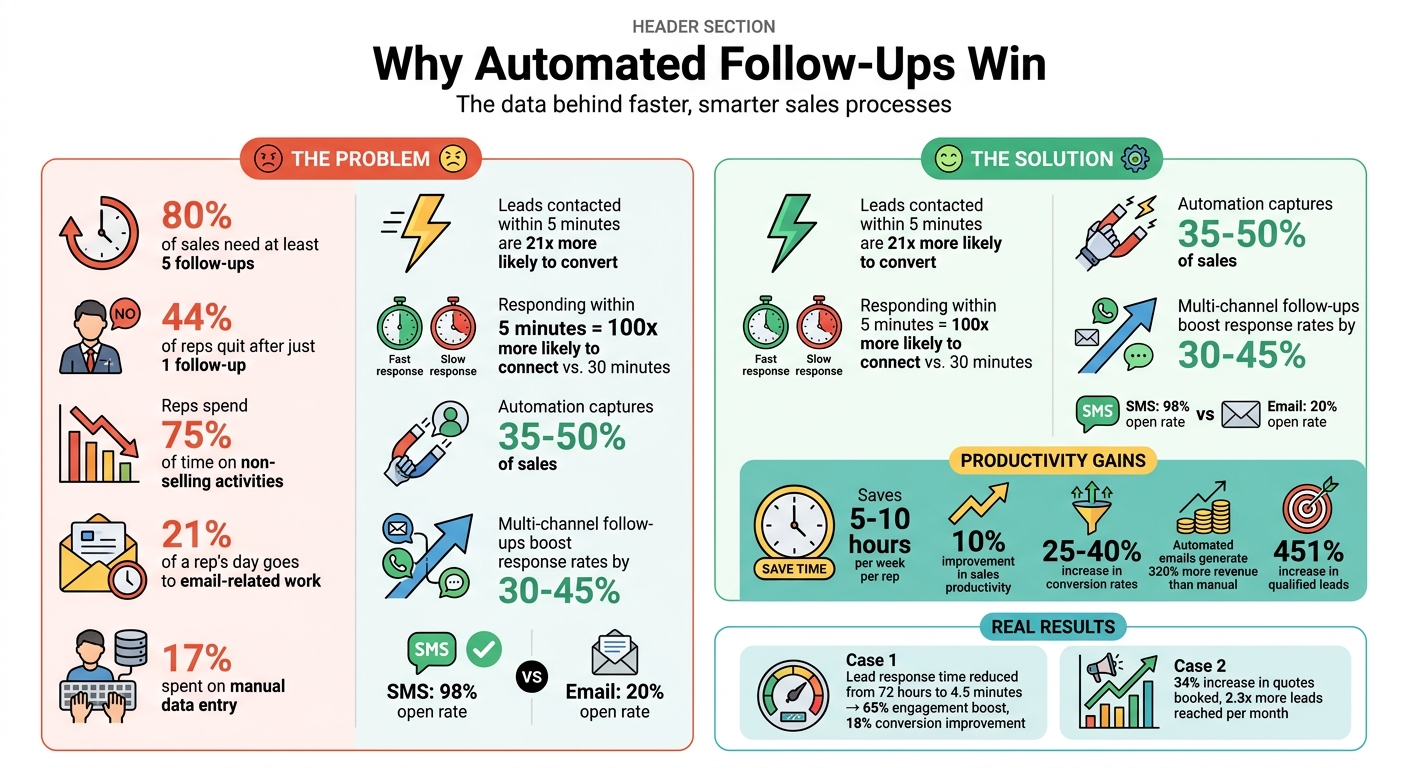
How Automated Follow-Ups Boost Sales Performance: Key Statistics
How to Automate Follow Up With AI and Turn More Leads Into Sales
sbb-itb-5772723
Why Automated Follow-Ups Help Sales Teams
Automated follow-ups solve common sales challenges like slow response times, inconsistent outreach, and disorganized pipelines. By addressing these issues head-on, automation ensures that no potential deal is overlooked.
Faster Response Times
Timing is everything when reaching out to a new lead. A rep who responds within 5 minutes is 100 times more likely to connect with a prospect than one who waits 30 minutes. But maintaining this speed manually – especially during busy periods – is nearly impossible. Automation fills this gap by initiating contact within 60 seconds, regardless of the time of day. Whether it’s an email, SMS, or phone call, automation ensures leads are engaged during that critical "golden window" when their interest is highest. This quick response strategy, which captures 35% to 50% of sales, demonstrates how automation can make a real difference.
Consistent Communication Across Channels
Following up consistently is key to converting leads. While 80% of sales happen between the 5th and 12th contact, nearly half of sales reps stop after just one attempt. This is where automation shines – it guarantees every lead receives a full sequence of follow-ups across multiple channels like email, SMS, and phone. This approach doesn’t just ensure persistence; it boosts response rates by 30% to 45%. For example, combining an email with a case study, an SMS reminder, and a phone call creates multiple touchpoints, increasing engagement. SMS alone, with its 98% open rate, far outperforms email’s 20% open rate, making it an essential part of any follow-up strategy. For B2B sales teams looking to add personalized video to their outreach mix, platforms like Sendspark enable you to record a single video and automatically generate thousands of individually personalized versions to strengthen engagement across channels.
Cleaner Pipelines and Better Lead Prioritization
Automation also keeps pipelines organized and ensures no lead is forgotten. Without it, valuable prospects can be overlooked as reps juggle new opportunities. Automated systems send reminders to move deals forward and even score leads based on their engagement – like email opens, link clicks, or visits to your website. This helps sales teams focus on the most promising opportunities. By reducing time spent on administrative tasks, reps can redirect their energy toward meaningful conversations, improving productivity by up to 30%.
| Aspect | Manual Follow-Up | Automated Follow-Up |
|---|---|---|
| Response Speed | Slower due to manual processes | Instant (under 60 seconds) |
| Consistency | Inconsistent; 44% quit after one touch | 100% consistent across all leads |
| Scalability | Limited by human bandwidth | Unlimited |
| Time Required | Time-consuming (up to 21% of a rep’s day) | Minimal (saving 4–6 hours weekly) |
How to Set Up Automated Follow-Ups in Teamgate CRM
Teamgate simplifies automated follow-ups by turning them into seamless workflows that handle repetitive tasks for you.
Building Automated Workflows
Begin by pinpointing key moments in the customer journey that can trigger follow-ups. These could include events like a lead’s status changing to "Contacted", a deal advancing to "Proposal Sent", or a prospect visiting your pricing page. Once these triggers are identified, you can create workflows to automate tasks such as scheduling follow-ups, sending reminders, or initiating the next step in the sales process. For instance, when a deal reaches the "Demo Completed" stage, Teamgate can automatically schedule a follow-up call for three days later and send a reminder email to the sales rep. This saves sales teams over two hours daily by reducing manual administrative work.
The workflow builder in Teamgate allows you to set specific conditions, define actions, and determine the sequence of events. These automated processes ensure that leads are engaged promptly, improving the likelihood of conversion.
Now, let’s talk about optimizing your email outreach.
Setting Up Email Templates and Sequences
Design personalized email templates that automatically pull CRM data such as first name, company, or job title. With Teamgate, you can tailor these templates to reflect specific actions prospects have taken – like downloading a whitepaper or attending a webinar – rather than sending generic follow-ups.
When planning your email sequence, time your follow-ups strategically. Aim to send the first email immediately after a trigger event, as responding within five minutes can make leads nine times more likely to convert. Space additional follow-ups every two to five days to maintain persistence without overwhelming the prospect. Before launching any sequence, test it thoroughly by sending it to yourself or colleagues to catch errors like broken links or awkward personalization. Also, set clear exit criteria so the sequence stops automatically when a prospect responds, avoiding unnecessary communication.
"Automation is not an excuse to be generic. Your follow-ups should feel like they came directly from you, not a robot." – Mixmax
Adding SMS and Call Reminders
Teamgate goes beyond email by supporting SMS and call reminders as part of your follow-up strategy. You can create custom activity types for these tasks, ensuring your multi-channel outreach stays organized. When scheduling a follow-up call or SMS, activate email reminders so the task owner gets notified. For larger outreach initiatives, use the Bulk actions feature in the Leads list to schedule activities for multiple contacts at once.
All scheduled follow-ups – whether calls or SMS – are displayed in the Organizer section, offering a clear calendar view of your daily tasks. You can also delegate tasks by reassigning activity ownership and setting reminders to notify colleagues of their new assignments. This integrated approach ensures your team stays on top of every lead, enhancing overall productivity and sales outcomes.
How Automation Improves Sales Productivity
Automation in sales isn’t just about saving time – it’s about transforming how teams work. By automating repetitive tasks, sales reps can focus on what they do best: closing deals. This shift not only enhances productivity but also ensures that every opportunity gets the attention it deserves.
Less Administrative Work for Reps
Did you know that sales reps spend up to 75% of their time on non-selling activities? Tasks like manual data entry eat up about 17% of their day, while email-related work accounts for another 21%. Automation takes these tasks off their plate. For example, emails, calls, and meeting notes are automatically logged into the CRM. After a call, the system can extract key action items, update deal stages, and document next steps – all without the rep lifting a finger.
This streamlined approach can save each rep 5 to 10 hours per week, giving them more time to focus on building relationships and closing deals.
"Sales teams don’t fail because they lack talent or motivation. They fail because administrative work prevents them from doing what they do best."
- Nirman Dave, Zams
By reducing busywork, automation ensures that deals move forward without unnecessary delays.
Keeping Deals Moving Forward
When reps aren’t bogged down by admin tasks, they can focus on maintaining momentum in their deals. Studies show that most sales require multiple follow-ups to close, yet many reps give up too soon. Automation helps bridge this gap by triggering timely actions. For example, if a prospect visits a pricing page, the system can automatically schedule a follow-up task.
Stage-based workflows also come into play, such as setting reminders to follow up three days after sending a proposal. Inactivity alerts add another layer of support, notifying both the rep and their manager if a high-value deal has stalled for too long – say, seven days. This ensures no opportunity falls through the cracks.
By using a mix of automated touchpoints and alerts, reps can keep prospects engaged without overwhelming them, creating a smoother path to closing.
Better Visibility for Managers
Automation doesn’t just help reps – it also empowers managers with better insights. By automating activity tracking, managers get a real-time view of rep performance without relying on manual updates. This data offers a clear picture of pipeline health, showing where deals stand and how long they’ve been in each stage.
Here’s how specific features improve managerial oversight:
| Visibility Feature | Managerial Impact |
|---|---|
| Automated Activity Logs | Provides an accurate record of all rep activities, reducing the risk of invisible revenue loss |
| Sequence Analytics | Identifies where prospects drop out of the funnel, enabling targeted strategy adjustments |
| Engagement Alerts | Notifies managers of critical actions, like when a prospect revisits the pricing page, so reps can prioritize effectively |
These insights allow managers to forecast revenue more accurately by analyzing engagement patterns and close probabilities. They can also pinpoint which reps need coaching or which deals require immediate intervention. The result? A 10% improvement in sales productivity and conversion rates that jump by 25% to 40% – all without adding extra staff.
Automation doesn’t just streamline processes; it makes the entire sales operation smarter and more effective.
Measuring the ROI of Automated Follow-Ups
Automation should generate measurable revenue impact, often within the first month. To demonstrate ROI, focus on tracking key metrics and comparing results before and after implementation. These metrics will reveal how automated follow-ups improve sales performance. Pinpointing the pipeline stages where leads tend to drop off can help you prioritize areas where automation can make the biggest difference.
Metrics to Track
Start with these key metrics:
- Time to First Contact: Aim to respond to leads in under five minutes.
- Contact Rate: Strive for an 80% or higher success rate in reaching leads.
- Follow-up Sequence Completion: Target 90% of leads receiving at least five follow-up touches.
- Cost per Qualified Meeting: Measure how much you’re spending to secure each meeting with a qualified prospect.
- Sales Cycle Length: Track how quickly deals move from first contact to closing.
- Revenue per Lead: Ensure that each lead contributes increasing value over time.
These benchmarks help you evaluate how automation is driving tangible improvements.
Examples of Immediate Results
Real-world examples show how automation can deliver quick wins. A real estate and legal services firm using Teamgate CRM’s SMS automation cut its lead response time from 72 hours to just 4.5 minutes. This shift boosted engagement by 65% and improved lead-to-opportunity conversions by 18%. Similarly, a roofing service business saw a 34% increase in quotes booked and reached 2.3 times more leads per month within three months of activating automation.
Conclusion
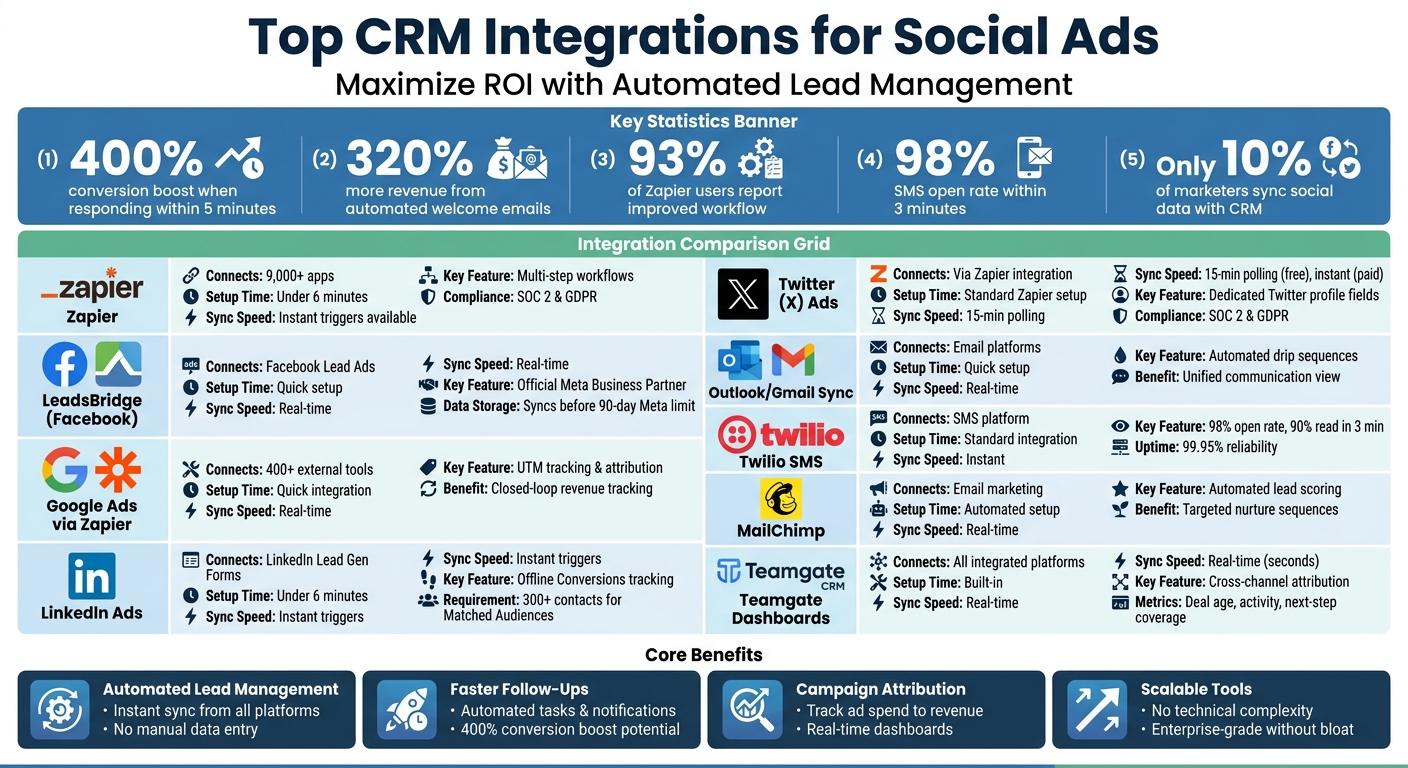
Automated follow-ups turn sales from a guessing game into a reliable, repeatable process. The numbers speak for themselves: responding to leads within five minutes, maintaining consistent outreach across multiple channels, and ensuring every deal has a clear next step can dramatically boost results. Automated emails alone generate 320% more revenue than manual ones, and businesses using automation report a 451% increase in qualified leads.
With Teamgate CRM, the guesswork disappears. It replaces manual tracking with structured follow-up systems that work seamlessly across your entire pipeline. Instead of drowning in administrative tasks, your team can zero in on high-priority prospects ready to take the next step. Conversations are logged automatically, leads get the right message at the right time, and managers gain instant clarity by tracking sales effectively.
Making the leap from reactive to proactive follow-ups doesn’t just save time – it lays the foundation for steady, scalable growth. Since 80% of sales require at least five follow-up touches, automation ensures you hit that mark consistently without exhausting your team.
With Teamgate, you can build a follow-up system where no lead gets overlooked, no deal stagnates, and your forecasts become dependable. The result? A well-maintained pipeline that safeguards revenue and fuels growth as your business scales.
FAQs
What should my first automated follow-up sequence look like?
Your first automated follow-up sequence should focus on speed and consistency. Begin by reaching out within 5 minutes of receiving a lead’s inquiry – this could be a quick email or SMS thanking them and offering assistance. Over the next few days, schedule additional follow-ups using CRM templates. These messages should provide helpful information or address typical questions, ensuring your communication stays relevant while avoiding excessive contact.
How do I keep automated follow-ups personal and not spammy?
To make automated follow-ups feel personal, leverage your CRM data to craft messages that align with customer actions, preferences, or recent interactions. Schedule follow-ups for meaningful moments – such as when a customer opens an email or submits a form – so the timing feels organic. Be mindful not to overwhelm recipients with too many messages, and always honor opt-out requests to maintain trust and a professional tone.
Which sales metrics best prove automation ROI in 30 days?
Key sales metrics that show the impact of automation within the first 30 days include response time, contact rate, and revenue per lead. By automating follow-ups, you can see faster response times, more consistent communication, and improved lead conversion, all of which contribute to better performance in these areas.