Book a demo today and save 50% off your first month, or 20% off your first year.

Get a free sales audit to uncover hidden revenue opportunities!

In today’s business environment, organizations seek efficient ways to manage their assets. Companies benefit from asset management software. It plays a crucial role in streamlining processes and boosting productivity. These tools help you track, maintain, and manage assets, ensuring maximum return on investment. This article explores several asset management solutions that help companies enhance operational efficiency.

Importance of Asset Management Software

Managing assets effectively is vital for any organization. Properly managing assets cuts expenses, prevents losses, and improves decision-making. With asset management softwares, companies can monitor the status and performance of their assets in real time. With this comprehensive overview, companies can effectively plan and allocate resources, leading to increased efficiency throughout the operation.

Essential Features to Consider

When selecting an asset management solution, several features stand out as essential. These include:

  • Real-Time Tracking: Keeps tabs on asset locations and conditions.
  • Maintenance Scheduling: Automates reminders for routine checks and repairs.
  • Reporting and Analytics: Provides insights into asset utilization and performance.
  • Integration Capabilities: Ensures seamless connection with existing systems.
  • User-Friendly Interface: Simplifies navigation and usage for all team members.

Selecting software that includes these features can lead to smoother operations and enhance efficiency.

Leading Asset Management Solutions

Comprehensive Management Tools

Several software options offer all-in-one solutions for asset management. These platforms usually incorporate features for tracking assets, managing maintenance, and generating reports. Accessing these tasks in a single spot provides you with a comprehensive overview of your asset operations. This type of asset management solution is particularly beneficial for large companies with a wide range of assets.

Cloud-Based Platforms

Cloud-based solutions offer flexibility and accessibility. These asset management systems let you access information from anywhere, so running operations remotely becomes a breeze. Built-in automatic updates mean the cloud infrastructure constantly integrates new functionalities and critical security patches, maintaining a perpetually current and fortified system. Cloud-based asset management tools are ideal for companies with employees based in multiple locations or working from home.

Specialized Software for Specific Industries

Some asset management tools cater to specific industries, offering tailored features that address unique challenges. Hospitals, for example, benefit from computer programs that help them ensure compliance with medical equipment regulations and keep up with maintenance. Similarly, managers on a busy factory floor need systems that monitor machine health and performance. Selecting industry-specific software ensures that all unique needs are met effectively. For IT departments managing company devices, a Mac optimizer helps keep MacBook fleets running at peak performance.

Benefits of Implementing Asset Management Software

Implementing the right asset management software brings numerous advantages:

  • Cost Efficiency: By optimizing asset utilization, companies can reduce unnecessary expenses.
  • Improved Productivity– Automation of routine tasks frees up time for strategic activities.
  • Risk Reduction: Real-time monitoring helps identify potential issues before they escalate, reducing downtime.
  • Enhanced Decision-Making: Access to detailed reports and analytics supports informed business decisions.
  • Sustainability: Prolonging asset life reduces waste and supports environmental goals.

Your daily operations become smarter and more efficient, contributing to a stronger bottom line.

Tips for Successful Implementation

To ensure the successful implementation of asset management software, organizations should consider the following tips:

  • Assess Needs: Understand the specific requirements of the organization and select software that aligns with those needs.
  • Train Staff: Provide comprehensive training to ensure all team members can use the new system effectively.
  • Monitor Progress: Regularly review the software’s impact on operations and make adjustments as necessary.
  • Seek Feedback: Encourage user feedback to identify areas for improvement and ensure satisfaction.

Implementing these strategies can ensure you utilize the full potential of asset management software and contribute to the long-term success of your organization.

Conclusion

Any company aiming to enhance its daily operations needs asset management software. Businesses can increase efficiency, save costs, and improve their decision-making by selecting the right asset management software for their needs. Whether opting for comprehensive management tools, cloud-based platforms, or industry-specific solutions, the benefits of these systems are clear. When companies plan and use these systems effectively, they can enhance business operations and achieve their goals.

Sales success in 2025 demands teamwork, not solo efforts. Modern buyers interact with multiple team members across various stages of their journey, making collaboration essential. A CRM like Teamgate ensures seamless information sharing, real-time updates, and task management to support this shift. Here’s what you need to know:

  • Centralized Data: Every email, call, and meeting is logged for shared visibility.
  • Real-Time Updates: Critical details are accessible instantly for better coordination.
  • Task Management: Clear ownership and deadlines prevent missed follow-ups.
  • Pipeline Tracking: Teams can identify bottlenecks and work together to move deals forward.
  • Integrations: Tools like Gmail, LinkedIn, and Zapier streamline workflows.

To succeed, sales teams must embrace shared goals, standardized processes, and open reporting. When combined with the right CRM tools, collaboration leads to faster deals, stronger customer relationships, and scalable growth.

How to Manage Your Sales Team using a Shared CRM

Strategies for Building Team-Based Sales with CRM

Leveraging centralized data is just the start – building a strong, collaborative sales team takes thoughtful strategy. Simply adopting a CRM platform isn’t enough; it’s about fostering teamwork that turns individual efforts into a cohesive, high-performing group.

Setting Shared Goals and Standard Processes

To align your team, you need shared goals that connect individual achievements to broader team objectives. Tools like Teamgate CRM make this alignment possible by offering a clear view of both individual and team performance metrics in one place.

Consistency is key, and that means creating standardized workflows everyone follows. This involves defining clear stages in your sales pipeline, standardizing how customer details are documented, and setting up uniform processes for lead handoffs. For example, when a marketing-qualified lead transitions from a sales development representative to an account executive, the process should follow specific, pre-defined steps.

Teamgate CRM supports this with customizable pipeline management. You can define stages, set required fields, and automate notifications. For instance, when a lead reaches the "qualified" stage, the system can automatically assign the next task to the right account executive and send them a notification with all the context they need.

Standardizing workflows reduces friction and ensures everyone has quick access to the information they need. It also makes it easier for team members to step in and support each other during busy times or when someone is unavailable. Real-time updates further enhance this collaboration.

Live Updates on Customer Interactions

Real-time information sharing eliminates delays that can disrupt teamwork. For example, if a sales development representative learns that a prospect is actively searching for solutions, that detail should reach the account executive immediately – not days later in a meeting.

Teamgate CRM’s activity tracking ensures every email, call, and meeting is logged and accessible to the entire team. This creates a shared customer history that everyone can rely on.

This approach is especially helpful in complex sales involving multiple stakeholders. Different team members might interact with various decision-makers within a prospect’s organization. For example, an account executive might uncover budget constraints while a sales engineer identifies technical needs. Having all these details in one place allows the team to craft a more effective proposal.

The platform’s email integration captures interactions automatically, reducing the chance of missed details. Notifications keep team members updated on key developments without overwhelming them. For example, you can set alerts for when a deal reaches the proposal stage or when a high-value prospect schedules a demo. These updates help the team stay on track with clear task assignments and timely follow-ups.

Task Assignment and Follow-Up Monitoring

Even in a collaborative environment, clear task ownership is essential. Teamgate CRM’s task management tools ensure that every action has a responsible owner and a deadline, making it easier to track progress and avoid missed follow-ups.

The system allows for detailed task assignments with deadlines, priority levels, and instructions. For instance, if an account executive promises to send pricing information by a certain date, that commitment becomes a tracked task with automatic reminders. If needed, managers can quickly reassign tasks, ensuring no context is lost.

Follow-up monitoring is even more effective when combined with pipeline visibility. Sales managers can identify deals with little recent activity and address potential issues before opportunities slip away. Workflow automation further streamlines follow-ups. For example, if a prospect downloads a case study, the system can automatically create a task for the assigned rep to reach out promptly. This ensures timely responses, even during hectic periods.

Reporting tools provide insights into task completion rates and follow-up performance across the team. These metrics not only highlight areas for improvement but also help ensure standardized processes are consistently followed.

Teamgate CRM Features That Improve Team Collaboration

Teamgate

A great CRM can transform a group of individual salespeople into a unified, high-performing team. Teamgate CRM is packed with tools designed to eliminate silos and make teamwork second nature for your sales organization.

Here’s a closer look at the features that help your team work in sync.

Lead and Contact Management

Teamgate CRM simplifies collaboration by gathering all customer interactions in one place. Phone calls, emails, meetings, and notes from different team members are stored in a shared timeline. This ensures that when a sales development rep hands off a lead to an account executive, the transition is smooth and fully informed – no need for lengthy debriefs.

The system supports unlimited contacts on its Team and Growth plans, removing restrictions that could hinder teamwork. Teams can also segment contacts based on specific criteria, making targeted outreach campaigns a breeze. For instance, if your team is focusing on manufacturing companies, everyone can access the same filtered list and coordinate their efforts seamlessly.

Contact scoring and tagging add another layer of efficiency. If someone from marketing flags a contact as "high-intent" based on their behavior, the sales team instantly sees this and can adjust their strategy accordingly.

Sales Pipeline Management and Tracking

With Teamgate CRM, managing your sales pipeline becomes a team effort. Everyone can see where deals stand and pitch in when needed.

The CRM offers customizable pipelines to match your team’s unique sales process. The Team plan includes three pipelines, while the Growth plan offers unlimited options, making it perfect for teams handling multiple product lines or markets. This flexibility allows processes to be tailored without sacrificing overall visibility.

Real-time pipeline updates ensure everyone stays on the same page. For example, when an account executive moves a deal to the proposal stage, the entire team is updated immediately. Sales managers can also step in when they notice deals stagnating, offering guidance or reallocating resources to keep things moving.

The visual pipeline interface highlights bottlenecks, enabling the team to share strategies and tackle obstacles together. If several deals are stuck in negotiations, team members can collaborate to find solutions and push them forward.

SmartDialer and Email Integration

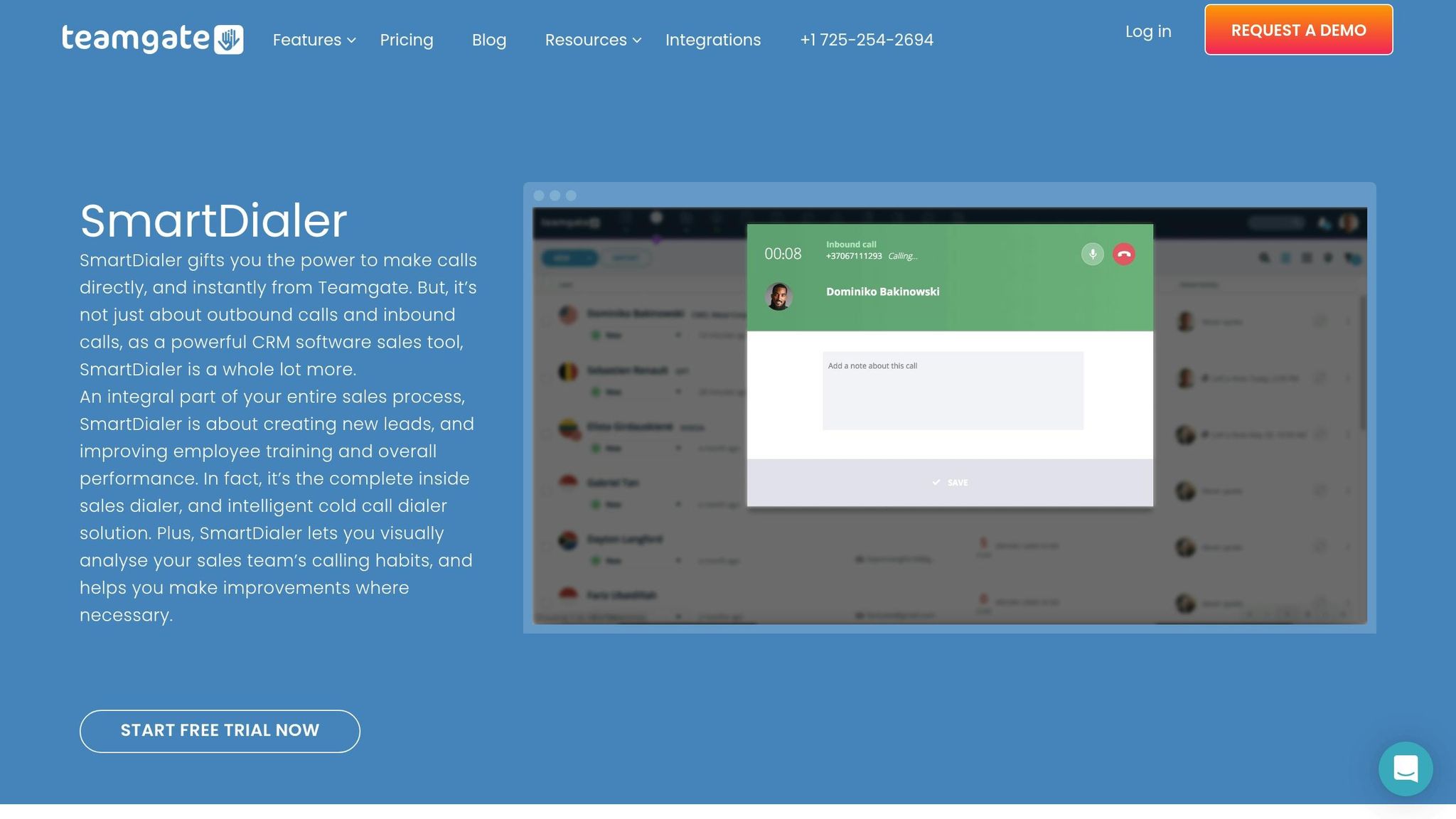
Teamgate CRM makes communication seamless by integrating essential tools directly into the platform. The SmartDialer, powered by Twilio, lets team members make calls straight from the CRM and automatically logs call details, saving time and ensuring nothing is missed.

Email integration captures every interaction without requiring manual entry. Whether it’s a follow-up email or a proposal, all communications are automatically added to the shared timeline, creating a complete picture of customer interactions.

Since the integration works with existing email systems, team members don’t need to change their habits. Instead, their usual workflows now contribute to a shared knowledge base, making collaboration easier. Plus, automated activity logging means less time on admin tasks and more time focused on selling.

Sales Insights and Analytics

Teamgate CRM doesn’t just help manage contacts and pipelines – it also provides valuable insights to guide your team’s strategy. Its reporting tools offer a clear view of both individual and team performance, helping identify what’s working and where adjustments are needed.

Sales dashboards provide real-time visibility into key metrics. Team members can see their contributions alongside overall team progress, encouraging collaboration over competition.

On the Growth plan, advanced analytics dive deeper into performance trends. Sales managers can pinpoint successful strategies and share them across the team, fostering a culture of continuous improvement.

The platform tracks metrics like conversion rates, deal velocity, and pipeline health at a team level. If certain team members excel in specific areas, their methods can inform training sessions or best practices for the whole group.

Forecasting tools align everyone around shared goals. Instead of conflicting individual forecasts, teams can build unified projections based on shared data and collective input.

Workflow Automations for Team Efficiency

Teamgate CRM automates repetitive tasks, freeing up time for meaningful collaboration. Its workflow automations ensure that routine processes happen smoothly, letting team members focus on closing deals together.

For example, automated task creation ensures no steps are missed during handoffs. When a lead reaches a certain score or a deal advances, the system automatically assigns follow-up tasks to the right person.

Notification systems keep everyone updated without overwhelming them. Alerts are sent for critical developments, like when a colleague needs help with a technical issue or a high-value prospect requests a demo.

sbb-itb-5772723

Connecting Teamgate CRM with Daily Work Tools

Modern sales teams juggle multiple apps – from Gmail to LinkedIn – and the constant back-and-forth can waste time and disrupt focus. Teamgate CRM tackles this issue by integrating seamlessly with the tools your team already relies on.

These integrations streamline data sharing between systems, ensuring everyone has access to current information. When your CRM works in harmony with your daily tools, your team can concentrate on selling instead of wrestling with manual data management. Let’s dive into how these integrations enhance workflows, particularly with email and social media tools.

Gmail and Calendar Integrations

Gmail and Calendar integrations are game-changers for keeping your team aligned. When someone sends an email from Gmail, the interaction is automatically logged in the contact’s timeline within Teamgate CRM. This means anyone following up on a lead can quickly review the email history without needing to chase down updates.

Emails sent directly from the CRM also sync with Gmail, ensuring everything stays consistent. On the scheduling side, calendar synchronization simplifies coordination. When a demo or client meeting is scheduled, it appears in both the CRM and the team member’s personal calendar. This makes it easy for everyone to track shared accounts, avoid scheduling conflicts, and provide timely support.

By enabling visibility into each other’s schedules, the integration helps prevent double-bookings and ensures smoother collaboration across the team.

LinkedIn and Social Media Integrations

Social selling becomes more efficient with LinkedIn and social media integrations. When a team member connects with a prospect on LinkedIn, the information flows directly into Teamgate CRM, creating a shared view of interactions across the team.

This visibility reduces the chances of multiple team members sending connection requests to the same prospect. It also helps time outreach more effectively. For example, if someone in marketing engages with a prospect’s LinkedIn post, the sales team can use that activity as a cue to follow up strategically.

By sharing social media insights, the team can craft messaging that responds directly to a prospect’s needs. If a prospect mentions a business challenge in a LinkedIn post, the team can tailor their outreach to address that issue. Additionally, shared content distribution ensures that marketing materials are consistently delivered across all channels, keeping messaging unified and impactful.

API and Zapier Plugins for Custom Workflows

Zapier

For teams looking to go beyond standard integrations, Teamgate CRM offers advanced API connections and Zapier plugins, opening up nearly endless possibilities. Zapier alone links to nearly 8,000 apps, enabling teams to create custom workflows tailored to their needs.

These workflows help automate repetitive tasks, saving time and reducing errors. For instance, when a new lead comes in through Facebook Lead Ads or Google Ads, Zapier can automatically create a contact in Teamgate CRM and assign it to the right team member.

Website form submissions can instantly turn into CRM leads, cutting out delays. Scheduling tools like Calendly or Acuity Scheduling can sync with the CRM to create follow-up tasks and update deal stages when prospects book meetings. This keeps everyone informed about prospect engagement without requiring manual updates.

Notifications can also be sent through tools like Slack, alerting the team when deals progress in the pipeline. Project management platforms such as Asana or Wrike can integrate to assist in coordinating complex sales processes, keeping everyone on the same page.

Automation extends to data management as well. Integrations can enrich contact records, remove duplicates, and flag missing details, ensuring the CRM stays clean and reliable. This not only saves time on data cleanup but also boosts confidence in reporting and forecasting.

E-commerce platforms like Shopify or WooCommerce can sync customer data and purchase histories, while financial tools like QuickBooks or Xero provide payment and credit insights to inform sales strategies.

Best Practices for Building a Team-Based Sales Culture

Technology by itself won’t create collaboration – it’s the culture behind it that truly makes the difference. Building a team-based sales culture requires deliberate changes in how teams approach training, communication, and accountability. These changes turn individual contributors into a cohesive group that achieves stronger results together.

Shifting from individual selling to a team-based approach requires a mindset shift, supported by clear processes and consistent reinforcement. These practices align perfectly with the CRM features discussed earlier, helping you unlock the full potential of Teamgate CRM for collaborative success. Let’s break it down.

Training Teams on Team-Based CRM Usage

Start by explaining how shared data benefits everyone on the team. Most CRM training focuses on technical features, but successful adoption begins with showing how collaboration directly impacts results. When team members understand that sharing information leads to shared success, they’re more likely to embrace new workflows.

Focus your training on real-world collaboration scenarios instead of isolated tasks. For example, instead of teaching someone how to update a contact record, show how those updates help a colleague prepare for an important meeting. Demonstrate how shared notes can prevent prospects from repeating their story, creating a smoother and more trusting experience.

Tailor your training to specific roles. For example:

  • Show SDRs how their lead notes help AEs close deals.
  • Illustrate to AEs how their updates make onboarding easier for customer success teams.
  • Help marketing teams see how sales feedback improves the quality of leads over time.

Practice makes perfect. Organize sessions where teams can rehearse workflows like handing off leads, updating deal stages, and coordinating follow-ups. These exercises build habits that make collaboration second nature, even in high-pressure situations.

Reinforcement is critical. Hold monthly sessions to review successful collaborations and pinpoint areas for improvement. Celebrate moments where shared CRM data led to closed deals or prevented missed opportunities. Sharing these success stories reinforces the value of teamwork and motivates everyone to stay engaged.

Building Cross-Department Collaboration

Teamgate CRM’s integrations make it easier to connect sales, marketing, and customer success teams, ensuring a unified customer experience. Breaking down silos between departments leads to better results across the board.

For example, marketing teams can use Teamgate CRM’s lead scoring and pipeline data to identify which campaigns are generating the best prospects. If leads from a specific source convert at higher rates, marketing can adjust their strategies to focus on what works. Sales feedback on lead quality also helps marketing refine their targeting and messaging, creating a feedback loop that improves efficiency over time.

Shared contact ownership ensures that prospects don’t receive mixed messages from different departments. With everyone accessing the same contact timeline, teams can coordinate their outreach. A prospect who downloads a white paper, receives a sales call, and gets a follow-up email will experience a seamless journey instead of disjointed interactions.

Customer success teams benefit by having visibility into the entire sales process. Knowing what promises were made during the sales cycle allows them to set realistic expectations during onboarding. Detailed deal notes can also help them anticipate and address potential issues before they escalate.

Regular cross-department reviews using shared CRM dashboards keep everyone aligned. These meetings can highlight pipeline health, lead quality, and customer feedback. For instance, if customer success identifies a common onboarding challenge, sales can adjust their approach to address it earlier in the process.

Revenue operations teams can use Teamgate CRM’s analytics to spot bottlenecks and opportunities throughout the customer lifecycle. This broader perspective helps streamline handoffs between departments, ensuring no prospects slip through the cracks.

Creating Shared Dashboards and Open Reporting

Aligned teams thrive on transparency, and shared reporting is key to building trust and accountability. Teamgate CRM’s shared dashboards provide a clear view of progress, helping everyone see how their individual contributions feed into team success.

Design dashboards that display both individual and team metrics. For example, include stats like overall pipeline health, average deal size, and collective quota attainment alongside personal performance indicators. This balance encourages collaboration while still recognizing individual achievements.

Real-time visibility into deal progress helps teams coordinate more effectively. For instance, if a deal is stuck, a colleague with expertise in that industry can step in to assist. Similarly, team members with lighter workloads can take on additional prospecting tasks to support the group.

Highlight team wins with dashboards that track collaborative efforts. Metrics like deals closed through teamwork, successful lead handoffs, and accounts where multiple team members contributed reinforce the value of working together. These numbers tell a story of partnership and shared success.

Make weekly dashboard reviews a team tradition. Use these sessions to discuss not just the metrics but the stories behind them. Which collaborative efforts paid off? Where did communication falter? What can be done differently next time? These conversations turn data into actionable insights that drive continuous improvement.

Open reporting also fosters shared learning. When top performers share their strategies and team members explain how collaboration helped them succeed, everyone benefits. Dashboards become more than just data – they spark discussions that lead to better outcomes.

The goal isn’t perfection; it’s progress. Celebrate small wins in collaboration metrics, even if overall sales numbers still need improvement. Building a team-based culture takes time, but recognizing positive trends keeps the momentum going and inspires ongoing effort.

Conclusion: Achieving Sales Success with Team Collaboration

The move from individual selling to a team-oriented approach has become a defining feature of today’s competitive sales environment. Teamgate CRM provides the tools and structure needed to help sales teams work in sync and perform at their best.

When sales teams share knowledge and coordinate their efforts, they can close deals faster, improve conversion rates, and build stronger relationships with customers. This collaborative approach fosters trust and delivers the kind of value that prospects appreciate.

Teamgate CRM eliminates common obstacles to teamwork by offering centralized data, real-time updates, integrated communication tools, and automated workflows. Features like the SmartDialer ensure consistent outreach, while email integration keeps everyone informed about customer interactions. Meanwhile, the platform’s analytics and insights empower teams to make smarter, data-driven decisions together.

With integrations for tools like Gmail and LinkedIn, Teamgate CRM enhances existing workflows, making it simple for teams to share information and stay aligned across the platforms they already rely on.

These capabilities do more than just streamline processes – they help create a collaborative sales culture. This shift from individual efforts to team-based selling offers long-term advantages. Teams that embrace collaboration retain institutional knowledge, even as employees come and go. They develop scalable processes that grow alongside the business. Most importantly, they deliver customer experiences that stand out in competitive markets.

Transitioning from independent sellers to a cohesive team takes effort, but the benefits – lasting success and scalable growth – are well worth it. With Teamgate CRM as the backbone and the strategies outlined in this guide, sales teams can work together to reach their full potential. The future of sales is collaborative, and Teamgate CRM is here to help your team thrive.

FAQs

How does Teamgate CRM help sales teams work together more effectively?

Teamgate CRM simplifies teamwork with features that keep communication clear and immediate. Tools like threaded comments, @mentions, and instant notifications ensure team members stay connected and updated in real time. This helps everyone stay on the same page regarding tasks and priorities.

It also offers task management, workflow automation, and shared access to customer data, making collaboration easy and efficient. By integrating with email and social platforms, Teamgate CRM boosts productivity, enabling sales teams to work together seamlessly and close deals as a unified, high-performing group.

How can sales teams shift from working individually to collaborating effectively using Teamgate CRM?

To shift from solo selling to a team-based strategy using Teamgate CRM, start by gathering all customer data in one place. By centralizing this information, everyone on the team stays on the same page, minimizing miscommunication and redundant work.

Make the most of Teamgate’s features like task assignments, deal tracking, and internal communication tools. These tools help organize workflows, define roles clearly, and ensure smooth transitions between team members throughout the sales process. Beyond the tools, fostering teamwork through strong leadership and open communication about the value of collaboration is key. With Teamgate CRM, aligning team goals and working together becomes more seamless, enabling your team to close deals more effectively as a unified group.

How do Gmail and LinkedIn integrations make Teamgate CRM more effective for sales teams?

Integrating Gmail with Teamgate CRM makes managing leads a breeze. It automatically captures leads, organizes your contacts, and allows you to handle personalized communication directly within Google Workspace. This means sales teams can focus on building strong client relationships without the hassle of jumping between different tools.

Adding LinkedIn to the mix takes things up a notch. With this integration, you can enrich contact profiles, sync conversations, and track your networking efforts right in the CRM. These tools work together to improve collaboration, ensure data accuracy, and simplify workflows – helping your team close deals more effectively.

Related Blog Posts

Q4 is crunch time for sales teams. It’s the final push to hit revenue goals, close deals, and take advantage of year-end budgets. With 75% of companies wrapping up their fiscal year in Q4, urgency is at an all-time high. Many businesses allocate up to 50% of their annual budgets during this period, creating a prime opportunity to close deals fast.

Here’s what you need to know to succeed in Q4:

  • Shorter sales cycles mean faster decision-making.
  • Dormant leads can often reignite due to "use it or lose it" budget scenarios.
  • Prioritizing high-value deals and tracking performance are critical.
  • Automation and integrations save time, letting your team focus on closing deals.
  • Real-time dashboards and forecasting help you stay on track and adjust strategies as needed.

Teamgate CRM simplifies this process by helping you manage pipelines, reactivate leads, automate follow-ups, and leverage data for smarter decisions. With the right tools and strategies, you can finish the year strong and set the stage for next year’s success.

Q4 Sales Power Plays: Revive Your Deals & Win More | Tips from Morgan J Ingram & Jen Allen-Knuth

Common Q4 Sales Challenges and How to Solve Them

Q4 brings unique hurdles for sales teams, from compressed timelines to unresponsive leads. The rush to close deals before year-end, coupled with holiday schedules and tighter budgets, can make this period particularly demanding. Prospects may feel overwhelmed by a year’s worth of sales pitches, leading to reduced engagement by October. On top of that, decision-making windows shrink drastically, forcing deals that typically take months to close to wrap up in just weeks.

But with the right tools, like Teamgate CRM, these challenges can be addressed effectively.

Managing Shorter Sales Cycles

The end of the year often means sales cycles get squeezed into tighter timeframes. Decision-makers may be harder to reach due to holiday absences, leaving fewer days to finalize deals. This makes it critical to streamline every step of your process.

Teamgate’s pipeline management tools help identify bottlenecks in your sales process, allowing you to eliminate delays. Automated reminders and tasks ensure your team stays on track, even when schedules are tight. Features like email integration and SmartDialer enable quick, tracked communication, so no interaction is missed during the holiday rush.

Customizable pipelines are another game-changer. You can adapt stages to fit the shorter timeline, assigning clear actions at each step to maintain momentum. With these tools, your team can stay agile and focused, even as deadlines loom.

Once your pipeline is optimized, you can turn your attention to reactivating leads that may have gone cold earlier in the year.

Reactivating Dormant Leads

Q4 is a great time to revisit leads that initially showed interest but didn’t convert. With year-end budgets and purchasing deadlines in play, these prospects might now be ready to engage.

Teamgate’s lead recycling feature simplifies this process. By using search filters, you can identify unqualified leads and reintroduce them into your active pipeline. This approach can help re-engage up to 5% of previously dormant leads.

Personalized outreach is key here. Instead of sending generic check-ins, use Teamgate’s integration with MailChimp to craft targeted email campaigns. Segment leads based on factors like their original interest, company size, or the stage where they dropped off. Tailored messaging that addresses their specific needs can reignite their interest.

The platform also provides detailed engagement insights, helping you refine your strategy and reach out at the right moment. For example, a lead who wasn’t ready to commit earlier in the year might now be motivated by approaching budget deadlines. Since these prospects already know your company, you can skip the introductory phase and focus on closing the deal.

Setting Up Sales Pipelines for Q4 Success

A well-structured sales pipeline is key to making the most of Q4. With tight deadlines and heightened urgency, it’s essential to prioritize high-value opportunities and keep deals moving at a steady pace. To do this effectively, fine-tuning your pipeline settings to focus on pressing Q4 deals is a must.

Customizing Pipelines for Q4 Priorities

Q4 is no time for generic, one-size-fits-all sales pipelines. With Teamgate, you can create multiple pipelines tailored to specific priorities, such as high-value deals, particular products, or distinct market segments. This kind of segmentation ensures your team directs its energy where it will have the most impact.

To get started, design Q4-specific pipelines that reflect the unique demands of year-end closing. Swap out generic deal stages like "Proposal" or "Negotiation" for more time-sensitive ones, such as "Q4 Discovery", "Q4 Proposal Sent", and "Final Negotiation – Year-End Close". These customized stages act as constant reminders to keep the momentum going.

Take advantage of custom fields to tag deals based on Q4 priorities and critical deadlines. These tags help flag deals that demand immediate attention, ensuring nothing slips through the cracks.

For added clarity, use color-coded visual indicators to highlight deals nearing their estimated close dates or those at risk of turning overdue. When every day counts, these visual cues make it easier for sales managers to quickly identify areas that need immediate action.

Once your pipelines are set up, the focus shifts to tracking and nurturing the most valuable opportunities.

Tracking High-Value Opportunities

In Q4, not all deals carry the same weight. To maximize your efforts, forecast deals based on their value and likelihood of closing. This targeted, data-driven approach ensures your team spends its time on the opportunities that can have the biggest impact on year-end results.

Real-time dashboards provide instant insights into the pipeline. At a glance, you can see which high-value deals are progressing smoothly and which ones might need extra attention. This visibility is critical for making quick decisions about resource allocation.

Bottlenecks can be particularly damaging during Q4, but visual displays help flag these issues early. Spotting and addressing these patterns in time can make all the difference in hitting your targets.

Make use of Teamgate’s reporting tools to monitor activity levels on your most important deals. If a high-value opportunity hasn’t seen any recent progress, it’s a clear signal that immediate action is needed – especially during the busy holiday season.

For a broader perspective, multiple pipeline reporting allows you to analyze performance across various deal types or market segments. This granular view helps you pinpoint which opportunities are most likely to close before the year wraps up, giving you the insights needed to adjust your strategy and finish Q4 on a strong note.

Using Lead Tracking and Scoring to Close More Deals

As Q4 ramps up, it’s all about focusing on the leads most likely to convert. With Teamgate CRM’s lead tracking and scoring tools, you can make sure your efforts are spent where they matter most.

The line between a strong Q4 and a lackluster one often hinges on how effectively you prioritize leads. With holiday schedules, year-end budget approvals, and procurement deadlines in full swing, having a system to quickly identify your most promising prospects is critical. Here’s where tailored lead scoring steps in to sharpen your focus even further.

Setting Up Lead Scoring for Faster Conversions

Lead scoring takes the guesswork out of prioritizing leads. Teamgate’s lead scoring feature assigns a numerical value to each prospect, reflecting how likely they are to convert. To get started, you can create custom fields that align with your specific business goals. These fields make it easier to segment leads and filter your target audience effectively.

Additionally, integrated email campaign tracking provides insights into engagement levels, helping you zero in on prospects who are actively showing interest. With this data-driven approach, your team can concentrate on closing deals with the highest potential.

Automating Follow-Ups for Hot Leads

Consistent follow-ups are crucial during Q4. Once you’ve scored your leads, timely engagement ensures no hot prospect falls through the cracks. Teamgate’s activity management system keeps you on track with automated reminders, so you never miss a vital follow-up. These workflows help maintain momentum, even when competing priorities threaten to derail your focus.

Another advantage? Qualified leads move faster through the pipeline thanks to the automatic transfer of communication history. This seamless integration reduces the chances of losing important details, ensuring a smooth transition from initial contact to closing the deal. By combining lead scoring with smart automation, your team can give every high-priority lead the attention it deserves during this critical quarter.

Using Automation and Integrations to Save Time

Q4 often brings a whirlwind of activity, with tight deadlines and an urgent need to close deals quickly. Suddenly, those manual tasks that felt manageable earlier in the year can become major roadblocks, eating up valuable time and energy. That’s where Teamgate’s automation and integration features step in, transforming how your team works during this high-pressure period.

By automating routine tasks, your sales team can focus on what truly matters: building relationships and closing deals. Instead of getting bogged down by data entry or follow-up reminders, they can channel their efforts into negotiations and driving results. Combined with streamlined pipelines and lead scoring, these tools help you speed up your Q4 sales process.

Workflow Automation: Simplify and Accelerate

Teamgate’s workflow automation takes the hassle out of routine tasks, keeping your sales pipeline moving without constant manual oversight. For example, leads are automatically assigned to team members, and follow-up tasks are created instantly, ensuring nothing gets overlooked during the rush.

When a prospect responds to a proposal, automated stage updates move the deal to the next step in the pipeline and trigger any necessary tasks for your team. This keeps everything up to date without requiring your reps to stop what they’re doing to make manual updates.

Need reminders for calls, emails, or meetings? Teamgate has you covered. Automated activity reminders not only ensure key interactions aren’t missed but also include helpful context, like past conversations or prospect details, so your reps can jump in fully prepared.

Seamless Integrations with Tools You Already Use

Automation is just one piece of the puzzle. Teamgate also integrates with the tools your team relies on every day, creating a unified sales environment that eliminates the need to constantly switch between platforms.

For instance, Google Calendar integration syncs your sales meetings with relevant prospect details, so everything is in one place. With Zapier, you can connect Teamgate to thousands of other apps, automating tasks like creating new contacts from email subscribers or sending notifications when a major deal progresses.

Email integration is another game-changer. Whether your team uses Gmail, Outlook, or another platform, all communication history is automatically linked to the corresponding deal in Teamgate. This means your reps can see the full relationship history with a prospect without jumping between apps.

For those with specialized needs, Teamgate’s Growth plan offers API access, enabling custom integrations with the tools your business depends on. Want to streamline phone calls? The Twilio integration allows click-to-call directly from contact records, with call logs automatically saved to the prospect’s file.

Making Better Decisions with Reporting and Forecasting

Q4 success isn’t just about putting in more hours – it’s about working smarter by leveraging the right data. With automation taking care of repetitive tasks, Teamgate’s reporting and forecasting tools equip you with the insights needed to make decisions that truly impact your bottom line. In a quarter where every deal matters, having a clear understanding of your sales performance is critical to hitting those year-end goals.

Data-driven decisions separate teams that finish strong from those that scramble to meet targets. The most successful sales teams rely on real-time insights to uncover opportunities, identify roadblocks, and pivot their strategies before it’s too late. These insights are seamlessly delivered through dashboards and forecasting tools.

Using Real-Time Sales Dashboards

Teamgate’s sales dashboards transform raw data into actionable insights, giving you an up-to-the-minute view of your team’s performance. Unlike static reports that can quickly become outdated, these dashboards continuously update, ensuring you always have the most current information at your fingertips.

Think of your dashboard as your Q4 command center. It provides a quick snapshot of deal progress, individual rep performance, and potential red flags. For example, you might notice that deals of a certain size are stalling or that specific industries are responding well to your campaigns. This visual format makes it easier to spot trends and patterns that might otherwise go unnoticed.

Pipeline health metrics are particularly valuable, showing not only where your deals stand now but also what’s likely to happen next. If your December pipeline looks thin, you still have time in October to ramp up prospecting efforts. Conversion rates between pipeline stages highlight exactly where deals are getting stuck, giving you the chance to address these issues before they snowball.

Tracking team performance is another critical feature, especially when everyone is striving to meet year-end quotas. You can quickly identify which team members need extra support or coaching and who might be in a position to mentor others. This real-time visibility allows you to allocate resources effectively and focus on areas that need immediate attention. Once these insights are in place, forecasting takes your strategy to the next level.

Forecasting to Adjust and Meet Targets

Teamgate’s forecasting tools combine historical sales data with your current pipeline to create reliable predictions about what’s ahead. This isn’t guesswork – it’s data-driven forecasting designed to guide your strategic decisions.

The system uses past and present data to generate clear sales projections, helping you determine whether you’re on track or need to make adjustments. However, the accuracy of these forecasts depends on having a well-defined sales process. Clear pipeline stages within Teamgate provide the structure needed for reliable predictions. Without this foundation, it’s much harder to score deals accurately and forecast future results.

When forecasts indicate you’re falling behind on targets, you can take action. For instance, you might shift your focus to high-value deals that are close to closing or prioritize follow-ups with warm leads that have been sitting in your pipeline. Forecasting helps you make these decisions based on the likelihood of success, not just the size of the deal.

Visual forecasting reports are another key feature. They confirm your progress and help with resource planning. If projections show a busy period ahead, you can prepare by clearing schedules or bringing in extra support. On the flip side, if a slower period is expected, you can use that time to focus on prospecting or nurturing leads that could pay off in the future.

Regularly reviewing your forecasts also serves as a valuable planning exercise. By comparing actual results to predictions, you can refine your forecasting accuracy over time and gain a deeper understanding of the factors that influence your sales cycles. This ongoing improvement ensures you’re making better decisions as Q4 unfolds.

Conclusion: Closing Q4 Strong with Teamgate

Teamgate

Q4 offers a prime opportunity to finish the year on a high note, and Teamgate’s CRM is built to help your team close deals effectively while maintaining momentum.

Here’s a quick recap of the key strategies for success this quarter: prioritize high-value deals by tailoring your pipelines, use lead scoring to identify top prospects, and automate follow-ups to ensure no opportunity slips through the cracks. These steps help you work smarter, not harder.

With real-time dashboards and forecasting tools, you can quickly identify potential issues and adjust your approach on the fly. This level of visibility ensures your team stays proactive and focused.

By setting up targeted pipelines, activating lead scoring, and closely monitoring forecasts, you can make every day in Q4 count. This approach isn’t just about wrapping up the year – Teamgate positions you for a stronger start in the year ahead.

Now’s the time to take action: review your pipeline, activate lead scoring, and use reporting tools to make data-driven decisions that drive results. Let Teamgate help you finish Q4 with confidence and set the stage for future success.

FAQs

How does Teamgate CRM help handle the fast-paced sales environment of Q4?

Teamgate CRM is built to address the fast-paced demands of Q4’s shorter sales cycles by simplifying essential tasks like deal tracking, pipeline management, and sales forecasting. Its visual sales pipeline offers a clear overview, making it easier to identify and resolve bottlenecks. This helps teams focus on high-priority deals and move them forward more effectively.

Key features such as automated follow-ups and accurate sales forecasting ensure that prospects receive timely communication, enhancing engagement and increasing the likelihood of closing deals before the year wraps up. These tools help sales teams stay organized, focused, and efficient during this critical time.

How can Teamgate help reactivate dormant leads during Q4?

Teamgate offers practical ways to re-engage dormant leads and bring them back into your sales pipeline during the crucial final quarter. One approach is crafting personalized email campaigns designed to resonate with individual prospects. Another is leveraging segmentation to deliver targeted offers to specific groups, ensuring your message is relevant and timely. On top of that, establishing consistent follow-up routines helps keep the conversation going and maintains engagement.

To make outreach even more effective, Teamgate helps ensure your lead data is accurate and current by verifying and updating contact information. With these strategies and tools, reconnecting with leads becomes simpler, giving you the chance to convert them into valuable opportunities before the year wraps up.

How can Teamgate’s automation and integrations improve sales efficiency during Q4?

Teamgate’s automation tools take the hassle out of repetitive tasks like lead scoring, follow-ups, and data entry. By handling these time-consuming activities, your sales team can focus on what truly matters – building strong relationships and sealing deals, especially during the crucial year-end push.

On top of that, Teamgate’s integration features effortlessly sync with platforms like Google Contacts, Excel, and QuickBooks. This seamless connection ensures smooth data sharing, minimizes manual errors, and keeps all your systems in sync. Together, these tools keep your team organized, efficient, and laser-focused on hitting those Q4 sales targets.

Related Blog Posts

Businesses generate massive amounts of customer data every day, but turning that data into revenue can be tricky without the right tools. Teamgate CRM simplifies this process by centralizing data, automating workflows, and providing actionable insights to help small and medium-sized businesses (SMBs) in the U.S. grow their sales and improve customer relationships. Here’s what Teamgate offers:

  • Centralized Data Management: Combines customer interactions, purchase histories, and communication logs into one place.
  • Lead Management: Scores and prioritizes leads, enabling sales teams to focus on high-value opportunities.
  • Sales Automation: Automates repetitive tasks like follow-ups and email sequences to save time.
  • Analytics & Forecasting: Provides accurate sales forecasts and performance reports to guide decision-making.
  • Customer Retention Tools: Enhances loyalty through personalized communication and organized contact management.
  • Integrations: Seamlessly connects with tools like Gmail, Google Calendar, and Zapier.

Teamgate helps sales teams work more efficiently, close deals faster, and make smarter decisions by turning raw data into actionable strategies. Whether you’re managing leads, tracking sales, or improving customer retention, Teamgate simplifies the process and drives measurable results.

How Can CRM Data Help Double Your Revenue? – Modern Marketing Moves

Lead Generation with Teamgate

Teamgate

Teamgate takes centralized data management a step further by equipping your sales team with tools to capture, qualify, and engage leads more efficiently.

The key to effective lead generation lies in capturing and nurturing prospects at just the right time, allowing your team to zero in on opportunities that hold the most promise. Let’s explore how Teamgate simplifies this process and enriches lead management.

Lead Capture Through Web Forms and Integrations

Leads can come from anywhere – web forms, social media, trade shows, or even referrals. Teamgate brings all these sources together into one unified system, automatically creating detailed prospect profiles.

With its web form integration, Teamgate collects visitor information directly from your website, instantly generating contact records that include source details and timestamps. The platform’s API connects effortlessly with your existing tools, channeling leads from marketing automation systems, social media platforms, and other sources directly into the CRM. This eliminates tedious manual data entry, ensures timely follow-ups, and tracks lead origins to help fine-tune your marketing strategies.

Lead Scoring and Prioritization

Not all leads are created equal, and Teamgate’s scoring system helps you identify the ones that matter most. By analyzing factors like company size, engagement level, and behavioral trends, the platform assigns scores to leads, highlighting those most likely to convert into customers.

This scoring system ensures that your team spends their energy on high-value opportunities while avoiding less promising leads. You can customize scoring criteria to align with your business model and ideal customer profile. Automated categorization further organizes leads based on their attributes, and the visual pipeline makes it easy for managers to see lead scores at a glance. This setup allows for better team performance monitoring and smarter resource allocation.

Faster Outreach with SmartDialer

SmartDialer

When it comes to converting leads, speed is everything. Teamgate’s SmartDialer helps your team move quickly by enabling them to make calls directly within the platform, eliminating the need to switch between apps. Whether it’s a local, national, or long-distance call, SmartDialer simplifies the process so your team can focus on building connections rather than tracking down contact details.

The tool also boosts engagement with features like call recording and playback, which allow managers to review conversations, refine scripts, and coach team members for better results. Intelligent call routing ensures inbound calls are handled immediately, while missed calls are logged for follow-up. Additionally, built-in script management keeps messaging consistent across the team.

Sales Process Management with Teamgate

After identifying and qualifying leads, Teamgate takes the reins to streamline your sales process. It organizes deals, equips your team with essential tools, and turns data-driven insights into revenue. By centralizing information, Teamgate simplifies, automates, and integrates your workflow to help close more deals efficiently.

The platform focuses on three key areas: tailored pipeline organization, smart automation, and smooth tool integration.

Custom Pipelines for Better Organization

No two businesses sell the same way, and Teamgate understands that. It allows you to design multiple custom pipelines that align with your specific sales processes. Whether you’re selling different products, operating in various regions, or catering to distinct industries, you can create pipelines that fit your needs, complete with personalized reporting, tagging, and search options.

For example, a software company might set up separate pipelines for enterprise clients and small businesses. Each pipeline can have unique stages and forecasting settings tailored to its buying process. The visual pipeline view makes it easy for managers to spot bottlenecks and prioritize deals. Additionally, you can assign specific team members to particular pipelines, ensuring that specialists handle the deals they’re best suited for.

Once these custom pipelines are in place, automated workflows guide deals smoothly through each sales stage.

Workflow Automation to Save Time

Repetitive tasks can eat into your team’s selling time, but Teamgate’s automation features take care of the routine work. As deals progress, the system can automatically generate follow-up tasks, schedule calls, or send pre-written emails. For instance, if a prospect requests a demo, Teamgate can create a task to prepare for it without any manual input.

Automated email sequences ensure consistent communication, freeing your team to focus on high-value activities. The platform also keeps your data synchronized – when you update a contact’s information in one place, it’s updated everywhere. This eliminates redundant work and ensures accuracy. Plus, reminder systems help your team stay on track by alerting them when it’s time to follow up, renew contracts, or re-engage unresponsive prospects. These features keep the sales cycle moving without missing a beat.

And all of this works seamlessly with the tools your team uses every day.

Tool Integrations for Daily Workflow

Sales teams juggle multiple tools throughout their day, and Teamgate makes it easier by integrating with Gmail, Google Calendar, marketing platforms, accounting software, and thousands of other apps via Zapier. Its mobile apps for Android and iOS ensure your team can stay connected and productive, even on the go. This eliminates the need to constantly switch between apps, keeping the focus on closing deals and driving revenue.

The end result? A smoother, more efficient sales process that accelerates deal progression while giving you clear insights into team performance and pipeline health.

Revenue Growth Through Analytics and Insights

Teamgate doesn’t just organize your sales data – it transforms it into clear, actionable insights that can directly impact your revenue. By combining forecasting, reporting, and financial tracking, the platform helps businesses turn raw data into measurable financial results.

Sales Forecasting for Better Planning

Accurate sales forecasts are a cornerstone of smart business planning, and Teamgate’s tools make this process more precise. The platform offers several forecasting methods:

  • Weighted forecasting: Assign more weight to deals in advanced stages of the sales pipeline.
  • Time-based forecasting: Set revenue goals for specific periods – monthly, quarterly, or annually – by analyzing past closing trends and seasonal patterns.
  • Probability-based forecasting: Sales reps can assign confidence levels to their deals, which, when combined with historical win rates, create more reliable revenue projections.

These forecasting features empower sales managers to allocate resources wisely and refine their strategies based on data-driven insights.

Reports That Drive Revenue Growth

Teamgate’s reporting tools dig deep into your sales data to uncover what’s working and what’s not. Reports on sales performance, win/loss analysis, lead source effectiveness, and pipeline velocity reveal profit opportunities and pinpoint bottlenecks. With this clarity, businesses can make sharper decisions about where to focus their efforts.

Measuring Financial Results with Analytics

The analytics dashboard provides a clear view of vital metrics like revenue per sales rep, average deal size, conversion rates, and sales cycle length. These numbers don’t just validate the value of your CRM investment – they also help guide smarter, more strategic decisions for future growth.

Customer Relationships and Retention

Building on streamlined sales processes and accurate forecasting, Teamgate’s data management tools play a key role in improving customer retention and loyalty. Keeping customers engaged and satisfied is essential for driving long-term business success. Teamgate’s suite of customer relationship features helps businesses make the most of their data, ensuring every interaction contributes to stronger, more meaningful connections. Here’s how Teamgate’s tools work to enhance customer retention and loyalty.

Centralized Contact Management

Teamgate acts as a single hub for organizing and managing all your business relationships, whether they’re customers or prospects. It categorizes contacts into "People" and "Companies", keeping related details neatly connected.

This centralization provides your sales team with easy access to complete customer profiles, which include call records, campaign histories, active deals, and communication logs – all in one place. Custom fields allow you to add specific details, such as preferred contact times or product choices, to further personalize interactions. The system also detects duplicate entries, allowing you to merge or remove them to keep your data clean and organized. Plus, features like contact ownership and collaboration ensure smooth teamwork by assigning a primary contact owner while enabling others to collaborate without overlapping efforts.

Retention Tools to Maximize Customer Value

Teamgate offers more than just contact storage; it streamlines retention efforts by consolidating all communications – including emails, calls, and comments – into a single, easily accessible location.

"Keep track of all communications with every contact; emails, call logs, or comment; everything is consolidated and may be viewed by all designated members of your team."

The platform also includes customer segmentation tools, which allow you to group contacts into categories like current customers, past customers, or prospects. As deals close, the system automatically updates customer statuses, making it easier to spot retention opportunities and tailor follow-ups. Additionally, file management features let you attach important documents – such as contracts or proposals – directly to contact profiles, ensuring critical information is always on hand.

Building Customer Loyalty Through Data

Teamgate’s retention tools go a step further by enabling data-driven personalization, which is key to fostering loyalty. With access to complete communication histories and custom fields capturing customer preferences, your team can craft interactions that feel tailored to individual needs and past conversations.

Enhanced contact profiles help your team forge deeper connections while identifying upselling or cross-selling opportunities using detailed customer data. Advanced filtering and search tools make it simple to pinpoint customers who haven’t been contacted recently, are approaching renewal periods, or fit the criteria for specific campaigns. This proactive approach to managing relationships not only reduces the risk of losing customers but also strengthens loyalty over time.

Conclusion: Teamgate Benefits for US SMBs

For small and medium-sized businesses (SMBs) in the US, success often hinges on turning raw data into measurable revenue. Teamgate CRM steps in to meet this challenge, offering a platform that transforms customer and sales data into practical insights that directly drive growth.

Key Takeaways

Teamgate delivers a range of tools to help US SMBs streamline their operations and boost sales. From lead generation and sales process management to analytics and customer retention, these features simplify workflows, improve conversion rates, and increase revenue potential.

By making deal progress transparent and automating routine tasks, Teamgate allows teams to focus on what they do best – selling. Its seamless integration with existing tools ensures a smooth workflow, enhancing overall productivity.

Analytics and forecasting tools empower businesses with strategic insights. Real-time visibility into sales performance, accurate revenue forecasts, and detailed reports help identify strengths and areas for improvement. This enables smarter resource allocation and better long-term planning.

Customer retention tools complete the sales cycle. Centralized contact management and relationship-building features help foster stronger connections, leading to repeat business and valuable referrals.

Final Thoughts on Data-Driven Sales Growth

The difference between thriving businesses and those that fall behind often comes down to how effectively they leverage their data. Teamgate offers pricing options that fit every budget, from a free Starter plan to the Growth plan at $59.90 per user per month, making data-driven sales management accessible for all US SMBs.

Adopting a CRM like Teamgate aligns your data with your revenue goals, creating a competitive edge. Every lead, sales conversation, and customer interaction becomes more valuable when you can score prospects effectively, provide complete context, and identify opportunities to retain customers.

While transforming scattered data into a revenue-driving system takes time, Teamgate’s intuitive features and user-friendly design help businesses see improvements early in their CRM journey. The real question isn’t whether you can afford to invest in better data management – it’s whether you can afford not to.

FAQs

How does Teamgate CRM help sales teams focus on the right leads and close more deals?

Teamgate CRM empowers sales teams to focus on the right opportunities through its lead scoring system, which evaluates each lead’s likelihood of converting. This approach helps teams concentrate their efforts on high-potential leads, improving both productivity and conversion rates.

On top of that, Teamgate offers user-friendly lead management tools that make segmentation and follow-ups a breeze. These tools ensure that every lead receives timely and appropriate attention. By simplifying these tasks, sales teams can operate more efficiently and achieve stronger outcomes.

What are the main features of Teamgate’s sales forecasting tools, and how do they help improve business planning?

Teamgate’s sales forecasting tools come with interactive dashboards that make tracking sales performance a breeze. These dashboards visually present key metrics, real-time data, and customizable sales pipelines, giving sales teams a clear view of their progress and a reliable way to anticipate future trends.

By digging into historical data, pipeline activity, and market patterns, these tools create precise sales forecasts. This helps businesses make well-informed decisions, whether it’s about planning strategies, allocating resources wisely, or managing risks effectively. Armed with these insights, companies can stay ahead of the curve and focus on boosting revenue.

How does Teamgate CRM help businesses retain customers and build long-term loyalty?

Teamgate CRM empowers businesses to keep customers coming back by providing a 360-degree view of each customer, making interactions more personal and impactful. By streamlining routine tasks through automation, your team can focus on what truly matters – understanding and meeting customer needs to build genuine connections.

With advanced data insights, Teamgate helps you predict customer preferences and offer customized solutions that boost satisfaction. Features such as customer segmentation and automated workflows simplify implementing loyalty programs, ensuring steady engagement and building trust over time. These tools work hand-in-hand to strengthen relationships and improve customer retention.

Related Blog Posts

If you found yourself in the situation of losing important customer relationship management (CRM) data – or you just want to know if it’s even possible to recover deleted CRM data in theory – this short guide will give you the answers. 

We’ll look at how CRMs handle deleted records, what built-in recovery options exist, when data recovery software might help, and what lessons you can borrow from companies that already lived through it.

How CRM Systems Store and Delete Data

At the core, every CRM is powered by a database. Records you see on the screen are stored as rows in tables, and attachments might live as binary files or links in a separate storage system. When you delete something, the CRM doesn’t always treat it the same way.

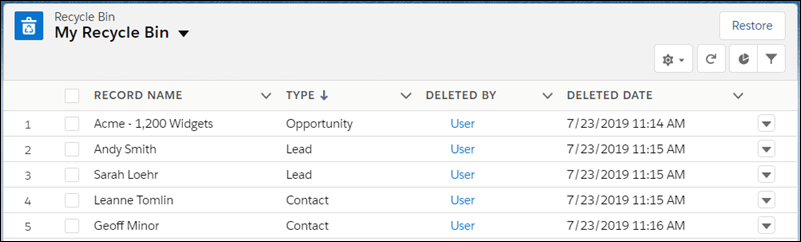
  • Some platforms use a “soft delete.” The record isn’t wiped right away – it gets flagged as deleted and moved into a recycle bin.
  • Others still rely on “hard deletes.” Microsoft Dynamics was notorious for this for years: the moment you hit delete, that record was gone unless you had a backup or auditing turned on.
  • Audit logs play a big role too. Even if the record is gone, an enabled audit trail can capture the field values at deletion, giving you at least a blueprint to rebuild the lost data.

Also its not always about a single user action but a system-level failure. We all remember the Salesforce NA14 outage in 2016: a database failure left customers without access for more than 20 hours. When the service came back, Salesforce had to roll back to the last good backup. That meant customers on NA14 lost nearly four hours of CRM data added between the backup and the crash. 

It’s a reminder that even the biggest vendors can stumble, and why backups matter as much as recycle bins.

Native Recovery Options in Popular CRMs

Now let’s talk in more detail about what options you actually have to recover deleted CRM data, depending on which system you use. Each platform treats deletions a little differently, and the tools they give you can save you a lot of stress if you know how to use them.

Salesforce

Salesforce is one of the better-known examples. It has a built-in recycle bin, which holds deleted records for about 15 days (sometimes extended to 30). If you notice the
mistake in time, you can restore records with a couple of clicks. After that window closes, though, you’re out of luck unless you have an export or backup.

Salesforce used to offer a paid “Data Recovery” service, but it was slow, expensive, and eventually retired. These days, they encourage admins to schedule weekly exports or use third-party backup apps.

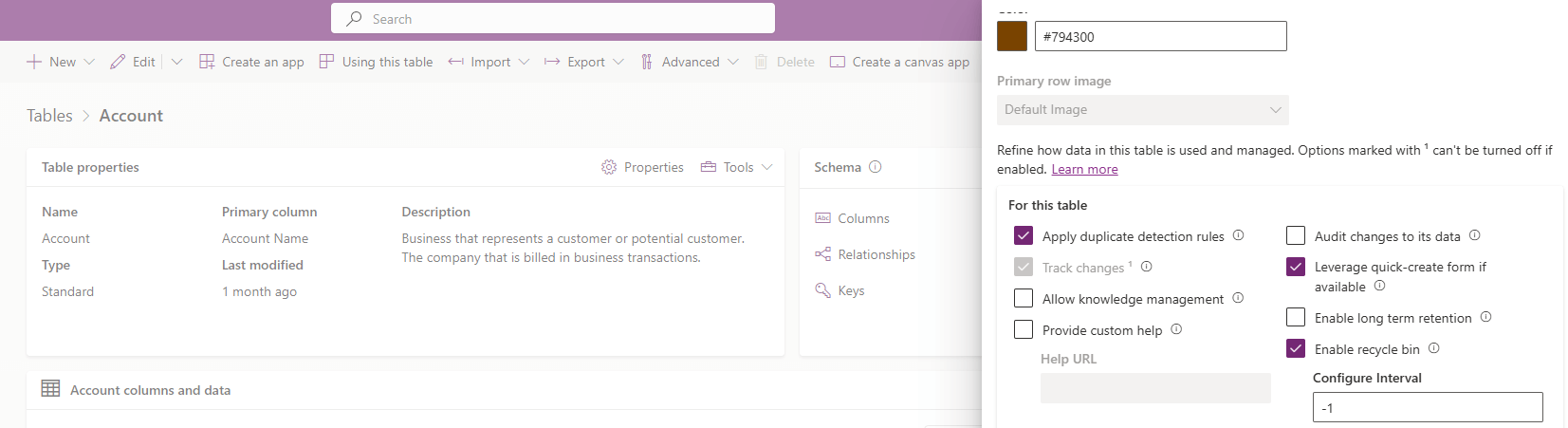
Microsoft Dynamics 365

Microsoft Dynamics 365 (Dataverse) was tougher historically because it didn’t have a recycle bin at all. Once a record was deleted, it was gone, unless you could restore the entire database. That’s changed Microsoft introduced a recycle bin preview feature that works more like Salesforce’s. Until that’s fully rolled out, though, most admins rely on SQL backups or third-party tools.

HubSpot

HubSpot takes a slightly different approach. It lets admins generate full backups of CRM data, and in higher-tier plans, schedule them automatically. You can restore property values from those backups within 14 days. It’s not as straightforward as a recycle bin, but it does give you a way to roll back to a recent state.

Zoho CRM

Zoho CRM has caught up too. For years, users complained that recovery was almost impossible without support tickets. Now, Zoho includes a recycle bin that keeps deleted records for 60 days, which makes recovery a lot simpler.

Other platforms like NetSuite, SugarCRM, or custom CRMs usually rely heavily on database-level backups. In many cases, the only way to get back deleted records is to restore from a snapshot or use an export file.

The bottom line: if you’re lucky, your CRM has a recycle bin and you catch the mistake quickly. If not, you’ll need backups, exports, or third-party tools to recover deleted CRM files and records.

How to Recover Deleted CRM Files Without Backups

Now, these are all obvious default features that might help you, so the answer to the question in the title of this article can be answered with a yes – it is possible to retrieve deleted records in CRM. But what if the situation is a bit more complicated? What options are there when you don’t have a recycle bin entry or a recent backup to fall back on?

  • This is where audit logs can help. Many CRMs can be configured to track changes, including deletions, at the field level. Even if the record itself is gone, the audit trail may hold all of the values it contained. With Salesforce, Zoho, or Dynamics 365, that means you can open the audit report, see exactly what was deleted, and rebuild the record manually. It’s slower than clicking “restore,” but it keeps you from losing everything.
  • Another trick is to pull from older data exports or linked systems. If your CRM was syncing data with a BI warehouse, email marketing tool, or even an Excel export someone saved last month, that copy might still contain the missing records. Admins sometimes even spin up a sandbox environment from an older snapshot to extract lost records, then re-import them into production.
  • Also, if you’re a fan of self-hosted or on-premises CRM systems – like many people who prefer not to rely on big-name cloud vendors – you actually have another option. In those setups, your CRM data lives on a server you control (most likely in a database file such as a SQL .mdf file or an Oracle data file). If that file itself was deleted, corrupted, or made inaccessible, general-purpose data recovery software can be very useful. Tools like Disk Drill, R-Studio, and many more software options can help extract entire database files from a damaged or failing disk.
    This type of recovery won’t undelete a single record inside a working database, but if the entire file is missing, these tools could save you.
  • As a last resort, you can reach out to vendor support. Some providers can perform limited point-in-time restores if you act fast, though they rarely guarantee full recovery. It’s not the smoothest process, but it can work if the deleted data is too critical to lose.

So while recovering deleted CRM files without default backups isn’t effortless, it is possible in some scenarios. 

Final Words and Tips

CRM data recovery isn’t always straightforward, but you usually have more than one way out of a bad situation. Recycle bins, audit logs, and vendor backups can handle most cases of accidental deletions. And if you’re running an on-premises setup, file recovery tools give you a fighting chance when a database file is deleted or damaged.

One thing that’s worth stressing is corruption. Even if you never delete anything and follow every best practice, nobody is completely safe from database corruption. Hardware can fail, disks can develop bad sectors, and integrations sometimes write broken data that damages entire tables.

That’s why you need to prepare. To recover CRM after data corruption, keep regular backups tested, and maintain redundant exports in more than one location. If you skip this step, you’ll end up scrambling with partial exports or audit logs, hoping they cover enough to rebuild what you lost.

A few practical tips to close this out:

  • Enable recycle bins if your CRM supports them.
  • Make backups a scheduled habit.
  • Double-check that auditing is enabled for your most important objects.
  • Limit delete permissions to trusted users.
  • Train staff to avoid accidental bulk deletes.
  • Test your recovery process at least once so you know it works before you need it.

FAQs

Can I recover deleted CRM records without a backup?

If your CRM has a recycle bin or audit logs enabled, you may be able to restore or manually rebuild records. Without those, your options are limited unless you have exports.

How long do deleted CRM files stay in the recycle bin?

The retention period depends on the CRM platform. 

  • In Salesforce, deleted records remain in the recycle bin for about 15 days (sometimes extended to 30 for certain editions). 
  • HubSpot doesn’t use a traditional recycle bin, but instead relies on backup snapshots that you can restore from within 14 days. 
  • Zoho CRM keeps them for up to 60 days. 
  • For other CRMs like Microsoft Dynamics, deleted records may bypass a recycle bin entirely unless you’re using the new recycle bin preview feature.

Can I restore attachments when I recover deleted CRM records?

In many cases, yes. If your CRM uses a recycle bin, attachments linked to a deleted record often move there as well. For example, in Salesforce, when you restore a record from the recycle bin, its associated notes and attachments come back too.

However, not all CRMs handle files the same way. Some systems treat attachments as separate objects or store them outside the main database. In those cases, deleting a record may wipe the attachment immediately, and restoring the record won’t bring it back.

Does enabling auditing slow down my CRM?

In most modern CRMs, enabling auditing has little impact on performance. Systems like Salesforce and Dynamics 365 are designed to handle changes in the background without noticeably slowing down everyday tasks like adding leads or updating opportunities. The only time you might notice a difference is if you enable auditing for every field across every object, which can increase database size and slightly affect reporting speed.

Open APIs make CRMs smarter and more efficient. They connect your CRM to tools like Gmail, LinkedIn, and accounting software, automating tasks and syncing data without manual effort. This creates a system that evolves with your business needs, helping teams save time, reduce errors, and make better decisions.

Key Benefits of Open APIs in CRMs:

  • Automate Workflows: Eliminate repetitive tasks like data entry or follow-ups.
  • Real-Time Data Access: Sync information instantly for faster, informed decisions.
  • Cross-Tool Integration: Link sales, marketing, and support systems for unified operations.
  • Custom Features: Tailor your CRM to fit your business processes.

Challenges to Consider:

  • Security Risks: More connections mean stricter data protection is needed.
  • Maintenance Effort: Ongoing updates and monitoring are required.
  • Complexity: Too many integrations can overwhelm systems.

Example Use Cases:

  1. Sales Teams: Sync LinkedIn data and email conversations for better lead tracking.
  2. Marketing Teams: Use CRM data to refine campaigns in real time.
  3. Support Teams: Automate ticket creation and updates for faster resolutions.

Platforms like Teamgate CRM use open APIs to integrate with tools like Zapier, making it easy to connect over 5,000 apps. This approach ensures your CRM grows along with your business, saving time and boosting productivity.

Takeaway: Open APIs transform CRMs into powerful, interconnected systems. Start small, focus on key integrations, and expand as needed to improve efficiency and collaboration.

Main Benefits of Open APIs in CRM Systems

Open APIs transform CRMs from static data repositories into dynamic tools that enhance business operations. They bring tangible advantages that directly impact productivity and decision-making.

Automating Workflows to Save Time

One of the standout benefits of open APIs is the ability to automate workflows, cutting down on repetitive tasks that often drain a team’s efficiency. By integrating your CRM with other tools, APIs streamline processes that would otherwise require manual effort.

For example, APIs can instantly transfer leads from web forms into your CRM, eliminating the need for manual data entry. They can also automate follow-ups, triggering personalized emails, setting reminders, or updating lead scores based on specific actions.

Customer support processes see similar improvements. When a support ticket is submitted, APIs can automatically create a case in your CRM, assign it to the right team member, and send updates to the customer. This automation reduces delays, allowing teams to focus on resolving issues instead of managing administrative tasks.

Connecting Data Across Business Functions

APIs play a crucial role in breaking down silos between departments, ensuring everyone has access to the same accurate and up-to-date information. By linking sales, marketing, and customer support systems, APIs enable seamless collaboration and reduce the chances of miscommunication.

For instance, marketing teams can use sales data accessed through APIs to refine their strategies, while sales representatives gain a complete picture of a prospect’s journey – from their initial website visit to email interactions. Similarly, customer support teams can review purchase histories and past communications, creating a unified understanding of the customer. This shared access to data fosters better teamwork and more informed decision-making.

Real-Time Data for Better Decisions

Open APIs enable real-time data synchronization, ensuring all teams have immediate access to the latest information. This constant data flow improves decision-making, enhances customer service, and elevates the overall customer experience.

Real-time data is particularly valuable for tracking customer sentiment and market trends. For instance, a company monitoring brand sentiment on social media can use APIs to gather insights from multiple platforms, allowing for timely responses.

Marketing teams can also leverage real-time CRM data to fine-tune campaigns on the go. Instead of waiting for periodic reports, they can quickly identify which messages are resonating and adjust their strategies accordingly. Similarly, sales managers can detect shifts in prospect behavior early and provide timely guidance to their teams.

Customizing CRM Features

Open APIs don’t just enhance automation and data integration – they also allow businesses to tailor their CRM systems to meet specific needs. Rather than adapting to generic software capabilities, APIs let you build custom features that align with your unique workflows.

For example, SaaS companies can integrate their CRM with analytics tools, billing systems, and product usage databases to develop detailed customer health scores. These insights help identify opportunities for growth or flag potential churn risks.

Service-based businesses can connect project management tools to their CRM, ensuring client records automatically update when milestones are reached or budgets are adjusted. This creates a unified view of client interactions across sales and service delivery.

E-commerce operations can benefit from APIs that link inventory management with customer records. Sales teams gain instant visibility into product availability during conversations, while support agents can proactively inform customers about restocked items or delivery updates.

Additionally, APIs offer the flexibility to embed CRM functionality directly into the tools your teams use daily. Sales reps can access customer details without leaving their email client, and support agents can update ticket statuses within their help desk software. This seamless integration keeps workflows efficient and teams focused on what matters most.

Real Examples: Connecting Business Tools with CRM

API integrations can transform CRM systems by linking them with essential tools businesses rely on every day.

Connecting Communication Tools

Integrating communication platforms into a CRM system is a game changer for keeping teams in sync and ensuring smooth customer interactions.

Email integration is a prime example. When connected with platforms like Gmail, the CRM automatically logs emails, tracks engagement, and eliminates the need for manual updates. Sales teams can send emails directly from the CRM, and the system tracks key metrics like opens, clicks, and replies. This two-way sync ensures that everyone on the team has access to a complete communication history, reducing duplicate outreach and keeping messaging consistent.

LinkedIn integration takes prospecting to a new level. By importing profile data such as job updates, company changes, and shared connections, LinkedIn integration allows sales teams to research leads without leaving the CRM. They can view profiles, send connection requests, and even track engagement – all while ensuring these interactions are logged in the CRM for future reference.

Phone system integration simplifies call management by linking VoIP platforms to the CRM. A dedicated front office software phone solution makes this process seamless by automatically syncing all business calling and messaging data with the customer record. With this setup, sales reps can view a customer’s entire history, including past call recordings and outcomes, right from their CRM dashboard. This seamless access to information helps teams stay informed and organized during calls.

Social media platforms add another layer of engagement by capturing customer interactions directly within the CRM.

Adding Social Media Channels

Facebook and Instagram APIs allow businesses to track engagement, such as likes, comments, and direct messages, within their CRM. These interactions can trigger automated follow-ups, such as sending a discount email to a customer who commented on a product post.

Twitter integration offers a way to monitor brand mentions and respond to customer service requests. By pulling in tweets with specific hashtags or mentions, the CRM can automatically create records for these interactions. Customer service teams can respond to complaints or questions while maintaining a detailed history of social media conversations.

These integrations provide a fuller picture of customer behavior. Beyond purchase history and email exchanges, sales teams gain insights into customer preferences and engagement patterns across multiple platforms, making their outreach more targeted and effective.

To complement these tools, analytics integrations provide even deeper insights into customer behavior and campaign performance.

Improving Analytics and Reporting

Google Analytics integration links website activity data with CRM records. This connection allows businesses to track how prospects interact with their site in real time, enabling tailored engagement strategies throughout the customer journey. Marketing teams can identify which content drives high-quality leads and follow the entire path from a prospect’s first website visit to a closed deal.

Business intelligence platforms like Tableau or Power BI enhance reporting by creating dynamic dashboards. These dashboards pull CRM data and update automatically, helping sales managers quickly identify trends, spot issues, and make data-driven decisions.

Financial software integration connects tools like QuickBooks to the CRM, streamlining processes like invoicing, tracking payment terms, and managing balances. This integration eliminates duplicate data entry and simplifies forecasting, making it easier to manage cash flow and financial planning.

API Types and Their CRM Integration Uses

Building on the advantages of open APIs, understanding their specific types helps clarify how they support various CRM functions. Each API type plays a unique role in connecting systems and enhancing CRM capabilities. Let’s dive into how System, Process, and Experience APIs contribute to improving CRM integration.

System APIs: Enabling Core Data Exchange

System APIs are the backbone of data exchange between your CRM and critical business systems. Their primary role is to retrieve and share data with core systems such as ERP platforms, billing software, proprietary databases, or payment processors.

For instance, when a customer completes a purchase on your e-commerce platform, System APIs automatically update your CRM with essential details like transaction records, payment status, and shipping information. This eliminates the need for manual data entry or complex workarounds, ensuring your CRM stays updated in real time.

These APIs act as a direct link between foundational systems and your CRM. By working quietly in the background, they ensure that your CRM always has access to accurate, up-to-date data from across your business ecosystem.

Process APIs: Automating Workflows

Process APIs go beyond simple data transfer – they focus on orchestrating and automating multi-step workflows across different systems. These APIs streamline complex processes that would otherwise require manual intervention.

Take lead scoring as an example. When a prospect visits your website, downloads a resource, and interacts with marketing emails, Process APIs integrate your website analytics, content management system, and email platform to automatically calculate and update the lead score in your CRM. This happens seamlessly, without requiring input from your sales team.

Process APIs also shine in pipeline management. For instance, when a contract is signed in your document management system, these APIs can simultaneously update the CRM deal status, trigger invoice creation, and notify the customer success team. This level of automation ensures workflows are consistent, reduces errors, and frees up time for your teams to focus on more strategic tasks.

Experience APIs: Enhancing User Interactions

While Process APIs focus on internal efficiency, Experience APIs are all about improving user-facing interactions. These APIs create tailored CRM features for specific audiences, whether they’re customers, partners, or internal teams.

A common application of Experience APIs is in customer portals. These portals pull relevant CRM data – like order history, support tickets, and account details – and present it in a clean, user-friendly format. For example, customers might see their purchase records and open support cases, while internal notes remain hidden.

Mobile apps also heavily rely on Experience APIs. Sales reps, for instance, can use mobile interfaces to access contact details, update deal stages, or log activities. The Experience API ensures that they see only the most relevant information, optimized for smaller screens and on-the-go usage.

Additionally, Experience APIs power custom dashboards for executives and managers. These dashboards pull CRM data and display it in role-specific views. For example, a sales manager might see team performance metrics and pipeline forecasts, while a customer service director reviews ticket resolution times and satisfaction scores.

Building a Flexible CRM System with Teamgate CRM

Teamgate CRM

Teamgate CRM uses open APIs to create a CRM system that adapts to your business needs while offering the scalability to grow alongside your company.

Teamgate CRM API Features and Benefits

The Teamgate CRM API provides full access to essential CRM functions, seamlessly connecting your sales processes with other business tools. It supports full CRUD (Create, Read, Update, Delete) operations across key CRM entities like contacts, deals, companies, activities, and custom fields.

This integration is a game-changer for managing your sales pipeline. For example, it can automate tasks like sending email notifications, updating forecasts, or creating follow-up activities as deals move through the pipeline. Custom fields and deal properties sync across connected systems automatically, ensuring your data stays consistent and accurate.

The API also enables advanced analytics by integrating CRM data with business intelligence tools or custom dashboards. Sales managers can skip the hassle of manual data exports and instead access real-time metrics, pipeline forecasts, and team productivity reports at the click of a button.

Additionally, Teamgate’s API includes webhook functionality, which delivers real-time notifications when specific events occur. For instance, if a deal surpasses a certain value or a high-priority lead is added, webhooks can instantly notify your team or trigger automated workflows in your connected systems.

To make integration even easier, Teamgate CRM also supports no-code tools for businesses that want powerful functionality without the complexity of coding.

Simplified Integrations with Zapier

Zapier

For businesses looking for quick, no-code solutions, Teamgate’s Zapier integration connects the CRM with over 5,000 apps – no technical expertise required. This feature is included with the Team plan ($39.90 per user per month) and Growth plan ($59.90 per user per month).

Zapier eliminates repetitive tasks, freeing up your sales team to focus on what matters most. For instance, when someone subscribes to your Mailchimp mailing list, Zapier can automatically create a new contact in Teamgate with all their details. Similarly, when deals are closed in Teamgate, Zapier can generate invoices in QuickBooks or add customers to your project management tools instantly.

The integration also enhances customer support. If a customer submits a ticket through Zendesk, Zapier can update their contact record in Teamgate with ticket details, giving your sales team the context they need for follow-ups.

Popular Zapier workflows include:

  • Connecting Google Sheets for bulk data imports.
  • Syncing calendar apps for automatic activity logging.
  • Integrating Shopify to transfer order data directly into CRM records.

These integrations not only save time but also create a seamless flow of information, making life easier for businesses of all sizes. Let’s take a look at how some companies have used Teamgate CRM to achieve these results.

Success Stories: How Businesses Use Teamgate CRM

A variety of businesses – ranging from service providers to e-commerce shops and B2B sales teams – have successfully streamlined their workflows with Teamgate CRM.

Service-based businesses use the API to connect project management tools with CRM data. This ensures that client information moves smoothly from the first interaction to project completion. For example, when a new project kicks off, automated workflows can create relevant contacts, deals, and follow-up tasks without any manual effort.

E-commerce companies rely on Teamgate’s integrations to unify online sales and customer management. Product catalogs sync automatically, orders are logged as deal records, and customer interactions are updated in real-time, ensuring a complete view of every customer.

B2B sales teams benefit from marketing automation integrations that score leads based on factors like website activity, email engagement, and demographics. High-priority leads are automatically flagged in Teamgate, allowing sales reps to focus on the best opportunities.

Thanks to its flexible API, Teamgate CRM allows businesses to start with simple integrations and gradually build more advanced workflows as their needs grow. This adaptability makes it an ideal choice for companies looking to expand their CRM capabilities without overhauling their systems.

Benefits and Challenges of Open API Integration in CRM

Integrating open APIs into CRM systems can significantly enhance their functionality, but it also brings its own set of challenges. Understanding these aspects is crucial for shaping a successful integration strategy.

Let’s start with the benefits. Open API integration allows your business to connect different systems, automate repetitive processes, and build workflows tailored to your specific needs. By synchronizing data across platforms, APIs eliminate the need for manual data entry, reducing errors and improving efficiency. They also offer scalability, enabling you to expand your CRM’s capabilities by adding new tools as your business evolves – without the hassle of replacing your entire system.

On the flip side, there are challenges that require attention. Security becomes a more intricate issue when multiple systems are connected, demanding robust authentication measures and vigilant data protection. Technical maintenance can also become a burden, as you’ll need to monitor integrations and adapt to changes in third-party APIs. Additionally, overloading your system with too many integrations can lead to complexity, making it harder to troubleshoot and manage.

While API integrations save time and cut operational costs in the long run, they do require an upfront investment in development and ongoing maintenance. The benefits and challenges are best understood through a side-by-side comparison:

Comparison Table: Benefits vs. Challenges

Benefits Challenges
Seamless Data Flow – Reduces manual entry and keeps data synchronized across platforms Security Complexity – Requires stronger authentication and constant monitoring
Workflow Automation – Frees up time by automating repetitive tasks Technical Maintenance – Demands regular updates and monitoring to ensure smooth operation
Scalability – Add tools and features without replacing your CRM system Integration Complexity – Too many connections can make the system harder to manage
Cost Efficiency – Automation lowers operational costs and boosts productivity over time Initial Investment – Requires development time, training, and potential subscription costs
Real-Time Updates – Enables quicker decision-making with instant data synchronization Dependency Risk – Relies on the reliability of third-party APIs
Customization – Adapts CRM functionality to meet your business needs Learning Curve – Teams need time to adjust to new workflows and systems

A successful API integration strategy requires a step-by-step approach. Begin with the integrations that address your most pressing challenges, then gradually expand to create a connected ecosystem. This method reduces complexity and ensures you see immediate benefits.

For many businesses, the advantages of open API integration outweigh the drawbacks, especially when approached thoughtfully. The flexibility, efficiency, and scalability it offers often justify the initial investment and ongoing effort. As your business grows and processes become more advanced, these integrations can play a key role in creating a CRM system that adapts to your needs.

Best Practices for CRM API Implementation

Building a CRM system with open APIs that works seamlessly requires more than just technical skills. The key to a smooth integration lies in careful planning, robust security measures, and ongoing support. Here’s how to approach CRM API implementation effectively.

Planning Your API Integration Strategy

Start by assessing your business needs. Pinpoint the processes that take up the most time or create bottlenecks in your workflow. These should be your top priorities for integration – don’t try to connect every tool at once.

Map out your data flow to ensure systems work together without creating silos. This step helps you identify what your team needs and how often updates are required, making it easier to choose the right APIs.

Set clear, measurable goals for each integration. For example, instead of saying “improve efficiency”, aim for specific results like “reduce lead entry time by 50%” or “eliminate duplicate data entry between email marketing and CRM.” These defined objectives make it easier to track progress and justify the investment.

Take a gradual approach. Start with one or two key integrations that address your biggest challenges. Once those are running smoothly, you can expand to include additional tools. This step-by-step method keeps things manageable and helps your team adapt to new workflows without feeling overwhelmed.

Finally, evaluate your technical resources. Some integrations require ongoing maintenance and troubleshooting. If your team lacks the necessary expertise, look for platforms with user-friendly integration tools or consider working with implementation partners.

Once your plan is in place, it’s time to focus on security.

Maintaining Security and Compliance

API integrations open multiple entry points for data, making security a top priority. Use strong authentication methods like OAuth 2.0 or API keys, and ensure they are rotated regularly. Avoid embedding credentials directly in your code, as this can expose sensitive information.

Encrypt data both in transit and at rest. Whether you’re handling customer details, financial information, or other sensitive data, use industry-standard encryption protocols to keep it secure.

Set up rate limits and monitor API usage to prevent abuse. Keep an eye out for unusual activity, such as failed authentication attempts or excessive API calls, and set up alerts to catch potential issues early.

Make security audits part of your regular maintenance routine. Check which systems have access to your CRM data, update permissions as needed, and remove access for tools or team members who no longer require it. Document these reviews to stay compliant with data protection regulations.

If your business operates internationally, be aware of data residency requirements. Some laws mandate that customer data must remain within specific geographic regions, which could influence your choice of API providers and integration methods.

With security in check, the next step is ensuring smooth operations through proper documentation and support.

Using API Documentation and Support

Good documentation can make or break your integration efforts. Before diving in, thoroughly review the API documentation. Pay attention to data models, endpoint structures, authentication methods, error handling, and details about staging and production environments.

Create your own internal documentation for every integration. Include details like the integration’s purpose, authentication methods, rate limits, testing procedures, and backup options. Store this information in a place where your team can easily access it.

Document technical specifics in your source code with comments, and summarize integration strategies in team wikis or engineering guides. This way, both developers and non-technical team members can understand how and why the integrations were implemented.

Establish strong communication channels with API providers. Many platforms offer resources like developer forums, dedicated support for integration partners, and direct contact options for technical issues. Don’t hesitate to use these resources – they can save you time and frustration.

Stay up-to-date with API changes by subscribing to developer newsletters or release announcements. Updates or deprecations can disrupt existing integrations, so knowing about them in advance allows you to plan and avoid downtime.

When selecting a CRM platform like Teamgate CRM, choose one with clear API documentation and responsive support. Platforms with active developer communities and well-documented APIs tend to have fewer issues and faster resolutions when problems arise.

Finally, always test integrations in a staging environment before going live. This step helps you catch potential issues before they impact your operations.

Conclusion: Building Better CRM Systems with Teamgate CRM APIs

A well-thought-out API strategy is essential for creating modern, adaptable CRM systems that meet today’s business demands.

Open APIs turn CRM platforms into dynamic, interconnected ecosystems rather than static tools. They make it possible to integrate seamlessly with platforms like LinkedIn, Gmail, and Facebook, enabling automation, real-time data synchronization, and tailored customizations that deliver measurable results.

Companies using Open APIs often see higher customer satisfaction, quicker innovation, and more efficient operations. For example, one sales organization integrated Teamgate CRM with its marketing automation and support systems. The result? A 30% increase in sales productivity and faster response times to customer inquiries.

Teamgate CRM’s API capabilities, backed by detailed documentation and Zapier support, give businesses the tools to create CRM systems tailored to their workflows and growth objectives. This approach also ensures that your CRM remains adaptable as new tools and requirements surface. The move toward API-first designs reflects a broader trend in business – favoring modular, interoperable systems that can quickly adjust to market shifts and evolving customer needs.

To succeed with API-enabled CRM systems, it’s crucial to define clear integration goals, prioritize security, and choose platforms that combine technical flexibility with user-friendly design. When implemented thoughtfully, Open APIs can transform your CRM from a basic contact manager into a central hub for managing customer relationships.

The pressing question is: How quickly can you harness Open APIs to stay ahead in today’s interconnected business landscape?

FAQs

How can businesses keep their CRM systems secure when using multiple open APIs?

To keep your CRM system secure while working with multiple open APIs, start by employing strong encryption protocols like AES 256-bit. This ensures sensitive data remains protected during transmission. Additionally, implement secure access controls such as OAuth 2.0 to restrict system access to authorized users only.

When selecting APIs, go with reliable providers known for maintaining high security standards. Regularly monitor API activity to catch and address any vulnerabilities early. Staying on top of updates and conducting routine audits can go a long way in keeping your CRM environment safe and dependable.

What should I consider when choosing tools to integrate with my CRM using open APIs?

When choosing tools to connect with your CRM through open APIs, focus on how well they match your business objectives and tackle your specific challenges. It’s essential to seek APIs that are secure, well-documented, and dependable, as these qualities play a key role in creating successful integrations.

You should also assess the API’s ability to adapt and its support for widely-used protocols like REST or GraphQL. Check if it can efficiently manage data synchronization, scalability, and error handling. Lastly, give preference to tools that offer an intuitive design and strong security measures to ensure your integrations are seamless, compliant, and built to last.

How do open APIs help a CRM system grow and adapt to a business’s changing needs?

Open APIs give CRM systems the ability to grow and adapt as your business evolves. They make it easy to integrate your CRM with various tools and platforms, like LinkedIn, Gmail, and Facebook. This means you can add new features or tailor the system to your needs without overhauling everything.

By linking different software seamlessly, open APIs ensure your CRM keeps up with your operational changes or shifts in industry demands. This leads to smoother workflows, improved efficiency, and better support for your business as it expands.

Related Blog Posts