Get a free sales audit to uncover hidden revenue opportunities!

Your sales pipeline is supposed to guide your revenue strategy, but here’s the truth: most pipelines are unreliable. Why? They’re often built on outdated data, gut feelings, and wishful thinking. The result? Missed forecasts, wasted time, and lost revenue.

Key Stats:

  • Only 7% of sales leaders forecast accurately.
  • 44% of companies lose 10% or more of annual revenue due to poor CRM data.
  • Businesses with strong pipeline management grow 15%-28% faster than their peers.

Why Pipelines Fail:

  1. Bad Data: Incomplete or outdated CRM information skews decisions.
  2. No Clear Standards: Deals progress based on assumptions, not evidence.
  3. Stalled Deals: Dormant opportunities inflate numbers, misleading leaders.

How to Fix It:

  • Define clear pipeline stages with strict entry/exit criteria.
  • Use data-driven forecasting methods (like AI or historical trends).
  • Automate CRM updates to reduce errors and improve accuracy.

A reliable pipeline isn’t about optimism – it’s about discipline, accurate data, and focusing on deals that matter. Start cleaning up your pipeline today to drive consistent growth.

Sales Pipeline Statistics: Data Quality Impact and Performance Metrics

Sales Pipeline Statistics: Data Quality Impact and Performance Metrics

Optimize Your Sales Pipeline Configuration | Strategic HubSpot Tutorial

HubSpot

Why Sales Pipelines Become Unreliable

Sales pipelines often falter due to three main culprits: bad data, inconsistent qualification standards, and an overload of stalled deals. Tackling these issues head-on is key to aligning your pipeline with actionable insights. Let’s break down how these challenges derail your sales process and how they can be addressed.

Bad Data and Inconsistent Updates

A reliable CRM starts with reliable data, but that’s easier said than done. When sales reps see data entry as a tedious task, corners get cut. They leave fields blank, fail to log meetings, and let contact information go stale. These manual errors create gaps that undermine leadership’s trust in the system. On top of that, a lack of system integration often forces teams to work with conflicting data, leading to poor decisions and wasted opportunities. In fact, businesses lose an estimated $3.1 trillion annually due to productivity losses and missed chances caused by fragmented data.

The problem doesn’t stop there. Data decay is a constant issue – about 25% of business contacts become outdated every year as people change jobs or companies. Without regular updates, your decisions are based on outdated or irrelevant information. Duplicate records, which affect 94% of businesses, add another layer of confusion, inflating pipeline numbers and muddying accountability.

The financial impact is staggering. Poor data quality costs companies an average of $14 million per year. Even worse, 93% of sales organizations struggle to forecast revenue within 5% accuracy, even just two weeks before a quarter ends. When your data is unreliable, every decision – whether it’s hiring, budgeting, or resource allocation – becomes a gamble.

"Your CRM is only as strong as the data powering it." – Revenue Grid

While bad data erodes trust in your pipeline, inconsistent deal qualification standards further distort your forecasts.

No Clear Deal Qualification Standards

When there’s no clear definition of what makes a deal “qualified,” your pipeline can turn into a dumping ground for wishful thinking. Instead of relying on objective evidence, reps may push deals forward based on gut feelings.

Sam McKenna, CEO of SamSales, refers to these as "fake deals" – opportunities that seem promising in meetings but fail to materialize by the end of the quarter. Reps often cling to these deals because finding new opportunities is tough, especially in challenging economic conditions. The result? A pipeline that looks full on paper but falls apart when reality hits.

Without well-defined exit criteria – specific benchmarks a prospect must meet to advance – deals move forward prematurely. This wastes time and resources on low-value opportunities while better prospects get overlooked. Pipelines can become top-heavy, filled with leads stuck in early stages simply because they weren’t properly vetted.

Qualification Factor Impact of Lack of Standardization Resulting Pipeline Inaccuracy
Decision-Maker Reps engage with non-influencers. Deals stall unexpectedly.
Budget Deals without confirmed funding are included. Revenue targets are missed despite a "full" pipeline.
Timeline No clear close date is set. Pipeline velocity metrics become unreliable.
Pain Points Deals move forward based on assumptions. High "Closed-Lost" rates in later stages.

The numbers back this up. Companies that implement effective pipeline management practices grow 15% faster than those that don’t, and that figure jumps to 28% when clear qualification standards are in place. Yet, only 13% of sales reps receive coaching on how to manage deals or have honest conversations about their pipeline’s health.

Too Many Stalled Deals in Your Pipeline

Stalled deals are the silent killers of pipeline accuracy. They sit in your CRM for months, inflating your numbers and misleading leadership about opportunity volume. Sales reps often hold onto these deals out of optimism, convinced that a "yes" is just around the corner – even when the deal has been dormant for weeks.

This reluctance to mark deals as inactive inflates pipeline metrics and skews forecasts. Without consistent follow-up, engagement fades, and deals stagnate. Stalled deals also waste valuable time – hours that could be better spent pursuing high-potential opportunities. According to the Pareto Principle, 20% of leads typically generate 80% of revenue. When your pipeline is cluttered with inactive deals, focusing on that critical 20% becomes a major challenge.

"If you can actually look at your activities, how long they’ve been there and what are your conversion rates, it tells you where you are and what’s not working." – Michelle Seger, Partner, SalesGlobe

The fix starts with honesty. Reps need to let go of deals that aren’t progressing, and managers must create a culture where this honesty is encouraged, not penalized. Without this shift, your pipeline will continue to mislead, and your forecasts will remain unreliable.

How to Build a Reliable Sales Pipeline

Fixing an unreliable sales pipeline requires a combination of standardization, data-driven strategies, and automation. By following these steps, you can transform your pipeline into a dependable system that drives consistent revenue.

Define Clear Pipeline Stages and Criteria

Your pipeline stages should align with your buyer’s journey, with clear criteria for moving deals forward. Map each stage to reflect the steps your buyers take – from Unconcerned to Investigating, Defining, Selecting, Negotiating, and finally Approving. This structure ensures your team stays focused on the buyer’s needs at every step.

Establishing exit criteria is crucial. For instance, a deal shouldn’t move from "Qualification" to "Meeting/Demo" unless the budget has been confirmed, the decision-maker identified, and a pain point documented. Without these checkpoints, deals may progress based on wishful thinking rather than solid evidence.

Companies with structured sales processes experience an 18% increase in win rates. This improvement comes from having a clear playbook that outlines specific actions for each stage. For example, during Prospecting, reps might focus on cold calls, while Qualification could involve BANT analysis, and Meeting stages might include personalized demos. When everyone follows the same roadmap, the pipeline becomes more predictable.

"You want to make sure your goals as a sales team are reflected in your CRM, so that means having accurate data and updating your pipeline consistently as a prospect progresses from one stage to the next stage."
– Galem Girmay, Revenue Enablement Manager, UserTesting

Breaking broad stages into smaller tasks can also improve visibility. For example, instead of "Making Contact", use more specific steps like "First Contact", "Set Meeting", and "Presentation". This level of detail helps identify where deals are stalling without overcomplicating the process.

To ensure your pipeline supports revenue goals, work backward. For example, if your target is $1.2M in closed deals and your win rate is 20%, you’ll need $6M in qualified opportunities. This approach provides a realistic picture of how much activity is required to meet your targets.

Use Data-Driven Forecasting Methods

Once your pipeline stages are in place, base your forecasts on solid data rather than gut feelings. Surprisingly, fewer than half of sales leaders feel confident in their forecasts, and 79% of sales teams miss their targets by more than 10%.

Look beyond stage probabilities when forecasting. Include metrics like deal age, activity levels (emails, calls, meetings), historical performance, and even external market trends. For example, a deal with prolonged inactivity shouldn’t be assumed to be near closing.

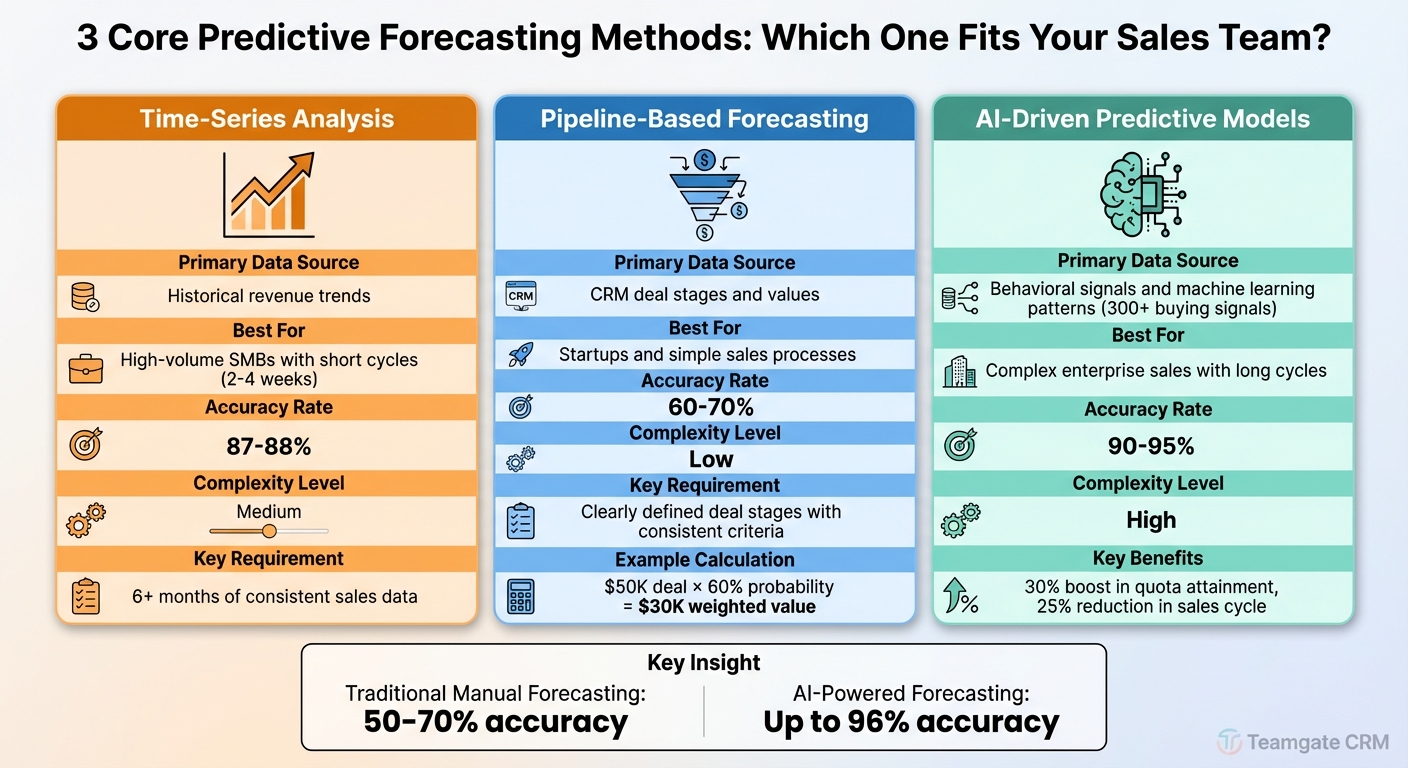
Top-performing sales teams achieve 80% to 95% forecast accuracy by combining pipeline data, historical win rates, and AI-driven analytics. This hybrid method provides a clearer and more reliable picture.

Forecasting Method Typical Accuracy Best For
Weighted Pipeline 60–75% Small teams or early-stage organizations
Time-Series Analysis 70–85% SaaS or recurring revenue models with stable history
AI/ML Models 75–90% Mid-to-large teams with complex sales pipelines
Hybrid Forecasting 85–95% B2B organizations with long sales cycles

Regularly review forecasts to catch potential issues early. For example, nearly 60% of forecasted B2B deals slip into the next quarter. Pay attention to warning signs like stagnant activity or shifting stakeholder priorities.

It’s also important to track forecast bias. If your team consistently overestimates or underestimates, adjust your stage probabilities accordingly. Improving CRM data hygiene, such as ensuring accurate and up-to-date records, can significantly enhance forecast reliability.

"Low forecasting accuracy often happens because teams rely on subjective judgment instead of data-driven predictive sales forecasting."
– Alex Zlotko, CEO, Forecastio

Automate Data Validation with Your CRM

Accurate data is the backbone of a reliable pipeline, but manual data entry is time-consuming and prone to errors. Automation can solve this problem by ensuring your CRM stays up-to-date without burdening your team.

Modern CRMs use AI to automatically log activities like emails, calls, and meetings directly into deal records. For example, when a rep sends a proposal or schedules a demo, the system updates the deal stage in real time, keeping your pipeline current.

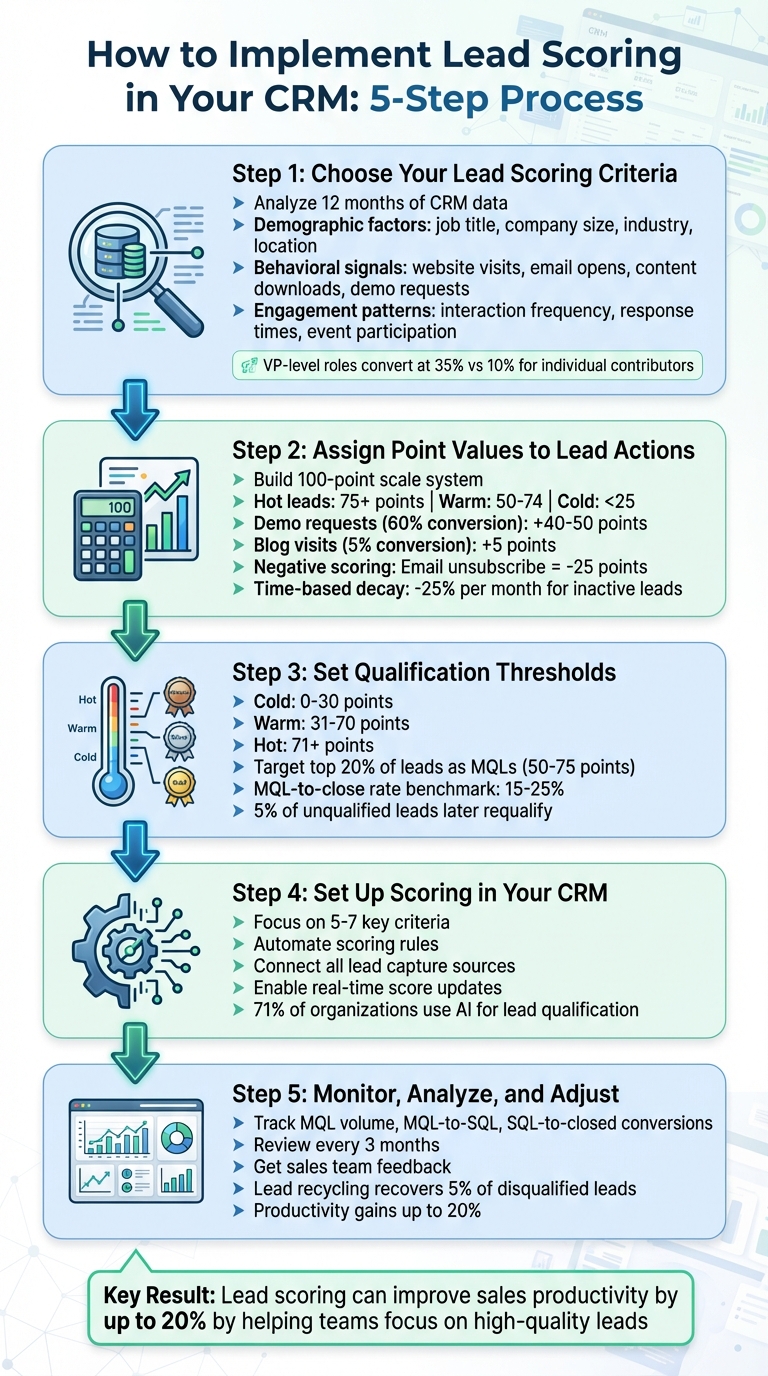
Automated lead scoring can also help prioritize deals. If a prospect attends a webinar, requests a demo, and matches your Ideal Customer Profile, the system can flag them as high-priority. This approach ensures your team focuses on the 20% of leads that generate 80% of revenue.

Data cleansing tools can further enhance accuracy by identifying duplicates, verifying contact details, and removing outdated information. Configure your CRM to run these audits regularly to maintain clean and reliable data.

Deal-rotting alerts are another valuable tool. These alerts notify your team when deals have stalled beyond your typical sales cycle, prompting timely reviews to prevent them from dragging down your pipeline’s performance.

Lastly, enforce exit criteria with validation rules in your CRM. For example, a deal shouldn’t move from "Qualification" to "Proposal" unless specific fields – like confirmed budget or identified decision-maker – are completed. This ensures deals progress based on evidence, not assumptions.

Teamgate CRM offers features like workflow automation, SmartDialer for tracking activities, and advanced analytics for real-time insights. These tools help maintain pipeline health while reducing the manual workload for your team.

Metrics That Show If Your Pipeline Is Working

To ensure your pipeline is functioning effectively, keep an eye on these key metrics:

Forecast Accuracy Rate

The forecast accuracy rate measures how closely your sales predictions align with actual results. You can calculate it using this formula:
[1 – |Forecasted Sales – Actual Sales| / Actual Sales] × 100.

For instance, if you forecasted $500,000 in sales but closed $450,000, your accuracy would be 90%. Top-performing sales teams typically achieve 80% to 95% accuracy, while the average for B2B teams ranges from 50% to 70%.

Pay attention to deal slippage, which refers to the percentage of deals delayed to a later quarter. Nearly 60% of B2B deals experience slippage, often due to rushed timelines or overlooked inactivity signals.

Another useful measure is the pipeline coverage ratio, calculated by dividing the total pipeline value by your sales target. For example, if your goal is $1 million, you should aim for at least $3 million in pipeline value. A low ratio suggests you need more leads, not just better closing techniques.

Perform regular CRM audits to clean up your pipeline. Removing inactive deals – typically about 15% – can improve forecast accuracy by as much as 30%.

While forecasting is crucial, understanding how deals flow through your pipeline offers even more insight into its health.

Pipeline Velocity and Deal Flow

Evaluate how quickly opportunities move through your pipeline to identify areas for improvement.

Sales velocity is a key indicator of how efficiently your pipeline generates revenue. It’s determined by four factors: the number of opportunities, average deal value, win rate, and the length of your sales cycle. A slow velocity often points to bottlenecks in your process.

To pinpoint delays, measure how long deals stay in each stage. For instance, if deals linger in the "Proposal" stage for 45 days but move through others in just 10 days, you’ve likely found a bottleneck. Use stage conversion rates to identify weak points. If only 30% of deals move from "Demo" to "Proposal", targeted coaching could help improve that transition.

Keep an eye on stalled deals, which are opportunities with no activity for 30 days or more. These deals can clog your pipeline and skew forecasts. Establish a timeline to purge inactive deals or move them to a "deferred" category to keep your pipeline clean.

Time Allocation to High-Value Deals

Direct your team’s focus toward high-value opportunities. Monitor the number of deals per rep to ensure efforts aren’t spread too thin. High-performing sales reps typically maintain a ratio of 1.25x to 1.5x opportunities for every closed deal.

Use the weighted pipeline value metric to prioritize deals effectively. This calculation multiplies a deal’s value by its probability of closing, based on its current stage. For example, a $100,000 deal with a 50% probability would contribute $50,000 to your weighted pipeline.

Track engagement depth by counting the number of stakeholders involved in each deal. Deals with 7 to 9 engaged stakeholders are far more likely to close. If your team focuses on deals with only one or two contacts, they may be misusing their time.

Lastly, analyze win rates by segment to identify where your team excels. For example, if your team closes 40% of enterprise deals but only 15% of SMB deals, you might want to adjust your lead qualification process to focus more on enterprise prospects. Breaking down metrics by factors like industry or deal size can lead to better forecasts and smarter resource allocation.

With tools like Teamgate CRM’s advanced analytics and sales KPI dashboards, you can track all these metrics in real time, helping you address potential issues before they affect your results.

Conclusion: Build a Sales Pipeline You Can Count On

Your sales pipeline doesn’t have to be a constant headache or a source of missed goals. The key to transforming it into something reliable lies in having accurate data, clear processes, and consistent follow-through. Poor data quality can wreak havoc on your revenue, but the right systems and practices can help you avoid these pitfalls.

A strong pipeline depends on two things: honest data and the discipline to move on from deals that aren’t progressing. It’s not always easy, but taking a structured approach can make all the difference.

Start by standardizing your pipeline stages with clear entry and exit criteria. Regularly clear out stalled deals – those that have gone inactive – and focus your team’s energy on high-potential opportunities. Deals with multiple engaged stakeholders are far more likely to close. Teams that stick to solid account plans can increase renewal likelihood by 94%, proving that structured processes lead to measurable success.

Technology plays a critical role here. Tools like Teamgate CRM take the guesswork out of pipeline management. With features like visual tracking, real-time updates, and automated insights, you can spot potential bottlenecks before they derail your forecast. Color-coded indicators and stage velocity dashboards provide clarity, while data-driven forecasting tools use past performance to generate dependable predictions.

FAQs

How can businesses keep their CRM data accurate and reliable?

Maintaining accurate CRM data takes a mix of consistent effort and clear guidelines. Start by establishing data-entry standards to ensure everything stays uniform. This could mean requiring specific fields, using consistent formats (like phone numbers in the style of (555) 555-1234), and setting up validation rules to catch mistakes before they get saved. Regularly cleaning your database is just as important – use tools to detect duplicates, merge similar records, and archive outdated information.

Assigning ownership of records is another smart move. When team members are responsible for reviewing and updating their data on a regular schedule – whether weekly or monthly – it keeps things current. Leverage automation tools to sync updates from connected platforms like email and calendars, and set up alerts to flag inactive records for review after 90 days. Periodic “data-cleanup sprints” can also help ensure your CRM stays accurate and up-to-date.

To make this process sustainable, turn data hygiene into a team-wide habit. Include it in training sessions and reinforce it through ongoing coaching. When your team understands how clean data improves forecasting and pipeline management, your CRM becomes a powerful tool for driving growth.

What are the best practices for defining effective sales pipeline stages?

To build effective sales pipeline stages, make sure each stage corresponds to a clear step in the buyer’s journey and includes specific entry and exit criteria. This removes any guesswork and ensures deals flow through the pipeline in an organized way. Use straightforward and meaningful names for the stages – like Prospecting, Qualification, or Closing – so the entire team is on the same page.

It’s also important to define measurable benchmarks for each stage. Metrics like win probability, expected deal size, and average time spent in a stage can sharpen forecasting and help pinpoint where deals might be getting stuck. Additionally, incorporate automation triggers – like automatically creating tasks or updating data – to keep everything up-to-date and running smoothly. When these elements are in place, your pipeline becomes a reliable reflection of sales progress and a powerful tool for making informed decisions.

How does automating CRM updates make your sales pipeline more reliable?

Keeping your CRM updated automatically helps maintain an accurate and reliable sales pipeline. By minimizing manual errors and ensuring consistent data, it delivers real-time insights, assigns lead scores automatically, and applies clear criteria for each stage. This makes tracking progress and making informed decisions much simpler.

Automation also simplifies data management, improving transparency and aligning your sales processes with achievable goals. The result? A dependable pipeline you can count on.

Related Blog Posts

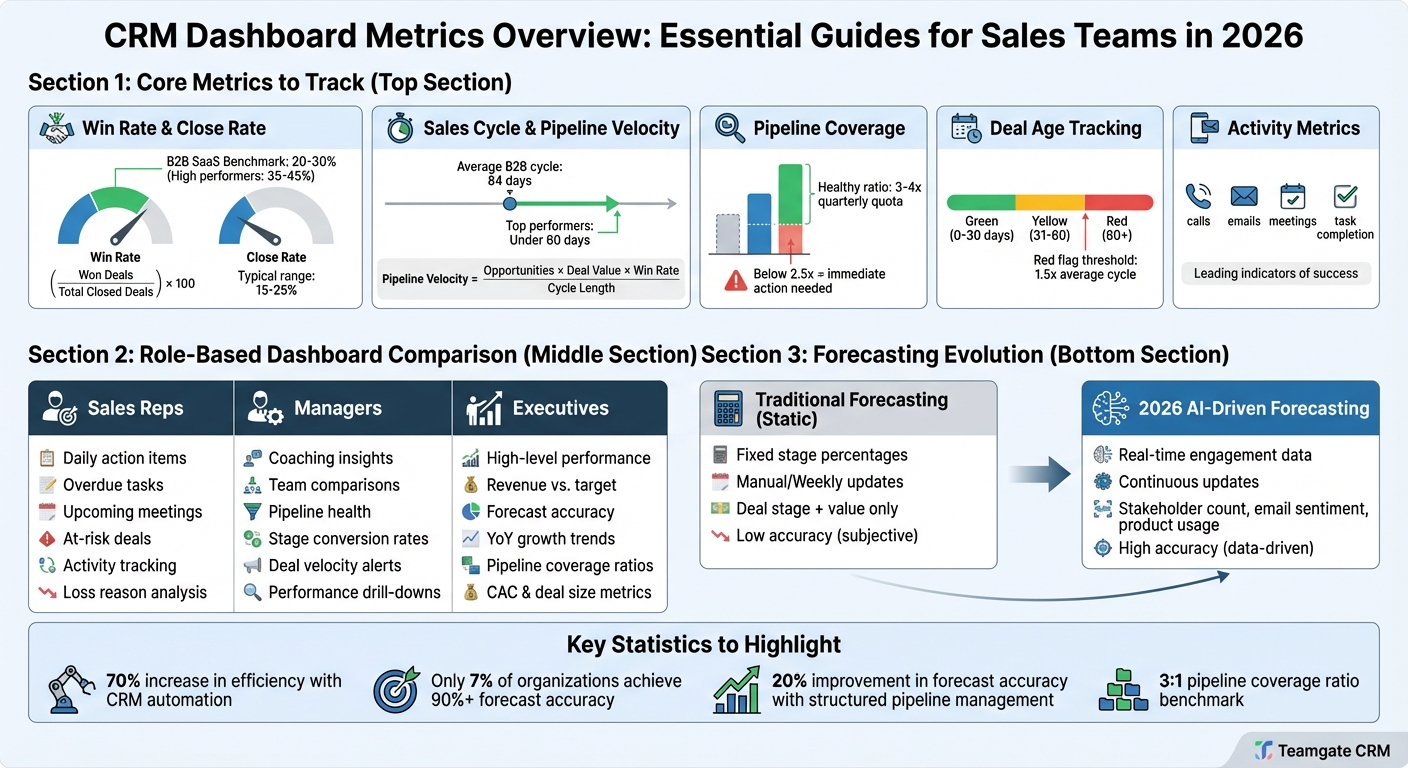
CRM dashboards help sales teams spot what’s changing in the pipeline right now, understand why it’s happening, and decide what to do next—without building manual reports.

A strong dashboard turns raw CRM activity (deal updates, emails, meetings, lead sources) into a single, role-based view of performance: pipeline coverage, forecast risk, rep execution, and bottlenecks. The goal isn’t “more charts.” It’s faster decisions and cleaner execution.

What the best CRM dashboards include:

  • Live pipeline health: stage volume, deal age, stuck-stage alerts, and next steps

  • Forecast you can explain: weighted pipeline + stage conversion history (not gut feel)

  • Rep execution signals: activity → outcome connections (what actions correlate with wins)

  • Role-based views: reps, managers, and execs see different “need-to-know” metrics

  • Automation: alerts, routing, and workflows to reduce response time and busywork

If you’re using a sales CRM such as Teamgate (or any comparable platform), you can typically start with a simple version (5–8 metrics) and expand once your team trusts the numbers.

Mastering CRM dashboards: transforming data into business insights

Key Metrics for Sales Performance

Essential CRM Dashboard Metrics for Sales Teams by Role

Essential CRM Dashboard Metrics for Sales Teams by Role

Your dashboard should answer three questions in under 30 seconds:

  1. Do we have enough pipeline to hit target? (coverage + quality)

  2. What’s most likely to close—and what’s at risk? (forecast + deal health)

  3. What should the team do today to move revenue forward? (next-best actions)

A good rule: start with 5–8 metrics per role. If everything is “important,” nothing is actionable.

Sales Pipeline Metrics

Pipeline dashboards work when they surface bottlenecks early and make it obvious what needs attention.

Core pipeline metrics to include

  • Stage distribution: how many deals (and how much value) sit in each stage

  • Deal age + time-in-stage: highlights stalled opportunities before the quarter is gone

  • Pipeline coverage: pipeline value ÷ quota (often tracked per rep and per segment)

  • Win rate by stage: shows where deals drop off and where coaching is needed

  • Pipeline velocity: how quickly deals move from stage to stage (timing for revenue)

  • Forecast-weighted pipeline: probability-weighted total (more realistic than “all deals count the same”)

Make it actionable (what to do when you see a problem)

  • If a stage has high volume + high time-in-stage, you likely have a process issue (handoff, pricing, legal, or unclear exit criteria).

  • If a rep has strong activity but low progression, coach messaging/qualification—not “work harder.”

  • If you have coverage but low forecast, improve deal quality (ICP fit, champion strength, next step set).

Revenue and Forecasting Metrics

Forecasting is more credible when you track the inputs that predict outcomes—not just a single “forecast number.”

Include these in 2025

  • Attainment vs target: month/quarter pacing (actual vs goal)

  • Forecast vs actual: accuracy trend over time (by rep + team)

  • Stage conversion rates: historical close rates per stage (per segment if possible)

  • Average deal cycle + cycle by segment: close-date risk signals

  • Slippage tracking: deals that moved out of period (why and where they slipped)

Avoid these common forecast mistakes

  • Counting every open deal equally

  • Treating “commit” as a feeling instead of a definition

  • Ignoring segment differences (SMB vs mid-market vs enterprise behave differently)

Companies with stronger analytics capabilities tend to outperform peers, which is why improving forecast inputs is worth the effort.

Team Productivity and Activity Metrics

Activity metrics matter when they’re tied to outcomes. Track volume—but prioritize conversion-driving behaviors.

Useful activity metrics

  • Speed-to-lead: time from inbound to first touch (especially for demo requests)

  • Follow-up consistency: touches per opportunity + days since last contact

  • Meeting-to-next-step rate: % of meetings that end with a scheduled next step

  • Activity by stage: what top performers do differently in discovery vs proposal vs negotiation

  • Task completion + overdue workload: signals execution risk (and helps managers unblock)

Fast response is one of the easiest wins to automate. One commonly cited benchmark: responding within one minute can materially increase conversions versus slower response windows (often attributed to lead response-time studies).

As Teamgate notes:

“Measurement of activity is an insightful and actionable means of discovering a salesperson’s productivity”.

If a salesperson has a high volume of meetings but struggles to close deals, they may need coaching on closing techniques rather than lead generation. This kind of visibility helps teams focus on the activities that deliver the best return on their time and effort.

Setting Up Dashboards for Real-Time Insights

Once you’ve identified the key metrics, the next step is setting up dashboards that provide a clear, real-time view of performance. A well-designed dashboard should present essential information at a glance without overwhelming users with excessive data.

Choosing the Right Visualizations

The type of visualization you choose can make or break your dashboard’s effectiveness. Here’s how to match the chart to your data:

  • Bar charts: Compare categories side by side.
  • Line graphs: Highlight trends over time.
  • Funnel charts: Track progress through sales stages.
  • Pie charts: Show proportions when dealing with a few categories.
  • Scatter plots: Reveal correlations between variables.
  • Heat maps: Identify patterns across datasets.

Getting this right is crucial. Kyle Dorman, Department Manager – Operations at Ray White, shared the impact of a well-optimized dashboard:

“There’s probably about a 70% increase in efficiency in regards to the admin tasks that were removed and automated, which is a huge win for us”.

Organizing Dashboard Layouts

To make dashboards intuitive and user-friendly, focus on layout:

  • Place the most critical metrics (around five to eight) in the top-left corner, as this is where users naturally look first.
  • Use clear headers and leave enough white space to keep the design clean and prevent visual clutter.
  • Include drill-down options for users who need to explore detailed data.

Customizing dashboards for specific roles ensures that everyone gets the information they need. For example:

  • Sales reps: Task-oriented details to guide daily activities.
  • Managers: Team-wide performance views.
  • Executives: High-level summaries for strategic decision-making.

Additionally, make sure the design is mobile-friendly with large, easy-to-tap elements for field teams.

Using Color Coding and Alerts

Color coding and alerts can make dashboards even more actionable:

  • Use a “traffic light” system: green for positive trends, yellow for warnings, and red for critical issues.
  • Set up automated alerts for key events, like when a sales rep hits their quota or a deal has stalled in the pipeline.
  • Tailor alerts based on roles: sales reps can receive task-specific notifications, while managers get team-wide updates.

Modern CRM dashboards often include conditional labels to flag urgent issues automatically. For instance, deals that haven’t been contacted in a set timeframe or opportunities that have moved backward in the sales cycle can be highlighted for immediate attention.

To keep everything up-to-date, ensure your dashboard refreshes every 15–30 minutes. This real-time synchronization eliminates data delays and ensures everyone is working with the most accurate information. With these tools in place, your team can quickly adapt their strategies to maximize performance.

Customizing Dashboards for Different Roles

When it comes to real-time insights, tailoring dashboards to fit specific roles takes things a step further. It ensures that every team member sees the data that matters most for their day-to-day tasks. Think about it: a sales rep on the ground has very different needs compared to an executive planning next quarter’s strategy. Customizing dashboards for roles isn’t just nice to have – it’s critical. It clears out the noise, leaving only the metrics that drive success for each user.

A well-designed sales dashboard reflects the unique responsibilities of each role. For example, sales reps need actionable data, managers require team-wide visibility, and executives rely on high-level summaries for strategic decision-making. Let’s dig into how dashboards can be tailored for these three key roles to ensure every action has impact.

Dashboards for Sales Representatives

For sales reps, dashboards should focus on the essentials: real-time pipeline overviews, call and email logs, task lists, and quota tracking. A “hot lead” filter can be a game-changer, helping reps zero in on high-priority prospects. Keep the metrics simple – five to seven key data points are ideal, as research shows that people can process only a handful of ideas at once [18].

Dashboards for Sales Managers

Managers need a broader view to guide their teams effectively. Their dashboards should feature metrics like win/loss ratios, average sales cycles, and pipeline value. Adding a “Wall of Shame” to flag overdue tasks, stalled deals, or missed opportunities can help managers stay on top of team performance. For example, a major South African bank used this approach to boost its one-call closure rate by 61% and cut customer complaints by 8% in just one quarter [18]. Leaderboard-style widgets can also encourage healthy competition while keeping performance metrics front and center.

Dashboards for Executives

Executives require a high-level perspective. Their dashboards should spotlight metrics like monthly recurring revenue, overall revenue growth, market trends, and unit economics such as ACV and win rates. One notable example comes from Business Intelligence Consultant Rohit Keserwani, who reported that implementing an executive-level CRM dashboard helped a Fortune 500 company in the U.S. achieve a 7% increase in customer satisfaction and an 11.3% boost in lead conversion from agency channels [18].

“Organizations are demanding CRM dashboards that help them quickly decide what actions to take. If the dashboard tells me that my lead conversion ratio is falling because the customer satisfaction score is going down, I can quickly act to improve the score.”
– Rohit Keserwani, Business Intelligence Consultant [18]

Tools like Teamgate CRM (https://teamgate.com) make it easy to customize dashboards for sales reps, managers, and executives, ensuring that everyone has access to the insights they need to make smarter, faster decisions.

Using Predictive Analytics and Automation

Dashboards designed for specific roles become even more powerful when paired with predictive analytics and automation. These tools help teams anticipate sales trends and take action before challenges arise. While real-time insights show what’s happening now, predictive analytics prepare you for what’s coming next. This means sales teams can address potential issues before they impact revenue.

Predictive analytics rely on historical data to forecast outcomes, while automation handles repetitive tasks that would otherwise drain time and energy. Together, they transform dashboards into tools that not only display current data but also predict future trends and automatically respond to key events. Companies with advanced analytics capabilities are twice as likely to rank in the top quartile of financial performance within their industries.

Using Historical Data for Forecasting

Historical sales data plays a crucial role in predicting future outcomes. CRM dashboards analyze metrics like deal closure rates, lead conversion history, and sales cycle length to forecast trends and revenue projections. For example, tracking how long it typically takes for a deal to close can help estimate when revenue will materialize.

Predictive tools also highlight high-risk deals needing immediate attention and provide insights into why deals are lost – whether it’s due to pricing, competition, or timing. By analyzing correlations between past activities (like calls or meetings) and deal outcomes, managers can gauge future success based on the current effort levels of their teams.

Historical Data Type How It’s Used in Predictive Analytics Dashboard Visualization Method
Win Ratios by Stage Predicts closing likelihood based on pipeline position. Funnel chart with percentage overlays.
Lead Source Scores new leads using historical conversion success. Lead score ranking or heat map.
Activity Metrics Links call/meeting volume to predicted deal outcomes. Activity vs. Results bar charts.
Loss Reasons Highlights patterns in failed deals to flag risks. Pie chart of “Top Loss Reasons.”
Sales Cycle Time Estimates close dates for current opportunities. Pipeline movement or “Time-in-Stage” reports.

By comparing current activity with similar periods from previous years, you can determine if your team is on track. Additionally, automated alerts can notify teams when deals remain stagnant for longer than the average sales cycle, helping to manage risks effectively.

Setting Up Automated Alerts and Workflows

Automated alerts and workflows build on predictive insights to keep the sales process agile and responsive. Setting estimated closing dates for deals can trigger alerts when deadlines are missed, ensuring no opportunities slip through the cracks.

For instance, when a lead reaches the final steps of an automated sequence, the dashboard can notify a sales rep to step in for a personal follow-up. This smooth transition between automation and human interaction boosts efficiency while maintaining a personal touch.

Integrating all communication and operational tools into the CRM creates a unified data source, eliminating silos and improving the accuracy of automation. As Gray Rentz, Senior Director at Polaris, explains:

“A unified customer view means richer customer conversations with deeper communications”.

Platforms like Teamgate CRM (https://teamgate.com) take this a step further with workflow automations that help teams stay proactive without adding manual work. These tools ensure sales teams are always ready to seize opportunities.

Applying Dashboard Insights to Sales Strategies

CRM dashboards are only as useful as the actions they inspire. The data they provide should replace guesswork, creating a foundation of transparency and trust in decision-making. As Ryan Harwood, CEO of PureWow, points out:

“Not everyone will always agree with you, but they’re much more likely to respect the decision if they understand the thought process behind it”.

By leveraging these insights, you can turn raw data into actionable strategies that enhance every aspect of your sales operations.

Real-time and predictive analytics can be game-changers, especially when used to refine your sales strategies. Start by examining your sales funnel to identify where deals tend to stall or fall apart. For example, tracking why deals are lost – whether it’s due to pricing concerns or competitor advantages – can highlight areas where your approach needs adjustment. Monitoring win rates at specific stages of the pipeline can also pinpoint weak spots, guiding targeted coaching on skills like proposal writing or negotiation.

The link between activity and outcomes is another key insight. Your dashboard might reveal that higher call volumes or multiple meetings lead to better win rates. With this information, you can set activity benchmarks and use them to coach underperforming team members.

Lead source effectiveness is another valuable metric. If certain marketing channels consistently bring in higher-quality leads, reallocating resources to those channels can boost your ROI. CRM marketing reports can further break down campaign performance, helping you fine-tune your approach.

Timing also plays a critical role. For instance, a “Deals over 12 Months” graph might show seasonal dips, enabling you to prepare for slower periods. Or, if the data shows that calls made between 1:00 PM and 3:00 PM yield better results, you can focus outreach efforts during those peak hours.

Improving Decision-Making Processes

The insights from dashboards don’t just highlight trends – they can directly improve your decision-making. By eliminating guesswork, dashboards provide objective data to guide choices. For example, if you’re debating whether to invest in training or hire more sales reps, the data can reveal whether the issue lies in pipeline coverage or conversion rates. This clarity ensures resources are allocated effectively, such as prioritizing tailored training over expanding the team.

Dashboards also elevate coaching by replacing vague advice with actionable feedback. Comparing individual reps’ performance against team averages can uncover specific areas for improvement, leading to more focused and productive coaching sessions.

Pipeline hygiene can also benefit from dashboard insights. A “Wall of Shame” approach, where overdue opportunities and stalled deals are flagged, encourages reps to keep their data current and pipelines clean.

Dashboards further enhance collaboration across teams. When marketing sees which campaigns generate the highest-quality leads, they can adjust their strategies. Similarly, product teams can use loss data to better understand customer pain points. As Gray Rentz, Senior Director at Polaris, puts it:

“A unified customer view means richer customer conversations with deeper communications”.

Resource allocation becomes clearer with dashboard insights. For example, if deals with your Ideal Customer Profile (ICP) consistently perform better, you can focus prospecting efforts on those target accounts. Similarly, aligning roles based on individual strengths – like assigning enterprise accounts to a rep who excels with larger clients – can significantly boost team performance.

Teamgate CRM offers customizable dashboards that track everything from win ratios to sales activity outcomes. With Advanced Analytics in their Growth plan, teams can segment performance data by lead source, deal size, and sales cycle length, making it easier to identify patterns and adjust strategies on the fly.

Measuring Dashboard Impact on Sales Performance

After implementing CRM dashboards, it’s essential to demonstrate their value by evaluating performance improvements and calculating financial returns.

Tracking Performance Improvements

To measure the impact of your dashboards, track both outcome metrics (like deals closed, win rates, and revenue growth) and activity metrics (such as calls, emails, and meetings). Monitoring both types of metrics helps you identify which actions lead to the best results.

Start by establishing benchmarks for key metrics like conversion rates, sales cycle lengths, and average deal sizes. Compare these figures before and after using dashboards to assess improvements. For instance, Big Dog Solar, a solar panel installation company in the U.S., switched from manual reporting to automated CRM dashboards. By analyzing their most effective strategies and lead sources, they achieved a 40% revenue increase.

Another critical area to monitor is pipeline health. Dashboards can help pinpoint where deals are getting stuck in your sales funnel. Addressing these bottlenecks can lead to faster sales cycles – measured as sales velocity, or the time it takes to move a deal from initial contact to closing. Additionally, track lead conversion ratios, especially the progression from Marketing Qualified Leads (MQL) to Sales Qualified Leads (SQL) and ultimately to closed deals.

To ensure your dashboards remain effective, focus on five to seven key metrics that align with your sales goals. As Keren Rosenfeld, Marketing Director at SimilarTech, advises:

“Not all metrics are important to track and depending on your business some will be more important than the others”.

By concentrating on the metrics that matter most, your team can stay focused on achieving success. Once you’ve tracked performance improvements, the next step is to calculate the financial impact of your dashboards.

Calculating ROI of CRM Dashboards

After identifying performance gains, it’s time to measure the financial return. ROI is calculated by comparing the benefits of your dashboards to their costs. Austin Caldwell, Senior Product Marketing Manager at NetSuite, explains:

“ROI is calculated by dividing the benefits of the investment by the costs of the investment; it is expressed as a percentage, the higher the better”.

Benefits include increased revenue from improved conversion rates, time saved through automated reporting, and better customer retention due to enhanced insights. Costs cover software subscriptions, training, and implementation efforts. For example, if dashboards help grow revenue by $100,000 annually while CRM costs total $25,000 per year, your ROI would be 300%.

Efficiency gains also play a significant role in ROI. For instance, responding to leads within one minute can boost conversion rates by 391%. Dashboards with real-time alerts can help achieve this faster response time. Similarly, using dashboards for lead scoring can improve lead generation ROI by up to 70%.

Another key metric is revenue per sales rep. Comparing individual performance before and after dashboard implementation can reveal productivity gains. Additionally, track metrics like Cost Per Acquisition (CPA) and cost per qualified lead to ensure your sales and marketing efforts remain cost-effective.

To ensure accurate ROI calculations, maintain clean data. Regularly audit your CRM to eliminate duplicates and correct attribution errors. Integrating your CRM with accounting or ERP systems can automate financial tracking, reducing manual work and providing real-time insights into how dashboards influence your bottom line. Together, tracking performance improvements and calculating ROI validates your dashboard investment and helps guide strategic decisions.

Conclusion

CRM dashboards are changing the way sales teams approach their work by turning raw data into meaningful insights. Instead of spending hours compiling manual reports, teams can access continuously updated data that pinpoints bottlenecks and highlights which activities drive results. This makes it easier to focus on what truly matters, ensuring your efforts have the greatest impact. By moving away from guesswork and embracing data-driven decision-making, you can quickly spot process issues and take corrective action.

These insights don’t just make workflows more efficient – they also refine your strategic focus. By connecting specific activities to measurable results, you can strengthen accountability and identify areas for improvement. With automated dashboards that update in real time, there’s no need for manual data entry, and performance trends are flagged instantly. Whether you’re working on generating new leads or qualifying existing ones, the data provided by these tools supports smarter, more strategic decisions.

For small and medium-sized businesses aiming to grow, platforms like Teamgate CRM offer features such as customizable pipelines, multi-currency support, and advanced analytics that scale alongside your business.

The secret to success lies in focusing on metrics that truly matter. Align your tracking with your sales goals, monitor both outcomes and activities, and regularly calculate your ROI by comparing revenue gains with implementation costs. Understanding how your efforts translate into closed deals not only builds accountability but also motivates your team and drives continuous improvement.

From real-time insights to automated alerts, every feature of a CRM dashboard is designed to give sales teams the visibility and control they need to hit their targets consistently. Start using CRM dashboards today and take the guesswork out of achieving your sales goals.

FAQs

How do CRM dashboards help identify and resolve sales bottlenecks?

CRM dashboards offer a real-time, visual snapshot of your sales pipeline, making it easier to spot where deals might be stalling. By showcasing key metrics – like the number of deals at each stage, conversion rates, and reasons for lost opportunities – they help identify bottlenecks. For instance, you might notice lower activity levels or certain stages taking longer than expected.

These dashboards also let you filter data by time frame, salesperson, lead source, or product. This flexibility helps sales teams dig into the root causes of delays, whether it’s a lack of follow-up, inefficiencies in the process, or a specific stage creating roadblocks. Armed with these insights, teams can act quickly to fine-tune workflows and keep the pipeline flowing smoothly. Plus, built-in forecasting tools make it easier to prioritize changes, reduce potential revenue losses, and make smarter decisions.

How do predictive analytics in CRM dashboards enhance sales performance?

Predictive analytics integrated into CRM dashboards takes raw sales data and converts it into actionable insights. This allows sales teams to anticipate future outcomes with greater precision. By forecasting metrics like revenue, win probabilities, and lead scores, sales leaders can zero in on high-value opportunities, allocate resources more effectively, and speed up the sales cycle. This focused approach not only boosts win rates but also leads to a more reliable sales pipeline.

When powered by AI, these dashboards take predictions to the next level by offering automated insights and recommendations. This automation saves time, enables quicker decision-making, and helps sales managers spot trends, address potential revenue gaps, and adjust strategies in real time. With features like future sales forecasts and real-time tracking in U.S. dollars ($), CRM dashboards simplify the sales process, enhance forecast accuracy, and empower teams to hit their revenue targets more efficiently.

How can CRM dashboards enhance sales decision-making?

CRM dashboards serve as a powerful tool for sales teams, offering a clear and visual snapshot of critical sales metrics such as progress toward targets, conversion rates, and win rates. By transforming complex data into straightforward charts and graphs, these dashboards eliminate the need for time-consuming analysis, enabling quicker and more confident decision-making.

The real-time insights provided by these dashboards allow managers to quickly identify bottlenecks, monitor underperforming stages, and adapt strategies as needed. Features like forecasting tools and lead-value indicators make it easier to set realistic goals and predict revenue with greater accuracy. Additionally, a well-structured dashboard promotes teamwork by delivering a unified view of sales activities, ensuring everyone on the team is working with the same up-to-date information. These tools equip sales teams to make informed, data-driven choices that lead to better outcomes.

Related Blog Posts

Optimize Your Sales Strategy with a Pipeline Conversion Rate Calculator

For sales teams, understanding the flow of leads through your funnel is everything. A tool like a sales funnel efficiency calculator can transform how you approach your pipeline. It’s not just about raw numbers—it’s about knowing where your process shines and where it needs a little polish.

Why Conversion Metrics Matter

Every lead represents potential revenue, but not every lead becomes a deal. Tracking conversion rates at each stage helps you identify weak spots. Are you losing too many leads before they become opportunities? Or maybe your team struggles to close opportunities into wins. By calculating these percentages, you gain actionable insights to refine your approach. Whether you’re a small business or a large enterprise, a pipeline performance tracker offers clarity on what’s working and what’s not.

Make Data-Driven Decisions

Armed with precise metrics, you can tweak your outreach, improve follow-ups, or even rethink how you qualify leads. The beauty of this approach is its simplicity—plug in your numbers and let the data guide you. Over time, small adjustments based on these insights can lead to big gains in revenue and team morale. So, take a moment to analyze your funnel today and set the stage for smarter sales tomorrow.

FAQs

What does pipeline conversion rate mean for my sales team?

Your pipeline conversion rate shows how effectively your team moves leads through the sales funnel. It breaks down into specific stages—like leads to opportunities and opportunities to deals—so you can see where you’re strong and where you might be losing potential customers. Think of it as a roadmap to spot bottlenecks and improve your process.

How can I improve my conversion rates using this tool?

This calculator gives you a clear snapshot of your funnel’s performance. Once you see the numbers, you can dig into why certain stages have lower rates. Maybe your lead qualification needs work, or your closing techniques could use a refresh. Pair the data with feedback from your team to brainstorm targeted fixes.

What if I enter zero or negative numbers?

No worries! The tool is built to catch those errors. If you input a zero or negative value, it’ll display a friendly message asking you to check your numbers. This ensures you’re working with valid data and getting accurate insights for your sales strategy.

Small sales teams don’t need more people – they need smarter tools. A CRM can help organize deals, automate follow-ups, and centralize communication, saving time and boosting efficiency. For example, a 5-person agency in Spokane cut their sales cycle by 43% and doubled client intake within 30 days of switching to a CRM. Here’s what you should look for:

  • Pipeline Management: Track deals visually, customize stages, and get real-time updates to avoid bottlenecks.
  • Email Integration: Sync Gmail/Outlook, centralize conversations, and use templates to save time.
  • Workflow Automation: Automate repetitive tasks like lead follow-ups, reminders, and data entry.
  • Sales Insights: Use dashboards and custom reports to make data-driven decisions.
  • Mobile CRM: Access customer data and manage tasks on the go.
  • SmartDialer: Make calls directly from the CRM, log outcomes, and schedule follow-ups automatically.
  • Multi-Currency Support: Simplify international sales with automated currency conversions and consistent pricing.

These features streamline operations, reduce manual work, and let your team focus on closing deals. Whether you’re managing five reps or scaling to twenty, the right CRM ensures growth without chaos.

Pipeline Management: Track deals without “false forecast”

When your team is moving fast, pipelines break in predictable ways: missing next steps, unclear ownership, and “late-stage” deals that haven’t had a meaningful touch in weeks. A strong CRM pipeline fixes this by making every opportunity answer three questions at a glance:

  1. What stage is it really in?

  2. What’s the next action and due date?

  3. What evidence supports the forecast? (last contact, meeting booked, proposal sent, decision date)

What “good” looks like in 2025

  • Stage definitions + exit criteria: Each stage has a clear meaning (e.g., “Proposal Sent” requires a delivered quote + scheduled review call).

  • Required fields at key moments: Prevents “empty” opportunities from polluting forecasting.

  • Stale-deal detection: Automatic flags when there’s no activity for X days.

  • Multiple pipelines only when needed: Great for renewals vs. new business, or SMB vs. enterprise — but avoid overcomplication early.

This keeps your team focused on deals that can close now, and it makes reporting trustworthy instead of aspirational.

Email Integration: Centralize Your Customer Communication

As teams grow, inbox chaos is one of the first productivity killers. Important conversations get buried, and new reps lack historical context.

Modern CRMs integrate directly with Gmail and Outlook to:

  • Automatically log sent and received emails

  • Attach conversations to contacts and deals

  • Preserve communication history when leads convert

Platforms like Teamgate sync full email threads to shared timelines, ensuring every rep and manager sees the same customer story without manual logging.

Why This Matters

Teams using centralized email communication consistently report:

  • Faster onboarding for new reps

  • Fewer missed follow-ups

  • Better coaching based on real conversations

Some CRM users report reclaiming up to 20% of selling time simply by eliminating inbox switching and manual data entry.

Workflow Automation: Save Time on Repetitive Tasks

When your sales team is small but growing, every hour matters. Teamgate CRM takes the hassle out of repetitive tasks by automating data entry, follow-ups, and lead assignments, giving your team more time to focus on closing deals.

For example, when a new lead fills out your website form, Teamgate automatically creates a contact, assigns it to a sales rep, and schedules a follow-up within 24 hours. It even attaches email conversations to the correct lead cards and transfers the full communication history when a lead converts – no manual data migration needed. These features help lay a solid foundation for streamlining your sales process.

The results speak for themselves. Companies using AI-powered CRM automation report 40% higher conversion rates and achieve more than double the ROI compared to those sticking with manual processes. One business even cut its administrative workload by 70%.

Automate Follow-Ups, Data Entry, and Reminders

You can take this even further by automating follow-ups, reminders, and data entry. Set up automatic follow-up emails, task reminders via email or SMS, and let the CRM handle lead scoring without any manual effort. Syncing with Google or Outlook calendars ensures meetings and reminders are logged automatically. These automations ensure no potential customer is overlooked.

Set Up Trigger-Based Workflows

Trigger-based workflows take automation to the next level. They can send follow-up emails, create call tasks, notify team members, or update records when specific events occur – like a lead status change or deal inactivity. For instance, if a deal sits idle for too long, the system can automatically create a follow-up task and alert the owner to re-engage.

By implementing standardized workflows, businesses can reclaim 10–20 hours per week. These automation features are available in Teamgate’s Team and Growth plans, and you can expand their reach by integrating with tools like Zapier or Make.com to connect with over 3,000 other apps.

“Utilizing sales insights we have been able to conduct targeted experiments, enabling Packagecloud to increase engagement rates by 18% through the refinement of scripts and lead targeting.” – Krish Sivanathan, Director of Operations, Packagecloud

Start small with high-impact workflows, such as automating new lead follow-ups or reminders after meetings. As your team grows, these automations will grow with you, keeping your sales process efficient without needing to add more team members.

Sales Insights and Reporting: Make Data-Driven Decisions

As your sales team grows, relying on intuition alone just doesn’t cut it anymore. To truly understand what’s working, where deals are stalling, and how close you are to hitting those revenue goals, you need hard data. In fact, research from McKinsey reveals that using AI-powered CRM analytics can boost conversion rates by 40% and double ROI.

By combining efficient pipeline management with streamlined communication, data-driven insights allow for smarter, more strategic decisions. Teamgate CRM takes your sales data and turns it into actionable insights through visual dashboards and custom reports. With real-time updates on your pipeline, team performance, and revenue forecasts (presented in USD and MM/DD/YYYY date formats), you’ll have everything you need to fine-tune your strategy. This approach ensures that every part of your sales process – whether it’s tracking the pipeline or integrating email – is continuously improving.

Take Allison Barkley from Baremetrics, for example. By embracing data-driven strategies, she achieved a 132% increase in conversion rates.

Monitor Performance With Sales Dashboards

Teamgate’s dashboards make it easy to stay on top of the numbers that matter most. Instantly see metrics like pipeline value, win rates, deal velocity, and team activity. Spot deals that need immediate attention, track individual reps’ performance against their quotas, and identify bottlenecks before they become major issues. For example, if win ratios start dropping at any stage, you’ll see it right away and can act quickly to fix the problem.

Create Custom Reports for Detailed Analysis

Dashboards are great for quick insights, but sometimes you need a deeper dive. That’s where Teamgate’s custom reports come in. With advanced filtering and Excel export capabilities, you can segment data by rep, deal stage, lead source, product line, or time period to answer your pressing questions. Analyze metrics like lead source win rates, sales stage conversions, and revenue forecasts to make proactive, informed decisions.

For businesses looking for even deeper insights, Teamgate’s Growth plan ($59.90/user/month) offers advanced analytics and lead scoring, giving you the tools to refine your strategy and drive revenue growth.

Mobile CRM: Manage Sales From Anywhere

Sales teams are often on the go, meeting clients and closing deals outside the office. That’s why having a mobile CRM is no longer a luxury – it’s a necessity. Did you know that 65% of sales reps with mobile access to their CRM system hit their annual sales targets? Plus, mobile CRM tools can help shorten sales cycles by 8% to 14%.

Teamgate’s mobile app brings the full power of its desktop CRM to your pocket. Available for both Android and iOS, the app ensures you can update deal details right after a client meeting or review customer histories before your next pitch. Everything syncs automatically, so there’s no need to wait until you’re back at your desk to log key information.

Access Customer Data Anytime, Anywhere

With the Teamgate mobile app, your entire sales database is just a tap away. Whether you need to check a customer’s history, review deal specifics, or pull up contact details, it’s all there. The app even includes an integrated map to pinpoint client locations, making it easy to spot nearby opportunities and get directions to your next meeting.

This location-based feature is a game-changer for field sales teams. Imagine wrapping up an appointment and quickly identifying other prospects in the area to fill your schedule more efficiently. You can also use the app’s in-app dialer to call leads, send emails, or update meeting notes – all without juggling multiple tools.

Stay on Top of Tasks With Mobile Notifications

Following up on time can make or break a deal. Teamgate’s mobile app ensures you never miss a beat by letting you manage tasks, schedule meetings, and set reminders on the fly. You can even configure automatic alerts via email or SMS, so important follow-ups don’t slip through the cracks while you’re on the road.

After meeting with a client, you can immediately log outcomes, update deal stages, and add notes – all from your phone. This real-time updating keeps your entire team on the same page and minimizes errors caused by outdated information. The app’s efficiency perfectly complements the broader CRM strategy, helping your team stay organized and productive, no matter where they are.

Multi-Currency Support and Product Catalog: Expand Into New Markets

Once your team has a handle on domestic sales, stepping into international markets requires tools that can simplify global transactions. As your sales team starts closing deals outside the U.S., managing multiple currencies and maintaining consistent pricing across regions can quickly become a headache. Studies show that businesses dealing with multiple currencies without proper systems spend 30–40% more time on reconciliation and reporting due to manual conversions and spreadsheet reliance. That’s time your team could use for more productive tasks.

Teamgate tackles these challenges with its multi-currency support and a robust product catalog. Available in the Growth plan ($59.90 per user/month), these features allow you to quote in your customer’s local currency while keeping forecasts and reports in USD. Combined with pipeline and automation tools, these capabilities ensure smooth transitions from domestic to international sales.

Handle International Deals With Multi-Currency Support

Teamgate enables you to set USD as your base currency and add only the currencies you need – whether it’s EUR, GBP, CAD, or AUD. For example, when a rep creates a deal with a prospect in London, they can simply select GBP as the deal currency. The system automatically converts the amount to USD, giving leadership a consistent revenue view.

This automation eliminates the need for manual calculations, reducing errors and saving time. McKinsey reports that companies with centrally managed, consistent pricing see margin improvements of 3–8% compared to those using decentralized pricing methods. Teamgate also lets you configure exchange rates and update them on a set schedule – weekly or monthly – so your reports remain accurate. This ensures smooth commission calculations and reliable investor reporting.

Maintain Consistent Pricing With a Product Catalog

Teamgate’s product catalog acts as a single source of truth for your offerings. It lets you list products and services with clear names, SKU codes, descriptions, and standard USD prices. When reps add products to deals, the system automatically fills in accurate pricing, eliminating guesswork and outdated information.

“Catalogue your merchandise or services offered by you and easily attach them to your deals. Add SKU codes, descriptions, prime cost and unit price in multi-currencies!” – Teamgate CRM Documentation

For international deals, you can either set region-specific pricing or let Teamgate convert your USD list prices based on the deal’s currency. For instance, if your software plan costs $99/month in the catalog, a rep working on a deal in EUR can apply a predefined €89 price or use the system’s current exchange rate. This keeps your core product information centralized while allowing flexibility for local markets.

A centralized product catalog also boosts quote accuracy by 15–20% and speeds up deal turnaround times, as reps work from pre-approved products rather than starting from scratch. As your team grows, the product catalog provides valuable insights into which products generate the most revenue in specific regions. You can filter by product, currency, or market to refine your strategy and focus on what drives results.

SmartDialer: Make Calls Directly From Your CRM

When your sales team has to bounce between a CRM, a phone app, and note-taking software, efficiency takes a hit. Studies reveal that switching between apps can cost sales teams 20–30 minutes each day – time that could be better spent closing deals. For small teams growing from 5 to 20 members, every minute matters. That’s where Teamgate’s SmartDialer steps in. Available with the Team plan ($39.90 per user/month), this feature simplifies your team’s communication workflow.

SmartDialer is an in-browser calling tool that allows sales reps to make and receive calls without ever leaving the CRM. By simply clicking on a phone number in a contact or deal record, reps can instantly connect via VoIP or carrier services like Twilio. This eliminates the delay of manual dialing and provides all the context – email history, deal notes, and past calls – on the same screen during the conversation.

“SmartDialer™ enables you to dial directly from your CRM, reducing dial lag and powering your agents to spend more time closing deals and generating leads.” – Teamgate

The feature also includes intelligent call routing. When a customer calls back, the system automatically identifies the caller and directs the call to the assigned representative. This ensures that the right person handles the conversation, avoiding unnecessary transfers or delays. For teams managing large volumes of leads, this creates a smoother and more personalized experience for customers.

Call Customers Without Switching Tools

One of SmartDialer’s standout features is its click-to-call functionality, which saves 5–10 minutes per call. Over the course of a 30-call day, that adds up to reclaiming as much as 2.5 hours for actual selling. Teams using CRM-integrated calling report 25% higher contact rates compared to manual dialing, as reps can move through their call lists more efficiently and maintain momentum.

Setting up SmartDialer is straightforward. Log into Teamgate’s admin settings, enable telephony under Integrations, and connect your provider by entering API credentials. A free trial is available to test it out. Assign phone numbers to users, try click-to-call with a demo contact, and you’re good to go. The feature works on both desktop and mobile apps, so field reps can make calls from their smartphones with the same one-click ease.

For growing teams, SmartDialer also offers customizable call dispositions – labels like “Interested”, “No Answer”, or “Callback Requested” – to categorize call outcomes. When a rep ends a call, they select a disposition, and the system automatically logs the result. This keeps your pipeline data organized and helps managers identify trends, such as which reps are securing the most “Interested” outcomes.

Track Calls and Schedule Follow-Ups Automatically

SmartDialer ensures that every call is logged in the contact timeline, capturing details like call duration, time, outcome, and rep notes. It also triggers workflows to schedule follow-ups based on call results. Missed calls? No problem. They’re logged and assigned to the responsible contact owner, with instant notifications in the CRM. This ensures no lead falls through the cracks, which is especially important for small teams where every opportunity counts.

For instance, if a call lasts more than two minutes and the disposition is marked as “Interested”, the system can automatically create a task to send a proposal within two days. Teams using this feature report a 40% increase in follow-up rates because the CRM handles scheduling without requiring manual input.

Call recordings and inline notes make it easy for managers to coach their reps and reduce prep time. One SaaS sales team of 10 reps using SmartDialer cut their call prep time from three minutes to just 30 seconds per call by having email history and notes readily available. They saw a 25% boost in contact rates and automated 80% of their follow-ups, helping them scale from $500,000 to $1.2 million in annual recurring revenue in just six months – without adding new hires.

For US-based teams, SmartDialer supports local carriers and VoIP at competitive rates (e.g., $0.01 per minute via Twilio). It also formats US-specific details like dates (MM/DD/YYYY) and phone numbers automatically. This seamless integration ensures that every call not only saves time but also contributes to a more streamlined and data-driven sales process.

Conclusion

After diving into the key CRM features, it’s clear how they contribute to driving sales growth effectively. Scaling a small sales team doesn’t mean hiring more people – it’s about leveraging the right tools. Features like pipeline management keep deals on track, email integration ensures all communications are centralized, workflow automation takes care of repetitive tasks, sales dashboards transform raw data into actionable insights, and mobile access keeps productivity high, no matter where your team works.

These tools don’t just improve local sales processes – they also set the stage for international expansion. Multi-currency support and a product catalog eliminate pricing mistakes and manual calculations, while the SmartDialer enables reps to make calls directly from the CRM, automatically logging conversations and scheduling follow-ups. A great example? In 2024, Krish Sivanathan, Director of Operations at Packagecloud, used Teamgate’s sales insights to refine lead targeting, boosting engagement rates by 18%.

Small businesses using CRM systems report a 29% jump in sales and a 47% improvement in customer service. Teams that automate workflows see up to 34% higher sales productivity by cutting down on repetitive tasks. These results come from centralizing customer data, automating routine tasks, and giving sales reps the tools they need to build stronger customer connections.

Teamgate offers flexible plans, starting with a free Starter plan, while advanced features are available on paid tiers. Plus, you can try it risk-free with a 14-day free trial – no credit card required.

Whether you’re managing a small team of five or scaling up to twenty, the right CRM features can mean the difference between chaotic growth and smooth, controlled expansion. Teamgate simplifies operations, helps your team zero in on high-value opportunities, and ensures consistent communication. This way, you can focus on what truly matters: closing deals and building meaningful customer relationships. By bringing together the essential tools, Teamgate equips small sales teams to grow sustainably and confidently.

FAQs

How do CRM features help small sales teams grow effectively?

CRM tools equip small, growing sales teams with everything they need to manage leads, simplify workflows, and boost revenue – all without adding more people to the team. A centralized contact database keeps every customer and prospect detail in one place. This means team members can quickly access interaction histories, avoid duplicating efforts, and stay on the same page.

Features like pipeline tracking make it easier to visualize deal stages, spot bottlenecks, and prioritize high-value opportunities. The result? Faster deal closures and a healthier sales funnel, even as the workload grows. Meanwhile, automation tools – think task reminders, email follow-ups, and lead scoring – cut down on time-consuming admin work. This allows sales reps to focus on their main job: selling.

On top of that, real-time reporting and analytics transform raw sales data into actionable insights. Leaders can pinpoint what’s working, identify areas that need improvement, and uncover new growth opportunities. Altogether, these tools create a streamlined, scalable system that helps small teams handle more leads, close more deals, and grow efficiently.

How does email integration benefit growing sales teams?

Email integration simplifies communication by syncing every sent and received message directly with your CRM, creating a centralized inbox. This setup allows sales reps to view complete conversation histories without toggling between email platforms and the CRM. Plus, each email is automatically tied to the correct contact, lead, or deal, ensuring smoother collaboration, faster follow-ups, and fewer missed opportunities.

Beyond visibility, email syncing enhances automation and workflow efficiency. Logged emails can automatically trigger tasks, reminders, or email sequences, cutting down on repetitive manual work. This streamlined process keeps sales teams focused on closing deals, increasing productivity, and delivering a smoother experience for both reps and customers.

How can workflow automation improve sales team efficiency?

Workflow automation takes the hassle out of repetitive tasks for sales teams, freeing up valuable time and boosting efficiency. Think about tasks like capturing leads, sending follow-up emails, setting task reminders, or moving deals along the pipeline – all of these can be handled automatically based on preset triggers.

By cutting down on manual work, automation lets sales reps zero in on what really matters: building relationships and closing deals. For small but growing teams, this shift can make a huge difference, helping them scale their operations without overwhelming their resources.

Related Blog Posts

Want to know how your sales team is performing? It boils down to two metrics: sales velocity and sales volume.

  • Sales velocity measures how quickly your leads turn into revenue. It’s calculated using the number of opportunities, average deal value, win rate, and sales cycle length.
  • Sales volume tracks the total number of units sold in a specific period, whether it’s products or services.

Both metrics are essential for understanding your sales process. Velocity focuses on speed and efficiency, while volume shows the scale of your sales. Together, they help you balance short-term wins with long-term growth.

Sales Velocity vs Sales Volume: Key Differences and Formulas

Sales Velocity vs Sales Volume: Key Differences and Formulas

1. Sales Velocity

Definition

Sales velocity refers to how quickly your qualified leads turn into revenue. Instead of focusing on total sales, it looks at the rate at which money moves through your pipeline.

Think of sales velocity as a speedometer for your sales engine. Revenue alone tells you how far you’ve traveled. Velocity tells you how fast you’re getting there—and whether you can accelerate without burning out your team.

Measurement Formula

To calculate sales velocity, you need four key variables: the number of opportunities in your pipeline, your average deal value, your win rate (expressed as a decimal), and the length of your sales cycle in days. Here’s the formula:

Sales Velocity = (Number of Opportunities × Average Deal Value × Win Rate) / Length of Sales Cycle

For instance, if you have 150 leads, an average deal value of $1,000, a 25% win rate, and a 30-day sales cycle, your sales velocity would be $1,250 per day. Over a quarter, this adds up to $112,500.

Focus

Sales velocity emphasizes pipeline efficiency rather than just raw sales numbers. It highlights where prospects are getting stuck and helps you determine what needs attention – whether that’s generating more qualified leads, increasing deal sizes, improving win rates, or speeding up the sales cycle. As Sujan Patel, Founder of Mailshake, explains:

“Improve your sales velocity, and not only will you sell faster, but you’ll also have time to close more deals”.

Units

Sales velocity is measured in dollars per day. For context, a healthy B2B company typically sees $500 to $1,000 per day, while established SaaS companies often aim for $5,000 or more daily. For SaaS startups, a good benchmark is $1,000 to $2,000 per day per sales rep.

Business Implications

Sales volume reflects market demand and customer interest. Even if revenue is flat, increasing volume can indicate:

  • Strong product-market fit

  • Effective promotions or pricing strategies

  • Expanding customer base

Key Benefits of Sales Volume

  • Supports inventory and production planning

  • Identifies top-performing products or services

  • Measures sales team output

  • Signals market expansion or contraction

Because it reflects past performance, sales volume is considered a lagging indicator.

Tools like Teamgate CRM make tracking these metrics simple with analytics and customizable dashboards. Whether it’s reducing response times, refining lead qualification, or coaching your team on handling objections, understanding sales velocity lets you focus on the areas that will have the biggest impact.

How to Calculate Your Sales Velocity

2. Sales Volume

Sales volume focuses on the total number of sales, offering a clear snapshot of how many units were sold during a specific time frame.

Definition

At its core, sales volume measures the total units sold over a defined period – whether that’s a month, a quarter, or a year. It’s all about quantity, answering the question: “How many units did we sell?”. For service-based businesses, this metric may reflect hours billed instead of physical products.

Measurement Formula

The simplest way to calculate sales volume is to tally up the total units sold during your chosen timeframe. Other useful formulas include:

  • Percentage Formula: (Units of a specific product × 100) ÷ Total units sold. This helps identify which products dominate your sales mix.
  • Break-even Sales Volume: Projected spending ÷ Price per unit. This tells you how many units you need to sell to cover your costs.
  • Sales Volume Variance: (Actual units sold – Budgeted units sold) × Price per unit. This measures how well your sales align with targets.

Focus

Sales volume highlights product movement and customer preferences rather than revenue. For example, a low-cost item with high sales volume may generate less revenue than a premium product but still indicate strong market demand. According to Donny Kelwig, Contributing Writer at Zendesk:

“Sales volume is a largely overlooked measuring tool, but its benefits to your company can’t be ignored”.

This metric helps you pinpoint which products resonate with customers, guiding decisions on production and resource allocation. It’s a critical tool for shaping marketing strategies and inventory management.

Units

Sales volume is expressed in physical units (products sold) or service units (hours billed). This makes it invaluable for managing inventory, planning production, and optimizing supply chains.

Business Implications

Sales volume serves as a lagging indicator, reflecting past performance. Investors often use it to gauge whether a business is expanding or shrinking, regardless of pricing changes. A product with high sales volume signals strong customer demand, even if it doesn’t bring in the most revenue. This insight can help businesses decide whether to discontinue slow sellers, reorder inventory, or assess sales team effectiveness.

Tools like Teamgate CRM simplify tracking by providing real-time data segmented by product line, region, or sales rep. This allows businesses to spot trends, forecast demand based on historical patterns, and determine which products deserve more marketing attention – all without the hassle of manual spreadsheets.

Sales Velocity vs Sales Volume: Key Differences Explained

1. Speed vs Quantity

  • Sales velocity measures how fast revenue is generated

  • Sales volume measures how much is sold

2. Forecasting vs Reporting

  • Velocity predicts future revenue

  • Volume reports historical performance

3. Efficiency vs Output

  • Velocity reveals efficiency and friction

  • Volume highlights scale and reach

A company can have:

  • High volume but low velocity (many small, slow deals)

  • High velocity but low volume (few high-value, fast deals)

When used together, these metrics provide a more balanced view of your sales performance, combining speed with market engagement.

Metric Key Benefit Potential Drawback
Sales Velocity Identifies bottlenecks and improves forecasting by tracking revenue speed. Can encourage rushed interactions or overuse of discounts, impacting profitability.
Sales Volume Measures market reach and team productivity. May overlook inefficiencies, like the time or resources required for each deal.

A practical way to get the most out of these metrics is by segmenting your analysis. For example, calculate velocity separately for small, mid-market, and enterprise deals. This approach helps you balance the longer sales cycles of high-value deals with the quicker transactions of smaller ones. It ensures you maintain both efficiency and substance, avoiding the trade-off between speed and quality.

Conclusion

Volume measures how many units you sell, while velocity tracks how quickly deals convert. Together, these metrics give a well-rounded view of your sales engine’s overall health.

By shortening your sales cycle, you can handle more deals in the same amount of time. Boosting velocity creates the opportunity to increase volume without needing to expand your team. This relationship shows that focusing on speed not only accelerates revenue but also enhances your team’s capacity for growth without adding extra resources. Achieving this balance requires precise tracking and smart use of automation tools.

With Teamgate CRM, you can stay on top of both metrics through customizable dashboards and workflow automations. Qualifying leads before including them in your calculations ensures your metrics are accurate. Plus, automated workflows can quickly flag deals that stall, helping you address potential revenue losses before they grow.

For even deeper insights, you can use Teamgate’s advanced analytics to segment your pipeline and calculate velocity for different deal sizes or customer groups. This method allows you to account for the longer cycles of large enterprise deals while still capturing the faster wins from smaller accounts. It provides a clear view of your pipeline’s performance and aligns with your goal of driving sustainable growth. After all, 69% of companies say converting leads into customers is their top priority. By tracking both velocity and volume, you’re not just generating activity – you’re building a system that supports long-term success.

FAQs

How can I speed up my sales process without lowering deal quality?

To boost sales velocity while keeping deal quality intact, it’s all about fine-tuning your pipeline and removing unnecessary obstacles. Start by sharpening your lead qualification process so only the most promising prospects make it into your funnel. Tools like Teamgate CRM’s scoring features can help you pinpoint and prioritize leads that show strong buying intent, ensuring your team spends time on the deals most likely to close.

Automation can also be a game-changer for repetitive tasks like sending follow-up emails, generating documents, or tracking activities. By automating these processes, your team can free up valuable time to focus on building genuine relationships with prospects. With Teamgate’s workflow automation, these tasks run smoothly in the background, maintaining efficiency without losing the personal touch that high-value deals demand.

Don’t forget to keep an eye on key sales velocity metrics: the number of opportunities, win rate, average deal size, and sales cycle length. Small adjustments can have a big impact. For instance, standardizing proposals might shorten your sales cycle, while upselling could increase deal sizes. With Teamgate’s real-time reporting, you can monitor these metrics closely and make data-driven tweaks to drive growth without sacrificing quality.

What are the best tools to track and improve both sales velocity and sales volume?

To keep a close eye on both sales velocity (how quickly deals move through your pipeline) and sales volume (the total number of deals closed), a strong CRM is a must-have. Tools like Teamgate CRM offer a clear view into critical metrics such as pipeline stages, deal sizes, win rates, and total closed revenue. These metrics not only help calculate sales velocity but also track volume trends, all within a single platform.

Some CRMs go a step further by including real-time dashboards. These dashboards can pinpoint bottlenecks, flag deals that are moving too slowly, and display total deal counts at a glance. This makes it easier for sales teams to tackle inefficiencies and strike the right balance between speed and quantity. With these tools in hand, you can rely on data to fine-tune your sales strategy and maintain steady growth.

Why is it important to balance sales velocity and sales volume in your sales strategy?

Balancing sales velocity and sales volume is crucial because they highlight two distinct aspects of growth. Sales velocity tracks how quickly deals progress through your pipeline. It’s a great tool for forecasting revenue and spotting bottlenecks. But if you prioritize speed alone, you might end up closing smaller deals quickly while missing out on larger, more lucrative opportunities.

Meanwhile, sales volume reflects the total business you’re generating, showcasing your market presence and revenue potential. However, focusing too much on volume can slow down your pipeline, delaying cash flow and tying up resources in lengthy, drawn-out deals.

Finding the right balance allows your team to sell efficiently while also closing high-value deals. This leads to steady growth, stronger profit margins, and a healthier sales pipeline. Tools like a CRM can help track key metrics – such as deal size, win rate, and sales cycle length – so you can adjust strategies in real time and maintain that balance effectively.

Related Blog Posts

CRM in 2025 is all about AI-driven growth, customer experience, and measurable returns.

  • 91% of companies with 11+ employees use CRM platforms, and adoption is growing 12.6% annually.
  • The market value is projected to surpass $112 billion globally, with businesses seeing an average ROI of $8.71 per $1 invested.
  • AI integration is the biggest shift: 70% of companies use AI in their CRM, and 65% leverage generative AI for tasks like forecasting, lead scoring, and personalized outreach.
  • CRM systems now unify data across channels (email, chat, social media) and improve customer retention by up to 27%.
  • Privacy and data accuracy remain challenges, with 37% of users reporting revenue loss due to poor data quality.

In short, CRM has evolved into a central tool for businesses to predict outcomes, streamline operations, and deliver tailored customer experiences. The key to success lies in leveraging AI while maintaining clean, reliable data.

CRM Statistics 2025: Market Size, ROI, and AI Adoption Rates

CRM Statistics 2025: Market Size, ROI, and AI Adoption Rates

CRM Market Overview and ROI Data

CRM Market Size and Growth

The global CRM market is on a rapid upward trajectory, with projections estimating it will surpass $112 billion by 2025 and reach an impressive $262 billion by 2032. This growth is fueled by the increasing demand for digital transformation, the need for stronger customer retention strategies, and the integration of AI technologies. What was once just a database tool has evolved into a sophisticated business solution, revolutionizing how organizations manage customer relationships. This surge in market value also reflects the widespread adoption of CRM systems across businesses of all sizes.

How Many Businesses Use CRM Systems

CRM systems have become a staple for mid-market and enterprise businesses, with 74% of U.S. companies already using one. Even among smaller businesses, adoption is growing steadily – 50% of companies with fewer than 10 employees now rely on CRM platforms. This widespread use highlights the clear financial advantages and operational improvements that CRM systems offer to businesses, regardless of their size.

Expected Returns from CRM Investments

The numbers speak for themselves: for every dollar spent on a CRM system, businesses typically see an average return of $8.71. Companies that implement their CRM systems effectively can experience ROI increases of up to 245%, with some enterprise organizations achieving an average ROI of 299% over three years. Beyond financial returns, CRM platforms can enhance productivity and efficiency by as much as 30%. These impressive results are often achieved by organizations that view CRM as a strategic investment. The key lies in implementing the system thoughtfully, ensuring strong user adoption, and continuously optimizing its use to align with business goals.

CRM systems are no longer just tools for managing customer data – they now drive real-time decisions and predictive insights that revolutionize sales and customer interactions. These advancements are shaping how businesses achieve ROI and redefine customer engagement.

AI-Powered Automation and Forecasting

Generative AI is transforming CRM capabilities in ways we couldn’t have imagined just a few years ago. In fact, 51% of businesses rank it as the leading CRM trend, and 65% have already adopted AI-driven features like chatbots, predictive analytics, and automated content creation. By the end of the year, more than 70% of CRM platforms are projected to include AI integration.

AI takes over repetitive, time-consuming tasks, freeing up sales teams to focus on building relationships and making strategic decisions rather than getting bogged down with administrative work. Beyond saving time, the integration of AI in CRM is expected to generate trillions of dollars in global business value in the near future.

"We commissioned this research to help enterprises cut through the hype, understand AI’s real business impact, and accelerate their own measurable outcomes. The findings show that when companies connect AI to quality data, invest in skills, and embed intelligence into core workflows, they generate meaningful returns on investment." – Brenda Brown, Chief Marketing Officer of AI, SAP

Multi-Channel Engagement and Personalization

Today’s customers expect seamless, consistent interactions across every channel – whether it’s email, phone, social media, live chat, or in-person meetings. Modern CRM systems make this possible by offering a unified, 360-degree view of customer data. This comprehensive approach enables sales and marketing teams to create highly personalized outreach strategies. For example, email campaigns tailored using CRM data see a 14% higher click-through rate compared to generic emails.

With 79% of customers expecting smooth cross-channel experiences and 71% demanding personalization, having unified CRM data is no longer optional. In fact, over two-thirds of companies now compete primarily based on customer experience. By breaking down data silos between sales, marketing, and service teams, CRM platforms can boost customer retention by up to 27%. Additionally, 47% of CRM users have reported a noticeable increase in customer satisfaction.

Privacy and Data Compliance Features

As CRM systems become more sophisticated, maintaining data accuracy and compliance has become a top priority. Modern platforms are equipped with advanced security tools to meet ever-changing privacy regulations and ensure customer trust. However, challenges persist – 37% of CRM users report revenue losses due to poor data quality, and 76% admit that less than half of their CRM data is accurate and complete.

The rise of AI introduces new compliance risks. A staggering 77% of organizations are concerned about unauthorized AI use, and over half have faced negative outcomes due to AI-related inaccuracies. To address these issues, CRM platforms are focusing on improving data hygiene, standardization, and compliance features. These improvements not only ensure regulatory adherence but also enhance the reliability of AI-powered tools.

How AI Is Changing CRM

AI is turning CRM systems from simple data storage tools into intelligent platforms that analyze information, identify patterns, and even take action independently. This shift, often referred to as the rise of agentic AI, is reshaping how businesses approach sales and forecasting.

AI Features Available in CRM Platforms

Today’s CRM platforms are packed with AI-driven tools that streamline tasks like lead scoring, forecasting, and sentiment analysis. These features take over routine and repetitive processes, giving sales teams more time to focus on nurturing customer relationships. For instance, AI can study customer interactions to predict which leads are most likely to convert, automatically prioritize follow-ups, and even craft personalized email responses based on previous conversations.

By embedding AI directly into everyday workflows, these platforms eliminate the hassle of toggling between multiple tools. Take Teamgate CRM as an example – it integrates AI-powered lead scoring and automation into its pipeline management. This ensures that users receive smart, actionable recommendations exactly where they need them, without disrupting their workflow.

AI Adoption Rates and Patterns

AI adoption in CRM is growing rapidly, though many organizations are still in the experimental phase. A notable trend is that 76% of companies now opt for pre-built AI solutions instead of developing custom ones internally. Adoption patterns reveal some interesting shifts – on average, businesses are managing about four AI-related risks today, a jump from just two in 2022. The real challenge isn’t deciding whether to embrace AI but figuring out how to scale it effectively while ensuring data quality and compliance. As adoption increases, businesses must address these complexities with careful planning and governance.

AI Risks and Governance Considerations

With AI adoption comes risk. 51% of organizations using AI have faced at least one negative outcome, and nearly one-third cite issues with AI inaccuracies. High-performing companies tackle these risks by implementing strong data hygiene practices and human oversight. For AI to deliver accurate results, maintaining clean and reliable data is essential. This means prioritizing tasks like removing duplicate entries, standardizing fields, and updating outdated records before leaning heavily on AI features. Without these measures, even the smartest AI tools can falter.

How to Measure and Improve CRM ROI

CRM ROI measures the financial benefits your business gains compared to the costs of implementing and maintaining a CRM system. These benefits include tangible gains like higher revenue and cost reductions, as well as intangible ones, such as better efficiency, stronger customer relationships, and smarter decision-making. For small and medium-sized businesses (SMBs), optimizing CRM ROI is an ongoing process. Let’s break down the metrics and methods that can help you maximize your CRM’s value.

Key CRM Metrics to Track

To get the most out of your CRM, focus on metrics that directly affect your business outcomes:

  • Lead Conversion Rates: This shows how well your CRM turns potential leads into paying customers.
  • Sales Cycle Duration: Identify delays or bottlenecks that slow down your sales process.
  • Customer Retention Rates: Keeping existing customers is often more cost-effective than acquiring new ones.
  • Customer Lifetime Value (CLV): Understand the total revenue a customer generates over their relationship with your business.

Tracking these metrics can reveal where your CRM is excelling and where adjustments are needed to improve performance.

Boosting CRM Performance

AI advancements are making CRM systems more accurate and easier to use, which directly impacts these metrics. The most significant factor in CRM success is how well your team adopts the system. When everyone consistently uses the CRM, data quality improves, leading to more reliable insights. On the flip side, poor data can lead to costly mistakes and missed opportunities. Additionally, effective reporting tools can turn raw data into actionable insights, helping you make better decisions.

Calculating CRM ROI

To calculate your CRM’s ROI, start by listing all associated costs. This includes upfront expenses like purchase, implementation, and training, as well as ongoing costs like subscriptions and staff time. Then, subtract these costs from the total benefits, such as increased revenue, time savings, and improved customer retention.

Here’s a simple formula:
ROI (%) = [(Total Benefits – Total Costs) ÷ Total Costs] × 100

For example, if your CRM costs $10,000 annually and generates $35,000 in additional revenue along with $5,000 in time savings, your ROI would be 300%. Aligning these calculations with your strategic goals ensures your CRM delivers measurable value.

Conclusion: Getting Ready for What’s Next in CRM

By 2025, CRM systems will have transformed from basic contact management tools into sophisticated, intelligence-driven platforms that actively influence sales strategies and customer relationships. The market continues to grow, with AI adoption standing out as a major driver of success. Companies using AI-powered tools for automation and multi-channel engagement are seeing tangible benefits like higher conversion rates, faster sales cycles, and increased customer lifetime value. When implemented effectively, modern CRM systems can deliver returns far greater than their costs. Looking ahead, CRM’s evolution will focus on even deeper integration into business strategies.

What Lies Ahead for CRM and Sales Teams

Building on the advancements of today’s AI-driven CRM, future systems are set to push further into autonomous operations. AI will evolve beyond current generative capabilities to manage complex workflows independently. Additionally, CRM platforms will integrate more seamlessly with marketing, service, and financial systems, creating a unified view of the customer.

To stay ahead, businesses should focus on improving data quality and embracing AI now. These steps will enable the advanced AI features necessary for future competitiveness. Companies that move from small-scale initiatives to full-scale AI deployment will be best positioned to gain the edge offered by these powerful tools.

The future of CRM centers on delivering a fully personalized customer experience. This means systems that can predict customer needs, automate tailored outreach on a large scale, and provide real-time insights to make every interaction meaningful. Organizations that take bold steps today to integrate AI and prioritize high-quality data will lead the way in tomorrow’s customer-first economy.

FAQs

How does AI in CRM help businesses retain customers?

AI integration in CRM empowers businesses to connect with their customers on a deeper level by providing personalized experiences that align with individual preferences. This approach helps customers feel genuinely valued and understood. By leveraging predictive analytics, businesses can pinpoint customers who might be at risk of leaving and address their concerns proactively, helping to minimize churn.

On top of that, AI-driven tools can handle tasks like automating follow-ups, suggesting customized solutions, and analyzing customer behavior patterns. These capabilities not only enhance relationships but also ensure businesses maintain a competitive edge in building loyalty and fostering long-term customer engagement.

What are the main challenges businesses face when using AI in CRM systems?

Implementing AI in CRM systems isn’t without its challenges. One of the biggest hurdles is ensuring high-quality data – AI tools are only as good as the data they process. On top of that, addressing potential bias in the data can complicate matters even further. Many companies also face difficulties integrating AI into their legacy systems or adapting it to fit their existing workflows.

Another common challenge is gaining user adoption. If the tools are too complicated or lack sufficient training resources, employees may resist using them. There’s also the issue of privacy and compliance risks, especially when sensitive customer data is involved. Companies must navigate these concerns carefully to avoid potential legal and reputational issues.

The cost of implementation and proving a clear return on investment (ROI) can also be sticking points. Over-customizing AI tools is another pitfall, as it can lead to inefficiencies. Striking the right balance between personalization and usability is crucial to ensure that these tools are effective and practical for everyday use.

How can businesses measure the ROI of their CRM systems?

Businesses evaluate the return on investment (ROI) of their CRM systems by analyzing improvements in performance and cost reductions. Key metrics often include increases in sales revenue (ranging from 3% to 15%), sales productivity (up to 34%), and customer retention rates (reaching as high as 86%). They also look at factors like larger deal sizes and cost savings achieved through automation and streamlined processes, which can cut expenses by 20%–30% and reduce sales cycles by up to 30%.

Another critical aspect is operational efficiency, such as time savings and better data accuracy. These benefits are weighed against the initial investment to gauge the overall ROI and the broader impact the CRM system has on the business.

Related Blog Posts